Conference Room Audio Installation in Singapore: Design, Setup and Integration
Written and reviewed by the ETA Visual Engineering & Project Team. Guidance is updated when project, product or Singapore site-planning practices change.
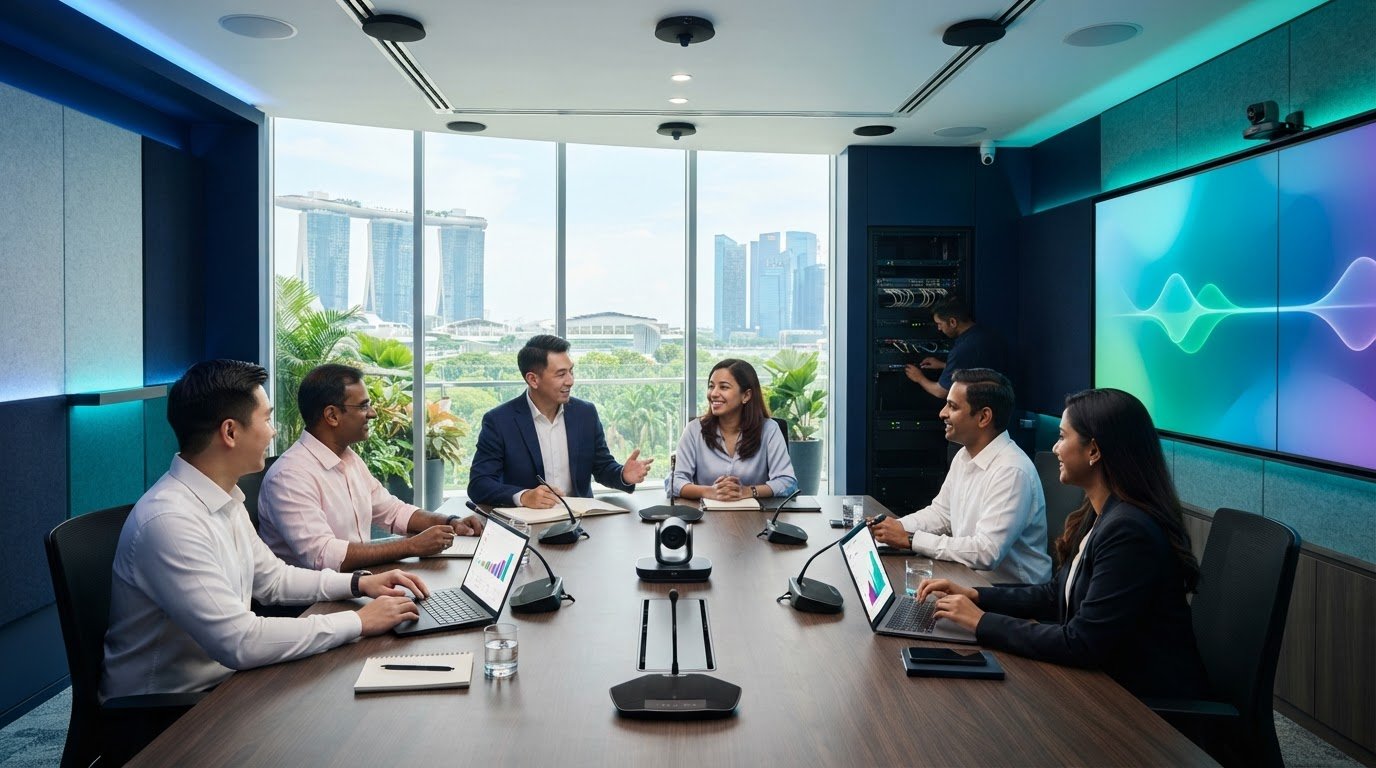
Adding more microphones does not automatically make a meeting easier to hear. If pickup is uneven or voices echo, remote participants can still miss key points, even when the room has plenty of equipment. A reliable conference room audio installation starts with the room and how people use it, then integrates microphones, speakers and conferencing equipment into one system. In Singapore, planning may also need to account for building access, permitted work hours, cable routes and room-use schedules. Selecting equipment before assessing these conditions can lead to avoidable coordination problems. Design the system around the room layout, acoustics and meeting formats, then commission it to check speech clarity for both in-room and remote participants. This guide explains how room use and acoustics affect system design, how audio equipment connects with conferencing technology, and what to plan for during installation. It also covers how ETA Visual’s site survey, system design, installation and commissioning services support a coordinated project, with maintenance and repair available after handover.
Key Takeaways
- Define meeting formats and seating arrangements before selecting microphones or loudspeakers.
- Map the signal path from microphone capture through processing to the conferencing platform and room playback.
- Compare microphone and speaker options by coverage, room appearance and installation conditions, rather than choosing components in isolation.
- A well-planned conference room audio installation moves through survey, design, site coordination, configuration, commissioning and handover.
- An integrator can coordinate system design and installation, aligning equipment, site requirements and commissioning.
Table of Contents
- Conference Room Audio Installation: What the System Must Deliver
- How Conference Room Audio Works: Microphones, Processing and Speakers
- Choosing Conference Room Audio Components Without Guesswork
- Conference Room Audio Installation in Singapore: Survey, Fit-Out and Commissioning
- Working with an Integrator for Conference Room Audio Installation
Conference Room Audio Installation: What the System Must Deliver
A conference room audio installation is more than a collection of microphones and speakers. It involves designing, integrating and commissioning equipment so speech is intelligible whether participants are seated around a table, presenting to the room or joining remotely. The system should provide consistent microphone pickup, controlled playback and dependable operation across the room’s regular meeting formats.
Audio is one part of a complete AV system, which may also include displays, cameras, conferencing equipment and room controls. Microphone audio needs to reach the conferencing platform, while remote participants’ voices need to play clearly in the room. Effective conference room AV integration planning coordinates these audio paths with the room’s other equipment instead of treating audio as a standalone purchase.
Room use and acoustics should guide the design. They affect where speech originates, how sound travels and what the system needs to capture or reproduce. Table microphones may suit a fixed discussion layout, while a presentation space may need to capture a speaker moving around the room. Hard surfaces can reflect sound, reducing intelligibility and increasing the risk of echo or feedback. Audio feedback occurs when amplified sound is picked up by a microphone and re-amplified, creating an unwanted loop. Assessing the room helps account for these interactions before equipment is selected.
Which meeting problems should the audio system solve?
For hybrid meetings, microphones need to capture in-room voices clearly for remote participants, while room speakers must reproduce remote voices at an intelligible level. Uneven coverage can make someone at one end of the table sound distant, even when participants closer to a microphone are heard clearly.
Sound reinforcement and conferencing audio have related but distinct roles. Reinforcement makes speech audible within the room. Conferencing carries local and remote audio between the room and the meeting platform. The design needs to account for both paths and manage the risk of echo and feedback.
How do room use and layout affect audio requirements?
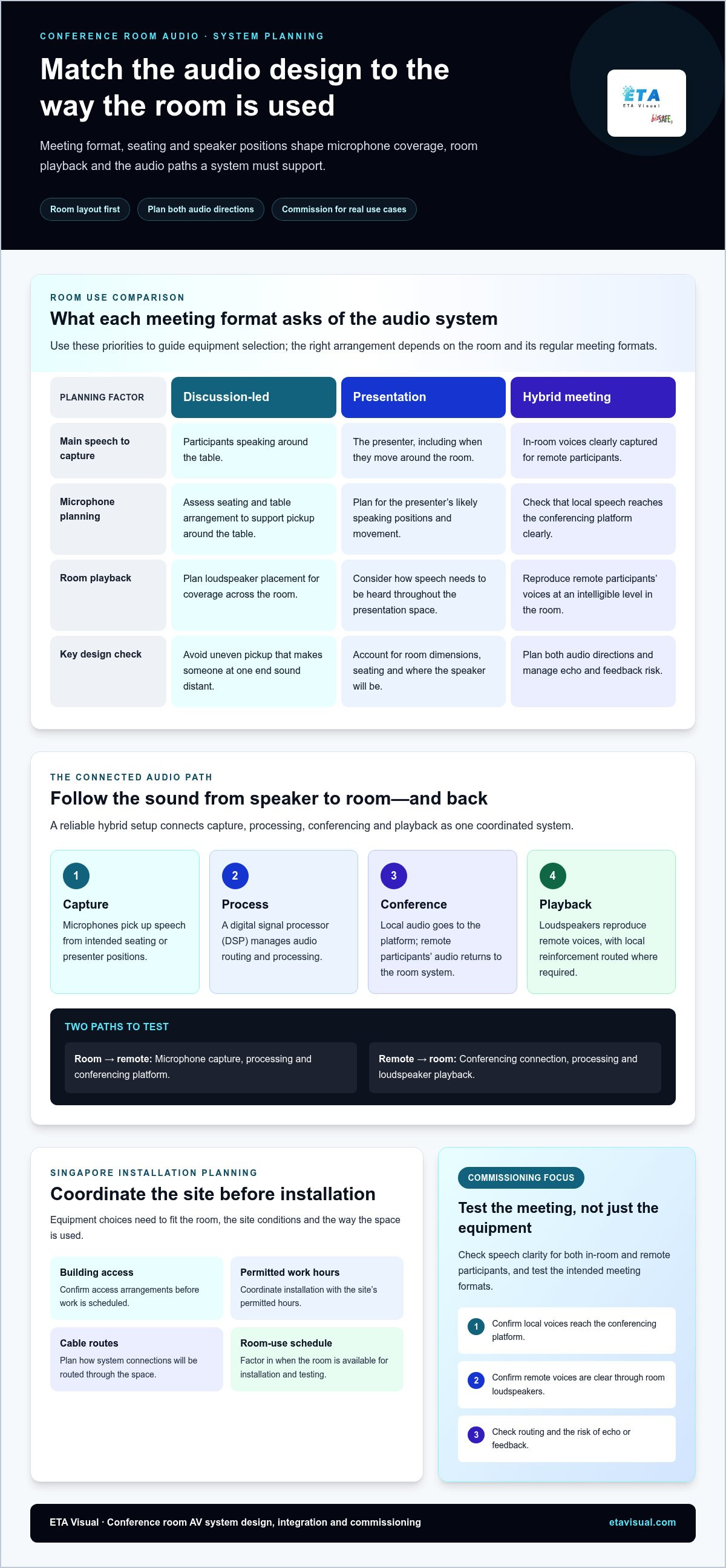
Discussion-led meetings need clear pickup from participants around a table. Presentations prioritise the presenter’s voice and may need to accommodate movement. Hybrid calls need reliable capture and playback in both directions. Room dimensions, table arrangement, seating and likely speaker positions all affect microphone coverage and loudspeaker placement.
How Conference Room Audio Works: Microphones, Processing and Speakers
Clear meeting audio depends on a complete signal path, not just a microphone that picks up voices. In a typical hybrid setup, local speech travels from microphones through audio processing to the conferencing platform. Remote participants’ audio returns through the system and plays through room loudspeakers. Routing varies with the equipment and meeting requirements, so each connection needs to be planned and tested as part of the whole system.
Follow the audio in both directions to understand how the system works:
- Capture: Microphones pick up speech from the intended seating or presenter positions.
- Processing: Audio signals are managed, adjusted and routed to the right destinations.
- Conferencing: The room system passes local audio to the conferencing platform and receives remote participants’ audio.
- Playback: Loudspeakers reproduce remote voices in the room, with local reinforcement routed where required.
A digital signal processor (DSP) manages audio routing and processing so microphones, conferencing connections and loudspeakers work together as a coordinated chain.
What roles do microphones, DSP and loudspeakers play?
Microphones capture voices. Their position and pickup pattern affect which speakers are heard and how much surrounding sound enters the system. The DSP manages signal levels, routing and system behaviour. Loudspeakers provide playback, with their positions planned for even coverage rather than excessive volume in one area. Coordinating microphones and loudspeakers helps reduce the risk of disruptive feedback and echo.
How should audio support hybrid meetings?
Hybrid calls need both far-end playback and a clear return path for local speech. Plan the conferencing connection, audio routing and user controls together so participants can start a call and manage the room without confusion. A configuration suited to one platform or meeting format may not suit another, so commissioning should test the intended use cases. Integrating these requirements within a broader commercial audio system design helps align conferencing connections, room playback and operational controls.
There is no universal room-size rule for choosing equipment. A fixed boardroom, a flexible training space and a room used for presentations and video calls have different requirements for microphone coverage, playback and control. Layout, speaker positions, conferencing equipment and the user experience all shape the signal flow. Poorly coordinated routing can send audio to the wrong destination, create uneven speech levels or allow loudspeaker output to re-enter microphones.
For conference room audio installation, ETA Visual coordinates system design, integration and commissioning around the project requirements rather than treating each component as an isolated purchase. The team also integrates commercial audio systems with meeting-room AV.
Choosing Conference Room Audio Components Without Guesswork
Choose components based on how people use the room, not on a room-size label alone. A fixed discussion table, a presentation space and a room with frequent hybrid calls have different requirements for pickup, playback, control and maintenance. Compare options by considering participant movement, seating positions, the preferred room appearance and how audio will connect to existing AV equipment.
Which microphone approach suits the meeting format?
Tabletop microphones can capture seated participants from nearby, but their placement and cabling affect the table’s appearance and flexibility. Ceiling microphones keep the table clear, while wireless microphones can support presenters who move around. Wireless equipment also requires a plan for charging, storage and handling. No microphone type suits every room; the right approach depends on meeting practices and the wider system design.
Loudspeaker selection also involves trade-offs. Ceiling speakers can distribute playback across a room when ceiling and installation conditions support them. Room-mounted speakers offer different placement options, subject to mounting locations, coverage and the required listening experience. The goal is intelligible, reasonably even playback, not simply maximum volume.
| Component approach | Useful consideration |
|---|---|
| Tabletop microphones | Participant proximity, table layout and visible cabling |
| Ceiling microphones | Clear table surfaces, ceiling conditions and pickup coverage |
| Wireless microphones | Presenter movement, charging, storage and operational workflow |
| Ceiling or room-mounted speakers | Coverage, mounting conditions and listener positions |
Wired connections can provide a fixed, predictable setup. Wireless components may reduce visible cabling or support movement, but need practical management. Integrated equipment can simplify day-to-day operation, while separate components can allow a more tailored design. Each option affects controls, troubleshooting and future maintenance, so compare the complete operating workflow.
What should an audio system integrate with?
Map audio connections to the conferencing platform, displays, room controls and existing AV equipment. Compatibility affects whether users can start a meeting, adjust volume and switch sources through a clear, consistent process. Planning these connections alongside displays and controls, as covered in the meeting-room audiovisual setup guide, helps ensure audio choices fit the wider AV workflow.
ETA Visual assesses the room and system requirements as part of its AV integration work, then designs and configures the system to suit. This brings component selection and integration into one project plan.
Conference Room Audio Installation in Singapore: Survey, Fit-Out and Commissioning
A well-managed conference room audio installation follows a clear sequence: survey, design, site coordination, installation, configuration, commissioning and handover. Each stage addresses practical questions before they disrupt the next. Confirming cable routes and mounting positions during the survey, for example, can help avoid late changes once the room fit-out is underway.
What does a site survey establish before installation?
A site survey records the room layout, seating, surface finishes, existing AV equipment and how staff use the space. It also checks likely cable routes, mounting positions, power requirements and access for future servicing. These findings inform system design and installation planning. A structured Singapore AV site survey helps identify constraints before equipment locations and installation work are finalised.
In Singapore, building-management coordination is an important part of project preparation. Confirm site access procedures, loading arrangements, delivery routes and permitted work hours. Some buildings have specific fit-out processes or restrictions, so coordinate with building management and relevant project teams before scheduling installation work.
Site conditions also affect equipment placement and future access. Check that mounting surfaces suit the proposed equipment, that power and cable routes can be coordinated with other trades, and that installed components remain accessible for maintenance. Approval or permit requirements can vary with project scope and site conditions, so establish which requirements apply to the specific project.
How are installation and commissioning completed?
After design and site coordination, the installation team mounts the equipment, connects audio signal paths and integrates the system with the required conferencing and room AV components. Configuration aligns routing and controls with the intended meeting workflow. Commissioning tests microphone pickup from relevant seating positions, loudspeaker coverage, feedback behaviour and connections to the conferencing platform.
Testing should reflect real use, not just confirm that the equipment powers on. Checks might include a discussion from different seats, a presentation using the planned microphone arrangement and a call with remote participants. The team can address routing, level or coverage issues before handover. Users should also receive clear operating guidance, including how to start a meeting, select the right source and adjust room audio controls.
ETA Visual provides site survey, system design, installation and commissioning for commercial conference room AV projects. Coordinating these stages helps align technical work with site conditions and room workflows. A clear handover gives facilities and IT teams a practical reference for everyday operation and future support.
Working with an Integrator for Conference Room Audio Installation
A conference room audio installation involves more than supplying equipment. Survey findings, system design, equipment selection, cabling, installation and commissioning need to work as one coordinated project. When one integrator oversees these stages, decisions about microphone placement, signal routing and room controls can be considered together, and installation can be planned around site conditions and meeting workflows.
ETA Visual integrates commercial audio and conference-room AV systems, coordinating project work from site survey and design through installation and commissioning. This approach aligns the audio chain with conferencing equipment, displays and room controls, giving the project team a clear route from requirements to handover. It also provides a point of coordination when technical decisions or site conditions need attention.
What should a project brief include?
Start with how the room is used: discussions, presentations, hybrid calls or a mix. Note typical seating patterns, whether presenters move, the conferencing platform and any existing AV equipment. Include site constraints such as access arrangements, permitted work hours, installation windows and handover needs. A site survey checks these details against the room and turns the brief into a project-specific design.
Project ownership should continue after installation. A handover should give facilities and IT teams clear information about system connections, configuration and everyday operation. Documented settings can help with troubleshooting if an input, control or conferencing connection later behaves differently. Simple user instructions also reduce reliance on informal knowledge held by one regular room user.
How can support help protect long-term usability?
Preventive maintenance can help identify issues before they disrupt routine use. Troubleshooting and technical support provide a path for resolving faults when they occur. The right support approach depends on the system and its operational needs. Planning commercial AV maintenance alongside installation keeps ongoing care in view instead of treating commissioning as the end of the project.
For Singapore businesses, useful handover records may include equipment locations, signal connections, control guidance and agreed maintenance information. Keep these materials accessible so new staff can understand the room and technical teams have a clear starting point when investigating an issue. The aim is to make the system understandable to users and supportable over time, without relying on guesswork.
ETA Visual brings survey, system design, installation, commissioning and support together for commercial conference room AV projects. A project discussion can start with the room’s meeting needs, existing equipment and site constraints.
Plan the Next Step for Clearer Meetings
Turn day-to-day meeting needs into a clear project brief. Note how the room is used, which conferencing platform it supports, what equipment is already in place and what audio issues staff encounter. Room plans and fit-out constraints can also help shape the initial discussion and give the design process a practical starting point.
ETA Visual provides end-to-end commercial AV support, from site survey and system design through installation and commissioning, with maintenance and technical support for commercial AV systems. This creates a coordinated route from planning to ongoing system care. A well-planned conference room audio installation can then reflect the room’s actual requirements instead of assumptions about how meetings take place.
With a clear brief and a coordinated integration plan, the meeting room can support communication for participants both in the room and on the call.
Do all conference rooms need a sound reinforcement system?
No. A room may not need local sound reinforcement if people can hear one another clearly without amplified speech. The requirement depends on room acoustics, seating distance, ambient noise and how the space is used. A small discussion room, for example, may need microphones and loudspeakers for remote calls but little or no amplification for people sitting together. Assess in-room audibility separately from the conferencing platform’s needs.
Can ceiling microphones work in a conference room with a large table?
Yes. Ceiling microphones can suit a large table when their placement and pickup are designed for the seating plan and ceiling conditions. A long table may need several planned pickup areas rather than one microphone expected to cover every seat. Consider ceiling height, obstructions such as lighting and ventilation, and whether people speak from fixed seats. Test pickup from different positions before finalising the design.
How many microphones does a conference room need?
There is no fixed microphone count for every room. The design depends on how many people need to be heard, where they sit, whether they speak at the same time and how the room is used. A presenter-led session may need a different arrangement from an open discussion around a table. Count alone does not determine coverage; microphone placement and configuration also affect how clearly voices are captured.
Is wireless audio equipment suitable for conference room installation?
Yes. Wireless equipment can suit rooms where presenters move or fixed cabling would limit flexibility. Plan for charging, storage, battery checks and responsibility for managing the equipment between meetings. The room’s wireless environment and the system’s connection with existing AV equipment also matter. For a fixed table discussion, a wired arrangement may be simpler to operate, so compare options against actual meeting habits.
Why does conference room audio produce echo or feedback?
Echo and feedback are different problems. Echo may occur when loudspeaker audio is picked up and returned through a microphone or conferencing connection, creating a delayed repeat for participants. Feedback is a reinforcing loop between a microphone and loudspeaker, often heard as ringing or a high-pitched tone. Incorrect routing, unsuitable levels or poor component placement can contribute to either problem. Check the signal path and settings, not just the volume.
Can an existing conference room audio system be upgraded without replacing everything?
Often, an upgrade can retain components that remain suitable, but assess their condition, connections and compatibility with the intended conferencing setup first. A room, for example, may need updated processing or controls while existing loudspeakers remain usable. A system review can identify what to retain, replace or reconfigure. Plan staged changes carefully so retained equipment continues to work with revised signal routing and room operation.
What affects the budget for conference room audio installation?
Budget depends on room layout and acoustics, microphone and loudspeaker choices, processing and conferencing connections, cabling, mounting conditions and installation access. Reusing existing equipment can affect the scope, depending on its condition and compatibility. Include commissioning, user handover and planned maintenance in project discussions. A site survey establishes the work involved, so the proposed design and quotation reflect the specific room rather than a generic package.
Visual planning reference
| Component approach | Useful consideration |
|---|---|
| Tabletop microphones | Participant proximity, table layout and visible cabling |
| Ceiling microphones | Clear table surfaces, ceiling conditions and pickup coverage |
| Wireless microphones | Presenter movement, charging, storage and operational workflow |
| Ceiling or room-mounted speakers | Coverage, mounting conditions and listener positions |
Want an accurate budget for your space?
We'll do a free site survey and prepare a clear, itemised quotation — no obligation.
Frequently asked questions
For hybrid meetings, microphones need to capture in-room voices clearly for remote participants, while room speakers must reproduce remote voices at an intelligible level. Uneven coverage can make someone at one end of the table sound distant, even when participants closer to a microphone are heard clearly. Sound reinforcement and conferencing audio have related but distinct roles. Reinforcement makes speech audible within the room. Conferencing carries local and remote audio between the room and the meeting platform. The design needs to account for both paths and manage the risk of echo and feedback.
Discussion-led meetings need clear pickup from participants around a table. Presentations prioritise the presenter’s voice and may need to accommodate movement. Hybrid calls need reliable capture and playback in both directions. Room dimensions, table arrangement, seating and likely speaker positions all affect microphone coverage and loudspeaker placement. Clear meeting audio depends on a complete signal path, not just a microphone that picks up voices. In a typical hybrid setup, local speech travels from microphones through audio processing to the conferencing platform. Remote participants’ audio returns through the system and plays through room loudspeakers. Routing varies with the equipment and meeting requirements, so each connection needs to be planned and tested as part of the whole system. Follow the audio in both directions to understand how the system works: A digital signal processor (DSP) manages audio routing and processing so microphones, conferencing connections and loudspeakers work together as a coordinated chain.
Microphones capture voices. Their position and pickup pattern affect which speakers are heard and how much surrounding sound enters the system. The DSP manages signal levels, routing and system behaviour. Loudspeakers provide playback, with their positions planned for even coverage rather than excessive volume in one area. Coordinating microphones and loudspeakers helps reduce the risk of disruptive feedback and echo.
Hybrid calls need both far-end playback and a clear return path for local speech. Plan the conferencing connection, audio routing and user controls together so participants can start a call and manage the room without confusion. A configuration suited to one platform or meeting format may not suit another, so commissioning should test the intended use cases. Integrating these requirements within a broader commercial audio system design helps align conferencing connections, room playback and operational controls. There is no universal room-size rule for choosing equipment. A fixed boardroom, a flexible training space and a room used for presentations and video calls have different requirements for microphone coverage, playback and control. Layout, speaker positions, conferencing equipment and the user experience all shape the signal flow. Poorly coordinated routing can send audio to the wrong destination, create uneven speech levels or allow loudspeaker output to re-enter microphones. For conference room audio installation, ETA Visual coordinates system design, integration and commissioning around the project requirements rather than treating each component as an isolated purchase. The team also integrates commercial audio systems with meeting-room AV. Choose components based on how people use the room, not on a room-size label alone. A fixed discussion table, a presentation space and a room with frequent hybrid calls have different requirements for pickup, playback, control and maintenance. Compare options by considering participant movement, seating positions, the preferred room appearance and how audio will connect to existing AV equipment.
Tabletop microphones can capture seated participants from nearby, but their placement and cabling affect the table’s appearance and flexibility. Ceiling microphones keep the table clear, while wireless microphones can support presenters who move around. Wireless equipment also requires a plan for charging, storage and handling. No microphone type suits every room; the right approach depends on meeting practices and the wider system design. Loudspeaker selection also involves trade-offs. Ceiling speakers can distribute playback across a room when ceiling and installation conditions support them. Room-mounted speakers offer different placement options, subject to mounting locations, coverage and the required listening experience. The goal is intelligible, reasonably even playback, not simply maximum volume. Wired connections can provide a fixed, predictable setup. Wireless components may reduce visible cabling or support movement, but need practical management. Integrated equipment can simplify day-to-day operation, while separate components can allow a more tailored design. Each option affects controls, troubleshooting and future maintenance, so compare the complete operating workflow.
Map audio connections to the conferencing platform, displays, room controls and existing AV equipment. Compatibility affects whether users can start a meeting, adjust volume and switch sources through a clear, consistent process. Planning these connections alongside displays and controls, as covered in the meeting-room audiovisual setup guide, helps ensure audio choices fit the wider AV workflow. ETA Visual assesses the room and system requirements as part of its AV integration work, then designs and configures the system to suit. This brings component selection and integration into one project plan. A well-managed conference room audio installation follows a clear sequence: survey, design, site coordination, installation, configuration, commissioning and handover. Each stage addresses practical questions before they disrupt the next. Confirming cable routes and mounting positions during the survey, for example, can help avoid late changes once the room fit-out is underway.
Plan the next step
Continue with a relevant solution and real Singapore project evidence.

