Seamless Video Wall vs Multiple Monitors: Which Costs Less
Written and reviewed by the ETA Visual Engineering & Project Team. Guidance is updated when project, product or Singapore site-planning practices change.
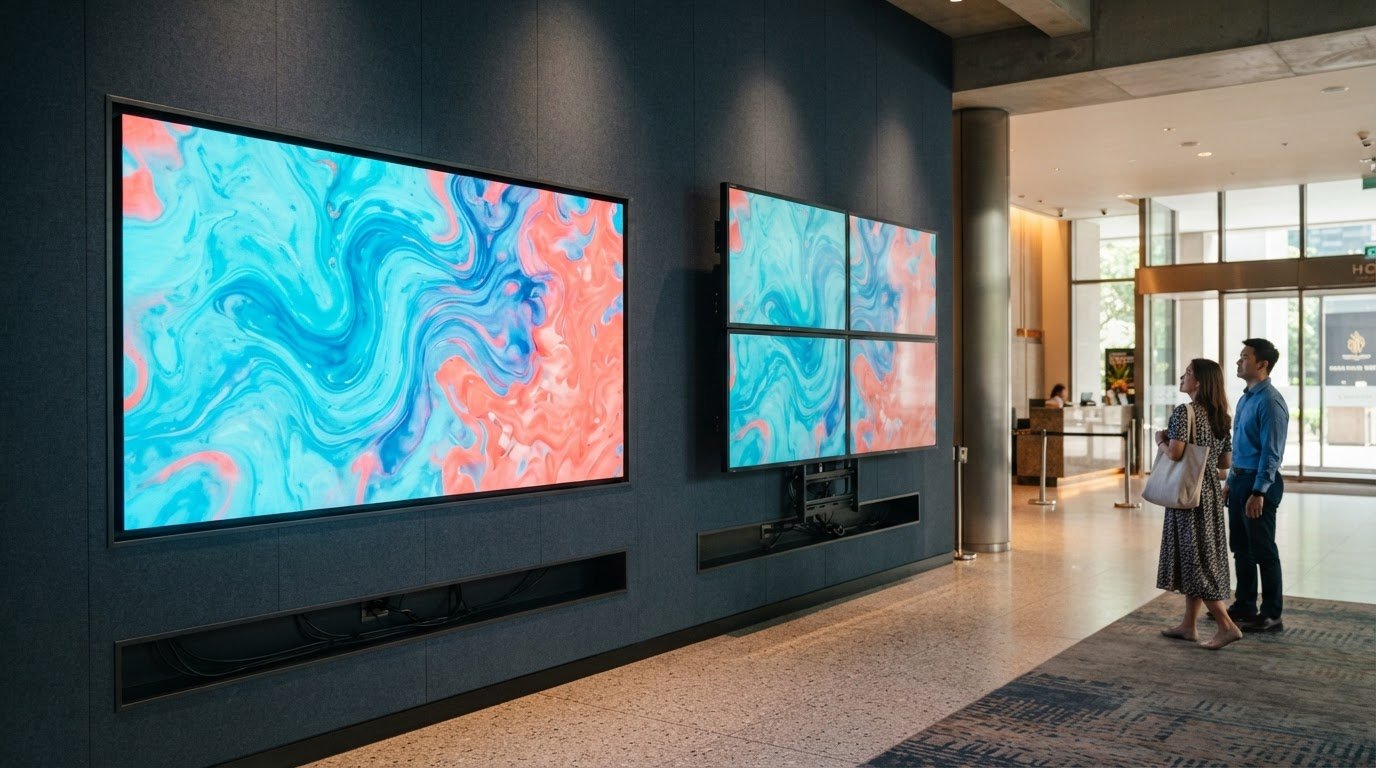
A seamless LED wall isn’t automatically the lower-cost choice. In the seamless video wall vs multiple monitors comparison, multiple commercial screens usually cost less to buy and install, while an LED wall delivers one continuous image without visible borders between panels. The right option depends on the display area, the viewing experience you need and the full installation scope. It’s understandable to focus on screen prices, but mounting, signal distribution, calibration and installation access also affect the project budget. In Singapore, site conditions such as building work hours, loading access and maintenance space can shape how a display is planned and installed. This guide compares visibility, bezels, installation needs and suitability for different budgets and spaces. You’ll see when individual screens are a practical fit, when a seamless wall makes more sense, and what to consider when planning a display for a retail space, office, hotel or other commercial environment.
Key Takeaways
- Assess how visible screen borders, viewing angles and content layout will affect the experience in your space.
- Include mounting, signal distribution, calibration and future maintenance in your total project planning.
- Plan the display around its operating environment, with Singapore’s heat, humidity, site access and building requirements in mind.
- Match the display type to the job: individual screens can suit distributed messaging, while a continuous canvas supports unified, large-format content.
- Allow for commissioning and maintenance access at the design stage to support reliable day-to-day operation.
Table of Contents
- Seamless Video Wall vs Multiple Monitors: The Main Differences
- Brightness and Visibility in Different Lighting Conditions
- Budget and Total Installation Considerations
- Technical Considerations for Installation and Commissioning
- Singapore Site and Operating Considerations
- Choosing a Video Wall for Different Budgets and Environments
- Common Mistakes When Comparing Video Walls and Screens
- How ETA Visual Can Help
Seamless Video Wall vs Multiple Monitors: The Main Differences
A seamless wall combines LED panels into one continuous image; multiple monitors remain separate screens, often divided by bezels. The wall favours uninterrupted visuals, while monitors offer a modular layout and can be replaced individually.
Seamless, Bezel-Free LED Walls
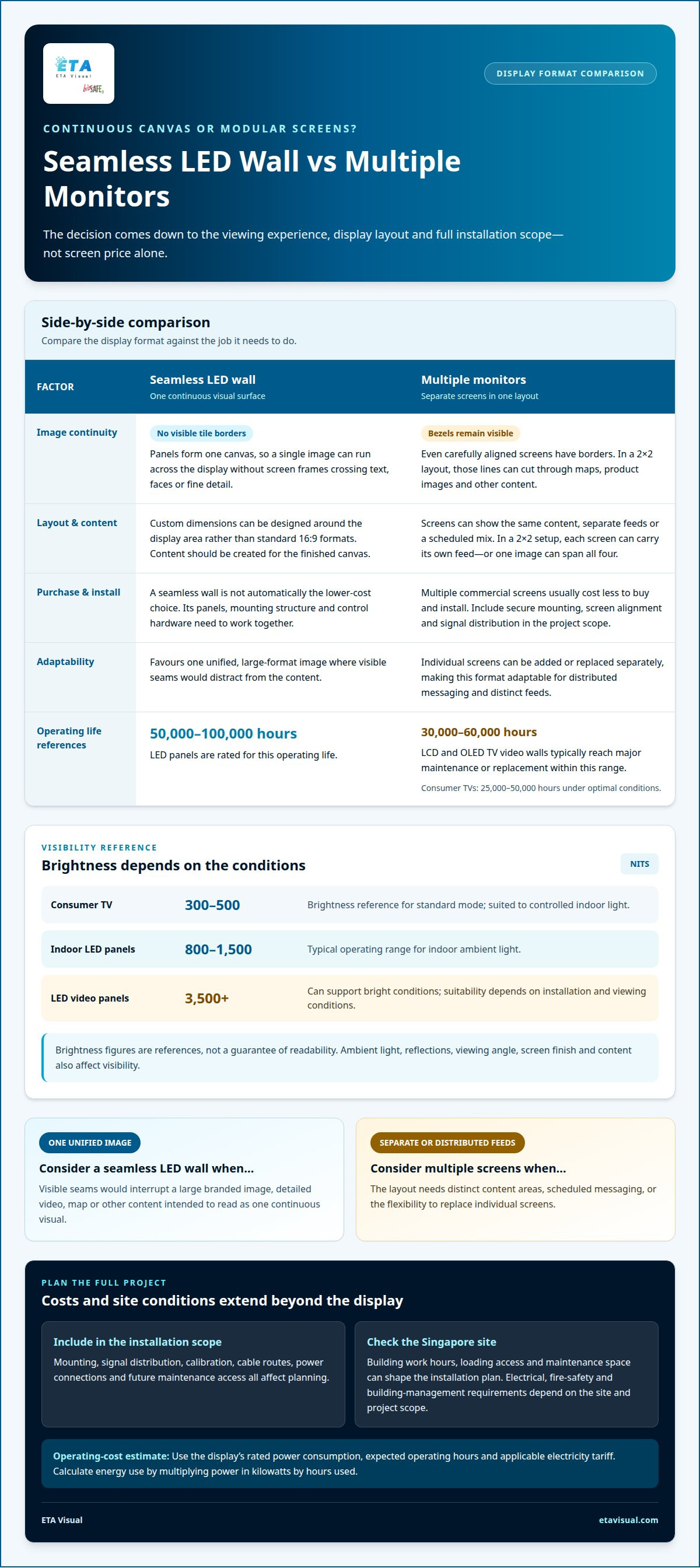
Direct View LED video walls form a continuous canvas, with no visible borders between tiles. Unlike a 2×2 monitor arrangement, they can show one image without screen frames crossing text or faces. Their aspect ratio can be designed around the display area, rather than being limited to standard screen dimensions. LED panels are rated for 50,000 to 100,000 hours of operation.
LCD Bezels and Visible Panel Gaps
An LCD video wall links separate displays, so bezels remain visible even when panels are carefully aligned. In a 2×2 layout, the borders create crossing lines through content, which can interrupt maps, product images or fine detail. Professional LCD displays can have narrower bezels than consumer televisions, but they don't create the border-free canvas of LED tiles. LCD and OLED TV video walls typically last 30,000 to 60,000 hours before major maintenance or replacement.
Screen Configuration Differences
Multiple monitors can show the same content, separate feeds or a scheduled mix. A 2×2 setup could assign one feed to each screen, while a single image spanning all four still crosses the bezels. LED walls support custom dimensions beyond standard 16:9 formats, so content must be designed for the finished canvas. Choose the configuration based on whether viewers need distinct screens or one unified visual.
Comparative Advantages and Disadvantages
LED suits presentations where visible seams distract, such as a large branded image or detailed video. Multiple screens can be added or replaced individually, making them adaptable for distributed content. Consumer TVs may last 25,000-50,000 hours under optimal conditions, compared with LED panels rated for 50,000 to 100,000 hours. For a closer look at LED and LCD video wall differences, compare the intended content, layout and maintenance needs.
Brightness and Visibility in Different Lighting Conditions
Brightness needs depend on ambient light, viewing position and whether the display faces windows or outdoor conditions. Compare the intended location and content, rather than brightness figures alone.
Visibility in Ambient Light
Ambient light affects contrast: reflections from windows or overhead lighting can make dark content harder to distinguish. A typical consumer TV has a brightness of 300-500 nits in standard mode, while indoor LED panels typically operate at 800 to 1,500 nits. These figures describe different display categories, not a guarantee of readability; screen finish, viewing angle and content also matter.
Colour and Brightness Uniformity
Uniformity matters across a large canvas. Traditional screens may vary in colour and brightness from one unit to another, while LED panels are designed to present a consistent image across the display. Mismatched tones are especially noticeable when a wall shows one brand image. Calibration and matched display hardware help align the result; content software cannot correct physical differences between screens.
Direct sunlight places greater demands on visibility than shaded indoor spaces. LED video panels can support 3,500 nits or higher, but the appropriate brightness depends on the installation and viewing conditions. For an outdoor-facing screen, consider sun direction, reflections and whether the display is exposed to weather. High brightness alone does not remove glare or guarantee clear content.
| Display option | Brightness reference | Typical consideration |
|---|---|---|
| Consumer TV | 300-500 nits | Controlled indoor light |
| Indoor LED panels | 800 to 1,500 nits | Indoor ambient light |
| LED video panels | 3,500 nits or higher | Bright conditions, subject to design |
Choose a display category suited to the brightest expected conditions, then assess colour consistency and reflections from the intended viewing positions.
Budget and Total Installation Considerations
Compare the full project scope, not just the display hardware. Electrical, fire-safety and building-management requirements depend on the site and installation scope, so assess them for the project. To estimate operating costs, use each display’s rated power consumption, expected operating hours and the applicable electricity tariff: multiply power in kilowatts by hours used.
Installation and Calibration Complexity
A temporary event display has different mounting, setup and removal needs from a permanent wall. Multiple monitors need secure mounts, aligned screens and suitable signal distribution. A video wall also requires its panels, mounting structure and control hardware to work together. Calibration helps align image output across displays; it becomes more involved when separate screens must show one coordinated image.
Installation and Maintenance Requirements
Permanent installations need mounting designed for the wall and display format, plus planned access for maintenance. An event setup prioritises safe assembly, stable positioning and efficient dismantling. In either case, the installation plan should account for cable routes, power connections and service access. A planned indoor LED wall mounting system helps coordinate the display with its supporting structure.
Multiple commercial screens generally cost less to buy and install than a full video wall, but total project cost also reflects mounting, signal processing, calibration and ongoing maintenance. For a permanent installation, include the expected operating schedule and future service access in the comparison. For a temporary event, consider setup and dismantling as well as the required display format.
Power use varies with the display hardware, content, brightness settings and operating hours. Compare manufacturer power specifications for the proposed screens or panels, then estimate consumption based on the site’s operating schedule and electricity tariff. This gives a more useful operating-cost comparison than counting displays alone.
Technical Considerations for Installation and Commissioning
Reliable performance starts with a design that treats the display, signal path and room as one system. Let the content format and viewing positions guide equipment selection.
First, define the sources, such as a media player, laptop or live camera feed. Then map how each signal reaches the display, including any processor needed to scale or distribute images. A multi-screen layout may show separate sources, while one continuous canvas needs coordinated processing and content mapped to its full dimensions.
Resolution is a system decision, not just a screen specification. The source output, processor capacity and display configuration must work together. If a laptop signal doesn’t match the wall’s canvas, scaling can affect image sharpness or leave unused areas. Confirm the expected content format before finalising the signal chain.
- Mounting: Check the supporting surface and allow for installation tolerances, cable routes and service access.
- Power: Coordinate display and control equipment connections with the site’s electrical plan.
- Control: Set out how operators select sources, change layouts and manage audio or other AV equipment.
During commissioning, the integrator checks signal routing, source switching, image alignment and playback with the intended content. A test pattern can reveal alignment or display issues before live material is shown. The team should also test the control interface, confirm each source appears in the right position and document the final configuration for future troubleshooting.
These checks matter in meeting rooms as much as public spaces. A coordinated AV system design can align display control with the room’s other equipment. Clear signal-flow documentation also helps facilities and IT teams identify where a fault may occur, from the source device through processing to the screen.
Singapore Site and Operating Considerations
In Singapore, site conditions influence the display design as much as its intended content. A screen in an air-conditioned office has different operating conditions from one near a mall entrance exposed to humid air, heat and outdoor weather.
Heat management starts with the location. A video wall needs suitable ventilation around its equipment, while enclosed cabinetry can restrict airflow. The site plan should account for nearby heat sources, air-conditioning outlets and access to serviceable components. For an outdoor-facing installation, the display’s environmental suitability must match its actual exposure.
Building management requirements can shape installation logistics. Shopping malls and commercial buildings may set procedures for contractor access, loading bays, work areas and permitted hours. These details affect how equipment reaches the display location and how installation is sequenced. Confirming access arrangements early helps coordinate delivery, mounting and commissioning with building operations.
- Access: Plan equipment movement through the loading bay, lift and intended installation route.
- Structure: Ensure the mounting design accounts for the wall or supporting structure and display load.
- Electrical: Coordinate power points, cable routes and control equipment with the site’s electrical layout.
- Maintenance: Preserve access to components so technicians can service the display without disrupting surrounding operations.
Humidity and temperature should inform equipment placement and the maintenance plan, especially where indoor and outdoor conditions change. A shopfront near an entrance, for example, may face different conditions from a screen deeper inside the retail space. Planning access for inspection and servicing is also essential.
For displays in permanent commercial environments, preventive maintenance contracts can support planned inspections and upkeep. The right schedule and access approach depend on the installation, operating hours and site procedures. Planning for these needs before installation helps avoid conflicts between the display, building operations and ongoing maintenance.
Coordinate power points, cable routes and control equipment with the site’s electrical layout. Ensure the mounting design accounts for the wall or supporting structure and display load. Building management procedures may also govern contractor access, loading bays, work areas and permitted hours.
Choosing a Video Wall for Different Budgets and Environments
The best fit depends on what the display must deliver, the available budget and the space it serves. Start by deciding whether viewers need independent messages or one continuous visual, then compare the system requirements with the installation’s purpose.
Budget Considerations
Multiple commercial screens usually cost less to buy and install than a full video wall. LCD video walls are generally more cost-effective than LED systems, while LED allows a continuous image and greater freedom in display shape. To compare a seamless video wall with multiple monitors usefully, consider the full project scope, including mounting, signal processing, installation, calibration and planned maintenance. A permanent lobby feature and temporary event screens also have different budget priorities.
A staged approach can help manage spending. For example, a business could begin with separate displays for distinct messages, then expand as its content plan develops. This works best when the control system and layout can support later additions. If one large visual is central to the experience, designing the complete display from the outset helps keep the content and physical format aligned.
Options for Different Environments
In offices, separate screens can serve meeting rooms or support different functions across the workplace. Control rooms need operators to access relevant live feeds, so the layout should reflect how information is used. Retail spaces may use a seamless wall for a prominent brand visual, while individual screens carry promotions in different areas. Digital signage can schedule messages across locations.
Match the display format to how people use the space. A hybrid setup can combine a central feature display with smaller screens for wayfinding or updates. For example, a hotel could use a large lobby display for welcome content and discreet screens near lifts for directions. Give each screen a defined purpose, then plan its content and controls around that role. This makes the setup easier to operate and more relevant to visitors.
Common Mistakes When Comparing Video Walls and Screens
A display can meet its specification and still be poorly suited to the people using it. Avoid these planning errors before committing to a format or layout.
- Choosing by wall area alone: A large display may dominate a compact reception or sit awkwardly behind furniture. Assess the room from the audience’s usual positions, including seated and standing viewpoints.
- Assuming every “video wall” works the same way: Tiled LCD displays and direct-view LED are different technologies. Compare how each suits the intended visual outcome, rather than relying on the category name alone.
- Judging from showroom demonstrations: A bright, polished demo may not reflect the material a business actually plans to show. Base decisions on representative brand assets, presentations or operational visuals.
- Leaving content ownership undecided: A display needs someone responsible for approving, updating and retiring messages. Define this workflow before launch, especially when marketing, operations and facilities teams share the space.
- Assuming future needs will stay fixed: A space may later support new campaigns, visitor information or business functions. Consider how the display’s role could change, not just its opening-day use.
For example, a reception screen might start with welcome messages, then later support event information or internal announcements. If different people manage those uses, agree how updates are requested and approved. This helps prevent content from becoming outdated or inconsistent across the organisation.
Consider the room as a whole, too. A screen behind a reception desk may be partly obscured by people or furnishings, even if it fits the wall. Reviewing the display in context helps align its placement with visitor movement and the space’s day-to-day purpose.
Before selecting equipment, document the intended audience, regular content, responsible content owners and likely future uses. This gives the project team a clearer basis for comparing options and avoids decisions driven by a demonstration or product label alone.
How ETA Visual Can Help
ETA Visual can turn the display comparison into a system design that fits your space, content and operating needs. The right recommendation starts with whether viewers need one continuous image, separate screens or a combination across a commercial environment.
Project planning considers the display area, viewing positions, content format, ambient light, available mounting space and signal sources. These decisions shape the selection, system integration, installation and commissioning. In Singapore, access routes, building procedures, electrical coordination and maintenance access also form part of practical site planning.
ETA Visual works with indoor LED screens, outdoor LED billboards, transparent LED displays, and flexible and curved LED displays. Each option serves different spatial and visual requirements. For example, an indoor screen can suit a controlled commercial setting, while a transparent display can support a shopfront concept where visibility through the glazing matters. The design should follow the project’s objectives, not force every space into the same display format.
As an AV system integrator, ETA Visual considers the display alongside its control and signal requirements, then coordinates installation and commissioning. This is useful when a project involves multiple sources, a custom wall layout or integration with existing AV equipment. Maintenance planning also helps ensure the display can be accessed and supported during normal operations.
Before the project begins, useful details include the site, intended content, viewing positions, operating schedule and any building access constraints. They help frame a practical discussion about display type, system design and installation requirements, rather than reducing the decision to hardware alone.
Discuss your display project with ETA Visual to explore an approach suited to your space and requirements.
What Is a Multi-TV Screen Wall?
A multi-TV screen wall is an arrangement of separate televisions mounted together to create a larger viewing area. A processor can distribute one image across the screens, or each television can show its own source. For example, a reception area might use one screen for announcements and another for visitor information. The visible frames remain part of the layout, so content should suit the screen boundaries.
What Are LED Walls?
An LED wall is a large display assembled from LED panels that work together as one screen. Unlike a wall made from televisions, it can be configured to suit the available display area rather than relying on standard TV dimensions. Businesses use LED walls for brand visuals, presentations and public information. The design should account for viewing distance, content and the space’s operating conditions.
Can You Use Both Together?
Yes. A business can use an LED wall as its main display and separate monitors for other information. For example, a hotel could place a large visual display in its lobby and use individual screens for meeting schedules or wayfinding. The systems can share content sources or operate independently, depending on the design. Planning control and signal routing together helps operators manage both display types efficiently.
Do Video Walls Need Special Content?
Prepare content for the wall’s overall dimensions and intended layout. A standard widescreen video may need cropping, repositioning or redesign to fill a custom-shaped canvas correctly. For example, a retailer using a vertical display should position key product details where they remain visible. Check image proportions, text placement and source resolution during preparation, then test the finished material on the display before publication.
Final Verdict: Which Video Wall Is Right for Your Business?
Choose the display that best supports the task in that space. A boardroom showing presentation slides may prioritise readable text and familiar source connections. A flagship retail feature may place greater value on a large, unified visual. Consider who will view the display, what content they need, how operators will control it and how the system will be maintained. These factors provide a clearer basis than screen count alone.
Lifespan and Durability: Which Lasts Longer?
There isn’t one lifespan that applies to every installation. Operating hours, ambient conditions, component quality and maintenance all affect how long a display remains suitable for its intended use. With multiple screens, one monitor can be replaced separately. LED walls use modular panels, which can support targeted servicing. The best comparison considers expected use and how disruptive maintenance would be.
Quick Answer: Which One Should You Choose?
Choose multiple monitors when separate feeds, staged expansion or individual screen replacement are priorities. Choose a seamless LED wall when content should read as one uninterrupted image across a large area. A combination may work well in a mixed-use space. For instance, a reception can use one main display for brand content and smaller screens elsewhere for schedules or operational messages.
Scalability and Customisation: Which Offers More Flexibility?
Multiple monitors are straightforward to expand by adding screens, provided the mounting, signal distribution and control system can support the change. LED walls offer more freedom to create a display shape or size beyond standard screen formats, but future changes need to fit the original system design. Define likely content and expansion needs early so later additions remain usable and visually coherent.
Visual planning reference
| Display option | Brightness reference | Typical consideration |
|---|---|---|
| Consumer TV | 300-500 nits | Controlled indoor light |
| Indoor LED panels | 800 to 1,500 nits | Indoor ambient light |
| LED video panels | 3,500 nits or higher | Bright conditions, subject to design |
Want an accurate budget for your space?
We'll do a free site survey and prepare a clear, itemised quotation — no obligation.
Frequently asked questions
A multi-TV screen wall is an arrangement of separate televisions mounted together to create a larger viewing area. A processor can distribute one image across the screens, or each television can show its own source. For example, a reception area might use one screen for announcements and another for visitor information. The visible frames remain part of the layout, so content should suit the screen boundaries.
An LED wall is a large display assembled from LED panels that work together as one screen. Unlike a wall made from televisions, it can be configured to suit the available display area rather than relying on standard TV dimensions. Businesses use LED walls for brand visuals, presentations and public information. The design should account for viewing distance, content and the space’s operating conditions.
Yes. A business can use an LED wall as its main display and separate monitors for other information. For example, a hotel could place a large visual display in its lobby and use individual screens for meeting schedules or wayfinding. The systems can share content sources or operate independently, depending on the design. Planning control and signal routing together helps operators manage both display types efficiently.
Prepare content for the wall’s overall dimensions and intended layout. A standard widescreen video may need cropping, repositioning or redesign to fill a custom-shaped canvas correctly. For example, a retailer using a vertical display should position key product details where they remain visible. Check image proportions, text placement and source resolution during preparation, then test the finished material on the display before publication.
Choose the display that best supports the task in that space. A boardroom showing presentation slides may prioritise readable text and familiar source connections. A flagship retail feature may place greater value on a large, unified visual. Consider who will view the display, what content they need, how operators will control it and how the system will be maintained. These factors provide a clearer basis than screen count alone.
There isn’t one lifespan that applies to every installation. Operating hours, ambient conditions, component quality and maintenance all affect how long a display remains suitable for its intended use. With multiple screens, one monitor can be replaced separately. LED walls use modular panels, which can support targeted servicing. The best comparison considers expected use and how disruptive maintenance would be.
Plan the next step
Continue with a relevant solution and real Singapore project evidence.