Enterprise AV Integration in Singapore: From Workplace Needs to Reliable Systems
Written and reviewed by the ETA Visual Engineering & Project Team. Guidance is updated when project, product or Singapore site-planning practices change.
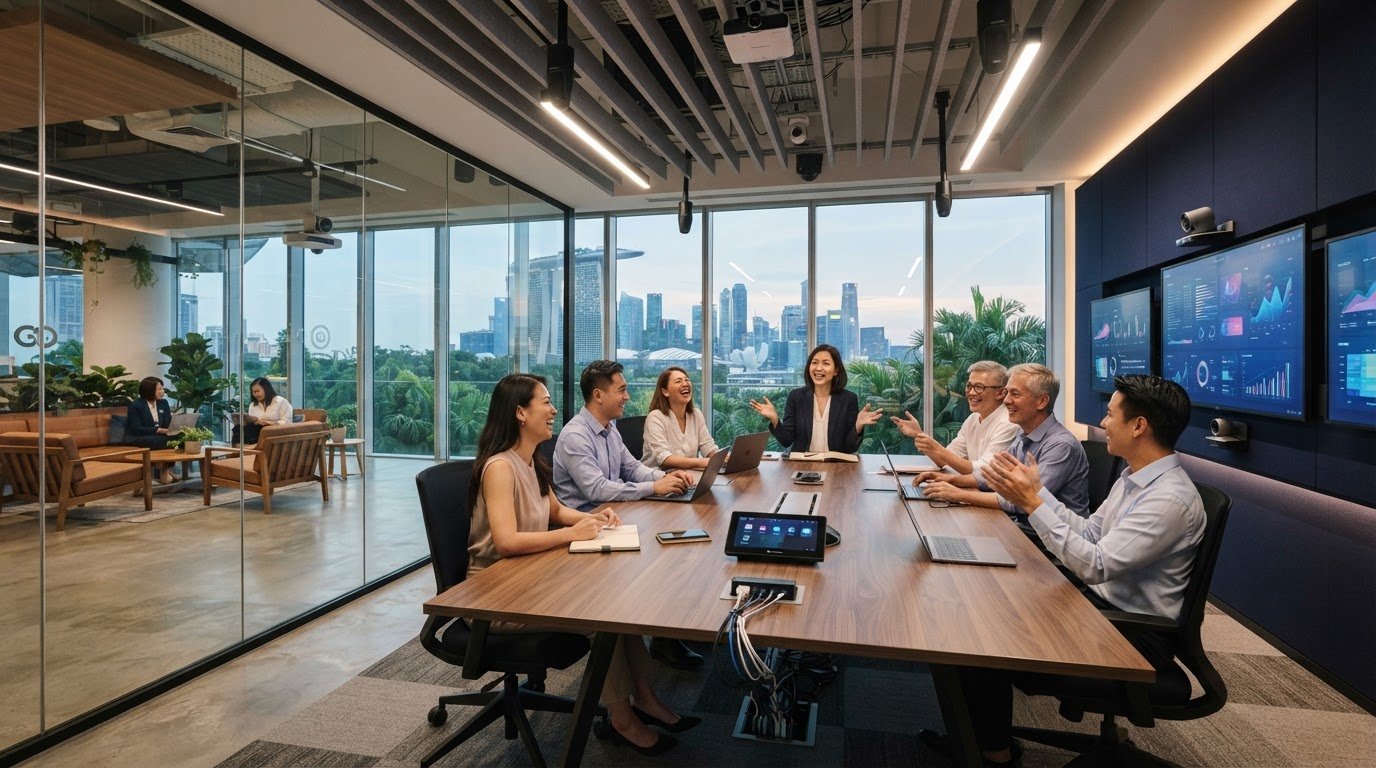
What if the biggest risk in an enterprise AV project isn’t the equipment, but the gaps between rooms, networks and the people who use them? A meeting room may work well on its own, yet employees can still face different controls, connection steps and audio quality from space to space. Enterprise AV integration addresses these gaps by aligning audiovisual systems with IT networks, building requirements and day-to-day workflows. That coordination can be challenging in Singapore, where building management arrangements, loading access and operating hours all affect installation planning. A system that looks complete on a drawing still needs to be practical to install, commission and maintain without unnecessary disruption to business. This guide explains how to plan connected AV across meeting rooms, shared spaces and enterprise environments. You’ll learn how to map user and room requirements, establish a consistent system approach, coordinate technical and site considerations, and plan each stage from design through installation, commissioning and ongoing support. The goal is a reliable system that people can use confidently, managed as one workplace rather than a collection of separate rooms.
Key Takeaways
- Start with the work people need to do in each room, then match the AV setup to those workflows and user groups.
- Enterprise AV integration depends on clear signal paths, documented system interfaces and coordination with the organisation’s IT environment.
- Use a five-step planning framework to map spaces, define requirements, document connections, plan operations and review support needs.
- Include access routes, loading arrangements and maintenance access in the Singapore site survey, alongside building-management and work-window coordination.
- Carry the project through design, installation and commissioning, checking system operation against agreed requirements before handover.
Table of Contents
Enterprise AV Integration for Singapore Businesses
Enterprise AV integration is the coordinated design, connection and support of audiovisual systems across an organisation’s commercial spaces, so they work as part of daily operations. It goes beyond buying displays, microphones or speakers for individual rooms. The work is to make equipment, signal paths and controls fit together, while accounting for how people use each space and how the systems will be maintained.
A room with separately operated devices may have a screen, conferencing camera and audio system, yet users may have to switch between controls or troubleshoot connections themselves. An integrated approach defines how those components work together and how the experience should be managed across rooms. There is a useful parallel with Enterprise Application Integration (EAI), which connects separate business applications. In AV, the connected elements are audiovisual devices, software and the systems they rely on.
For Singapore businesses, planning needs to reflect the mix of spaces and operational requirements within a workplace or commercial environment. The objective is not to make every room identical. It is to create a clear, manageable approach while allowing each room to serve its specific purpose.
Which business spaces can an enterprise AV system connect?
A coordinated system may cover meeting rooms, boardrooms, training spaces and shared commercial areas. A boardroom might prioritise clear discussion and dependable presentation, while a training space may need to support instruction and shared content. In a common area, the focus may be communicating information to a wider audience, potentially using digital signage or an LED display. Requirements depend on room purpose, users and workflow. For meeting spaces, conference room audio installation is one part of planning the overall experience.
What outcomes should integration support?
Start with the intended experience, not a hardware shortlist. Useful objectives include consistent operation, intelligible audio, clear presentation and a straightforward route from starting a meeting to sharing content. Define these objectives before choosing equipment; the right components are those selected to meet the agreed requirements. For example, specify how a user should start a presentation and what should happen when they select a source, then use that workflow to guide the design and commissioning checks.
- Consistency: Users can recognise the operating approach from room to room.
- Communication: Audio and visuals support the purpose of each meeting or activity.
- Usability: Common tasks, such as starting a presentation, have clear steps.
- Manageability: System design and support account for the organisation’s operational needs.
These outcomes give project teams a shared basis for planning. They also help distinguish a connected workplace system from a collection of devices that happen to occupy the same rooms.
How Enterprise AV Systems Connect Rooms, Devices and IT
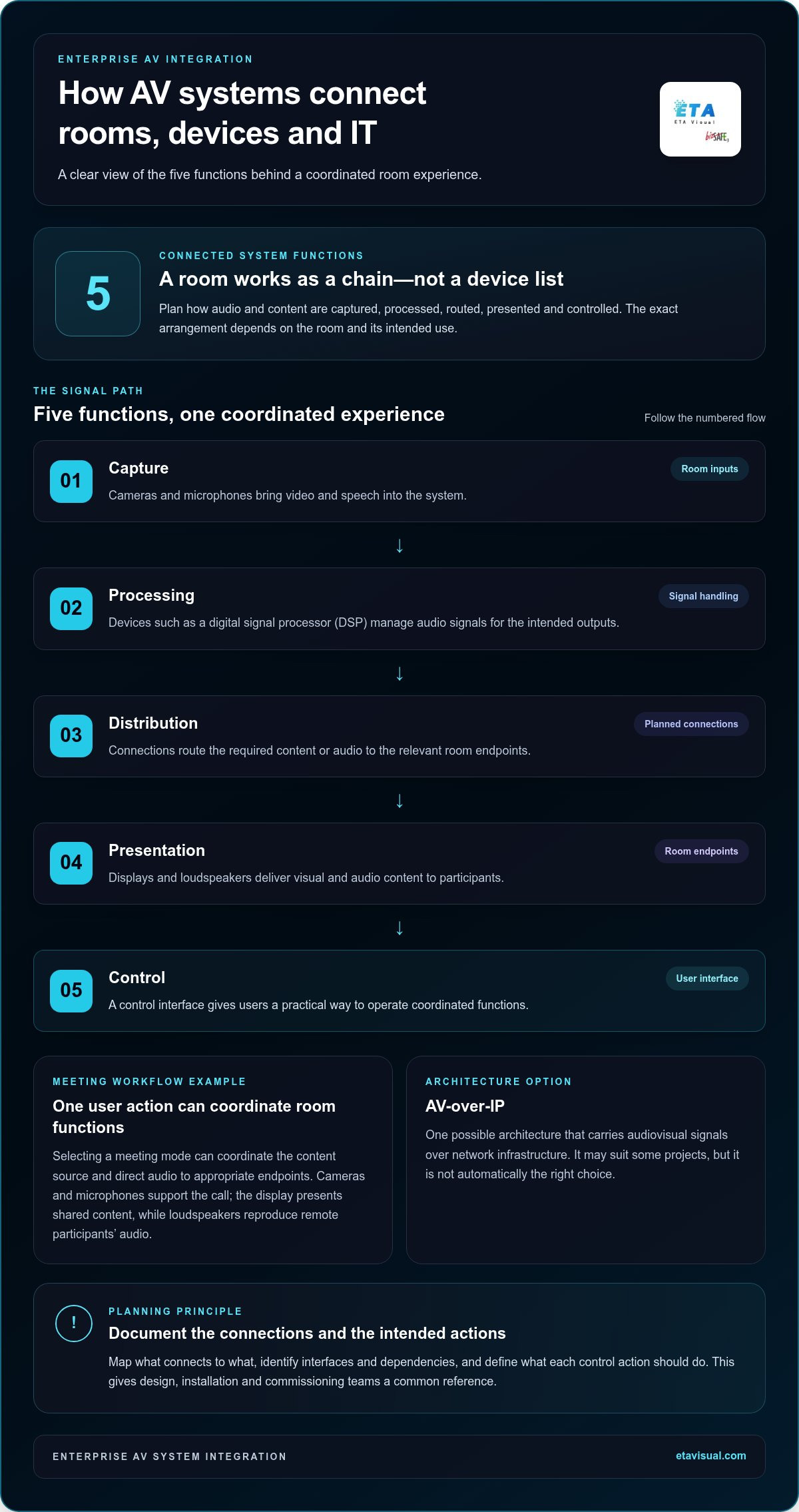
A room’s AV experience depends on a chain of functions, not just the devices people can see. Enterprise AV integration maps how content and sound are captured, processed, distributed and presented, then defines how users control that flow. Drawing the connections early helps project teams identify interfaces and dependencies before installation.
A typical signal path might start with a laptop or room camera. The signal may pass through processing equipment, such as a digital signal processor (DSP) for audio, before being routed to displays, loudspeakers or conferencing endpoints. A control interface gives the user a practical way to operate the system. The exact arrangement depends on the room and its intended use.
- Capture: Cameras and microphones bring video and speech into the system.
- Processing: Devices such as a DSP manage audio signals for the intended outputs.
- Distribution: Connections route the required content or audio to the relevant room endpoints.
- Presentation: Displays and loudspeakers deliver visual and audio content to participants.
- Control: A control interface provides a user-facing way to operate coordinated functions.
How do AV components work together?
Consider a meeting workflow: a user selects a meeting mode, and the configured controls coordinate relevant room functions, such as selecting a content source and directing audio to the appropriate endpoints. A camera and microphones support the call; the display presents shared content, while loudspeakers reproduce remote participants’ audio. This is an example, not a fixed equipment recipe. Room purpose determines which components and control actions make sense.
Interoperability depends on planned interfaces and signal paths, not simply on placing devices in the same room. Documenting what connects to what, and what each control action is intended to do, gives the design, installation and commissioning teams a common reference. For broader AV design principles, consult AVIXA industry standards.
Where do networks and building systems fit?
AV-over-IP is one possible architecture, carrying audiovisual signals over network infrastructure. It can suit some projects, but it isn’t automatically the right choice for every room or organisation. The design should account for intended signal flows and be coordinated with enterprise IT teams on network requirements, security policies and operational responsibilities. Capacity and compatibility depend on the project assessment.
Building management systems may also be relevant where AV needs to interact with building functions. That connection depends on the systems, interfaces and access available for the project, so it should be treated as a design consideration rather than assumed. Clear interface documentation helps teams define responsibilities and identify dependencies. Organisations planning a connected system can also review AV system design considerations as they map their requirements.
How to Evaluate an Enterprise AV Integration Plan
A useful plan turns business needs into design decisions that can be reviewed and tested. Before comparing equipment, assess how rooms are used, who uses them, what content they handle and how people need to communicate. This keeps an enterprise AV integration focused on workable outcomes rather than a list of devices.
Use this five-step framework to structure the review:
- Define workflows. Describe common activities, such as presenting, training or joining a video call, and note where users encounter friction.
- Map spaces. Group rooms by purpose and record meaningful differences in users, layout and operating needs.
- Document interfaces. Identify source devices, AV connections and relevant IT or building-system dependencies.
- Plan operations. Define who will use and manage the systems, and what information is needed for day-to-day support.
- Review support. Consider maintenance access, troubleshooting responsibilities and how future changes could be handled.
What should a project brief specify?
Record each room’s function, user journey, source devices and required outputs. Note existing AV, IT and building-system interfaces that may affect the design, along with known operating constraints. Separate essential requirements from optional capabilities. For example, distinguish a must-have presentation workflow from a feature that would be useful but is not needed for the room to perform its core role.
Then compare proposed designs against the same practical criteria: interoperability between components, repeatability across suitable rooms, maintainability and the ability to accommodate planned changes. A consistent approach needn’t mean identical equipment everywhere. It means users and support teams can understand where rooms share a workflow and where a different setup is justified.
Link each need to a system requirement and an acceptance check:
- Need: Present content from a meeting source. Requirement: A defined connection and display route. Check: Confirm the intended source appears on the designated display.
- Need: Hold a clear discussion. Requirement: Audio capture and playback suited to the room’s use. Check: Test speech from the intended user positions.
- Need: Make routine operation understandable. Requirement: Agreed control actions for common tasks. Check: Walk through the user journey against the operating brief.
- Need: Support ongoing operation. Requirement: Documented system interfaces and support responsibilities. Check: Review handover information with the relevant teams.
How can the design support consistent operation?
Identify controls and workflows that can be standardised across rooms with similar purposes, while preserving room-specific functions where needed. Use the agreed user and system requirements to shape commissioning checks, rather than relying only on whether each device powers on. For delivery coordination, the enterprise AV project management guide offers related planning detail.
This process gives decision-makers a clearer basis for evaluating design trade-offs and confirming what successful operation should look like before implementation begins.
Planning Enterprise AV Installation Around Singapore Building Conditions
A sound enterprise AV integration plan needs to work with the building, not just the room layout. In Singapore, a site survey helps teams understand how equipment can reach its installation point, where it can be mounted and how it will be accessed for maintenance. These details can affect design choices, delivery sequencing and disruption during installation.
Survey findings should inform the design before equipment is finalised. A display location may be suitable visually but difficult to service; a cable route may cross areas with access restrictions. Singapore’s heat and humidity also make equipment location and ventilation relevant design considerations. The right approach depends on the site and equipment requirements, rather than a one-size-fits-all assumption.
What should a Singapore site survey examine?
Record room dimensions, mounting locations, cable routes and available equipment access. Trace the practical route from delivery point to installation area, including loading arrangements and access constraints. Coordinate with building management and project stakeholders so site rules, work windows and dependencies are understood before mobilisation.
- Physical conditions: Confirm proposed mounting areas, clearances and access for installation and future servicing.
- Routes and logistics: Map cable pathways, delivery access, equipment staging areas and any restricted areas.
- Environment: Note heat sources, ventilation conditions and exposure to Singapore’s humid climate where relevant to equipment placement.
- Interfaces and approvals: Identify electrical, structural or regulatory considerations that need assessment against the specific site and verified guidance.
- Operational constraints: Record building-management arrangements, permitted working windows and the effect of work on occupied areas.
Electrical and structural requirements vary with the installation. Assess them for the actual site and handle them in line with applicable, verified guidance. Assumptions from another building are not a substitute for project-specific review.
How should installation minimise operational disruption?
Plan the work sequence around business activity and agreed access arrangements. Confirm when equipment can be delivered, where it can be staged and how installation teams can reach work areas. This helps avoid bringing equipment to site before the installation area is ready or blocking routes needed by building users.
Maintenance access matters too. Consider how technicians will reach equipment after handover, and whether planned mounting or surrounding finishes could obstruct inspection or replacement. Broader design decisions, including system layout and coordination, are covered in the AV system design guide for Singapore.
Before mobilisation, align the site survey findings, installation sequence and access arrangements with the project team. This gives installation a practical basis and helps surface constraints while there is still time to address them.
From System Design to Commissioning and Ongoing Enterprise AV Support
A reliable AV system is delivered through connected project stages, with requirements carried from the initial survey into design, installation, testing and ongoing care. Enterprise AV integration doesn’t end when equipment is mounted and powered on. The system needs to be checked in its intended spaces, handed over in a usable form and supported as operational needs change.
- Site survey: Record room conditions, existing infrastructure, access and operational constraints.
- System design: Translate agreed workflows into a coordinated design, including equipment, connections and control.
- Procurement and installation: Coordinate supply and site work with the approved design and project arrangements.
- Commissioning: Test system functions against the agreed requirements and document any issues that need attention.
- Handover and support: Provide relevant operating information and establish a practical route for maintenance or troubleshooting.
Keeping these stages aligned helps avoid a gap between what the design specifies and what users encounter after installation. It also gives the project team clear points to review before the system moves into routine operation.
What happens during commissioning and handover?
Commissioning checks whether the installed system performs the agreed tasks in its intended environment. Tests can cover audio, video, controls and connections, following the workflows defined for the project. For example, a presentation check should confirm that the intended source can be selected and displayed, while an audio check should assess the agreed capture and playback functions in the space. Acceptance checks should reflect the project brief, not assumptions about what a room ought to do.
Handover should equip the relevant stakeholders to operate and manage the system. Useful information may include system configuration, connection and control details, operating guidance, and a record of commissioning checks. User familiarisation helps people understand routine actions and where to find practical operating information. The format and scope should suit the organisation and the system delivered.
How can ongoing support protect system usability?
Support planning distinguishes scheduled preventive maintenance from troubleshooting and repair when a fault occurs. Preventive maintenance provides a planned opportunity to review system condition and operation; on-demand support addresses issues that arise during use. Keeping configuration and system information organised can help make fault diagnosis more orderly, particularly where several rooms or connected components are involved.
ETA Visual’s project lifecycle includes site surveys, system design, procurement, installation and ongoing maintenance. Its support options include preventive maintenance contracts and emergency on-site repair. Organisations can include maintenance in their planning for the system’s operational life. Clear ownership of handover information and support arrangements helps teams keep the system understandable after project completion.
Set a clear direction for your next AV project
Reliable AV should keep pace with the way your organisation changes. New teams, room uses and communication needs can all affect how systems are used over time. Treat the project as the start of an ongoing approach to workplace technology, with clear ownership for decisions as needs evolve.
ETA Visual is a Singapore-based AV system integrator providing LED display and AV solutions, including system design, installation and maintenance. Its project delivery spans more than ten countries, supporting organisations from initial planning through ongoing operation.
For a practical starting point, define the rooms, workflows and operational constraints that matter most. A clear brief helps shape the system design, site survey and commissioning checks around how your organisation will use the technology.
What is enterprise AV integration?
Enterprise AV integration is the design and connection of audiovisual systems across an organisation’s spaces, including the controls, signal paths and support arrangements needed to make them work together. The process starts by documenting room uses and workflows, then translating them into system requirements and checks. This helps teams coordinate rooms with shared needs while allowing for spaces that require a different setup.
How does enterprise AV integration support hybrid meetings?
It helps make meetings easier to run for people joining in the room and remotely. Planning should account for the meeting platform, how participants join, and how hosts manage common tasks such as sharing content or changing meeting modes. Agreeing these routines helps teams set sensible expectations for each room. The final design depends on the organisation’s chosen platforms, user needs and room conditions.
What systems are commonly included in an enterprise AV integration project?
Project scope varies, but may cover workplace collaboration and presentation, commercial audio, digital signage or LED displays. A project can address one system in a single space or coordinate several applications across a wider estate. Define what is in scope, including any existing equipment that will remain in use. This clarifies responsibilities and prevents assumptions about what the project will deliver.
How do AV systems integrate with an organisation’s IT network?
AV network connections should be planned with clear ownership between AV and IT teams. Practical details to resolve include who manages device records, how network changes are communicated and which team handles an issue that crosses AV and IT. Agreeing these working arrangements before deployment can reduce confusion during later changes or troubleshooting. The specific technical design depends on the organisation’s network environment and policies.
What should a Singapore enterprise AV site survey assess?
Alongside physical conditions, use the survey to build an inventory of equipment that may be retained, replaced or connected to the new system. Record available equipment documentation and identify the teams responsible for existing devices or interfaces. This can reveal legacy dependencies that are not obvious from room drawings alone. Survey findings help the project team distinguish confirmed information from items that need further investigation before design decisions are finalised.
How long does enterprise AV installation take?
There’s no single duration that applies to every project. Timing depends on the number and type of spaces, design complexity, equipment procurement, site readiness and access arrangements. Work may also need to be sequenced around business operations or building requirements. For a phased rollout, agree which rooms are priorities and what dependencies must be resolved before each phase begins. A site survey and defined scope help establish a project-specific schedule.
What factors affect the budget for enterprise AV integration?
Budget depends on the project scope and requirements of each space. Factors include the number of rooms, display and audio needs, control functions, connection methods, existing infrastructure and any cabling or site work required. Access restrictions and installation sequencing can also affect the work involved. Include commissioning, handover and ongoing maintenance in the planning discussion, so the budget reflects the system lifecycle, not equipment alone.
Visual planning reference
| Planning factor | What to define | Why it matters |
|---|---|---|
| Viewing positions | Nearest viewing distance and audience locations | Supports an appropriate pixel-pitch and screen-size decision. |
| Content workflow | Input sources, resolutions and control workflow | Helps ensure information remains readable and simple to operate. |
| Installation conditions | Structure, access, power, ventilation and maintenance access | Aligns the display scope with the physical site before procurement. |
Want an accurate budget for your space?
We'll do a free site survey and prepare a clear, itemised quotation — no obligation.
Frequently asked questions
A coordinated system may cover meeting rooms, boardrooms, training spaces and shared commercial areas. A boardroom might prioritise clear discussion and dependable presentation, while a training space may need to support instruction and shared content. In a common area, the focus may be communicating information to a wider audience, potentially using digital signage or an LED display. Requirements depend on room purpose, users and workflow. For meeting spaces, conference room audio installation is one part of planning the overall experience.
Start with the intended experience, not a hardware shortlist. Useful objectives include consistent operation, intelligible audio, clear presentation and a straightforward route from starting a meeting to sharing content. Define these objectives before choosing equipment; the right components are those selected to meet the agreed requirements. For example, specify how a user should start a presentation and what should happen when they select a source, then use that workflow to guide the design and commissioning checks. These outcomes give project teams a shared basis for planning. They also help distinguish a connected workplace system from a collection of devices that happen to occupy the same rooms. A room’s AV experience depends on a chain of functions, not just the devices people can see. Enterprise AV integration maps how content and sound are captured, processed, distributed and presented, then defines how users control that flow. Drawing the connections early helps project teams identify interfaces and dependencies before installation. A typical signal path might start with a laptop or room camera. The signal may pass through processing equipment, such as a digital signal processor (DSP) for audio, before being routed to displays, loudspeakers or conferencing endpoints. A control interface gives the user a practical way to operate the system. The exact arrangement depends on the room and its intended use.
Consider a meeting workflow: a user selects a meeting mode, and the configured controls coordinate relevant room functions, such as selecting a content source and directing audio to the appropriate endpoints. A camera and microphones support the call; the display presents shared content, while loudspeakers reproduce remote participants’ audio. This is an example, not a fixed equipment recipe. Room purpose determines which components and control actions make sense. Interoperability depends on planned interfaces and signal paths, not simply on placing devices in the same room. Documenting what connects to what, and what each control action is intended to do, gives the design, installation and commissioning teams a common reference. For broader AV design principles, consult AVIXA industry standards.
AV-over-IP is one possible architecture, carrying audiovisual signals over network infrastructure. It can suit some projects, but it isn’t automatically the right choice for every room or organisation. The design should account for intended signal flows and be coordinated with enterprise IT teams on network requirements, security policies and operational responsibilities. Capacity and compatibility depend on the project assessment. Building management systems may also be relevant where AV needs to interact with building functions. That connection depends on the systems, interfaces and access available for the project, so it should be treated as a design consideration rather than assumed. Clear interface documentation helps teams define responsibilities and identify dependencies. Organisations planning a connected system can also review AV system design considerations as they map their requirements. A useful plan turns business needs into design decisions that can be reviewed and tested. Before comparing equipment, assess how rooms are used, who uses them, what content they handle and how people need to communicate. This keeps an enterprise AV integration focused on workable outcomes rather than a list of devices. Use this five-step framework to structure the review:
Record each room’s function, user journey, source devices and required outputs. Note existing AV, IT and building-system interfaces that may affect the design, along with known operating constraints. Separate essential requirements from optional capabilities. For example, distinguish a must-have presentation workflow from a feature that would be useful but is not needed for the room to perform its core role. Then compare proposed designs against the same practical criteria: interoperability between components, repeatability across suitable rooms, maintainability and the ability to accommodate planned changes. A consistent approach needn’t mean identical equipment everywhere. It means users and support teams can understand where rooms share a workflow and where a different setup is justified. Link each need to a system requirement and an acceptance check:
Identify controls and workflows that can be standardised across rooms with similar purposes, while preserving room-specific functions where needed. Use the agreed user and system requirements to shape commissioning checks, rather than relying only on whether each device powers on. For delivery coordination, the enterprise AV project management guide offers related planning detail. This process gives decision-makers a clearer basis for evaluating design trade-offs and confirming what successful operation should look like before implementation begins. A sound enterprise AV integration plan needs to work with the building, not just the room layout. In Singapore, a site survey helps teams understand how equipment can reach its installation point, where it can be mounted and how it will be accessed for maintenance. These details can affect design choices, delivery sequencing and disruption during installation. Survey findings should inform the design before equipment is finalised. A display location may be suitable visually but difficult to service; a cable route may cross areas with access restrictions. Singapore’s heat and humidity also make equipment location and ventilation relevant design considerations. The right approach depends on the site and equipment requirements, rather than a one-size-fits-all assumption.
Plan the next step
Continue with a relevant solution and real Singapore project evidence.

