Professional Audio Visual Systems: A Commercial Buyer’s Guide
Written and reviewed by the ETA Visual Engineering & Project Team. Guidance is updated when project, product or Singapore site-planning practices change.

What if the system with the longest equipment list is the least suitable for your team? Choosing professional audio visual systems is not simply a matter of selecting screens, speakers and microphones. The components need to support how people use the space and work together as a reliable, manageable system. Comparing AV options can be challenging because a meeting room, retail space and hotel venue have different requirements. Separate devices can also create a complicated user experience when their connections and controls have not been planned together. This guide explains how to match system types to your venue and workflows, what to consider when integrating audio, video and control, and how installation and commissioning affect daily use. It also covers lifecycle support, including maintenance access and ongoing service, so you can compare the full scope of a solution rather than hardware alone. In Singapore, site conditions, building access and venue requirements can influence the design and installation plan. The goal is a clear, maintainable AV system that works for the people who rely on it.
Key Takeaways
- Match professional audio visual systems to the activities, users and requirements of each commercial space.
- Compare standalone and networked approaches by considering integration, control, future expansion and support needs.
- Check how the proposed scope addresses your business requirements, site conditions, installation and commissioning.
- Plan project stages around Singapore venue logistics, including loading arrangements, building access and work schedules.
- Consider preventive maintenance alongside fault response to support dependable day-to-day operation.
Table of Contents
What professional audio visual systems do for commercial spaces
Professional audio visual systems bring equipment and control together to support a defined business activity. Rather than treating a display, speakers and source devices as separate purchases, an integrated design considers how content enters the system, reaches the right outputs and is managed by the people using the space. The aim is a practical workflow, not simply a room filled with equipment.
The audiovisual (AV) category covers technologies that combine sound and visual content. In a commercial system, the design also accounts for signal paths and control, so users can carry out tasks such as playing retail content or starting a presentation without managing disconnected devices. The appropriate level of integration depends on the space, its users and how it operates.
Which commercial spaces benefit from integrated AV?
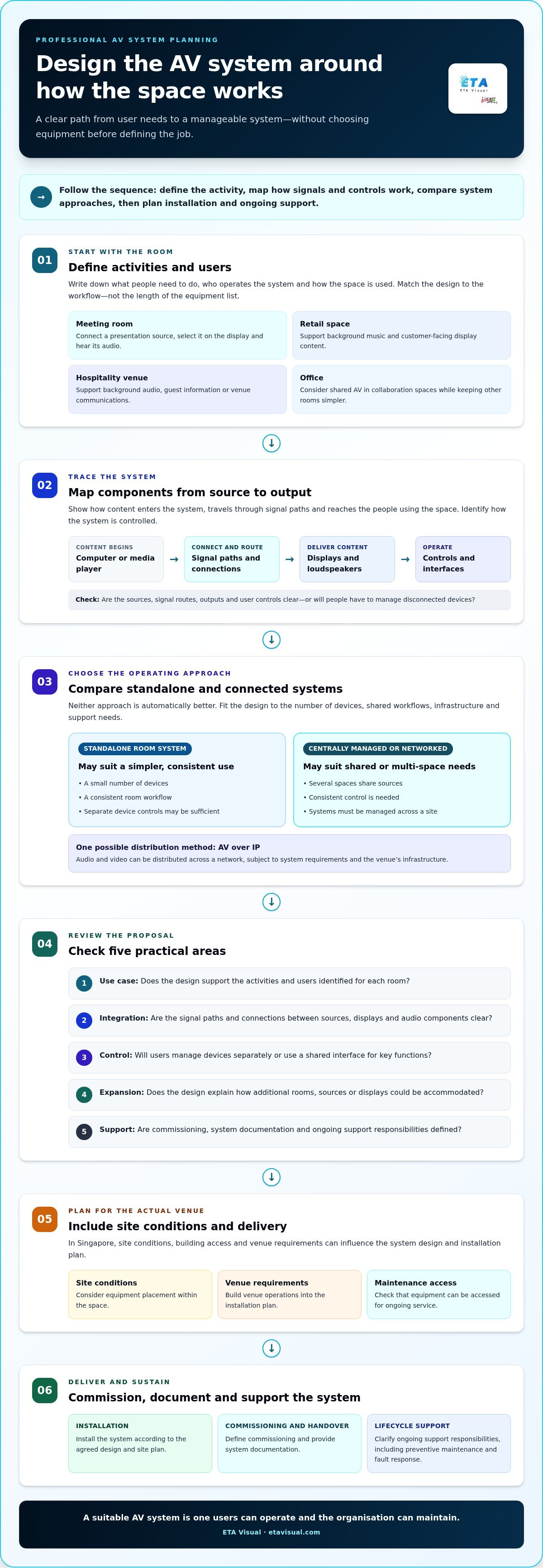
Different venues need different combinations. Retailers may use background music and digital displays for customer-facing communication. A meeting room may need a display, microphones, loudspeakers and a straightforward way to connect presentation sources. In hospitality, background audio and visual displays can support guest information or venue communications. Offices may benefit from shared AV in collaboration spaces while keeping other rooms simpler.
Integration is useful when components need to work together as part of a routine, but it is not automatically right for every room. A standalone display or audio device may be sufficient for a limited task. A larger or shared environment may benefit from centralised control or connected signal distribution. Decide based on the activities users need to carry out, not the number of devices available.
What belongs in a professional AV system?
A system may include source devices, such as a computer or media player; displays, including commercial screens or LED displays; loudspeakers; signal paths that carry audio and video; and control interfaces for selecting sources or adjusting the system. Depending on the application, additional equipment may be needed to route, process or manage signals.
The key distinction is coordination. With standalone devices, users may need to manage separate connections, inputs and controls. AV integration plans how components connect and how users operate them together. Define the room’s activities, content sources and operating needs before choosing equipment. This makes it easier to tell which components are essential and which would add complexity without solving a real problem.
For example, a conference room designed for presentations and collaboration has different priorities from a retail environment designed for music and customer-facing displays. In Singapore, site conditions and venue operations can also affect equipment placement and maintenance access. See this guide to commercial AV integration in Singapore for more context on connecting system elements around a space’s requirements.
How to compare professional AV system approaches
Compare how each approach will work in practice, not just the equipment schedule. A standalone room system may suit a space with a small number of devices and a consistent use. A centrally managed or networked design may be more appropriate when several spaces share sources, need consistent control or must be managed across a site. Neither approach is automatically better. The right fit depends on workflows, interfaces, infrastructure and support responsibilities.
Match system design to workflows, not equipment lists
Start by recording what users need to do, then map equipment to those tasks. Consider who will operate the system, when the space is in use, which content sources are needed and whether rooms change between meeting, presentation or other functions. For a meeting room, for instance, note how users connect a presentation source, select it on the display and hear its audio. This gives the design a clear use case and helps avoid unnecessary components.
Compare integration, control and future flexibility
Separate controls give users individual ways to operate devices. Centralised control can bring common tasks into one interface. AV over IP is one possible method of distributing audio and video across a network, subject to system requirements and the venue’s infrastructure. A proposal should show how signals move between sources and outputs, which interfaces connect the components, and where installation, commissioning and ongoing support responsibilities sit. AVIXA, the Audiovisual and Integrated Experience Association, provides industry resources for professional AV.
Use these comparison points to assess whether an approach matches the space:
- Use case: Does the design support the activities and users identified for each room?
- Integration: Are signal paths and connections between sources, displays and audio components clear?
- Control: Will users manage devices separately or operate key functions through a shared interface?
- Expansion: Does the design explain how additional rooms, sources or displays could be accommodated?
- Support: Are commissioning, system documentation and ongoing support responsibilities defined?
Look for a clear explanation of what happens from source to output, including who is responsible for each connection and interface. If the proposal leaves these boundaries unclear, it may be difficult to understand how the system will operate as a whole or how it will be supported after handover.
For a new installation or upgrade, ETA Visual can align system design with site conditions and user workflows. Discuss your commercial AV project with the team.
What to check in an AV system proposal before committing
A strong proposal links your business needs to a defined system scope. It should explain why the selected equipment and connections suit the space, how the system will be installed, and what will be tested before handover. For professional audio visual systems, a hardware list alone does not show how the complete solution will work.
Does the scope cover design through commissioning?
Review the site survey findings and design deliverables alongside the installation scope. The proposal should identify who coordinates equipment, signal paths and control integration, and what commissioning will test. For example, it can specify whether intended sources reach the correct outputs and whether controls operate as designed. Commissioning checks the installed system at handover; it does not replace a documented design that explains how the system is intended to function.
Check that the stated requirements can be traced through the proposal. If a meeting space needs presentation from more than one source, for example, the scope should make clear how those sources connect to the display and audio system and how users select them. A useful design reference is this guide to AV system design in Singapore.
Are Singapore site and building conditions addressed?
A proposal should reflect the actual site rather than assume every venue is alike. In Singapore, heat and humidity may influence equipment placement and operating conditions. The survey should also consider where equipment can be installed and accessed for maintenance, along with relevant power, cable routes and structural support requirements. These project-specific details need appropriate assessment.
For commercial premises, coordination can be as important as the equipment plan. Building management arrangements, loading access and permitted work hours may affect how installation is scheduled and carried out. Check that the proposal explains how these site constraints are incorporated into project planning, rather than leaving access and coordination outside the stated scope.
Before committing, check whether the proposal clearly sets out:
- Requirements and rationale: How the design responds to the intended activities and venue.
- Design and responsibilities: Who coordinates equipment, signal flow, control and interfaces.
- Installation scope: What work is included, including relevant site and access coordination.
- Commissioning and handover: What will be tested and what system information will be provided.
- Ongoing access: Whether equipment locations allow practical inspection and maintenance.
A clear scope reduces uncertainty between design, installation and handover. ETA Visual provides site surveys, system design, installation and commissioning, connecting these stages around the venue’s requirements.
How to plan an AV project from assessment to handover
A clear sequence keeps the system aligned with the venue, users and installation conditions. For professional audio visual systems, planning should connect what people need to do with the site survey, design, installation and handover. Equipment delivery alone does not complete the project.
Start with the site survey and system requirements
Document how each space is used, who will operate the system, what content sources are required and which existing devices may need to connect. A site survey can also review equipment locations, power, cable routes, access for installation and ongoing maintenance. Record unresolved dependencies, such as access arrangements or site information still needed, rather than assuming standard conditions.
ETA Visual’s Singapore AV site survey guide provides more detail on the assessment stage.
Plan installation, commissioning and handover
Use a staged plan to coordinate decisions and site work:
- Gather requirements: Identify users, room activities, content sources and day-to-day operating needs.
- Survey the site: Review existing equipment, installation locations, power, signal routes and maintenance access.
- Develop the design: Define system components, connections and control in response to the requirements and survey findings.
- Coordinate installation: Plan work with building management and account for loading arrangements, site access and permitted work schedules. These conditions can affect delivery routes, work sequencing and when spaces are available.
- Commission and hand over: Check that the installed system operates against the agreed design, then familiarise users with its normal operation.
Commissioning is a functional check, not a substitute for a clear system design. It should establish whether the connected sources, signal paths, displays, audio and control behave as intended. Address issues identified during these checks as part of project close-out.
Plan handover to support continuity. Depending on project scope, relevant information may include system layouts, signal-flow details, operating guidance and a record of the installed configuration. User familiarisation helps staff understand routine operation and who to contact for support. Together, these steps make the system easier to operate and maintain after installation.
Why lifecycle support belongs in your professional AV decision
A system’s value depends on more than its initial installation. Displays, audio equipment, signal paths and controls may support daily meetings, customer communication or venue operations. If a fault interrupts those activities, a clear maintenance and repair plan helps the business respond in an organised way.
Preventive maintenance and fault response serve different purposes. Scheduled checks can help assess system condition and identify potential issues before they disrupt normal use. A reactive approach addresses faults after they occur, which may suit some equipment or operating needs, but users may be without a working system while the issue is diagnosed. The right balance depends on the system, how often it is used and the consequences of downtime.
What should ongoing AV support address?
Support can include planned inspections, troubleshooting and review of equipment and connections. Its scope should reflect the installed system and environment: a frequently used meeting room, for example, has different operating demands from an intermittently used display. In Singapore, equipment placement and maintenance access also matter, particularly where heat, humidity or venue schedules affect routine servicing.
Plan support alongside the design. Consider which components are business-critical, how faults will be reported and what access is needed to inspect or service equipment. ETA Visual provides preventive maintenance contracts and emergency on-site repair for commercial AV systems. For more on maintenance planning, read this Singapore AV equipment maintenance guide.
Choose an integrator accountable beyond installation
When one project partner coordinates design, installation, commissioning and ongoing support, there is a clearer connection between the original requirements and the system in operation. This matters when troubleshooting depends on understanding how components connect, how signal paths were designed and how the system was commissioned. ETA Visual supports these lifecycle stages, with service shaped around the project and installed equipment.
For a broader view of how design and implementation fit together, see ETA Visual’s commercial AV integration guide. When assessing support, look for a defined scope that explains what maintenance covers and how repair needs are handled. Installation alone does not describe how the system will be supported over time.
Discuss your AV project or request a site survey to plan a solution around your venue, workflows and support needs.
Build an AV solution that works beyond installation
The right professional audio visual systems are matched to how people use a space, not chosen from an equipment list alone. Compare approaches by their integration, control and future needs, then check that the proposal connects your requirements to a defined design, installation scope and commissioning process.
Plan support from the outset, too. ETA Visual provides end-to-end project support from site survey and design through installation and commissioning, with ongoing maintenance and repair for commercial AV systems. This connects project decisions to the system’s day-to-day operation.
A site survey is a practical first step towards an AV solution suited to your venue, users and operating needs.
What is a professional audio visual system?
A professional audio visual system combines audio, visual, signal distribution and control components to support defined business activities. Its scope can range from a single meeting room to a multi-zone commercial space. For example, a conference room may bring presentation sources, a display and audio together, while a retail environment may use commercial audio and digital displays. The right configuration depends on users, content, room conditions and operating requirements, not a fixed equipment bundle.
How do I choose a professional AV system for my business?
Start by documenting what users need to do, where they will use the system and what content it must handle. Then assess how the proposed components connect, how users will control them, and what installation, commissioning and ongoing support are included. A site survey can identify room conditions, existing equipment, power and access constraints before the design is finalised. This gives you a practical basis for comparing proposals against your actual workflows.
What is the difference between AV equipment and AV system integration?
AV equipment refers to individual devices, such as displays, loudspeakers or control components. Integration is the design and connection of appropriate equipment so the components work together for the intended use. Depending on the agreed scope, an integration project may also include site assessment, installation, commissioning and support. The distinction matters because a list of devices alone does not explain how signals move between them or how users operate the complete system.
Should a commercial AV system use AV over IP?
AV over IP may suit a project where network-based signal distribution fits the required functions and infrastructure, but it is not right for every space. The decision depends on system design, existing network conditions, how signals need to be routed and support requirements. A technical assessment should establish whether this approach suits the project. Compare it with other suitable designs based on workflows, interfaces and operating needs, rather than choosing by trend alone.
What should an AV system proposal include?
A useful proposal explains the business requirements, recommended system scope, design approach, installation responsibilities and commissioning process. It should also make relevant site dependencies, signal connections and support arrangements clear. Review whether the proposed components address the intended activities and whether the boundaries between design, installation and integration are defined. Proposal contents vary by project, so focus on how clearly the scope connects the recommended system to the venue and its users.
How long does professional AV system installation take?
Installation duration depends on the system scope, site conditions, equipment, access arrangements and coordination with building management. A single room and a multi-zone commercial system can involve different installation and commissioning requirements. In Singapore, loading arrangements and permitted work schedules may also affect project coordination. Establish the project timeline after assessing the site and agreed scope, rather than relying on a general estimate that may not reflect the venue.
Why is AV commissioning important?
Commissioning checks that installed components operate together in line with the agreed design and intended use. Depending on project scope, checks may cover connections, signal flow, control functions and the operation of audio and displays. This helps identify issues before handover, when users begin relying on the system. Plan commissioning as part of project delivery, with the checks and handover process clearly defined rather than assumed to happen automatically.
Visual planning reference
| Planning factor | What to define | Why it matters |
|---|---|---|
| Viewing positions | Nearest viewing distance and audience locations | Supports an appropriate pixel-pitch and screen-size decision. |
| Content workflow | Input sources, resolutions and control workflow | Helps ensure information remains readable and simple to operate. |
| Installation conditions | Structure, access, power, ventilation and maintenance access | Aligns the display scope with the physical site before procurement. |
Want an accurate budget for your space?
We'll do a free site survey and prepare a clear, itemised quotation — no obligation.
Frequently asked questions
Different venues need different combinations. Retailers may use background music and digital displays for customer-facing communication. A meeting room may need a display, microphones, loudspeakers and a straightforward way to connect presentation sources. In hospitality, background audio and visual displays can support guest information or venue communications. Offices may benefit from shared AV in collaboration spaces while keeping other rooms simpler. Integration is useful when components need to work together as part of a routine, but it is not automatically right for every room. A standalone display or audio device may be sufficient for a limited task. A larger or shared environment may benefit from centralised control or connected signal distribution. Decide based on the activities users need to carry out, not the number of devices available.
A system may include source devices, such as a computer or media player; displays, including commercial screens or LED displays; loudspeakers; signal paths that carry audio and video; and control interfaces for selecting sources or adjusting the system. Depending on the application, additional equipment may be needed to route, process or manage signals. The key distinction is coordination. With standalone devices, users may need to manage separate connections, inputs and controls. AV integration plans how components connect and how users operate them together. Define the room’s activities, content sources and operating needs before choosing equipment. This makes it easier to tell which components are essential and which would add complexity without solving a real problem. For example, a conference room designed for presentations and collaboration has different priorities from a retail environment designed for music and customer-facing displays. In Singapore, site conditions and venue operations can also affect equipment placement and maintenance access. See this guide to commercial AV integration in Singapore for more context on connecting system elements around a space’s requirements. Compare how each approach will work in practice, not just the equipment schedule. A standalone room system may suit a space with a small number of devices and a consistent use. A centrally managed or networked design may be more appropriate when several spaces share sources, need consistent control or must be managed across a site. Neither approach is automatically better. The right fit depends on workflows, interfaces, infrastructure and support responsibilities.
Review the site survey findings and design deliverables alongside the installation scope. The proposal should identify who coordinates equipment, signal paths and control integration, and what commissioning will test. For example, it can specify whether intended sources reach the correct outputs and whether controls operate as designed. Commissioning checks the installed system at handover; it does not replace a documented design that explains how the system is intended to function. Check that the stated requirements can be traced through the proposal. If a meeting space needs presentation from more than one source, for example, the scope should make clear how those sources connect to the display and audio system and how users select them. A useful design reference is this guide to AV system design in Singapore.
A proposal should reflect the actual site rather than assume every venue is alike. In Singapore, heat and humidity may influence equipment placement and operating conditions. The survey should also consider where equipment can be installed and accessed for maintenance, along with relevant power, cable routes and structural support requirements. These project-specific details need appropriate assessment. For commercial premises, coordination can be as important as the equipment plan. Building management arrangements, loading access and permitted work hours may affect how installation is scheduled and carried out. Check that the proposal explains how these site constraints are incorporated into project planning, rather than leaving access and coordination outside the stated scope. Before committing, check whether the proposal clearly sets out: A clear scope reduces uncertainty between design, installation and handover. ETA Visual provides site surveys, system design, installation and commissioning, connecting these stages around the venue’s requirements. A clear sequence keeps the system aligned with the venue, users and installation conditions. For professional audio visual systems, planning should connect what people need to do with the site survey, design, installation and handover. Equipment delivery alone does not complete the project.
Support can include planned inspections, troubleshooting and review of equipment and connections. Its scope should reflect the installed system and environment: a frequently used meeting room, for example, has different operating demands from an intermittently used display. In Singapore, equipment placement and maintenance access also matter, particularly where heat, humidity or venue schedules affect routine servicing. Plan support alongside the design. Consider which components are business-critical, how faults will be reported and what access is needed to inspect or service equipment. ETA Visual provides preventive maintenance contracts and emergency on-site repair for commercial AV systems. For more on maintenance planning, read this Singapore AV equipment maintenance guide.
A professional audio visual system combines audio, visual, signal distribution and control components to support defined business activities. Its scope can range from a single meeting room to a multi-zone commercial space. For example, a conference room may bring presentation sources, a display and audio together, while a retail environment may use commercial audio and digital displays. The right configuration depends on users, content, room conditions and operating requirements, not a fixed equipment bundle.
Plan the next step
Continue with a relevant solution and real Singapore project evidence.

