How Long Do Commercial LED Screens Last Compared With LCD?
Written and reviewed by the ETA Visual Engineering & Project Team. Guidance is updated when project, product or Singapore site-planning practices change.
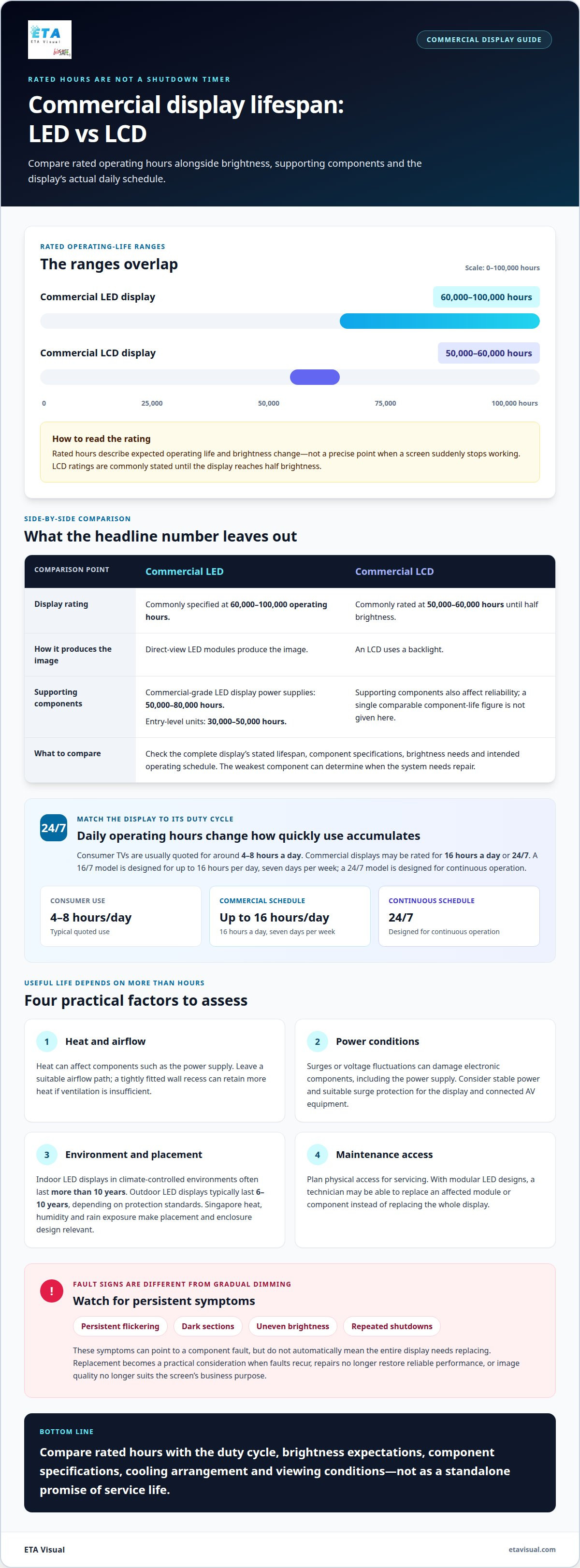
50,000 hours isn’t a countdown to a blank screen. A commercial LED display is commonly specified for around 60,000 to 100,000 operating hours, compared with 50,000 to 60,000 hours for a commercial LCD display. The question “how long do commercial LED screens last?” is best answered as a brightness rating, not a promise that the screen will suddenly stop working at that point. It’s reasonable to focus on lifespan when a display supports daily business operations. But rated hours are only part of the picture: brightness can decline gradually, and actual service life also depends on operating hours, brightness settings, heat management and maintenance. This guide explains what a 50,000-hour rating means, how commercial LED compares with LCD, and which warning signs may point to a fault rather than normal dimming. It also covers how repairs and practical maintenance can affect a display’s useful life, with considerations relevant to commercial spaces in Singapore.
Key Takeaways
- A 50,000-hour rating describes expected operating life, not a precise point when a screen will stop working.
- Compare LED and LCD ratings by looking at brightness depreciation and intended daily operating hours, not hours alone.
- Learn to distinguish gradual dimming from warning signs such as uneven brightness, flickering or failed sections.
- Understand how modular repairs can address individual component faults without necessarily replacing the whole display.
- Account for heat, humidity, weather exposure and maintenance access when assessing a screen’s likely service life in Singapore.
Table of Contents
- Does a display stop working after 50,000 hours?
- LCD or LED Lifespan: Which Technology Lasts Longer?
- Common warning signs and repairs
- Lumen depreciation and L70 ratings
- How long do indoor versus outdoor commercial LED screens last?
- ETA Visual: Indoor P0.9~P5 LED Screens
Does a display stop working after 50,000 hours?
No. A 50,000-hour figure is a rated operating life, not a fixed shutdown point. Whether a display remains useful also depends on its operating schedule, brightness, component condition and environment.
Operating Hours and Warranty Coverage
A lifespan rating estimates operating time, while a warranty defines a separate period of coverage. Commercial signage displays commonly have a 3-year warranty on commercial terms, but that does not mean the display is expected to fail when coverage ends. Check how the warranty relates to the intended daily schedule and which faults it covers. This helps distinguish expected wear from a fault that may qualify for repair.
Indoor and Outdoor Screen Lifespans
Indoor LED displays in climate-controlled environments often last more than 10 years, while outdoor LED displays typically last 6-10 years, depending on protection standards. Singapore’s heat, humidity and rain exposure make placement and enclosure design relevant to outdoor lifespan. An outdoor display also needs maintenance access suited to its location. The outdoor LED screen guide covers those project considerations.
Commercial Operation Versus Consumer Use
Operating hours change how quickly a display accumulates use. Consumer TVs are usually quoted for around 4 to 8 hours of use a day, while commercial displays are rated for 16 hours a day or 24/7. A 16/7 display is designed for up to 16 hours per day, seven days per week. A 24/7 model is designed for continuous operation. Match the rated schedule to the venue, rather than assuming a consumer TV can meet a shop’s daily operating needs.
This matters when comparing purchase and replacement costs. A consumer TV may suit occasional use, but frequent replacement or downtime can affect its overall value in a business setting. Commercial displays are designed for longer operating schedules and signage use. Compare the intended duty cycle, warranty terms, support needs and expected replacement interval, not just the purchase price.
Cooling, Airflow and Replacement Signs
Heat can affect components such as the power supply, so ventilation and clear airflow around the cabinet matter. A display fitted tightly into a wall recess may retain more heat if there isn’t enough space for ventilation. Plan the installation around the cabinet, airflow path and physical access needed for servicing.
Look for persistent flickering, dark sections, uneven brightness or repeated shutdowns. These symptoms can point to a component fault, but they don’t automatically mean the entire display needs replacing. With a modular LED design, a technician may be able to replace an affected module or component. Replacement becomes a practical consideration when faults recur, repairs no longer restore reliable performance, or image quality no longer suits the screen’s business purpose.
LCD or LED Lifespan: Which Technology Lasts Longer?
LED and LCD ratings describe expected operating life, but supporting components also affect reliability. Commercial LCD displays are commonly rated for 50,000 to 60,000 hours until they reach half brightness. Commercial-grade LED display power supplies typically last 50,000-80,000 hours, while entry-level units typically reach 30,000-50,000 hours. A long-lived LED module cannot keep a display operating if its power supply fails.
That makes the manufacturer’s component specifications important alongside the headline lifespan figure. Check the rated operating schedule and the stated lifespan for the complete display, not just its LEDs or backlight. A display used for extended daily viewing, for example, puts longer demands on its power supply than one switched off outside business hours. The weakest component can determine when the system needs repair.
LED and LCD displays also differ in how they produce light. An LCD uses a backlight, while a direct-view LED display produces the image with LED modules. Their rated hours are not always directly comparable. Brightness, operating conditions and the model’s intended use all affect how long each remains suitable for its viewing environment. Compare ratings with the intended operating schedule and viewing conditions.
Power quality matters to both technologies. A surge or voltage fluctuation can damage electronic components, including a display’s power supply. Stable power and suitable surge protection help reduce exposure to those electrical events. In a Singapore commercial building, power planning should account for the display and connected AV equipment, rather than treating the screen as an isolated device. Voltage regulation may also be considered where the installation’s power conditions warrant it.
Heat is another factor in component longevity. Higher operating temperatures can shorten the life of power-supply components, so consider cabinet airflow and ventilation during installation. A display enclosed tightly behind a feature wall may have different cooling conditions from one with clear airflow around its cabinet. The design needs to balance the viewing position and mounting arrangement with enough space for heat to escape.
Software and image performance affect useful life differently from hardware failure. A screen may still power on while its brightness, image consistency or compatibility no longer meets the business’s needs. For an LED installation, assess its expected operating hours alongside the role it serves. A commercial LED and LCD video wall comparison can help relate technology choice to viewing requirements and system design.
For a fair technology comparison, consider rated hours, power-supply specifications, duty cycle, cooling arrangement and expected image performance together. No single figure captures the full service life of a commercial display.
Common warning signs and repairs
A change in image quality can signal normal wear, a component fault or an issue elsewhere in the digital signage system. Note what changed, where it appears and whether it persists after restarting the display. A dark patch in one area, for example, suggests a different fault pattern from a screen that loses its entire image. This helps technicians narrow down the cause instead of replacing parts prematurely.
Watch for these specific changes while the screen is operating:
- Dark or discoloured areas: A localised patch may indicate an LED module or connection problem.
- Flickering: Record whether it affects the whole image or only one section. Signal, connection or power faults can produce different patterns.
- Uneven brightness: A visible difference between sections may affect content legibility, especially across a large display.
- Repeated shutdowns: Note whether the fault occurs after the screen has been running for a period, as temperature and ventilation can influence component behaviour.
These symptoms do not automatically mean the full display has reached the end of its lifespan. A technician can assess the image, connections, power supply and control system to locate the fault. If the display uses a modular design, individual LED modules or components can be replaced. For example, a trained technician can replace a 250 × 250 mm LED display module in 5-10 minutes. That is the module replacement time, not the full diagnostic or repair duration.
Repair decisions depend on the extent of the fault and the display’s role. A single failed module on a retail screen may be repairable, while recurring faults across several areas call for a broader assessment. If the screen runs continuously, also consider operating temperature, airflow and power conditions. Poor ventilation can contribute to heat build-up, which may affect electronic components and cause faults to appear sooner.
After a repair, check the affected area against the surrounding modules. A colour or brightness mismatch can remain noticeable even when the image returns. A technician can assess whether calibration is needed and test the display with its normal content and signal source. This matters for digital signage, where text, branding and moving images should remain consistent across the screen.
Routine care can help identify problems before they interrupt operation. Keep a record of recurring symptoms and maintenance work, and schedule inspections suited to the installation environment. Singapore’s heat and humidity make airflow and enclosure condition relevant, particularly for displays in warm or exposed locations. The LED display maintenance guidance explains practical care considerations for commercial installations.
Lumen depreciation and L70 ratings
Lumen depreciation is the gradual reduction in light output as LEDs age. An L70 rating describes the operating point when output reaches 70% of its initial level. It does not mean the display suddenly stops working. For an indoor retail screen, the practical question is whether signage remains bright and consistent enough for its viewing conditions.
Commercial LED displays are typically rated for 50,000-80,000 hours before reaching L70. Premium or broadcast LED displays are typically rated for 80,000-100,000+ hours before reaching L70. These figures describe brightness retention, not a guaranteed replacement date. Individual results depend on operating conditions and display design.
Read the specification carefully because “lifespan” can refer to different brightness thresholds. A stated 100,000-hour LED lifespan estimate may indicate the point when a diode has fallen to half its original brightness, rather than its L70 point. Half brightness and 70% brightness are different measurements. Comparing two displays therefore requires matching the threshold, not just comparing the printed hours.
For example, if an indoor screen starts at full output, its L70 point means it has retained 70% of that initial output. The screen may still show content after reaching that rating, but the reduced brightness can affect readability. A retail display near bright shopfront lighting may become less effective sooner than one in a controlled indoor viewing area, even if both have similar rated hours.
Brightness requirements affect how useful the remaining output is. A screen designed for a bright environment may retain adequate visibility after some brightness loss, while a display with limited brightness headroom may become difficult to read sooner. During installation planning, consider ambient light, viewing distance, content contrast and the intended operating schedule. These factors help define a practical replacement threshold for the business.
Replacement decisions should distinguish gradual, even dimming from localised faults. If the whole image has become less bright over time, this may reflect normal depreciation. A dark patch or uneven colour across modules suggests a different issue and may call for inspection or repair. Comparing current output with commissioning records or previous calibration results can help show whether brightness has declined uniformly.
For Singapore retail signage, assess legibility under the actual lighting conditions, not only in a dim test environment. A commercial LED screen brightness specification should account for the installation environment and viewing needs. That makes L70 a useful planning reference, rather than a standalone promise of how long a screen will remain suitable.
How long do indoor versus outdoor commercial LED screens last?
Indoor and outdoor LED screens face different operating conditions, so their useful service lives vary. Indoor displays in climate-controlled environments often last more than 10 years, while outdoor displays typically last 6-10 years, depending on protection standards. Those estimates provide context, but Singapore’s heat, humidity, rain and direct sunlight can influence how a particular installation performs.
For an indoor screen in an office or shopping mall, key considerations include operating hours, brightness settings and heat around the cabinet. A display mounted in a poorly ventilated recess may retain more heat than one with clear airflow. Plan for both ventilation and the space technicians need to reach components.
Outdoor installations face additional exposure to weather and airborne dust. The enclosure and protection design need to suit the location, while drainage, mounting and maintenance access matter for ongoing operation. A screen facing direct sunlight may also experience more heat. A sheltered building façade and an exposed roadside location can therefore create different operating conditions.
Humidity needs attention in either setting, especially where moisture can affect electrical connections. Follow the display manufacturer’s operating limits for humidity; a limit such as 85% is product-specific and should not be treated as a universal requirement. Enclosure condition, airflow and any signs of condensation are useful inspection points. For outdoor screens, inspections should also follow severe weather events, when mounting, seals and visible damage can be assessed.
Maintenance access affects how quickly faults can be identified and repaired. An outdoor display installed high above a busy area may require planned access arrangements, while an indoor screen in a mall may need work coordinated with building management. The outdoor LED screen guide for Singapore businesses covers installation and site considerations that affect this planning.
For digital signage enclosures with fans, air-filter cleaning or replacement intervals depend on the enclosure and site conditions. A 6-12-month interval may be suitable in some environments, but follow the manufacturer’s maintenance guidance. Dustier locations may need closer attention because blocked filters can restrict airflow. A maintenance plan should also account for the screen’s position, enclosure design and the way technicians access its components.
For a practical lifespan assessment, consider the display’s operating schedule, exposure to heat and weather, and available maintenance access together. A screen can remain operational yet become unsuitable if its image no longer meets viewing requirements. Replacement planning should account for both physical condition and the display’s intended business purpose.
ETA Visual: Indoor P0.9~P5 LED Screens
ETA Visual helps businesses plan indoor LED screens around the space, viewing conditions and intended use. Its Indoor P0.9~P5 LED Screens suit commercial environments where screen size, pixel pitch and installation design need to work together. The right selection depends on viewing distance, content, ambient light and available maintenance access, not lifespan ratings alone.
For a storefront or exposed location, Outdoor LED Billboards may better suit the environment; Transparent LED Displays and Flexible & Curved LED can support different spatial designs. ETA Visual designs, installs and commissions display solutions, helping align the screen with the wider project requirements.
Contact ETA Visual to discuss your LED display requirements.
Plan the Next Display Around Its Role
Set a replacement plan around what the display needs to deliver, not just whether it still powers on. Decide which outcomes matter most for your site: clear content, consistent image quality, reliable daily operation or easy maintenance access. These priorities turn a lifespan estimate into a practical business decision.
To answer how long do commercial LED screens last at your site, consider the display’s role as well as its condition. A screen showing time-sensitive customer information may need a different replacement threshold from one used for occasional brand content. Recording faults, image changes and service work can also help your team plan future upgrades.
For a new installation or an ageing display, start by aligning the screen design with the location, content and operating needs. A considered plan can make the decision easier for your facilities, retail or project team.
A clear brief gives your next display project a confident starting point.
Does turning a screen off at night make it last longer?
Yes. Switching it off while the venue is closed reduces accumulated operating hours. Set the schedule around actual opening hours and any overnight content or monitoring needs. For a retail display, a timed shutdown can avoid running promotional content in an empty shop. Coordinate the schedule with the content management system so planned playback resumes correctly when the business opens.
How Long Does a Commercial Display Last?
There isn’t one calendar lifespan that applies to every commercial display. Some are replaced because their technology no longer meets business requirements, even though they still work. A retailer, for example, may need a newer display to support updated content or fit a refurbishment. Include the screen’s business purpose and likely technology changes in replacement planning, rather than relying only on whether it powers on.
How long does an LED video wall last?
An LED video wall’s useful life depends on the display system and the image quality the venue needs to maintain. For a control room, consistent colour and detail across the wall may be essential; for a lobby, the visual requirements may differ. Include content sources and signal processing in lifecycle planning, since a working display still needs to suit the system feeding it.
How many years does a screen last at 12, 16 and 24 hours a day?
The calendar estimate depends on the screen’s rated operating hours. Calculate it separately for each schedule: divide the rated hours by the daily operating hours, then divide by 365. Use the actual average schedule, including days when the venue is closed. Without a specified operating-hour rating for the display, giving fixed year figures for these schedules would be misleading.
What is the typical lifespan of commercial LED screens in operating hours and years?
Commercial LED lifespan is specified in operating hours, while a calendar lifespan is an estimate based on how often the screen runs. Displays are often replaced because the technology has become obsolete rather than because every component has failed. This distinction matters for budgeting: a screen’s remaining physical life may not match how long it remains suitable for the business.
How many years do commercial LED displays last with different daily usage levels?
Different daily schedules produce different calendar estimates from the same rated-hour figure. A screen operating only during staffed hours accumulates use differently from one left on overnight. For a meaningful estimate, use the display’s specification and a realistic operating calendar, including weekly closures and seasonal changes. Keep that calculation separate from decisions about image quality or business suitability.
What factors affect the lifespan of commercial LED screens?
Lifecycle planning also depends on how easily the installation can be serviced and documented. Record commissioning settings, component changes and recurring faults so later assessments have a useful reference. For a large installation, plan how replacement parts will be identified and stored. Clear records can help technicians match service work to the correct display configuration.
How does brightness degradation affect the usable life of an LED screen?
Brightness loss matters when it interferes with the display’s intended task. Promotional text, for example, may remain readable while subtle product imagery becomes less effective. Assess the actual content from normal audience positions, rather than judging an empty test screen alone. If the image still serves its purpose, reduced output doesn’t automatically mean immediate replacement is necessary.
Visual planning reference
| Planning factor | What to define | Why it matters |
|---|---|---|
| Viewing positions | Nearest viewing distance and audience locations | Supports an appropriate pixel-pitch and screen-size decision. |
| Content workflow | Input sources, resolutions and control workflow | Helps ensure information remains readable and simple to operate. |
| Installation conditions | Structure, access, power, ventilation and maintenance access | Aligns the display scope with the physical site before procurement. |
Want an accurate budget for your space?
We'll do a free site survey and prepare a clear, itemised quotation — no obligation.
Frequently asked questions
Yes. Switching it off while the venue is closed reduces accumulated operating hours. Set the schedule around actual opening hours and any overnight content or monitoring needs. For a retail display, a timed shutdown can avoid running promotional content in an empty shop. Coordinate the schedule with the content management system so planned playback resumes correctly when the business opens.
There isn’t one calendar lifespan that applies to every commercial display. Some are replaced because their technology no longer meets business requirements, even though they still work. A retailer, for example, may need a newer display to support updated content or fit a refurbishment. Include the screen’s business purpose and likely technology changes in replacement planning, rather than relying only on whether it powers on.
An LED video wall’s useful life depends on the display system and the image quality the venue needs to maintain. For a control room, consistent colour and detail across the wall may be essential; for a lobby, the visual requirements may differ. Include content sources and signal processing in lifecycle planning, since a working display still needs to suit the system feeding it.
The calendar estimate depends on the screen’s rated operating hours. Calculate it separately for each schedule: divide the rated hours by the daily operating hours, then divide by 365. Use the actual average schedule, including days when the venue is closed. Without a specified operating-hour rating for the display, giving fixed year figures for these schedules would be misleading.
Commercial LED lifespan is specified in operating hours, while a calendar lifespan is an estimate based on how often the screen runs. Displays are often replaced because the technology has become obsolete rather than because every component has failed. This distinction matters for budgeting: a screen’s remaining physical life may not match how long it remains suitable for the business.
Different daily schedules produce different calendar estimates from the same rated-hour figure. A screen operating only during staffed hours accumulates use differently from one left on overnight. For a meaningful estimate, use the display’s specification and a realistic operating calendar, including weekly closures and seasonal changes. Keep that calculation separate from decisions about image quality or business suitability.
Plan the next step
Continue with a relevant solution and real Singapore project evidence.