LED Display Maintenance Guide for Singapore Businesses
Written and reviewed by the ETA Visual Engineering & Project Team. Guidance is updated when project, product or Singapore site-planning practices change.
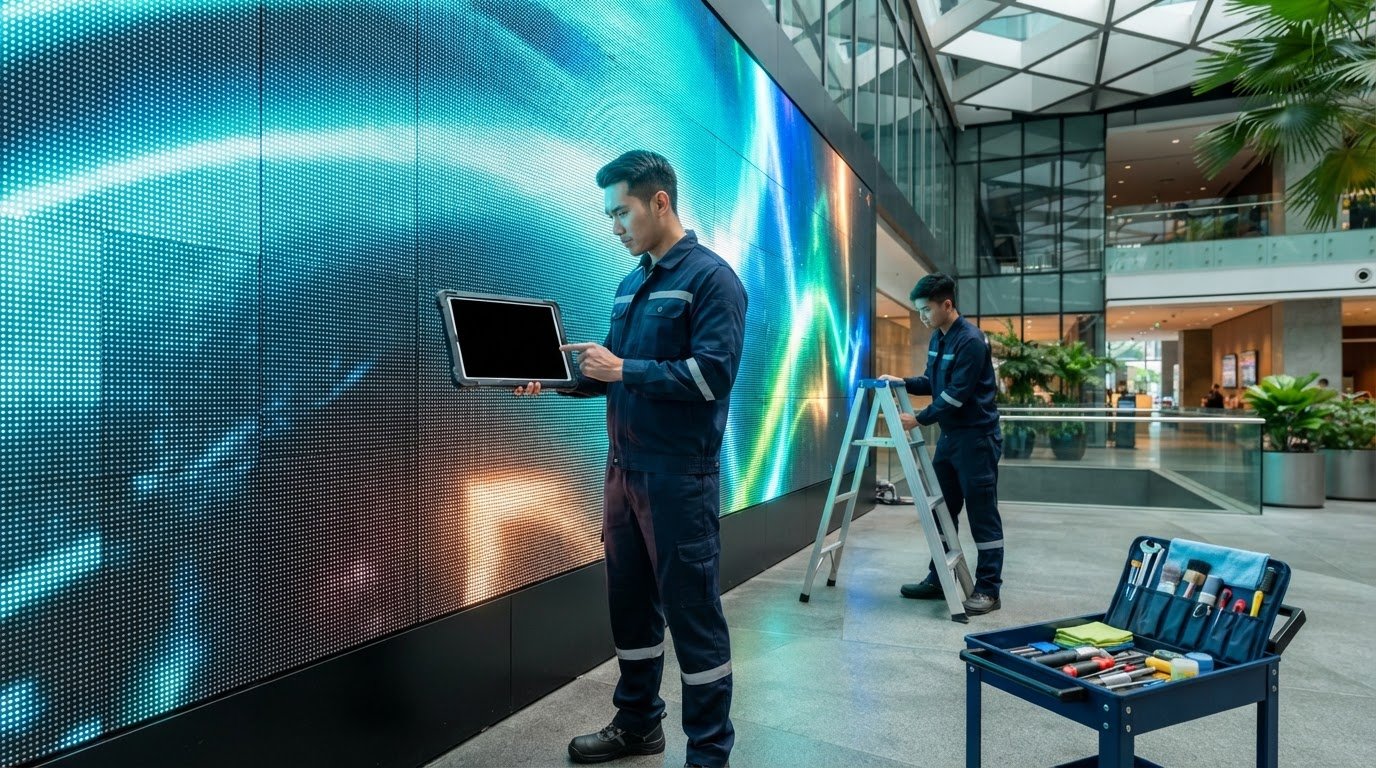
What if the biggest risk to your LED screen isn’t a fault, but an attempt to clean or service it without a safe access plan? LED display maintenance involves more than wiping the surface. The screen’s design, location and operating demands determine what can be checked, how it should be cleaned and when specialist support is needed. In Singapore, heat, humidity, dust and access constraints in malls, offices and retail spaces also shape the maintenance plan. When a fault interrupts content, teams need a clear process for reporting it and arranging a response. This guide explains how to plan maintenance around front- or rear-access designs, site conditions and the screen’s role in your business. You’ll learn how to assign inspection responsibilities, distinguish routine observations from specialist troubleshooting, and plan access to reduce disruption. It also covers how scheduled inspections, remote monitoring and firmware updates can fit into preventive support, giving your team a practical framework for managing the display over time.
Key Takeaways
- Build LED display maintenance around visual checks, manufacturer-approved cleaning, system checks and professional inspection.
- Follow the display manufacturer’s procedures to reduce the risk of damaging modules or other components during cleaning and handling.
- Plan front- or rear-access requirements around the installation so service areas can be reached safely.
- Set inspection frequencies using manufacturer guidance, site conditions, operating hours and the service agreement.
- Record symptoms and escalate recurring faults, abnormal operation, damaged components or specialist access needs for professional troubleshooting and repair.
Table of Contents
- Why LED Display Maintenance Matters for Commercial Screens in Singapore
- What an LED Display Maintenance Routine Should Include
- Front-Access or Rear-Access LED Walls: Plan Maintenance Around the Design
- How to Build a Preventive LED Display Maintenance Plan
- When to Use Professional LED Display Maintenance and Repair
Why LED Display Maintenance Matters for Commercial Screens in Singapore
A commercial LED screen is part of a business communication system, not just a bright surface on a wall. A maintenance plan brings together inspection, approved cleaning, system monitoring and qualified repair. Its scope should reflect the screen’s design and the way the site operates. Regular checks help teams spot changes in image quality or system behaviour, while making it clearer who is responsible for reporting issues and arranging technical work.
The impact of a fault depends on where and how the screen is used. A problem on a retail display can interrupt a promotion. In a hotel or restaurant, it may affect menus, offers or guest information. In an office, a blank or distorted screen can disrupt meetings or workplace communications. Match the escalation process to the display’s role. A screen carrying time-sensitive content may need a different continuity plan from one used occasionally.
Preventive maintenance looks for developing issues before they interrupt operation; fault-response repair addresses a problem after it appears. Both have a place in a planned support approach. Understanding the components and applications behind LED display technology also helps explain why checks should cover more than the visible modules. ETA Visual’s guide to LED video walls in Singapore provides related context on installation and system design.
What commercial LED display maintenance covers
Checks can cover the screen’s physical condition, power and signal paths, control system and image performance. Staff can make routine observations and report dark areas, unexpected flicker, unusual noise or changes to displayed content. These observations help with diagnosis, but they are not a reason to open equipment. Work inside electrical equipment and repairs to components should be handled by qualified personnel. The appropriate inspection scope depends on the display design and operating conditions.
Why site conditions matter in Singapore
Humidity, heat, dust and ventilation are factors to assess at the installation, not automatic explanations for a fault. An indoor screen near a warm or dusty area may need a different inspection and cleaning approach from one in a more controlled environment. Outdoor exposure and airflow around the equipment also matter. Base the plan on the actual site conditions rather than assuming all screens need the same routine.
Access and business operations matter too. Coordinate inspections and cleaning with building management, including work approvals, access routes and site procedures. In malls and other managed premises, loading arrangements, permitted work areas and operating hours can affect when technicians can reach the display. Identify who reports symptoms, who coordinates access and who is responsible for specialist work. Clear responsibilities make maintenance easier to schedule around customers, guests and staff.
What an LED Display Maintenance Routine Should Include
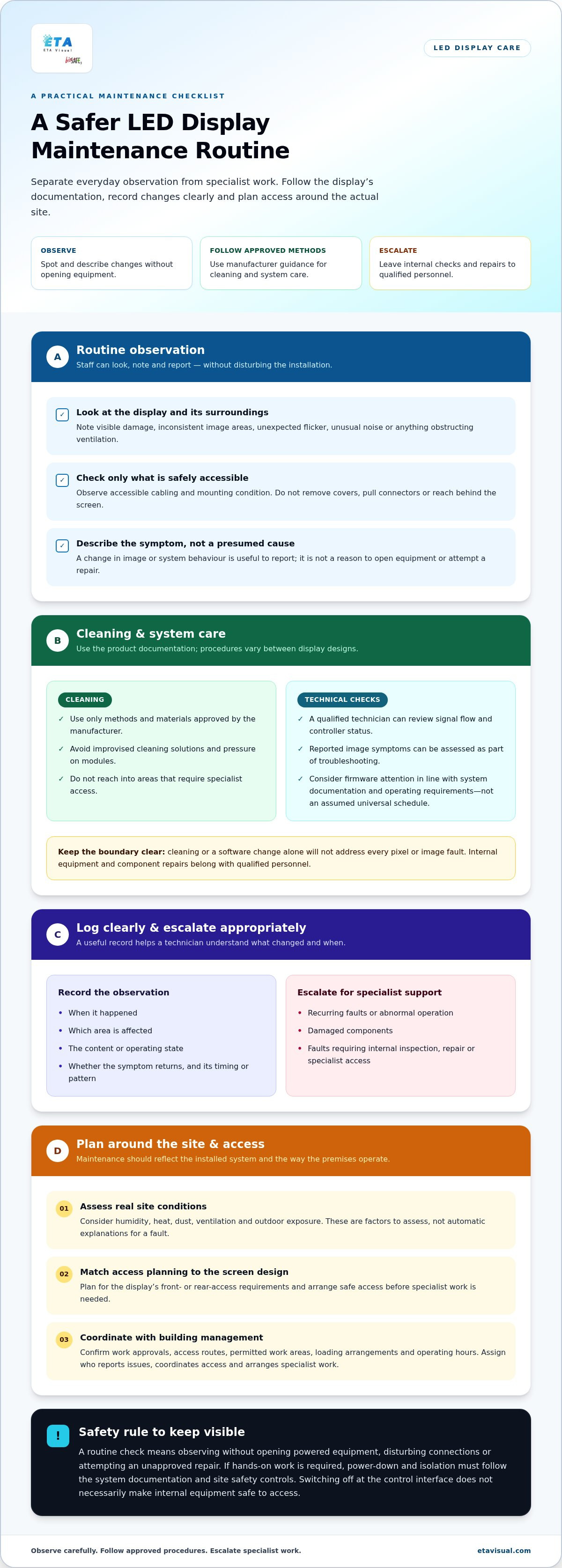
A useful routine separates tasks by risk and responsibility. Staff can observe the screen and log changes. Cleaning should follow the manufacturer’s instructions, while technical checks should be handled by qualified personnel. This keeps routine care practical and makes the boundary between spotting a problem and attempting a repair clear.
A safe routine check means observing the display without opening powered equipment, disturbing connections or attempting an unapproved repair. If hands-on work is required, power-down and isolation must follow the system documentation and site safety controls. Switching off the display at its control interface does not necessarily make internal equipment safe to access.
Visual, structural and environmental checks
During an observation, look for visible damage, inconsistent image areas, unusual noise and anything obstructing ventilation. Check accessible cabling and the mounting condition without removing covers, pulling connectors or reaching behind the screen. Record what changed, when it happened and which area is affected. If the same issue returns, noting its timing and pattern can help a technician narrow down the cause.
Cleaning, software and system checks
Clean the display surface only with methods and materials approved by its manufacturer. Avoid improvised cleaning solutions, pressure on modules and reaching into areas that require specialist access. Procedures vary between display designs, so use the relevant product documentation. ETA Visual’s LED screen cleaning guide offers further guidance on handling this work carefully.
System checks should look beyond surface appearance. A qualified technician can review signal flow and controller status, assess reported image symptoms and consider whether firmware needs attention. Manage updates in line with the system documentation and operating requirements, rather than applying them to an assumed universal schedule. Cleaning or a software change alone will not address every pixel or image fault.
- Observe: Note visible changes, unusual sounds and airflow obstructions.
- Clean: Follow the manufacturer’s approved method for the screen surface.
- Log: Record the time, affected area, content or operating state, and whether the symptom recurs.
- Escalate: Leave covers, electrical equipment, internal components and repairs to qualified personnel.
Shape maintenance around the installed system rather than relying on a generic checklist. A preventive maintenance plan can bring observations, approved cleaning and qualified system checks into one process. For broader industry context, see this industry reference. ETA Visual can help plan maintenance around your installation through its LED display maintenance service.
Front-Access or Rear-Access LED Walls: Plan Maintenance Around the Design
Access design determines how technicians can reach modules and service components after an LED wall is installed. A front-access system can suit a location with little or no working space behind the display. A rear-access system requires a safe route and enough clearance at the back. The installation geometry, not just the screen specification, shapes the maintenance plan.
For a wider view of how installation and servicing fit together, ETA Visual’s Singapore LED video wall design and maintenance guide covers related planning considerations.
How front-access and rear-access maintenance differ
- Front access: Where the system is designed for it, servicing is carried out from the display face. This can suit locations with limited rear clearance, but technicians still need a safe working position in front of the screen.
- Rear access: Servicing takes place from behind the display. The installation must provide a safe route and enough working space to reach the relevant service areas.
- Maintenance implications: Module removal and replacement must follow the procedures for that specific system. Access direction alone does not determine what can be removed or how it should be handled.
A wall in a shallow recess, for example, may leave little space for rear servicing. A screen above a counter or in a high-ceilinged space may be difficult to reach from the front, requiring suitable access equipment and a safe working position. Neither layout should be assumed to be easier without assessing the complete installation.
How to plan access without disrupting operations
Map the route from the building’s access point to the display. Identify pinch points, nearby structures and restrictions on moving or positioning access equipment. Consider ceiling height, the screen’s location, the size of the working area and any lifting constraints. For a Singapore mall, hotel or office, coordinate with building management on work controls, access arrangements and operating-hour requirements.
Maintenance timing also matters. Work near a retail display can affect customer movement or trading. A hotel screen may be in a guest-facing area, while an office display may be needed during working hours. Plan a suitable maintenance window with the site team, taking into account the display’s business role and the time needed to prepare and clear the work area.
Document who arranges site access, who manages the work area and what access equipment may be required. Include these details in the handover information so future technicians can plan before arriving. This makes LED display maintenance more predictable and helps the business schedule servicing around the realities of the space.
How to Build a Preventive LED Display Maintenance Plan
A preventive plan turns scattered checks and fault reports into a managed process. It should record what is installed, who is responsible for each task, how often checks take place and what happens when a fault needs technical attention. Set frequencies using manufacturer guidance, site conditions, operating hours and the service agreement, rather than applying one calendar to every display.
- Document the system. Keep the display layout, control components, available system documentation, service history and known access constraints in one record. Note whether maintenance requires front or rear access and record site arrangements that affect entry.
- Assign checks. Name the internal role responsible for routine observation and reporting. Specify which tasks are reserved for qualified technical support so staff know where their responsibility ends.
- Record symptoms. Log the affected screen area, when the issue appeared, whether it recurs and any relevant recent system changes. Record clear observations rather than speculative diagnoses.
- Escalate and review. Define when a report must be passed to technical support. Review service records and recurring issues to improve the plan.
Create a maintenance record and escalation path
A useful record helps a technician connect a reported symptom with the system layout and past work. For example, log a recurring image issue with its location and timing, along with any recent changes to content or the control system. Internal teams should stop at observation and reporting if diagnosis requires opening equipment, handling components or doing work outside their training and site procedures.
Make the escalation process practical. Identify who receives the report, who coordinates access and how the screen’s business importance is communicated. If a display supports time-sensitive retail or workplace content, include that context so the response can be planned appropriately. Do not assume a fixed repair time unless it is stated in the service terms.
Choose preventive support that fits the display
Different support elements address different needs. Scheduled inspections provide planned on-site assessment. Remote monitoring can help track system status, while firmware updates can be reviewed as part of maintaining the control system. The right combination depends on the installation and how the screen is used. ETA Visual’s preventive maintenance agreements can include scheduled inspections, remote monitoring and firmware updates.
Set out responsibilities in the agreement, including how faults are reported and assessed, how access is arranged, and how parts and technical labour are handled. For Singapore sites, include building management procedures, loading arrangements and permitted working hours in the access plan. Addressing these details in advance can reduce avoidable coordination problems during a maintenance visit.
Review the plan after a repair, a change to the display system or a shift in operating conditions. Maintenance scope, access requirements and parts handling can also affect budget planning. The LED screen maintenance cost planning guide explains factors that shape maintenance costs without assuming every installation needs the same support.
When to Use Professional LED Display Maintenance and Repair
Internal teams can report what they see, but recurring faults, abnormal operation, damaged components or access beyond their safe working capability call for professional assessment. Examples include an image fault that returns after checking the content or source, unusual control-system behaviour, or visible damage to the screen or its mounting. Record the symptoms and affected area, then escalate instead of attempting an improvised fix.
Do not open powered equipment or attempt repairs to modules, power supplies or other components unless qualified personnel are carrying out the work in line with the system documentation and site safety controls. Unapproved intervention can create safety risks or make diagnosis more difficult. For commercial LED display maintenance, a clear boundary between staff observation and specialist work helps protect both the screen and the people responsible for it.
Maintenance contract or on-demand repair?
Planned support organises checks before a fault occurs; on-demand repair responds after a problem is reported. Preventive maintenance agreements can include scheduled inspections, remote monitoring and firmware updates. This approach helps organise oversight across the display lifecycle, with the scope shaped by the installation and its operating needs.
On-demand support addresses an isolated fault or a display without scheduled maintenance after an issue has interrupted normal operation. ETA Visual provides emergency on-site repair, technical troubleshooting, genuine replacement parts and technical labour for urgent repairs. The response and repair outcome depend on the fault, access and service terms. A support arrangement should not be treated as a guarantee of fixed uptime or response times.
How ETA Visual supports commercial LED displays
Reliability depends on more than a repair visit. System integration connects the display with its control and signal path. Commissioning prepares the system for operation, while maintenance and repair support it through ongoing use. Connecting these stages gives the service team a clearer understanding of the installed system and its access requirements.
ETA Visual supports commercial displays through installation, commissioning, preventive maintenance and repair. Maintenance support can include scheduled inspections, remote monitoring and firmware updates, while troubleshooting and on-site repair address reported faults. The right approach depends on the display design, access constraints, operating hours and the screen’s role in business communications. A retail promotion screen, for example, may need different maintenance scheduling from an office display used for meetings.
Before arranging support, note the display type and location, the symptoms or maintenance objectives, and any access or building-management requirements. Sharing this context helps frame a practical discussion about inspection, monitoring and repair responsibilities.
Make Maintenance Part of Your Display’s Next Operating Plan
Give your display a clear place in your business’s operating plan. Assign an owner for maintenance records, include servicing in operational planning and make sure relevant teams know how to report a concern. This keeps responsibilities clear even when facilities, IT or site teams change.
Review the plan when the screen’s role or the surrounding space changes. A new content schedule, refurbishment or change in business hours may affect when maintenance can be carried out. Treat LED display maintenance as an ongoing part of managing the system, not a task to consider only after disruption. A defined support arrangement gives your team a practical basis for planning work and making informed decisions as needs evolve.
With a clear plan and suitable support in place, your team can manage ongoing care and keep the display ready for the work it needs to do.
How often should an LED display be maintained?
Use the manufacturer’s guidance to set a schedule, but avoid assigning one interval to every task. Surface observations, cleaning, firmware review and professional inspection may each need different timing. Start with the display’s handover documentation, which can identify task-specific recommendations. In Singapore, review the plan if nearby construction increases dust, site activity changes or daily use increases.
Can I clean an LED display myself?
Staff may be able to carry out routine external care if the manufacturer’s instructions permit it. Keep a cleaning record with the date, person responsible and method used, and note any change noticed afterwards. This helps distinguish a new mark from an existing one. If the instructions or screen condition are unclear, leave the task to qualified support rather than experimenting.
What is the difference between front-access and rear-access LED display maintenance?
The terms describe which side provides access to serviceable components: the display face for a system designed for front access, or the space behind it for rear access. Record the approved access method in the site handover documents. Later changes, such as new cabinetry or fixtures, can alter the working area, so review the access plan if the surrounding fit-out changes.
What should I do if part of an LED display goes dark?
First ask the content operator whether the dark area is intentional in the current layout or schedule. If it appears unintended, take a clear photograph showing the affected section in context and note what content was playing. Avoid changing controller settings to test a theory. Sharing the image and playback context with technical support can help establish whether the issue relates to content or the display system.
Does Singapore’s humidity affect LED display maintenance?
Humidity is relevant, but it does not establish a fault or predict a specific outcome. Include details in a maintenance report if ventilation, air-conditioning operation or nearby water exposure has changed. This helps a technician assess the installation alongside the manufacturer’s environmental guidance. Do not set an assumed humidity threshold or treat a change in room conditions as a diagnosis.
Is preventive maintenance better than waiting for an LED display fault?
Preventive maintenance supports earlier observation and planned attention, while on-demand repair starts after a fault is reported. Neither approach removes all risk, so consider what staff should do if the display is unavailable during an important operating period. A continuity plan might identify an alternative way to share essential information or who can approve a temporary content change while the fault is assessed.
When should an LED display be inspected by a professional?
Arrange professional assessment if the screen has recurring faults, visible damage or abnormal operation, or if servicing requires internal work. A burning smell, unexpected heat or unusual noise also warrants prompt attention. If it is safe to do so, stop using the display and keep people clear of the affected area while arranging support. Symptoms can have different causes, so avoid diagnosing the problem yourself.
Visual planning reference
| Planning factor | What to define | Why it matters |
|---|---|---|
| Viewing positions | Nearest viewing distance and audience locations | Supports an appropriate pixel-pitch and screen-size decision. |
| Content workflow | Input sources, resolutions and control workflow | Helps ensure information remains readable and simple to operate. |
| Installation conditions | Structure, access, power, ventilation and maintenance access | Aligns the display scope with the physical site before procurement. |
Want an accurate budget for your space?
We'll do a free site survey and prepare a clear, itemised quotation — no obligation.
Frequently asked questions
Planned support organises checks before a fault occurs; on-demand repair responds after a problem is reported. Preventive maintenance agreements can include scheduled inspections, remote monitoring and firmware updates. This approach helps organise oversight across the display lifecycle, with the scope shaped by the installation and its operating needs. On-demand support addresses an isolated fault or a display without scheduled maintenance after an issue has interrupted normal operation. ETA Visual provides emergency on-site repair, technical troubleshooting, genuine replacement parts and technical labour for urgent repairs. The response and repair outcome depend on the fault, access and service terms. A support arrangement should not be treated as a guarantee of fixed uptime or response times.
Use the manufacturer’s guidance to set a schedule, but avoid assigning one interval to every task. Surface observations, cleaning, firmware review and professional inspection may each need different timing. Start with the display’s handover documentation, which can identify task-specific recommendations. In Singapore, review the plan if nearby construction increases dust, site activity changes or daily use increases.
Staff may be able to carry out routine external care if the manufacturer’s instructions permit it. Keep a cleaning record with the date, person responsible and method used, and note any change noticed afterwards. This helps distinguish a new mark from an existing one. If the instructions or screen condition are unclear, leave the task to qualified support rather than experimenting.
The terms describe which side provides access to serviceable components: the display face for a system designed for front access, or the space behind it for rear access. Record the approved access method in the site handover documents. Later changes, such as new cabinetry or fixtures, can alter the working area, so review the access plan if the surrounding fit-out changes.
First ask the content operator whether the dark area is intentional in the current layout or schedule. If it appears unintended, take a clear photograph showing the affected section in context and note what content was playing. Avoid changing controller settings to test a theory. Sharing the image and playback context with technical support can help establish whether the issue relates to content or the display system.
Humidity is relevant, but it does not establish a fault or predict a specific outcome. Include details in a maintenance report if ventilation, air-conditioning operation or nearby water exposure has changed. This helps a technician assess the installation alongside the manufacturer’s environmental guidance. Do not set an assumed humidity threshold or treat a change in room conditions as a diagnosis.
Plan the next step
Continue with a relevant solution and real Singapore project evidence.

