Interactive LED Displays in Singapore: Applications, Design and Integration
Written and reviewed by the ETA Visual Engineering & Project Team. Guidance is updated when project, product or Singapore site-planning practices change.
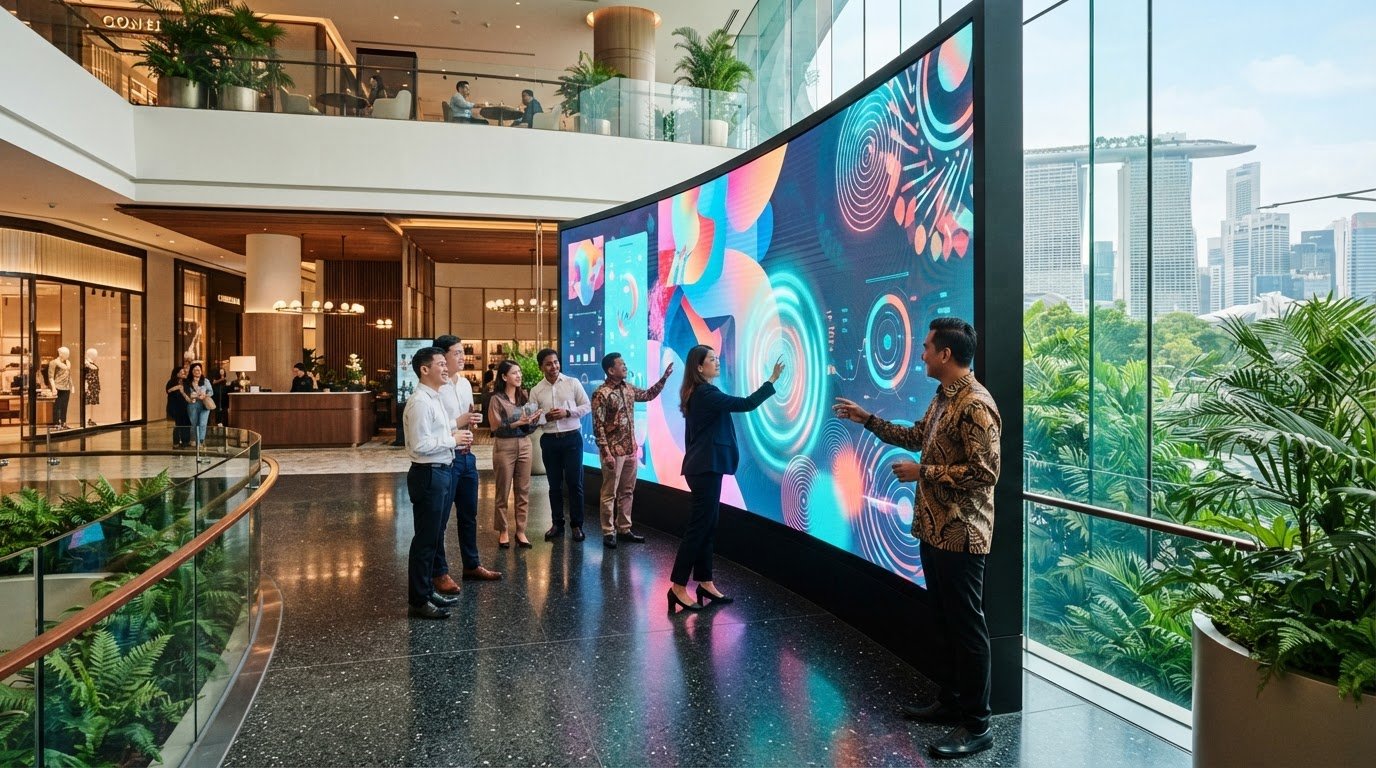
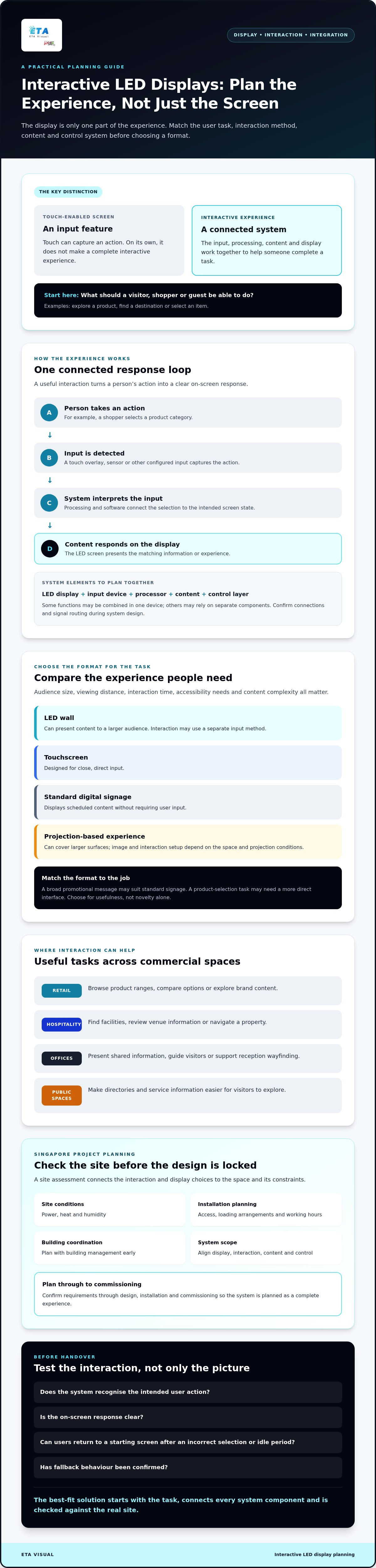
A touch-enabled screen is not automatically an interactive LED experience. Interactive LED Displays work best when the display, interaction method, content and control system are designed around a clear user task, such as exploring a product, finding a destination or selecting an item. It is easy to focus first on visual impact. But choosing a screen before deciding how people will use it can lead to an engaging concept that is difficult to operate, update or maintain. Touch-enabled signage describes an input feature. An interactive experience also depends on the software, content flow and system integration behind it. This guide explains how interactive LED displays work, where they can add value in retail, hospitality and commercial spaces, and what to assess before choosing a design. It covers interaction options, display and content requirements, control and AV integration, and practical site factors such as power, heat, humidity, installation access and maintenance. A site assessment helps connect these decisions to the space and its constraints. The goal is to match the technology to the task and plan a solution that can be commissioned and supported reliably.
Key Takeaways
- Start with the user task, then select an interaction method and display format that suit how people will use the space.
- Interactive LED Displays rely on more than the screen: input, processing, content and control must work together.
- Compare LED walls, touch displays, kiosks and standard signage against audience size, viewing distance, interaction time and content needs.
- Plan the site survey, installation access, loading arrangements and working hours with building management early.
- Align the project scope across display, interaction, content and control, then confirm requirements through design, installation and commissioning.
Table of Contents
- What are interactive LED displays, and where do they work best?
- How an interactive LED display system connects input, content and control
- Interactive LED displays vs touchscreens: how to choose the right format
- How to plan an interactive LED display project in Singapore
- How ETA Visual supports interactive LED display integration
What are interactive LED displays, and where do they work best?
An interactive LED display is a screen experience that responds to a person’s input through a configured system. The LED panels provide the visual output, while the interaction may rely on separate touch overlays, sensors, software or other inputs selected for the project. A standard LED screen does not automatically include touch or interactive functions.
Think of it as a loop: a person takes an action, the system recognises it, and the content responds. For example, a shopper selects a product category and sees relevant items or information. The screen, input method, processing and content all need to work together. For a technical grounding in how the display itself produces images, see this overview of LED display technology.
What makes an LED display interactive?
Touch is one possible input, but it is not the only option. Depending on the design, interaction could use a sensor or another configured input method. The right choice depends on the task, environment and how people will approach the display. Specify the intended user action and on-screen response before selecting hardware. Otherwise, a large display may attract attention without helping users complete a task.
Which commercial spaces can benefit?
Interactive LED Displays can support practical tasks in retail, hospitality, offices and other public-facing commercial spaces. Examples include:
- Retail: Let shoppers browse product ranges, compare options or explore brand content instead of relying only on static promotional messages.
- Hospitality: Help guests find facilities, review venue information or navigate a property.
- Offices: Present shared information, guide visitors or support wayfinding in reception areas.
- Public-facing spaces: Make directories or service information easier to explore when visitors need to find specific details.
The format matters. A touchscreen is designed for close, direct input, while an LED wall can present content to a larger audience and may use a separate interaction method. Standard digital signage displays scheduled content without requiring user input. Projection-based experiences can cover larger surfaces, but the image and interaction setup depend on the space and projection conditions.
Choose a format based on audience, viewing distance, interaction time, accessibility needs and content complexity, not novelty alone. A broad promotional message may suit standard signage, while a product-selection task may need a more direct interface. For a wider comparison of signage formats, explore ETA Visual’s digital signage solutions. Its fine-pitch indoor LED display work can also help readers understand an indoor LED format, although the appropriate interaction method must be assessed separately.
How an interactive LED display system connects input, content and control
An interactive display works as a coordinated system, not as a screen operating in isolation. A touch action, sensor event or other configured input must be detected, interpreted and matched to the right content before the display can show a useful response. The signal path and equipment depend on the LED display design and the interaction required.
The system components are an LED display for visual output, an input device to capture user actions, a processor to interpret signals, content to provide the response, and a control layer to manage playback and operation. Some functions may be combined in one device, while others rely on separate components. Confirm how each part connects during system design rather than assuming the display includes every function.
From a user action to an on-screen response
Consider a shopper selecting a product category. A touch overlay or another configured input sends that selection to processing equipment or software, which triggers the relevant screen state. The LED display then presents the matching product information. The input device and LED panels may be physically separate, so their compatibility and signal routing need to be planned together.
Test the interaction using representative content before handover. Check that the intended action is recognised, the response is clear, and users can return to a starting screen if they make an incorrect selection or leave the display idle. Confirm fallback behaviour too, such as what appears if the interactive application or input stops responding.
Content, processing and display integration
Plan content alongside the hardware. Define the available actions, the screen state for each action, how users move between states, and what the display should show when no one is interacting. Then confirm the content format, playback requirements, processing capacity, control method and signal routing against the selected equipment. These decisions affect compatibility and should be checked before installation, not left until content production is complete.
For wider context on the category and its development, see Mordor Intelligence’s overview of the global interactive display market. For project planning, it can also help to review ETA Visual’s commercial LED display solutions alongside the intended content and control requirements. Confirming the full signal path during design and commissioning helps the team test the experience as users will encounter it.
Interactive LED displays vs touchscreens: how to choose the right format
The right format depends on what people need to do, how many will use it and where they will encounter it. A large display can make content visible across a retail space, but it may be unsuitable for a task that requires close, precise input. Interactivity is worthwhile when it helps users complete a clear task or supports a defined business purpose, not simply because the technology is available.
When does an interactive LED wall make sense?
An interactive LED wall may suit a shared experience, such as exploring a product range together or engaging with brand content from different positions in a store. Before choosing one, check that key information remains legible at expected viewing distances and that one person’s interaction will not make the experience confusing for others. Screen size alone does not determine suitability. The site, content and input method must work for the intended audience.
When might a touchscreen or standard signage be more suitable?
Use the user task to narrow the choice. A shopper browsing detailed product options may benefit from a close-range interface, while a store-wide campaign may need content that people can view without stopping to interact.
- Touch display: Consider for individual tasks involving precise selection, detailed navigation or longer interaction.
- Interactive kiosk: Consider when a dedicated station can guide users through a defined task, such as looking up information or making a selection.
- Standard digital signage: Choose for one-way communication, such as promotions or announcements, when participation is not required.
- Interactive LED wall: Consider for a shared visual experience, provided the interaction and content remain clear for multiple viewers.
Also assess audience size, viewing distance, typical interaction duration, content complexity and accessibility. Can users read the interface from where they will stand? Are controls and text easy to understand? Is there a straightforward way to proceed if someone does not interact? These questions help distinguish a useful experience from an impressive-looking screen that people cannot use comfortably.
There is no automatic winner. A touchscreen may be more practical for detailed, one-person navigation; an LED wall may be more suitable where shared visibility matters; standard signage may be enough when the message is simply meant to be seen. ETA Visual’s fine-pitch indoor LED project offers a display reference, but it should not be taken as an example of an interactive installation. Confirm the site and user requirements before selecting a format.
How to plan an interactive LED display project in Singapore
Plan the user experience and the installation together. A clear sequence helps identify constraints early, before they affect the display design, content or commissioning schedule.
- 1. Define the user task. Specify what a visitor should be able to do, what response the display should provide and what happens when the system is not being used.
- 2. Survey the site. Check viewing positions, interaction zones, ambient conditions, available space, power, signal routes, mounting options and access for future maintenance.
- 3. Design the integrated system. Match the display, input method, processing, content and control to the task and site. Confirm heat management and ventilation needs, particularly in enclosed areas.
- 4. Coordinate the installation. Confirm building management requirements, loading arrangements, access routes and permitted working hours. Resolve site-specific constraints before scheduling the installation.
- 5. Install, commission and hand over. Test the complete interaction, document the agreed system configuration and clarify who is responsible for content updates and ongoing support.
Singapore’s heat and humidity make the operating environment an important design consideration. Account for equipment ventilation and maintenance access, not just the visible screen area. Electrical, structural, permit and certification requirements also depend on the project. Verify them with relevant authorities, building stakeholders and qualified professionals rather than assuming one set of requirements applies to every site.
What should the site survey confirm?
Record where people will stand, how they will interact and whether the content remains usable from those positions. Check ambient conditions, available installation space, power provision, signal routing and mounting constraints. Confirm how technicians can reach components for maintenance. Discuss findings with building management and other relevant project stakeholders before finalising the design, especially if access or working hours may affect installation planning.
What should commissioning test?
Test representative user scenarios from input through content processing to the LED display. Confirm the signal path, screen operation, content playback and agreed control functions, including the intended response when a user exits or the experience is idle. Record system settings, operating guidance and support responsibilities at handover so the client knows how the installation will be managed after commissioning.
How ETA Visual supports interactive LED display integration
Interactive LED Displays need to be planned as a complete system, with the screen, input method, content and control approach working towards the same user task. ETA Visual is a Singapore-based AV system integrator specialising in LED display solutions. Its services include site surveys, system design, supply, installation and ongoing maintenance for commercial environments.
The integration process starts by understanding the venue and intended experience. From there, the project scope can set out the display format, how users will interact, what content needs to appear and how the system will be operated. Specific interaction technologies, content platforms and control equipment should be assessed against project requirements before they are included in a proposal.
What to expect from an integration partner
Ask how the partner will assess the site and document the system design, including power, signal routing, mounting and maintenance access. In a retail environment, confirm how installation arrangements will be coordinated with building management, including access and working-hour restrictions. These details connect the proposed equipment to the practical conditions of the venue.
Commissioning should check the complete experience, not just whether the LED screen powers on. Agree on user scenarios to test, then confirm the input response, content playback, display operation and control functions. Before handover, clarify which party is responsible for troubleshooting, content changes and ongoing support, and make sure maintenance access is understood.
Prepare a useful project brief
A focused brief helps the integration team assess the project more efficiently. Include:
- Audience and task: Who will use the display, and what should they be able to do?
- Venue and conditions: Where will it be installed, and what are the expected operating conditions?
- Content and control: What information or media must be shown, and who will manage it?
- Site information: Share available plans, access constraints, and known power or structural details.
- Support expectations: Describe maintenance access needs and the support arrangements the business requires.
ETA Visual can use this information to assess the site and define a practical LED and AV scope from design through installation and maintenance. The final solution should reflect the task and venue, rather than assume every interaction method or platform is suitable for every project.
Make your next display project work as a complete experience
Interactive LED Displays deliver value when the interaction serves a clear purpose and the screen, input method, content and control system are planned together. The right format depends on the task and setting: a shared LED experience, a close-range touchscreen and standard signage each suit different needs.
For an installation in Singapore, assess the site early. Confirm viewing positions, power, ventilation, mounting, maintenance access and building arrangements before finalising the design. Then test the complete user journey during commissioning, not just the display hardware.
ETA Visual provides project-based design, installation and maintenance for commercial LED and AV solutions. A well-defined brief can help align the display and system requirements with the way people will use the space.
With the right planning and integration, your display can become a useful part of the customer experience, built around real needs and practical operation.
What is an interactive LED display?
An interactive LED display is an LED display system designed to respond to user input, rather than only showing one-way content. Input may come from a touch interface, sensor or another configured method. The display, interaction hardware, processing, software and content need to work together. The design depends on the user task, venue and project requirements, so the term does not mean every LED screen has interaction functions built in.
How does an interactive LED display work?
A user action is detected by the configured input method, interpreted by the system and matched to a content response. That response is processed and shown on the LED display. For example, selecting an item could prompt the system to show related product information. Devices, software and signal paths vary by project, so confirm compatibility during design and test the complete interaction flow during commissioning.
Can an LED screen be made interactive?
Yes, an LED screen can be part of an interactive system, but it does not necessarily include touch or sensing functionality by itself. A separate input method, control system and suitable content may be required. Start by defining what users need to do, then ask an AV integrator to assess the technical approach, equipment compatibility and site requirements. This helps ensure the interaction is practical for the venue and intended task.
Are interactive LED displays better than touchscreens?
Neither format is universally better. Interactive LED Displays may suit a larger shared visual experience, while a touchscreen can be more suitable for close-range tasks that need precise individual input. Compare audience size, viewing distance, interaction duration, content complexity, accessibility and site conditions. A store-wide brand experience and a shopper browsing detailed product options may call for different formats, even within the same retail environment.
What should businesses check before installing an interactive LED display in Singapore?
Confirm the intended user experience, viewing positions, installation space, power and signal routing, mounting provisions and maintenance access. Coordinate access, loading arrangements and permitted working hours with building management where applicable. Heat and humidity may also affect equipment placement and ventilation planning. Electrical, structural and approval requirements depend on the project, so verify them with qualified professionals, relevant building stakeholders and authoritative sources.
Do interactive LED displays need ongoing maintenance?
Commercial displays and their supporting systems may need maintenance to support reliable operation, but the appropriate schedule depends on the equipment, environment and usage. Include access for inspection and servicing in the design, especially where screens or components are difficult to reach. Before selecting a solution, ask the integrator what maintenance checks, troubleshooting responsibilities and support arrangements are available. Clear ownership helps teams respond when the display or interaction system needs attention.
Visual planning reference
| Planning factor | What to define | Why it matters |
|---|---|---|
| Viewing positions | Nearest viewing distance and audience locations | Supports an appropriate pixel-pitch and screen-size decision. |
| Content workflow | Input sources, resolutions and control workflow | Helps ensure information remains readable and simple to operate. |
| Installation conditions | Structure, access, power, ventilation and maintenance access | Aligns the display scope with the physical site before procurement. |
Want an accurate budget for your space?
We'll do a free site survey and prepare a clear, itemised quotation — no obligation.
Frequently asked questions
Touch is one possible input, but it is not the only option. Depending on the design, interaction could use a sensor or another configured input method. The right choice depends on the task, environment and how people will approach the display. Specify the intended user action and on-screen response before selecting hardware. Otherwise, a large display may attract attention without helping users complete a task.
Interactive LED Displays can support practical tasks in retail, hospitality, offices and other public-facing commercial spaces. Examples include: The format matters. A touchscreen is designed for close, direct input, while an LED wall can present content to a larger audience and may use a separate interaction method. Standard digital signage displays scheduled content without requiring user input. Projection-based experiences can cover larger surfaces, but the image and interaction setup depend on the space and projection conditions. Choose a format based on audience, viewing distance, interaction time, accessibility needs and content complexity, not novelty alone. A broad promotional message may suit standard signage, while a product-selection task may need a more direct interface. For a wider comparison of signage formats, explore ETA Visual’s digital signage solutions. Its fine-pitch indoor LED display work can also help readers understand an indoor LED format, although the appropriate interaction method must be assessed separately. An interactive display works as a coordinated system, not as a screen operating in isolation. A touch action, sensor event or other configured input must be detected, interpreted and matched to the right content before the display can show a useful response. The signal path and equipment depend on the LED display design and the interaction required. The system components are an LED display for visual output, an input device to capture user actions, a processor to interpret signals, content to provide the response, and a control layer to manage playback and operation. Some functions may be combined in one device, while others rely on separate components. Confirm how each part connects during system design rather than assuming the display includes every function.
An interactive LED wall may suit a shared experience, such as exploring a product range together or engaging with brand content from different positions in a store. Before choosing one, check that key information remains legible at expected viewing distances and that one person’s interaction will not make the experience confusing for others. Screen size alone does not determine suitability. The site, content and input method must work for the intended audience.
Use the user task to narrow the choice. A shopper browsing detailed product options may benefit from a close-range interface, while a store-wide campaign may need content that people can view without stopping to interact. Also assess audience size, viewing distance, typical interaction duration, content complexity and accessibility. Can users read the interface from where they will stand? Are controls and text easy to understand? Is there a straightforward way to proceed if someone does not interact? These questions help distinguish a useful experience from an impressive-looking screen that people cannot use comfortably. There is no automatic winner. A touchscreen may be more practical for detailed, one-person navigation; an LED wall may be more suitable where shared visibility matters; standard signage may be enough when the message is simply meant to be seen. ETA Visual’s fine-pitch indoor LED project offers a display reference, but it should not be taken as an example of an interactive installation. Confirm the site and user requirements before selecting a format. Plan the user experience and the installation together. A clear sequence helps identify constraints early, before they affect the display design, content or commissioning schedule. Singapore’s heat and humidity make the operating environment an important design consideration. Account for equipment ventilation and maintenance access, not just the visible screen area. Electrical, structural, permit and certification requirements also depend on the project. Verify them with relevant authorities, building stakeholders and qualified professionals rather than assuming one set of requirements applies to every site.
Record where people will stand, how they will interact and whether the content remains usable from those positions. Check ambient conditions, available installation space, power provision, signal routing and mounting constraints. Confirm how technicians can reach components for maintenance. Discuss findings with building management and other relevant project stakeholders before finalising the design, especially if access or working hours may affect installation planning.
Test representative user scenarios from input through content processing to the LED display. Confirm the signal path, screen operation, content playback and agreed control functions, including the intended response when a user exits or the experience is idle. Record system settings, operating guidance and support responsibilities at handover so the client knows how the installation will be managed after commissioning. Discuss your LED display project Interactive LED Displays need to be planned as a complete system, with the screen, input method, content and control approach working towards the same user task. ETA Visual is a Singapore-based AV system integrator specialising in LED display solutions. Its services include site surveys, system design, supply, installation and ongoing maintenance for commercial environments. The integration process starts by understanding the venue and intended experience. From there, the project scope can set out the display format, how users will interact, what content needs to appear and how the system will be operated. Specific interaction technologies, content platforms and control equipment should be assessed against project requirements before they are included in a proposal.
Plan the next step
Continue with a relevant solution and real Singapore project evidence.

