Digital Signage for Retail: Singapore Buyer’s Guide
Written and reviewed by the ETA Visual Engineering & Project Team. Guidance is updated when project, product or Singapore site-planning practices change.
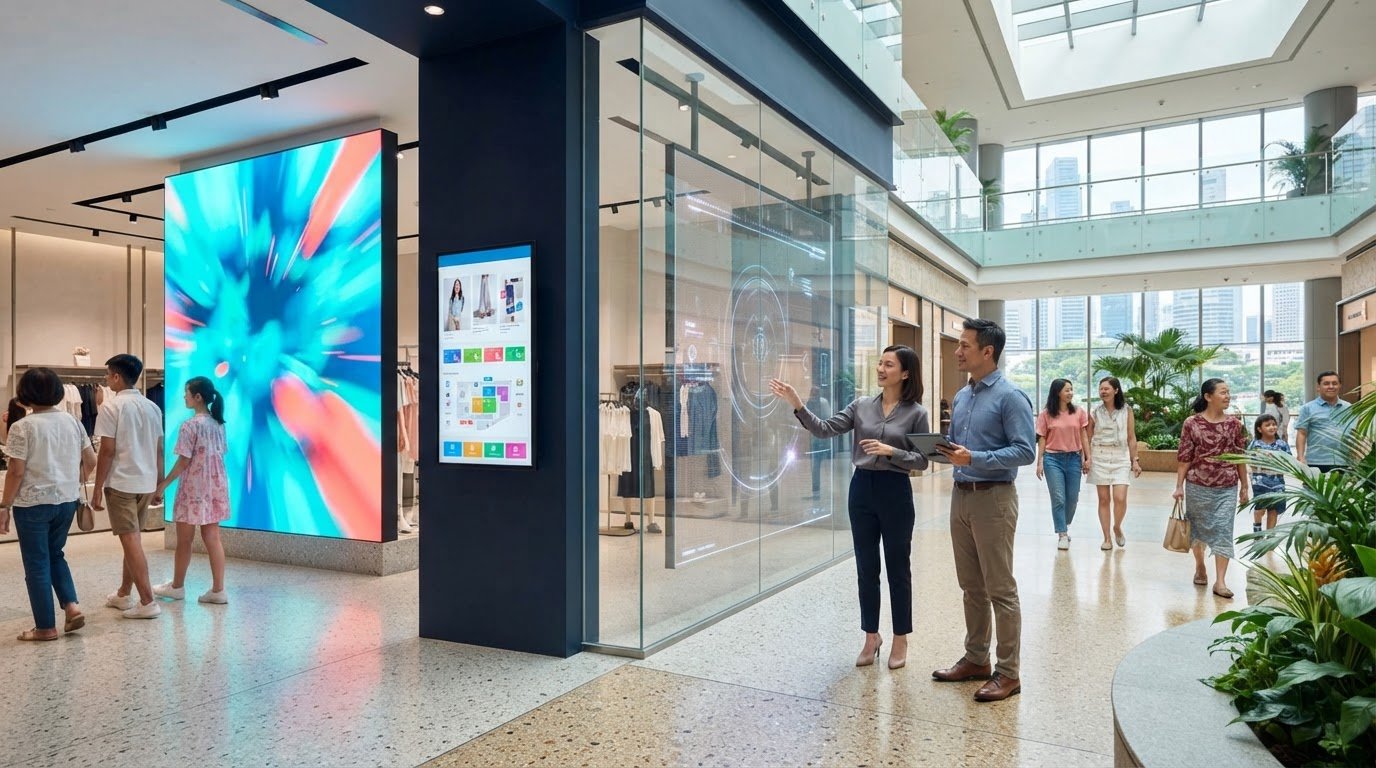
The most eye-catching screen is not necessarily the right one for your store. Effective digital signage solutions for retail depend on more than display type: viewing distance, ambient light, content, layout and day-to-day operation all shape the decision. A screen that works well in a bright shopfront may not suit an indoor feature wall or a compact aisle. Choosing between LED, LCD and transparent LED starts with how and where customers will see the display, then moves to practical installation needs. In Singapore, planning should account for heat and humidity, as well as mounting, power, access and coordination with building management. This guide provides a practical way to compare display options and plan a system around your retail environment. You’ll learn how to assess placement and viewing conditions, match content to the screen, plan integration and maintenance, and understand the stages from site assessment through installation and commissioning. The aim is a display that works as part of the store, not simply a screen that looks suitable on a specification sheet.
Key Takeaways
- Define what each display needs to do, from promoting offers to supporting wayfinding, before selecting hardware.
- Compare LED, LCD and transparent LED according to placement, viewing conditions and content, rather than treating one option as best for every store.
- Plan content format, scheduling and system control alongside the display so assets are ready for commissioning.
- Include Singapore site conditions in the project plan, including mall coordination, loading access, work windows, power and future maintenance access.
- Choose digital signage solutions for retail as an integrated system, with clear responsibility for site assessment, design, installation, commissioning and ongoing support.
Table of Contents
- What retail digital signage needs to achieve before you choose a display
- Compare retail signage display options by placement and viewing conditions
- Evaluate content, control and integration before committing to retail signage
- Plan Singapore retail installation, access and lifecycle requirements
- Choose an integrated retail signage partner and define your next steps
What retail digital signage needs to achieve before you choose a display
Start with the store’s communication needs, not a screen specification. Digital signage solutions for retail combine displays, content and playback or control systems to deliver relevant messages in specific parts of a store. The display is one part of the system. Its purpose, placement and content plan determine whether it communicates clearly in the retail environment.
Definition: Retail digital signage is a coordinated display and content system used to present planned messages in a store. A screen without a content plan has no defined message, schedule or role in the shopper journey.
For a broader introduction to the medium, see What is digital signage. In a retail setting, the practical question is what each display needs to communicate and where that message will be most useful.
Which retail communication goals can signage support?
Set the goal before choosing the format. A promotion near a featured product may need clear pricing and a campaign end date, while a storefront message may focus on a current offer or seasonal range. Product storytelling can explain materials, features or brand values; wayfinding can direct visitors to departments or services. Brand communication may use imagery and motion to create a consistent visual experience across store zones.
These messages serve different purposes. Informational content answers a question, promotional content presents an offer, and ambience-led content supports the store’s visual atmosphere. For each screen, record the audience, message, location, update schedule and person responsible for changing the content. Signage can help communicate these messages, but it does not guarantee a particular sales outcome.
Why does the store environment shape the solution?
Consider the shopper’s route and likely viewing conditions. A display facing a busy walkway may need a message understood at a glance; a screen beside a product display may support closer viewing and more detail. Sightlines, viewing distance, ambient light, obstructions and likely dwell time all influence placement, screen size and content design.
A storefront, feature wall and interior zone each have different constraints. For a window-facing display, consider incoming light and how much of the view into the store should remain open. A feature wall may support larger brand visuals, while an interior display can serve a specific department or information point. These choices also affect mounting, power and access for future servicing.
ETA Visual’s retail LED display solutions are planned around the application and site conditions. A site assessment helps connect the communication goal to display placement and the physical store environment. Read the guide to commercial AV site surveys in Singapore for details on what to assess.
Compare retail signage display options by placement and viewing conditions
LED, LCD and transparent LED each suit different retail settings. The right choice depends on where the display will sit, how customers will view it and what the content needs to show. Compare options against the actual store environment rather than treating one technology as a universal winner.
| Display type | Typical placement | Viewing conditions | Content characteristics | Project considerations |
|---|---|---|---|---|
| Indoor LED | Feature walls and larger visual areas | Assess viewing distance, sightlines and ambient light | Can suit large-format imagery and motion content | Plan pixel pitch, screen dimensions, structure, power and maintenance access together |
| LCD | Individual retail zones or locations where a conventional display format fits the layout | Consider screen position, reflections, viewing angles and surrounding light | Useful for discrete messages, product information and scheduled promotions | Check mounting, cabling, content format and how the display fits the store design |
| Transparent LED | Glass-facing storefronts | Assess the glazing, light conditions, sightlines and visibility from both sides | Designed to present digital content in a glass-facing environment while retaining a view through the display | Review the actual glass, mounting approach, content design and site conditions |
When might an indoor LED display suit a retail space?
An indoor LED display can suit a feature wall or larger visual area where a broad, unified image is a priority. Consider pixel pitch, the spacing between pixels, alongside typical viewing distance. Closer viewing and detailed content may call for a different configuration from a screen mainly seen across an open space. The appropriate choice depends on the application, content and site. ETA Visual’s fine-pitch LED display guide explains the factors involved.
When might transparent LED be relevant for a storefront?
Transparent LED may suit a glass-facing retail setting where digital messaging is wanted without turning the window into a conventional opaque screen. Visibility depends on the display, content, ambient conditions and specific glazing. Fine text or dense layouts may be harder to read from some positions, so assess viewing angles and sightlines before finalising creative assets. Keep essential messages brief and legible at the expected viewing distance.
For any format, confirm the intended screen location and content before fixing the design. This helps align display dimensions and pixel pitch with viewing conditions, while allowing for mounting, power and servicing. For wider context on the sector, MarketsandMarkets’ digital signage market trends provide an industry overview. To discuss how display options fit a retail site, explore retail LED display integration.
Evaluate content, control and integration before committing to retail signage
A display can present content as intended only when the content plan and system design are considered together. Before selecting hardware, decide who creates and approves assets, who publishes them, and how updates will be managed. These decisions shape the requirements for each screen and the control system behind it.
Content requirements should inform display selection, because screen format, placement and signal design must support the messages the store plans to show.
What should a retail content and scheduling plan include?
Map the content to store zones and operating needs. A promotion near a product range may need to change with a campaign, while a welcome message or brand visual in another area may follow a different schedule. Decide whether screens share one playlist, show location-specific messages, or combine both approaches.
Set clear responsibility for preparing, checking and publishing content. A practical plan identifies:
- Content types for each screen, such as promotional, informational or brand-led material.
- Which campaigns trigger updates and who supplies the approved assets.
- Whether messaging should be consistent across screens or tailored to individual zones.
- Who manages routine publishing and checks that the intended content is displayed.
These requirements help define the day-to-day control workflow. Software functions vary by project, so list the tasks the system needs to support rather than assuming a particular scheduling or management feature.
How do display resolution and signal flow affect the result?
Prepare content for the display’s dimensions and resolution. Aspect ratio matters too: an asset designed for a standard landscape screen may need to be adapted for a wider LED canvas or a differently shaped display. Stretching or cropping existing artwork can make text difficult to read or remove important visual details. Confirm the screen format and content specifications before producing final assets and commissioning the system.
Plan the signal path as well. A source device provides the content; any required processing or control equipment manages how it is formatted and delivered to the display. The arrangement depends on the screen type, number of displays and operating requirements. Confirm the project design, including connections, control points and what happens if a source or signal is interrupted.
For digital signage solutions for retail, this coordination helps avoid a common mismatch: content prepared for one screen format being installed on another. ETA Visual’s indoor LED content resolution guide offers further detail on aligning assets with an LED display. Define these requirements early so system design, content preparation and commissioning work towards the same outcome.
Plan Singapore retail installation, access and lifecycle requirements
A reliable installation starts before equipment arrives. For digital signage solutions for retail, site conditions, mall coordination and future servicing should be part of the design, not handled as last-minute details.
What should a retail site survey establish?
A site survey records the proposed display position, sightlines, mounting conditions and nearby services. It also identifies practical installation constraints, including the route from the loading bay, delivery arrangements, access to the work area and work windows set by mall or building management. These details shape the installation plan and help coordinate the display work with store operations.
Assess power availability, cable routes and mounting support for the specific location. Structural review may also be needed, depending on the display and how it is supported. Singapore’s heat and humidity are relevant to equipment placement and operating conditions, particularly near entrances or other areas exposed to changing temperatures. Consider them as part of the project design rather than assuming one equipment rating suits every site.
ETA Visual’s Singapore AV site survey guide explains how a survey helps establish project requirements before installation planning proceeds.
How should maintenance access and uptime enter the plan?
Plan how technicians will reach the display, connections and control equipment once the store is operating. A screen mounted above a feature wall may need a different servicing approach from a display positioned in an accessible interior zone. Choose an access approach that suits the location and minimises disruption to normal retail activity.
A practical project sequence is:
- Survey: document location, sightlines, mounting, nearby services and access constraints.
- Design: coordinate the display, power, signal routes, control equipment and maintenance access.
- Installation: schedule delivery and on-site work with the relevant building and retail teams.
- Commissioning: check image presentation, signal flow, control and whether content behaves as intended.
- Ongoing care: plan preventive maintenance and support around the store’s operating requirements.
Commissioning should verify the complete system, not only whether the screen turns on. Confirm that the intended source reaches the display, content is presented correctly and controls operate as planned. Preventive maintenance and a defined support plan help keep the system serviceable over time; the arrangements should reflect the installation and operating environment.
Choose an integrated retail signage partner and define your next steps
A retail display project involves more than supplying a screen. The display, content requirements, signal path, installation conditions and maintenance plan need to work together. A clear scope helps you understand how each project stage will be handled and reduces the risk of important details being overlooked.
What should a retail signage project scope make clear?
Look for a defined plan that connects the store’s communication goals to the installed system. The scope should identify proposed display locations, content formats, signal sources and control arrangements, along with responsibilities for installation and coordination with the site team.
Before approving the design, check that the project documentation covers:
- Design: display type and position, content requirements, signal flow, power and mounting considerations.
- Delivery: site assessment, installation responsibilities, access coordination and commissioning checks.
- Handover: operating guidance, system documentation and the process for reporting faults.
- Ongoing support: maintenance arrangements and access needed to service the display.
These points make it easier to see whether the proposed digital signage solutions for retail are designed around the store’s actual requirements, rather than only a hardware list. ETA Visual’s digital signage integration service connects display planning with system design, installation and support.
How can ETA Visual support a retail display project?
ETA Visual is a Singapore-based LED and AV system integrator. Project support covers site surveys, system design, supply, installation, commissioning and ongoing maintenance. This end-to-end approach links the choice of display to content needs, site conditions and future service access, with the system planned as a complete deployment.
For a productive first discussion, prepare the intended display locations, the messages or content each screen must show, any known site or mall access requirements, and the people responsible for content updates. These details establish a practical basis for design and project planning. The proposed scope can then set out responsibilities from assessment through commissioning and maintenance, tailored to the retail environment.
A well-defined plan gives your team a clearer view of what will be installed, how it will be operated and how support will be managed. If you are considering a new display or reviewing an existing setup, share your requirements with ETA Visual to discuss the next steps.
Plan your retail display with confidence
Choosing digital signage solutions for retail starts with the store’s goals and viewing conditions, not a preference for one screen type. Match LED, LCD or transparent LED to the intended location, then align content format, control and signal flow with how the display will be used.
In Singapore, a sound plan also accounts for site access, mounting, power and maintenance from the outset. Mall coordination and the store environment can shape installation scheduling and how the system can be serviced later.
ETA Visual supports retail and other commercial display projects through site surveys, system design, installation and maintenance. As an LED and AV integrator, the team connects display decisions with content needs and site requirements, and provides rapid-response support.
With the right planning, your signage can fit naturally into the store and remain manageable as content and operating needs change. Take the next step with a clear view of what your display needs to achieve.
What are digital signage solutions for retail?
Digital signage solutions for retail combine displays, content and the equipment or controls needed to present messages in store. They can support promotions, product information, wayfinding and brand communication. Planning the content and its purpose is as important as choosing the screen: define which messages belong in each store zone, who updates them and how customers are expected to view them.
Is LED or LCD better for retail digital signage?
Neither is universally better; the choice depends on the location, viewing conditions and content. Indoor LED can suit larger feature areas where a broad visual canvas is desired. LCD may fit a more discrete display position or a specific store zone. Compare the intended screen size, viewing distance, sightlines, ambient light, content format, mounting and maintenance access before settling on a display type.
Can transparent LED displays be used in retail storefronts?
Yes, transparent LED can be considered for a glass-facing retail environment where digital content is wanted while retaining some view through the display. Suitability depends on the actual glazing, mounting conditions, light and viewing angles. Content also matters: bold, uncluttered visuals may be easier to understand at a glance than dense text. Assess the storefront and intended message together before finalising the design.
How do I choose the right digital signage display for my shop?
Start with the communication goal and the shopper’s likely route through the space. Identify whether the display is for a storefront, feature wall or interior zone, then assess viewing distance, sightlines and ambient light. Match screen format and pixel pitch to the content and viewing conditions, and consider power, mounting, signal flow and servicing access. A site survey helps translate these needs into a practical design.
What should a Singapore retailer consider before installing digital signage?
Plan for site conditions and building coordination early. In a mall, include access routes, loading arrangements and permitted work windows in the project plan in coordination with building management. Consider Singapore’s heat and humidity when assessing the display location, especially near entrances. Power supply, mounting support, cable routes and any structural review are site-specific design matters, so assess them for the proposed installation rather than making assumptions.
How should retail digital signage content be planned and updated?
Map content to screen locations and store needs. For example, schedule campaign assets for relevant product zones while keeping brand or wayfinding messages consistent where appropriate. Assign responsibility for preparing, approving and publishing updates, and decide whether screens share content or show location-specific messages. Prepare assets to suit the display’s resolution and aspect ratio, then confirm the control workflow against the system design.
What should be included in a retail digital signage installation and maintenance plan?
Include the site survey, system design, display and signal requirements, installation responsibilities, access coordination and commissioning checks. Commissioning should verify image presentation, signal flow, controls and intended content behaviour. The handover should explain system operation and support arrangements. Plan maintenance access around the display location and store operations, with preventive maintenance and a clear process for addressing faults to support ongoing operation.
Visual planning reference
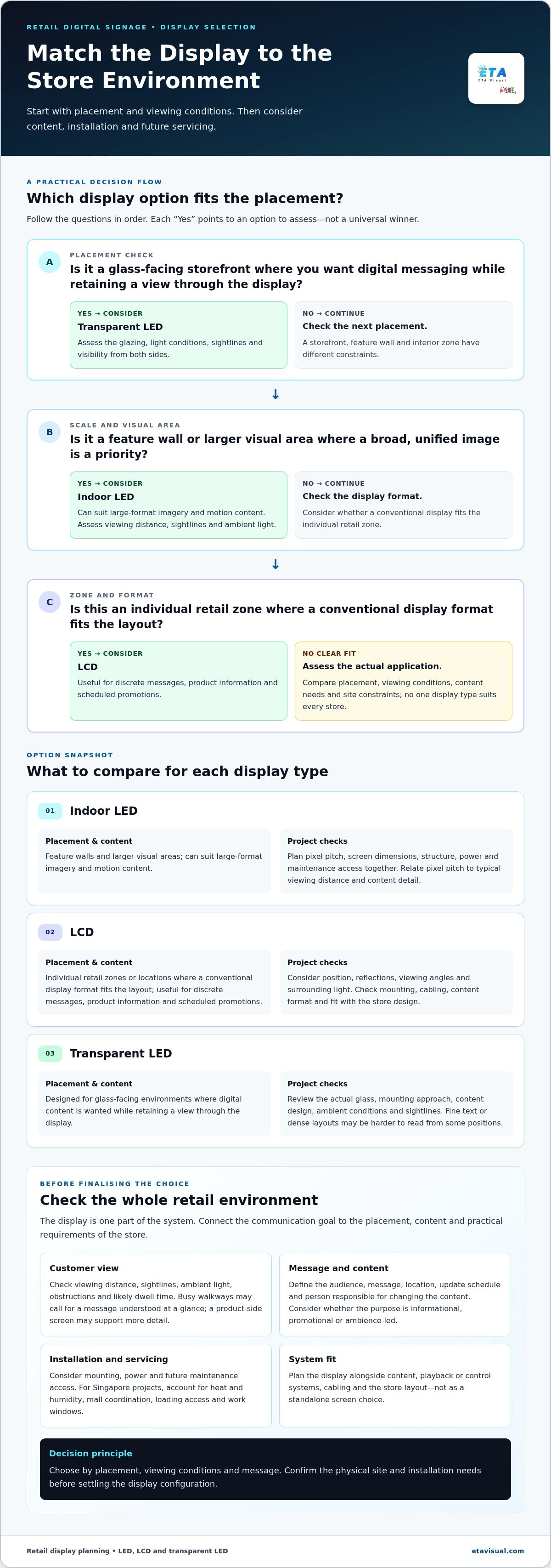
| Display type | Typical placement | Viewing conditions | Content characteristics | Project considerations |
|---|---|---|---|---|
| Indoor LED | Feature walls and larger visual areas | Assess viewing distance, sightlines and ambient light | Can suit large-format imagery and motion content | Plan pixel pitch, screen dimensions, structure, power and maintenance access together |
| LCD | Individual retail zones or locations where a conventional display format fits the layout | Consider screen position, reflections, viewing angles and surrounding light | Useful for discrete messages, product information and scheduled promotions | Check mounting, cabling, content format and how the display fits the store design |
| Transparent LED | Glass-facing storefronts | Assess the glazing, light conditions, sightlines and visibility from both sides | Designed to present digital content in a glass-facing environment while retaining a view through the display | Review the actual glass, mounting approach, content design and site conditions |
Want an accurate budget for your space?
We'll do a free site survey and prepare a clear, itemised quotation — no obligation.
Frequently asked questions
Set the goal before choosing the format. A promotion near a featured product may need clear pricing and a campaign end date, while a storefront message may focus on a current offer or seasonal range. Product storytelling can explain materials, features or brand values; wayfinding can direct visitors to departments or services. Brand communication may use imagery and motion to create a consistent visual experience across store zones. These messages serve different purposes. Informational content answers a question, promotional content presents an offer, and ambience-led content supports the store’s visual atmosphere. For each screen, record the audience, message, location, update schedule and person responsible for changing the content. Signage can help communicate these messages, but it does not guarantee a particular sales outcome.
Consider the shopper’s route and likely viewing conditions. A display facing a busy walkway may need a message understood at a glance; a screen beside a product display may support closer viewing and more detail. Sightlines, viewing distance, ambient light, obstructions and likely dwell time all influence placement, screen size and content design. A storefront, feature wall and interior zone each have different constraints. For a window-facing display, consider incoming light and how much of the view into the store should remain open. A feature wall may support larger brand visuals, while an interior display can serve a specific department or information point. These choices also affect mounting, power and access for future servicing. ETA Visual’s retail LED display solutions are planned around the application and site conditions. A site assessment helps connect the communication goal to display placement and the physical store environment. Read the guide to commercial AV site surveys in Singapore for details on what to assess. LED, LCD and transparent LED each suit different retail settings. The right choice depends on where the display will sit, how customers will view it and what the content needs to show. Compare options against the actual store environment rather than treating one technology as a universal winner.
An indoor LED display can suit a feature wall or larger visual area where a broad, unified image is a priority. Consider pixel pitch, the spacing between pixels, alongside typical viewing distance. Closer viewing and detailed content may call for a different configuration from a screen mainly seen across an open space. The appropriate choice depends on the application, content and site. ETA Visual’s fine-pitch LED display guide explains the factors involved.
Transparent LED may suit a glass-facing retail setting where digital messaging is wanted without turning the window into a conventional opaque screen. Visibility depends on the display, content, ambient conditions and specific glazing. Fine text or dense layouts may be harder to read from some positions, so assess viewing angles and sightlines before finalising creative assets. Keep essential messages brief and legible at the expected viewing distance. For any format, confirm the intended screen location and content before fixing the design. This helps align display dimensions and pixel pitch with viewing conditions, while allowing for mounting, power and servicing. For wider context on the sector, MarketsandMarkets’ digital signage market trends provide an industry overview. To discuss how display options fit a retail site, explore retail LED display integration. A display can present content as intended only when the content plan and system design are considered together. Before selecting hardware, decide who creates and approves assets, who publishes them, and how updates will be managed. These decisions shape the requirements for each screen and the control system behind it. Content requirements should inform display selection, because screen format, placement and signal design must support the messages the store plans to show.
Map the content to store zones and operating needs. A promotion near a product range may need to change with a campaign, while a welcome message or brand visual in another area may follow a different schedule. Decide whether screens share one playlist, show location-specific messages, or combine both approaches. Set clear responsibility for preparing, checking and publishing content. A practical plan identifies: These requirements help define the day-to-day control workflow. Software functions vary by project, so list the tasks the system needs to support rather than assuming a particular scheduling or management feature.
Prepare content for the display’s dimensions and resolution. Aspect ratio matters too: an asset designed for a standard landscape screen may need to be adapted for a wider LED canvas or a differently shaped display. Stretching or cropping existing artwork can make text difficult to read or remove important visual details. Confirm the screen format and content specifications before producing final assets and commissioning the system. Plan the signal path as well. A source device provides the content; any required processing or control equipment manages how it is formatted and delivered to the display. The arrangement depends on the screen type, number of displays and operating requirements. Confirm the project design, including connections, control points and what happens if a source or signal is interrupted. For digital signage solutions for retail, this coordination helps avoid a common mismatch: content prepared for one screen format being installed on another. ETA Visual’s indoor LED content resolution guide offers further detail on aligning assets with an LED display. Define these requirements early so system design, content preparation and commissioning work towards the same outcome. A reliable installation starts before equipment arrives. For digital signage solutions for retail, site conditions, mall coordination and future servicing should be part of the design, not handled as last-minute details.
Plan the next step
Continue with a relevant solution and real Singapore project evidence.

