Corporate AV Installation: Singapore Business Buying Guide
Written and reviewed by the ETA Visual Engineering & Project Team. Guidance is updated when project, product or Singapore site-planning practices change.

A corporate AV installation is only as dependable as the way its components work together. Displays, audio, conferencing equipment and controls can each look suitable on paper, yet leave staff dealing with disconnected systems if signal flow and room use are not planned together. Corporate AV installation services should cover the full project lifecycle, from site assessment and system design to installation, commissioning and ongoing support. A good proposal explains what is included and how the system will work in daily use. In Singapore, planning also needs to account for building access, loading arrangements, work-hour restrictions and maintenance access. This guide explains what a well-scoped installation should cover, how to compare equipment and integration plans, and what to consider for reliable operation and future support. The aim is a coordinated system that suits your business, not simply a list of hardware.
Key Takeaways
- Define the work the AV system needs to support, such as presentations, collaboration or information display, before selecting equipment.
- Corporate AV installation services should connect system design, equipment, installation, commissioning and ongoing support in one coordinated process.
- Compare proposals by how they address your workflows, signal flow and handover, not just by equipment lists or headline specifications.
- Plan for Singapore site conditions, including building management coordination, loading access, work hours and installation routes.
- Clear documentation, user guidance and planned maintenance make a system easier to operate and support over time.
Table of Contents
- Corporate AV installation services: define the business need before selecting equipment
- What corporate AV installation services should include, from system design to commissioning
- How to compare corporate AV installation proposals beyond the equipment list
- Planning corporate AV installation in Singapore: access, environment, and coordination
- From corporate AV installation to dependable daily operation
Corporate AV installation services: define the business need before selecting equipment
Corporate AV installation is the planning, integration, installation, commissioning and ongoing support of audiovisual systems for workplace use. The scope depends on the space, how people will use it and the project requirements. It is more than a list of screens and speakers: the system must connect content sources, displays, audio and controls into a practical way of working.
Start with the business task. Is the room used for presentations, hybrid collaboration or decision-making? Does the lobby need to display visitor information or company content? Will staff need audio in reception and shared workplace areas, or screens for operational monitoring? These use cases shape the system design. Audiovisual (AV) systems combine sound and visual components, but a corporate installation also needs to account for how those components interact in a particular environment.
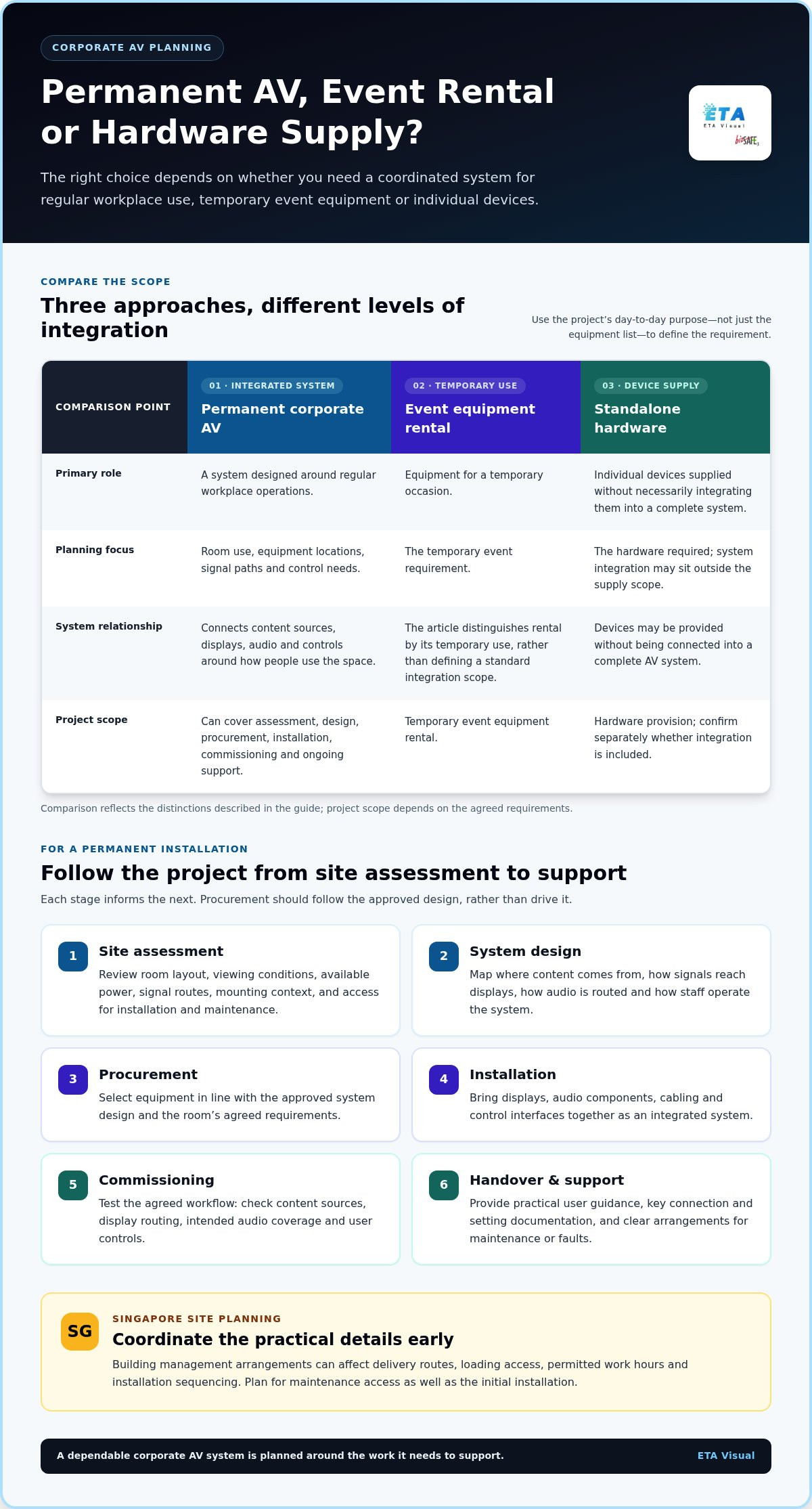
A permanent installation is designed around regular operations, equipment locations, signal paths and control needs. Event equipment rental is generally for a temporary occasion, while standalone hardware supply may provide devices without integrating them into a complete system. The project brief should make clear whether the requirement is a permanent business system or temporary event support.
Which corporate spaces and activities need AV planning?
Boardrooms and meeting rooms may need conferencing, presentation and collaboration functions, with sources and controls staff can use consistently. In corporate lobbies and shared spaces, LED displays or digital signage can show visitor information and company content. Commercial audio can support reception or workplace announcements. It can also be designed across multiple zones when different areas have different audio needs. The right arrangement depends on the space and operating brief.
What belongs in a corporate AV project brief?
Give the design team enough context to plan beyond equipment selection. Record:
- Room purpose, typical audience and expected operating patterns.
- Content sources, such as presentation devices or conferencing systems, and existing equipment to retain or connect.
- How users should select content, adjust audio and operate the system.
- Key stakeholders, including facilities, IT/AV, project management and building management.
In Singapore, early coordination with building management helps identify site-specific access and work arrangements before installation planning is finalised. For a wider explanation of how commercial audio is scoped and integrated, see this retail audio system design guide. A clear brief gives corporate AV installation services a defined operational target, keeping design decisions focused on how the system will be used.
What corporate AV installation services should include, from system design to commissioning
A well-managed installation follows a clear sequence: site assessment, system design, procurement, installation, commissioning and ongoing support. Each stage informs the next. A site survey, for example, can identify room conditions and access constraints that affect equipment choices, cable routes and installation planning. Procurement should follow the approved design, rather than drive it.
System integration connects components around their intended use. An LED display may receive content through a signal distribution system, while commercial audio and control interfaces are configured to support the room’s workflow. The design should show where content comes from, how it reaches each display, how audio is routed and how staff operate the system. Equipment and technical details depend on the room, application and agreed requirements.
How site assessment informs AV system design
A site assessment considers room layout, viewing conditions, available power, signal routes, mounting context and the access needed to install and maintain equipment. These details help shape a workable design before equipment is procured. Structural and electrical requirements depend on the site and proposed system, so assess them in context rather than assuming a standard layout. See the Singapore AV site survey guide for more on what an assessment can cover.
What installation and commissioning should achieve
Installation brings displays, audio components, cabling and control interfaces together as an integrated system. In Singapore, sequencing matters too. Delivery routes, building access and permitted work arrangements can affect how equipment reaches the site and when installation tasks can take place.
Commissioning tests and verifies the installed AV system against its agreed functional requirements. Checks should follow the intended workflow. Confirm that content sources appear correctly, signals reach the right displays, audio suits the intended coverage and user controls work as expected. Relevant industry standards for AV installation can provide useful context for system performance and documentation, alongside the project’s own requirements.
Handover should leave the client able to operate and support the installation. Provide practical user guidance, documentation of key connections and settings, and clear support arrangements for maintenance or faults. For a corporate LED display project, discuss the display requirements as part of the wider AV system design.
How to compare corporate AV installation proposals beyond the equipment list
A longer equipment list does not necessarily mean a more complete installation. Compare proposals against the same business requirements and workflows: how people will use the room, what content they need to share and how they will operate the system. This helps show whether a proposal covers integration and delivery or mainly itemises hardware.
Use a consistent comparison framework. Check whether each proposal explains the role of each component, how devices connect, and what will be tested and handed over. For example, if a display and conferencing source are specified, the proposal should also explain how the source signal reaches the display and how a user selects it.
| Proposal area | What to compare |
|---|---|
| Requirements | Does the proposal address the same room uses, users and functional needs? |
| System design | Are content sources, interfaces, signal flow and control responsibilities explained? |
| Supplied equipment | Are components linked to specific functions, rather than listed without context? |
| Installation | Are site assumptions, access arrangements and coordination responsibilities stated? |
| Commissioning | Are functional checks and the agreed completion criteria described? |
| Documentation | Will handover information support operation and future troubleshooting? |
| Support | Are maintenance, repair and support arrangements clearly set out? |
Which technical and operational details make proposals comparable?
Make sure each proposal responds to the same brief and identifies the stakeholders involved, including facilities, IT/AV and project management. Compare installation assumptions and coordination responsibilities. Then look for a clear explanation of everyday operation: how users choose a source, manage audio and use the control interface. Consider maintenance access as well. Equipment that is difficult to reach can make routine servicing and fault diagnosis more complicated.
How should buyers assess lifecycle support?
Support scope can vary. Compare what each proposal says about preventive maintenance, troubleshooting, firmware support and repair processes. Consider the operational impact if a system is unavailable: a meeting room may have a workaround, while a display used for essential business communication may be more time-sensitive. The right support arrangement depends on system complexity, use and business priorities. For ongoing care, review the scope of AV maintenance services.
For corporate AV installation services, the most useful comparison is about fit: whether the design, delivery and support plan make the intended workflow practical and maintainable, not which proposal contains the most devices.
Planning corporate AV installation in Singapore: access, environment, and coordination
Good site planning helps prevent avoidable delays and keeps installation aligned with how the workplace operates. Coordinate stakeholders, survey the site, agree access arrangements, install the system, test it and complete the handover. In Singapore, building-specific processes can affect each step, so plan access and work arrangements with the relevant site teams instead of making assumptions.
How to coordinate building access and installation work
Before equipment arrives, align the installation plan with facilities, IT/AV, project management, building management and other trades working in the space. Confirm the delivery route, loading access, equipment staging area, permitted work windows and access permissions. These details may affect the work sequence, particularly when large displays or other bulky components need to pass through shared areas.
Map dependencies as well. Display mounting may need to follow wall or fit-out work, while cable routes and control equipment locations may depend on other trades completing their tasks. Plan for future servicing too. Displays, audio components and control equipment should remain accessible for inspection and maintenance, subject to the room design.
What to consider for Singapore operating conditions
Heat and humidity are relevant design considerations, but their effect depends on the equipment, location and operating environment. A unit in a climate-controlled meeting room faces different conditions from equipment near an entrance or in an exposed area. Ventilation, heat build-up, moisture exposure and cleaning access can all affect equipment placement and the support plan.
Select brightness, environmental protection, power provision and mounting arrangements for the application and site conditions rather than treating them as fixed choices for every project. During planning, note areas exposed to direct sunlight, outdoor weather or limited airflow, then assess the implications for the proposed system. Check applicable Singapore regulatory, certification or building requirements against authoritative sources. Do not assume a general AV installation rule covers every site.
Before work begins, confirm stakeholders and access, complete the site survey, coordinate deliveries and trades, install the system, test against the agreed requirements and document the handover. This gives facilities and IT/AV teams a clear view of what is ready for use and how to access the equipment later.
From corporate AV installation to dependable daily operation
A system is ready for business use when staff know how to operate it and have a clear route to support. A structured handover turns commissioning results into practical day-to-day knowledge, rather than leaving teams to figure out controls and connections on their own.
What should happen after commissioning?
Handover should give users and support teams information they can refer to later. Depending on the project scope, this can include operating guidance, system documentation showing key connections and equipment locations, and support contacts. A short orientation can walk users through common tasks, such as selecting a content source, adjusting audio or using the control interface. Clear documentation also helps facilities and IT/AV teams understand the system when troubleshooting is needed.
Maintenance planning should reflect the installation. A display used regularly in a corporate lobby may have different inspection and servicing needs from equipment in a meeting room used intermittently. Operating conditions, system complexity, equipment access and usage all influence the appropriate ongoing care. Scheduled inspections can identify issues for attention, while a defined repair process gives staff a practical next step if a fault affects normal operation. For projects centred on workplace screens, explore ETA Visual’s corporate LED display service.
How to move from requirements to a scoped project
Prepare the information that will shape the project: room plans, intended uses, existing AV equipment, stakeholder needs and known access constraints. Note how staff will use the system, which content sources they rely on and any operational priorities, such as room availability or maintenance access. These details help align the proposed design, installation and support with the realities of the workplace.
ETA Visual delivers corporate AV projects as an integrated lifecycle, bringing together site surveys, design, installation, commissioning and after-sales support. The focus is on how the system fits the space and how its components work together, not just on equipment supply.
For an initial discussion, share your requirements, room plans and any known access constraints.
Build an AV system around how your business works
A successful installation starts with the workplace need, not a hardware list. Define the activities the system must support, then assess proposals for clear design, integration, commissioning and handover. In Singapore, include building access, delivery routes, work windows and maintenance access in the project plan so site conditions are considered early.
Well-scoped corporate AV installation services connect displays, audio, signal flow and control in a system staff can operate with confidence. The work continues after commissioning: clear documentation, user guidance and agreed support arrangements help teams manage the system. Preventive maintenance and rapid-response repair support can address ongoing operational needs.
ETA Visual supports AV projects from site survey and design through installation and commissioning, with after-sales maintenance and repair. Share your room plans, intended use, existing equipment and access constraints to discuss a practical project scope.
With a clear brief and coordinated planning, your AV system can support everyday business use and adapt as your needs evolve.
What do corporate AV installation services include?
Corporate AV installation services typically cover site assessment, system design, equipment supply, installation, commissioning and ongoing support. The scope depends on the business use and space. A project might integrate a conference room display with presentation sources, audio and room controls, or provide LED displays and commercial audio for shared areas. A clear proposal should state what is included at each stage, including testing, handover and support arrangements.
How does a corporate AV installation project typically progress from survey to commissioning?
A project generally moves from site survey to system design, procurement, installation, commissioning and handover. The survey informs the design by documenting the room, viewing conditions, power, signal routes, mounting context and installation access. After equipment is installed and connected, commissioning tests the system against agreed functional requirements, such as whether sources display correctly and controls work as intended. Handover provides user guidance and relevant system documentation.
How do I compare corporate AV installation proposals?
Compare proposals against the same room uses and operational requirements, not just equipment quantities or headline specifications. Check whether each explains system design, content sources, signal flow, interfaces, control responsibilities, installation assumptions, commissioning checks, documentation and support. A proposal listing a display and conferencing equipment should also explain how they connect and how users operate them. This makes differences in scope and workflow fit easier to identify.
Can corporate AV systems combine LED displays, audio, and room control?
Yes. A designed system can coordinate LED displays, commercial audio, signal distribution and control interfaces to support the room’s intended use. A meeting space, for instance, may need users to select a presentation source while audio follows the meeting workflow. The design should clarify how signals travel between devices and how staff control them. Equipment choices and integration details depend on the space, operating needs and project requirements.
What should businesses plan before installing AV in a Singapore building?
Plan system requirements alongside site and building coordination. Record room use, existing equipment, power and signal needs, equipment locations and maintenance access. Discuss delivery routes, loading access, equipment staging, work windows and access arrangements with relevant site teams, including building management. Heat, humidity, ventilation and exposure may also affect equipment placement, depending on the installation. Check applicable regulatory or building requirements with authoritative sources.
How can a business reduce disruption during corporate AV installation?
Agree the work sequence and site arrangements before equipment is delivered. Coordinate facilities, IT/AV, project management, building management and other trades, then align installation tasks with access permissions, loading arrangements and available work windows. Confirm equipment routes and staging areas, and identify dependencies such as wall works or cabling. Schedule testing and handover so users know when the system is ready for normal operation.
Does corporate AV installation include maintenance and repair support?
Maintenance and repair support form part of ETA Visual’s AV services. Preventive maintenance contracts and emergency on-site repair support help businesses plan for inspections or faults. The appropriate approach depends on system complexity, operating conditions and usage. Document support contacts and troubleshooting steps at handover so staff know how to report an issue and what information to provide.
Visual planning reference
| Proposal area | What to compare |
|---|---|
| Requirements | Does the proposal address the same room uses, users and functional needs? |
| System design | Are content sources, interfaces, signal flow and control responsibilities explained? |
| Supplied equipment | Are components linked to specific functions, rather than listed without context? |
| Installation | Are site assumptions, access arrangements and coordination responsibilities stated? |
| Commissioning | Are functional checks and the agreed completion criteria described? |
| Documentation | Will handover information support operation and future troubleshooting? |
| Support | Are maintenance, repair and support arrangements clearly set out? |
Want an accurate budget for your space?
We'll do a free site survey and prepare a clear, itemised quotation — no obligation.
Frequently asked questions
Boardrooms and meeting rooms may need conferencing, presentation and collaboration functions, with sources and controls staff can use consistently. In corporate lobbies and shared spaces, LED displays or digital signage can show visitor information and company content. Commercial audio can support reception or workplace announcements. It can also be designed across multiple zones when different areas have different audio needs. The right arrangement depends on the space and operating brief.
Give the design team enough context to plan beyond equipment selection. Record: In Singapore, early coordination with building management helps identify site-specific access and work arrangements before installation planning is finalised. For a wider explanation of how commercial audio is scoped and integrated, see this retail audio system design guide. A clear brief gives corporate AV installation services a defined operational target, keeping design decisions focused on how the system will be used. A well-managed installation follows a clear sequence: site assessment, system design, procurement, installation, commissioning and ongoing support. Each stage informs the next. A site survey, for example, can identify room conditions and access constraints that affect equipment choices, cable routes and installation planning. Procurement should follow the approved design, rather than drive it. System integration connects components around their intended use. An LED display may receive content through a signal distribution system, while commercial audio and control interfaces are configured to support the room’s workflow. The design should show where content comes from, how it reaches each display, how audio is routed and how staff operate the system. Equipment and technical details depend on the room, application and agreed requirements.
Make sure each proposal responds to the same brief and identifies the stakeholders involved, including facilities, IT/AV and project management. Compare installation assumptions and coordination responsibilities. Then look for a clear explanation of everyday operation: how users choose a source, manage audio and use the control interface. Consider maintenance access as well. Equipment that is difficult to reach can make routine servicing and fault diagnosis more complicated.
Support scope can vary. Compare what each proposal says about preventive maintenance, troubleshooting, firmware support and repair processes. Consider the operational impact if a system is unavailable: a meeting room may have a workaround, while a display used for essential business communication may be more time-sensitive. The right support arrangement depends on system complexity, use and business priorities. For ongoing care, review the scope of AV maintenance services. For corporate AV installation services, the most useful comparison is about fit: whether the design, delivery and support plan make the intended workflow practical and maintainable, not which proposal contains the most devices. Good site planning helps prevent avoidable delays and keeps installation aligned with how the workplace operates. Coordinate stakeholders, survey the site, agree access arrangements, install the system, test it and complete the handover. In Singapore, building-specific processes can affect each step, so plan access and work arrangements with the relevant site teams instead of making assumptions.
Handover should give users and support teams information they can refer to later. Depending on the project scope, this can include operating guidance, system documentation showing key connections and equipment locations, and support contacts. A short orientation can walk users through common tasks, such as selecting a content source, adjusting audio or using the control interface. Clear documentation also helps facilities and IT/AV teams understand the system when troubleshooting is needed. Maintenance planning should reflect the installation. A display used regularly in a corporate lobby may have different inspection and servicing needs from equipment in a meeting room used intermittently. Operating conditions, system complexity, equipment access and usage all influence the appropriate ongoing care. Scheduled inspections can identify issues for attention, while a defined repair process gives staff a practical next step if a fault affects normal operation. For projects centred on workplace screens, explore ETA Visual’s corporate LED display service.
Corporate AV installation services typically cover site assessment, system design, equipment supply, installation, commissioning and ongoing support. The scope depends on the business use and space. A project might integrate a conference room display with presentation sources, audio and room controls, or provide LED displays and commercial audio for shared areas. A clear proposal should state what is included at each stage, including testing, handover and support arrangements.
Plan the next step
Continue with a relevant solution and real Singapore project evidence.

