Auditorium LED Display: Choose SMD or COB and Plan Your Setup
Written and reviewed by the ETA Visual Engineering & Project Team. Guidance is updated when project, product or Singapore site-planning practices change.
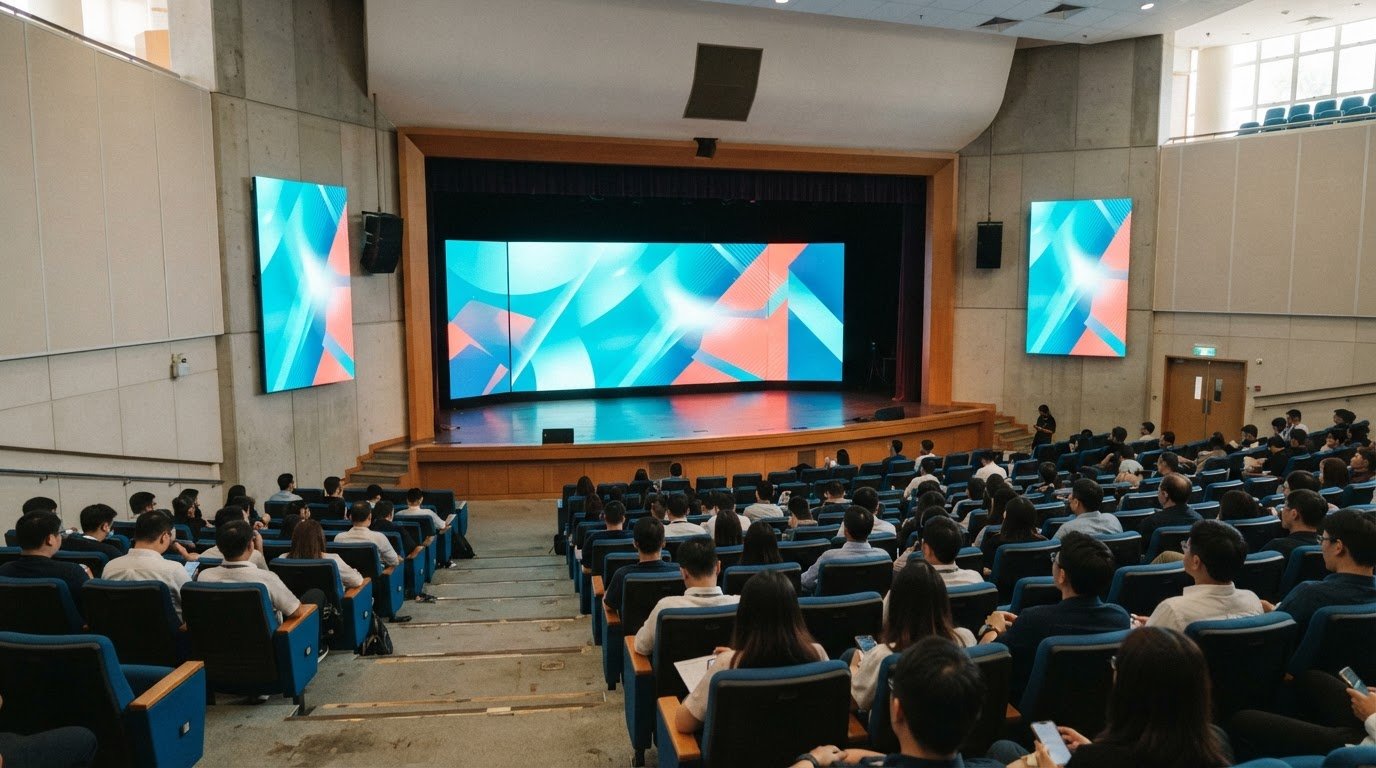
The finest-pitch screen isn’t automatically the right choice for an auditorium. An auditorium LED display can use SMD or COB technology; the better fit depends on viewing distance, content, room conditions and maintenance needs. For brightness, standard indoor auditoriums commonly use 800-1,200 nits, while spaces with strong daylight may need 1,500 nits or higher. It makes sense to consider more than image quality when choosing an auditorium LED display. SMD and COB differ in how their LED elements are packaged, which can affect the screen surface, close-up viewing and maintenance. Let audience sightlines and room lighting guide the decision, rather than relying on a specification alone. This guide explains how to compare SMD and COB, plan the main screen and supporting displays, and account for brightness, AV equipment and maintenance access. It also covers project considerations in Singapore, such as site conditions, building management and access for upkeep, so you can plan a system around how the auditorium will be used.
Key Takeaways
- Choose between SMD and COB by weighing viewing distance, screen use and maintenance needs, rather than relying on one specification alone.
- Plan the main screen and supporting side displays around audience sightlines so viewers at the edges can follow presentations and performances.
- Match screen brightness to the room’s ambient light, accounting for daylight and stage lighting as well as audience comfort.
- Assess warranty terms, maintenance access and ongoing support alongside the display hardware to plan for reliable operation.
- Coordinate the screen with audio, lighting and conferencing equipment, and factor Singapore site access and building requirements into installation planning.
Table of Contents
- Auxiliary side screens to address viewing blind spots
- Brightness for different ambient-light conditions
- Contractor reputation, warranty, and maintenance
- Applications for presentations and performances
- Auditorium LED installation planning
- ETA Visual: Indoor P0.9~P5 LED Screens
Auxiliary side screens to address viewing blind spots
Side screens can extend the main image to seats with restricted views. Plan their position, size and pixel pitch around the room’s seating layout.
An LED screen produces its own light, while a projector casts an image onto a screen. LED can remain more visible in ambient light; projection may suit rooms that do not need a large fixed display and where lighting can be controlled.
In Singapore, consider fire-safety, electrical-installation and building requirements alongside venue alteration controls. Plan cable routes, finish materials, electrical provision, structural support and maintenance access before installation. These considerations affect the design and work sequence.
Viewing distance and seating layout determine how clearly audience members can see the image. Map the front, rear and side seats, then assess sightlines to the main screen and stage before choosing screen size and pixel pitch.
Screen Size and Seating Layout
Screen size and seating layout show how the display’s dimensions relate to audience positions and sightlines. A screen sized for central seats may look too small or be partly obscured from the sides. In a school auditorium, map the furthest seats and widest viewing angles, then position the display so content remains visible from those areas. Check views from the aisles and from behind stage structures.
Seamless Displays and Viewing Angles
A seamless display presents content across connected panels without prominent breaks. Viewing angle matters because people seated to the side see the screen obliquely, making alignment differences more noticeable. Check sightlines from the outer seats as well as the centre aisle. Transparent LED serves a different purpose: it can preserve visibility through a display, though content and background affect legibility.
Auxiliary screens can address blind spots when seats sit far to either side of a wide stage. One school auditorium installation used four smaller side screens. Its central screen used a 2.5 mm pixel pitch, while the side screens used 2.9 mm. Treat this as a layout example, not a specification for every school. Screen dimensions, content and viewing distance still matter.
For small auditoriums with 50-200 seats, a commonly recommended pixel pitch is P1.5-P2.5. A smaller pitch packs pixels more closely and can support detailed content viewed at shorter distances; a larger pitch may suit audiences seated further away. Compare the nearest and furthest seats, especially when slides include small text or fine graphics.
Outdoor venues face different exposure conditions; Singapore-specific considerations for outdoor LED billboards are covered in outdoor LED billboard installation.
Brightness for different ambient-light conditions
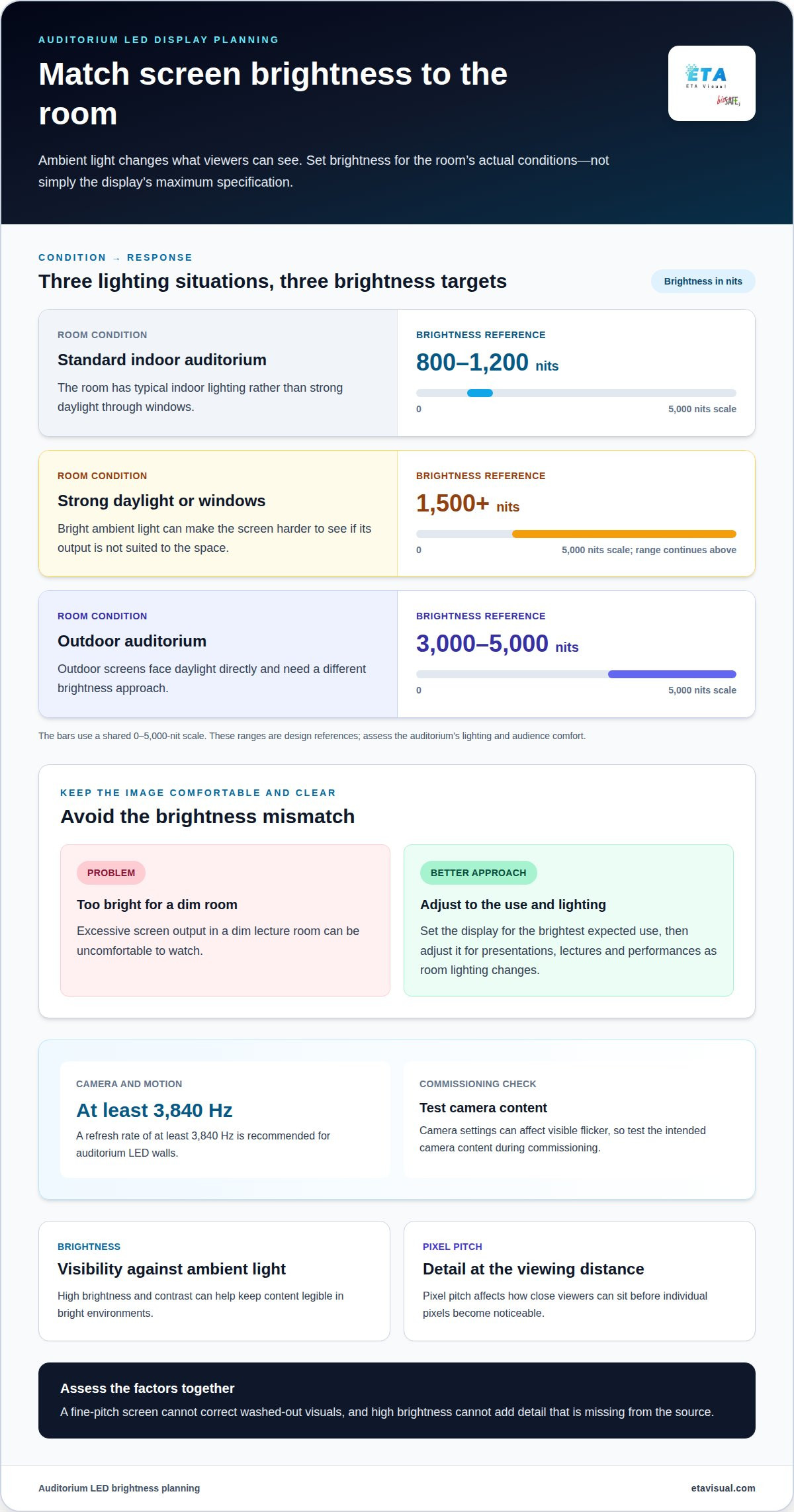
Ambient lighting affects how bright an auditorium screen needs to be for clear visuals. Set the target for the room’s actual lighting, rather than relying on the maximum specification alone.
For standard indoor auditoriums, a commonly recommended brightness range is 800-1,200 nits. Indoor screens are generally recommended at 800-1,500 nits, while areas with strong daylight or windows may need 1,500 nits or higher. These ranges help frame the design; lighting levels and audience comfort still matter.
For an auditorium LED display, brightness, refresh rate, resolution and colour performance should work together. A refresh rate of at least 3,840 Hz is recommended for auditorium LED walls. 4K and 8K are examples of high resolutions, but the source content and screen configuration determine the detail viewers can actually see.
Visual quality depends on more than brightness. High brightness and contrast can help keep content legible in bright environments, while excessive output in a dim lecture room can be uncomfortable to watch. Set the display for the brightest expected use, then adjust it for presentations, lectures and performances as room lighting changes.
Pixel pitch affects how close viewers can sit before individual pixels become noticeable. Brightness affects visibility against ambient light, while refresh rate affects how consistently moving images appear. Assess these factors together: a fine-pitch screen cannot correct washed-out visuals, and high brightness cannot add detail that is missing from the source.
Colour performance also depends on consistent calibration across the display. Compare skin tones, presentation slides and saturated graphics at the intended brightness. White slides may reveal uneven whites, while performance footage can expose colour differences between screen sections. Review the content you plan to show, not just the specification sheet.
Glare, flicker and heat are practical risks to manage. Aim the screen to limit reflections and avoid running it brighter than the room requires. A refresh rate of at least 3,840 Hz is recommended, but test camera content during commissioning because camera settings can affect visible flicker. LED panels generate heat, so allow appropriate airflow around the installation.
Outdoor auditorium screens face daylight directly and need a different brightness approach. A commonly recommended range is 3,000-5,000 nits for outdoor auditoriums. For Singapore installations, account for direct sun, rain exposure and ventilation when assessing the location. Review the LED image quality factors alongside room lighting and viewing conditions.
Contractor reputation, warranty, and maintenance
A well-planned auditorium screen needs support beyond installation. Consider the project process, warranty terms and maintenance arrangements together, as each affects long-term operation. Assess a provider’s work through relevant completed installations, clear technical documentation and an organised handover. For a school auditorium, the handover should explain who manages the display, how to report faults and what routine care involves.
Start with a site survey. Record the mounting surface, access routes, electrical provision, signal paths and available maintenance space. These details affect where the screen can go and how technicians can reach its components later. In Singapore venues, loading access, building management procedures and permitted work hours can also shape delivery and installation planning.
Warranty terms should explain what is covered, how claims are handled and which conditions apply. Compare coverage for LED modules, power supplies, control components and labour, rather than treating the display as one undifferentiated item. Keep warranty documents with commissioning records, configuration details and final system drawings. These records give the venue a practical reference when troubleshooting.
Plan maintenance access and replacement components before the screen is built into the auditorium. Find out whether the design allows front access, rear access or both. Front access can help when the display is close to a wall; rear access needs space behind the structure. The right arrangement depends on the mounting design and room layout.
- Record the screen configuration and installed component types.
- Document signal connections, control settings and commissioning results.
- Set out a process for reporting faults and arranging service.
- Plan storage and handling for compatible spare components.
Clear maintenance records help technicians identify faults without disrupting unrelated equipment. For example, a documented signal path can help distinguish a display fault from an input or control issue. Regular maintenance and warranty support can reduce operating costs and help extend an LED system’s lifespan.
LED modules have a typical lifespan of 80,000-100,000 hours under normal conditions. This figure isn’t a promise of trouble-free operation; ventilation, operating conditions and maintenance affect the system over time. Build those factors into lifecycle planning, rather than judging total cost from screen resolution or contrast alone. A clear visual experience depends on a stable system and effective fault response, not just image clarity at commissioning.
For Singapore venues, preventive maintenance contracts can formalise planned inspections and ongoing care. A LED display maintenance plan should match the screen’s access design, operating schedule and support needs.
Applications for presentations and performances
A school auditorium can use a large LED display wall as its main screen for lessons, assemblies and guest presentations. It can show lecture slides, recorded material or live camera feeds, giving the audience one visual reference. Prepare content for the screen’s aspect ratio so text and diagrams remain clear rather than stretched or cropped.
For a lecture, prioritise legible slides, speaker visibility and smooth transitions between content sources. A teleprompter screen in front of the stage can help a presenter follow speech notes while facing the audience. Place it within the speaker’s natural sightline and keep the displayed text concise. This helps prevent it from competing with the main presentation or distracting people in the front rows.
Corporate events use screens for keynote slides, panel discussions and video calls. A conferencing camera can show remote participants while the display presents shared material. Plan how each source will be used and test transitions before the event. A consistent layout helps presenters move from a title slide to a speaker feed without confusing the audience.
Performances call for a different visual approach. A theatre production might use scenic backgrounds, while a cultural event could display translated captions or supporting imagery. Choose visuals that complement performers rather than overpower them. Coordinate content changes with stage cues, and have operators work with the lighting and audio teams to avoid conflicting effects at key moments.
Consistent content across the main screen and supporting displays can help people follow an event from different parts of the venue. A school assembly might show the same speaker feed on each screen, while a concert could use side displays for close-up camera views. Match each screen’s content to its role and check sightlines from the outer seats.
Before an event, test the actual presentation files, video clips and camera feeds. Confirm that text is readable from the rear seats and that transitions follow the event’s running order. A rehearsal can also reveal whether stage effects, subtitles or live images obscure performers. These checks matter for both a formal lecture and a fast-changing performance.
Plan the display as part of the venue’s wider AV system, not as a standalone backdrop. Integrating it with audio, lighting and conferencing cameras supports coordinated presentations and performances. In a school auditorium, for example, the lecturer’s computer, stage camera and playback source can follow a consistent control workflow. Clear source labels and a defined operator position make event changes easier to manage.
Auditorium LED installation planning
Installation planning brings the screen, building structure and event equipment together as one working system. In a Singapore auditorium, coordinate the display design with the venue team before deciding its position or installation sequence.
The mounting structure must support the display and suit the wall or supporting frame. A site assessment should consider the screen’s dimensions, mounting method, existing structure and installation access. Plan electrical provision and ventilation too: the display needs a suitable power arrangement, while airflow helps manage heat around operating components.
Map the signal path from source equipment to screen. A school auditorium, for example, may need to display a presenter’s laptop, a stage camera and playback images. Decide where equipment will sit, how cables will reach the screen and how operators will select inputs. Clear signal routing reduces confusion during lectures, performances and conferences.
Integration matters too. Coordinate the screen with audio, lighting and conferencing cameras so each system supports the event. In a conference presentation, slides might appear on the display while the room audio carries the presenter’s voice. For a performance, the operator may need to cue images alongside stage lighting and sound.
Plan the physical work around the venue. In Singapore, coordinate building management processes, loading access, delivery routes and permitted work hours with the site team. Check whether equipment can reach the auditorium through service lifts, corridors and stage access points. These details can affect how components are delivered and assembled.
- Record the screen location and audience viewing sightlines.
- Map power, data and signal routes between equipment and display.
- Coordinate structural assessment, mounting design and maintenance access.
- Schedule installation and testing around venue access arrangements.
Commissioning should test the whole system, not just the screen. Run sample presentation slides, video images and camera feeds through the planned signal path. Check that the display, audio and lighting respond as intended, then document final connections and operating settings for venue staff.
Indoor and outdoor installations have different site conditions. An outdoor venue needs a design suited to its exposure and operating environment, while an indoor hall may prioritise controlled lighting and integration with existing equipment. Flexible screen arrangements can support different stage formats, but the structure, cable routes and viewing positions must still suit each intended layout.
For a coordinated screen and room-technology plan, discuss your auditorium display installation.
Coordinate site processes, access and permitted work hours with the venue team and building management. Plan suitable power and ventilation, and assess whether the mounting structure suits the wall or supporting frame.
ETA Visual: Indoor P0.9~P5 LED Screens
ETA Visual helps auditorium teams turn display requirements into an integrated screen plan. Its Indoor P0.9~P5 LED Screens cover a range of pixel pitches, allowing the design to account for seating distance, content and room conditions rather than selecting a screen by resolution alone.
Bring ETA Visual in when comparing SMD and COB, planning side screens or coordinating a display with existing AV equipment. Site assessment and system design can help align screen placement, installation and maintenance access with the venue layout. Where preserving visibility through a display matters, Transparent LED Displays may also suit the design brief.
Contact ETA Visual to discuss your auditorium display requirements.
Turn Your Display Plan into a Practical Design
The next step is to turn your auditorium requirements into a design that supports the way the venue is used. Consider whether the screen needs to serve changing programmes, different presenters or future room updates. This broader view helps keep an auditorium LED display aligned with day-to-day needs, rather than a single event or content format.
ETA Visual offers Indoor P0.9~P5 LED Screens for indoor applications, alongside Outdoor LED Billboards and Transparent LED Displays for other display environments. If you’re weighing display options for a Singapore venue, a discussion about the space, intended use and integration needs can help shape a suitable direction.
A clear brief is a strong starting point for a display system that works well in the room.
Criterion 2: Choosing display technology - SMD LED or COB LED?
SMD and COB are two ways of packaging LED components. The right choice depends on the display’s intended use and maintenance approach. Compare sample panels under the auditorium’s expected lighting, including for close-up viewing and camera use. Review how the selected panel is repaired and which replacement components it uses. This helps you weigh image appearance and ongoing service needs without treating either technology as the automatic choice.
What Is an LED Wall for an Auditorium?
An LED display wall is a large-format surface made from LED panels and controlled as one canvas. It displays the content signal sent through the system. For a venue manager, useful design details include the canvas dimensions, the content formats it can show and how operators select inputs. These details help determine whether existing presentation equipment can feed the wall as intended.
Why Are LED Walls Important in Auditoriums?
An LED display wall gives a venue a consistent visual focal point that can adapt to different programmes. This can help a school alternate between assemblies, guest speakers and student presentations, each with different content. A planned content workflow also helps staff prepare files in advance and avoid last-minute layout changes. The display’s value comes from fitting the venue’s programme and operating routines, not simply from its size.
What types of LED displays are suitable for an auditorium?
A fixed indoor screen is a common choice for a permanent stage installation. Curved or flexible formats can suit a stage design that needs a shaped visual surface, while transparent LED can work where maintaining a view through the display is part of the design. For a multi-purpose venue, compare how each format fits the stage architecture, content workflow and planned maintenance access.
What LED screen size and pixel pitch are recommended for an auditorium?
There is no universal screen size or pixel pitch for every room. Check that the content fits the screen’s shape without cropping, then review text and graphics from representative seats. A slide deck with small labels needs different image detail from a backdrop with large titles. Include the source resolution in the design discussion, since it affects how content maps onto the display canvas.
How much does an auditorium LED display cost in Singapore, including installation?
The price depends on the project and is provided after a quotation request. Cost factors include display dimensions, pixel pitch, mounting design, control equipment, cabling, integration and site access. An existing venue may need different preparatory work from a new auditorium. For a useful comparison, review the quotation scope, including design, hardware, installation, commissioning and ongoing support arrangements.
What are the power consumption and operating costs of an auditorium LED wall?
Power use varies with display configuration, brightness settings and operating schedule. To estimate electricity costs, use the system’s rated power information, expected operating hours and the venue’s electricity tariff. Include associated equipment if it runs with the screen. Actual consumption changes with content and settings, so use an operating profile that reflects lectures, rehearsals and event days.
How should an auditorium LED display be operated, maintained, and repaired?
Use a documented procedure for loading content, selecting inputs and shutting down, and assign responsibility to trained venue staff. Before an event, confirm the correct file version and test the intended sources. If a fault occurs, record its visible symptoms, affected content and input source for diagnosis. Do not open display components; technical repairs should follow the equipment’s service procedures and warranty terms.
Visual planning reference
| Planning factor | What to define | Why it matters |
|---|---|---|
| Viewing positions | Nearest viewing distance and audience locations | Supports an appropriate pixel-pitch and screen-size decision. |
| Content workflow | Input sources, resolutions and control workflow | Helps ensure information remains readable and simple to operate. |
| Installation conditions | Structure, access, power, ventilation and maintenance access | Aligns the display scope with the physical site before procurement. |
Want an accurate budget for your space?
We'll do a free site survey and prepare a clear, itemised quotation — no obligation.
Frequently asked questions
SMD and COB are two ways of packaging LED components. The right choice depends on the display’s intended use and maintenance approach. Compare sample panels under the auditorium’s expected lighting, including for close-up viewing and camera use. Review how the selected panel is repaired and which replacement components it uses. This helps you weigh image appearance and ongoing service needs without treating either technology as the automatic choice.
An LED display wall is a large-format surface made from LED panels and controlled as one canvas. It displays the content signal sent through the system. For a venue manager, useful design details include the canvas dimensions, the content formats it can show and how operators select inputs. These details help determine whether existing presentation equipment can feed the wall as intended.
An LED display wall gives a venue a consistent visual focal point that can adapt to different programmes. This can help a school alternate between assemblies, guest speakers and student presentations, each with different content. A planned content workflow also helps staff prepare files in advance and avoid last-minute layout changes. The display’s value comes from fitting the venue’s programme and operating routines, not simply from its size.
A fixed indoor screen is a common choice for a permanent stage installation. Curved or flexible formats can suit a stage design that needs a shaped visual surface, while transparent LED can work where maintaining a view through the display is part of the design. For a multi-purpose venue, compare how each format fits the stage architecture, content workflow and planned maintenance access.
There is no universal screen size or pixel pitch for every room. Check that the content fits the screen’s shape without cropping, then review text and graphics from representative seats. A slide deck with small labels needs different image detail from a backdrop with large titles. Include the source resolution in the design discussion, since it affects how content maps onto the display canvas.
The price depends on the project and is provided after a quotation request. Cost factors include display dimensions, pixel pitch, mounting design, control equipment, cabling, integration and site access. An existing venue may need different preparatory work from a new auditorium. For a useful comparison, review the quotation scope, including design, hardware, installation, commissioning and ongoing support arrangements.
Plan the next step
Continue with a relevant solution and real Singapore project evidence.