LED Display Image Quality: Three Metrics That Shape What Viewers See
Written and reviewed by the ETA Visual Engineering & Project Team. Guidance is updated when project, product or Singapore site-planning practices change.
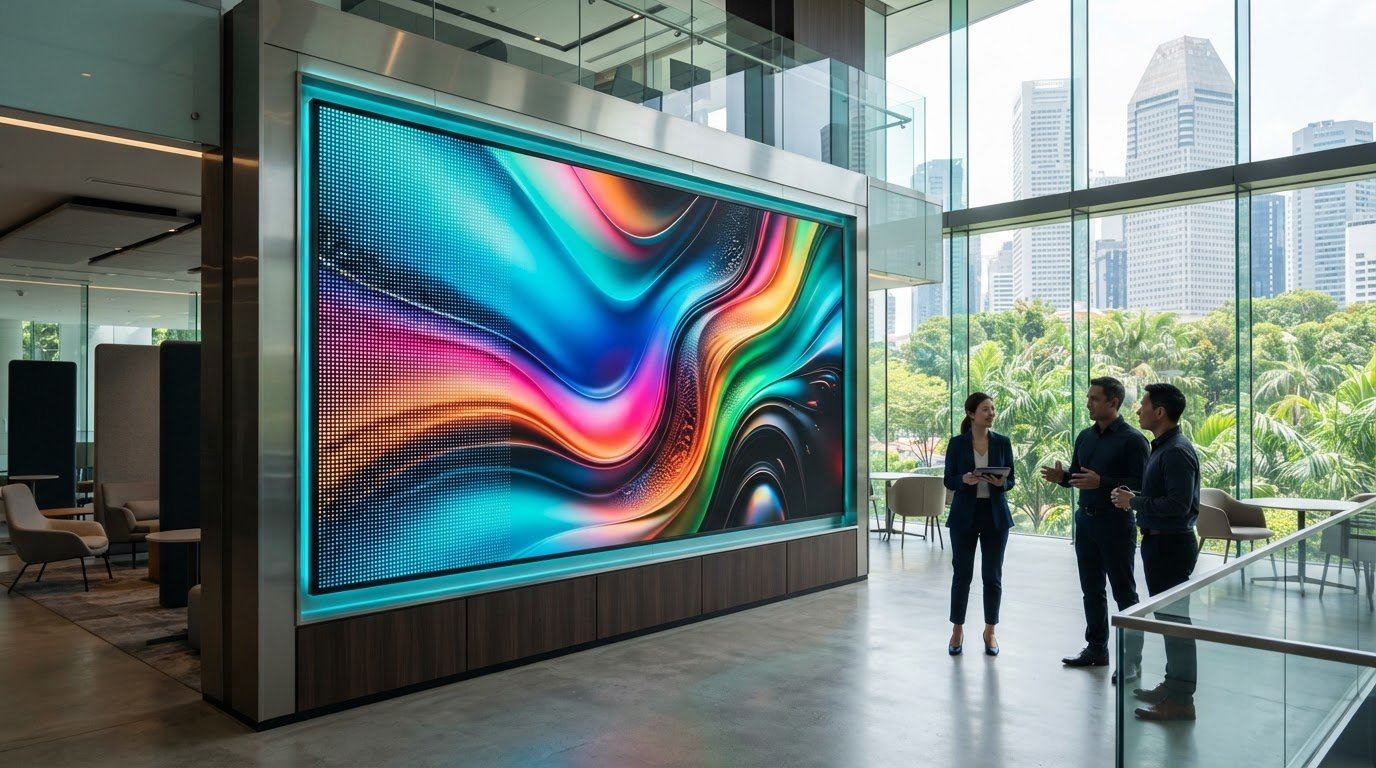
What if the LED display with the most impressive specification isn’t the one that looks best in your space? LED display image quality is a system outcome, shaped by the screen, the content it shows and the conditions around it. A display that appears crisp in a showroom may look different beside a bright window or under strong retail or office lighting. Proposals can be difficult to compare: pixel pitch, brightness, contrast and colour all affect what viewers see, but no single figure tells the whole story. This guide explains how to assess those factors in context, so you can judge a display by how it is likely to perform where it will be installed. We’ll look at how pixel pitch relates to viewing distance, why brightness must suit ambient light, and how contrast and colour contribute to a clear, balanced image. You’ll also learn what to ask an integrator about content, signal flow and commissioning before committing to a commercial LED display.
Key Takeaways
- Assess LED display image quality as a complete viewing experience, not as a single specification on a proposal.
- Match pixel pitch and resolution to the detail viewers need at the closest expected viewing distance.
- Compare displays using the same representative content and consider how ambient light may affect visibility.
- Before purchase, check site conditions such as operating hours and installation access.
- Review content, signal flow and commissioning alongside the screen selection to support a consistent result.
Table of Contents
- What determines LED display image quality in a commercial space?
- Three LED display image quality metrics to assess
- How to compare LED display image quality for your application
- A practical LED display image quality assessment before purchase
- From image-quality assessment to an integrated LED display solution
What determines LED display image quality in a commercial space?
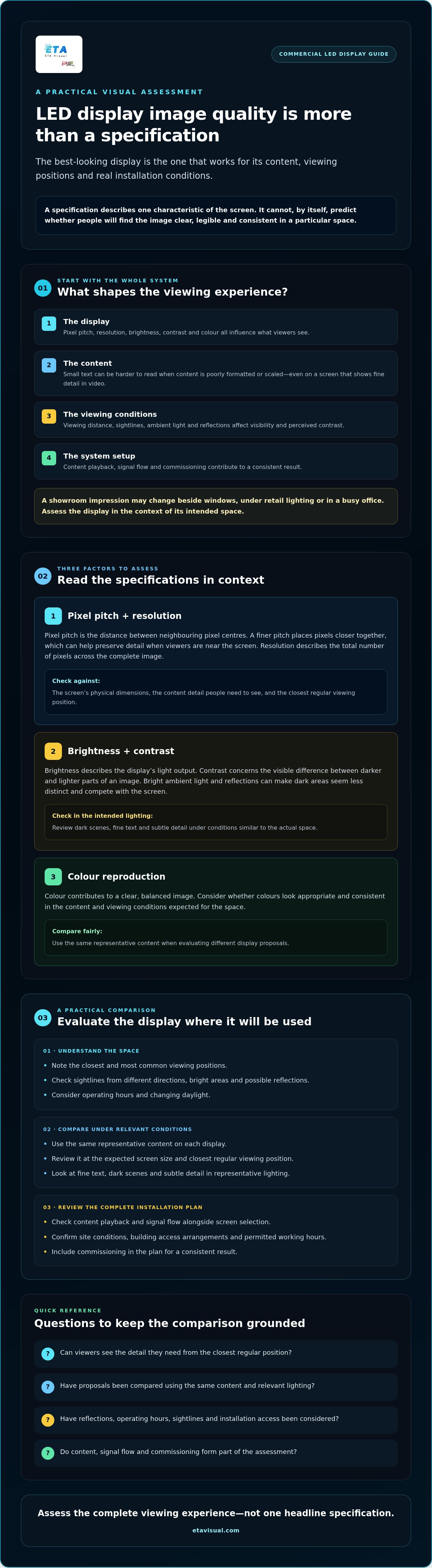
LED display image quality depends on how the display, content, viewing conditions and system setup work together. A specification describes one characteristic of the screen; by itself, it can’t predict whether viewers will find the image clear, legible and consistent in a particular space.
A screen viewed in a controlled showroom may look different once installed beside windows, under retail lighting or in a busy office. The actual experience depends on where people stand, what they need to see and how the display receives and processes content. Assess the whole system rather than comparing figures in separate proposals.
Why specifications alone cannot predict the viewing experience
Specifications describe measurable characteristics, but the viewer-facing result depends on how those characteristics interact. The same screen may show fine detail clearly in a high-quality video but make small text harder to read if the content is poorly formatted or scaled. Ambient light and reflections can also affect perceived contrast and visibility. No single specification guarantees superior image quality.
A general overview of LED display technology can help explain the hardware, but a commercial assessment also needs to consider content playback, signal flow and screen setup. The practical question is whether important content remains readable and the image looks consistent from the positions people actually use.
Which viewing conditions matter in commercial interiors?
Start with the closest and most common viewing positions. Check sightlines for people approaching from different directions, and note whether reflections or bright areas could compete with the screen. Lighting conditions vary between a shopfront, a hotel reception and an office meeting area, so assess the space according to its use rather than relying on a generic indoor assumption.
Where practical, assess the proposed display during representative operating conditions, including the usual lighting and the content it will show. For an indoor fine-pitch application, ETA Visual’s fine-pitch indoor LED display work provides a relevant reference for considering this display category.
Operating hours and changing daylight may influence the conditions viewers experience. Record the intended viewing positions, content types and lighting conditions before comparing proposals. Also confirm any building access arrangements or permitted working hours that could affect installation or review.
These checks turn a showroom impression into a site-specific evaluation. They also give an integrator clearer information for aligning the screen choice with the content, signal path, installation and commissioning plan.
Three LED display image quality metrics to assess
To compare screens meaningfully, consider the detail they can show, how visible that image remains in the space, and whether colours look appropriate and consistent. Together, these factors help you judge the viewing experience rather than selecting a display based on a single headline specification.
1\. Pixel pitch and resolution: judge detail from the intended viewpoint
Pixel pitch is the distance between the centres of neighbouring pixels. A finer pitch places pixels closer together, which can help preserve detail when viewers are near the screen. Total resolution is different: it describes how many pixels make up the complete image, across its width and height. The screen’s physical dimensions and pixel pitch determine that overall resolution.
Assess both against the content and viewing positions. A screen showing large graphics across a reception area has different detail requirements from one displaying small text to people standing nearby. Ask to review typical content at the expected screen size and from the closest regular viewing position. For more technical background, see this LED display technology engineering guide.
2. Brightness and contrast: check visibility in the actual light
Brightness describes the light output of the display; contrast concerns the visible difference between darker and lighter parts of an image. Neither tells the whole story on its own. Bright ambient light can make dark areas seem less distinct, while reflections may compete with the screen and reduce legibility. A setting that looks comfortable in a dim demonstration area may not suit a brightly lit retail environment.
Review dark scenes, fine text and areas with subtle detail under lighting conditions similar to those in the intended space. The ISO standards for image quality offer a reference for measured imaging characteristics, but a standards-based measurement cannot replace checking content visibility at the installation site.
3. Colour reproduction: look for appropriate, consistent output
Colour reproduction is the display’s ability to render the colours in the source content. Consider whether brand colours, skin tones and product imagery look appropriate, and whether colours appear consistent across the screen. Colour accuracy means colours are represented faithfully; consistency concerns whether they look alike across the display and over time. A more vivid appearance may be a preference, not necessarily greater accuracy.
Pixel pitch and resolution shape visible detail, brightness and contrast affect visibility, and colour reproduction influences how faithfully and consistently content appears. Assess them together using content suited to your space, or discuss a commercial LED display assessment that takes viewing conditions and system setup into account.
How to compare LED display image quality for your application
Compare candidate displays using the same representative content, screen size and viewing conditions wherever possible. A showroom demonstration is useful, but it may not reflect your installation’s viewing distance, lighting or everyday content. Judge each proposal against the task the display must perform, rather than looking for one universally best metric.
Match image-quality priorities to content and viewing distance
For text, menus or detailed graphics, check legibility from the positions people are expected to use. For video and brand imagery, review colour, shadow detail and tonal transitions with assets similar to the ones you’ll show. If the screen will serve several purposes, test a range of content rather than relying on a single idealised image.
Use a consistent comparison checklist:
| What to assess | Practical comparison |
|---|---|
| Viewing distance | Check the closest regular viewer position, as well as typical sightlines across the space. |
| Image detail | Use real text, graphics and fine details to see whether essential information remains clear. |
| Ambient light | Compare screens under similar lighting and look for reflections or loss of visibility. |
| Colour | Show the same brand imagery, skin tones and product visuals on each candidate. |
| Content type | Test the actual mix, such as static graphics, text and moving video. |
For example, a display used for close-up product imagery needs to be assessed differently from one showing broad promotional visuals to viewers further away. Let the project requirements determine which trade-offs matter. ETA Visual’s fine-pitch indoor LED display project information offers a relevant reference for considering this display category, without replacing a site-specific evaluation.
Consider refresh rate in context
Refresh rate may matter for moving content and when a screen is captured by a camera, such as during filming or photography. The interaction between a display and a camera can affect how the screen appears in captured footage. Ask suppliers to demonstrate the intended setup if camera use is part of the project. Refresh rate is one consideration, not a complete measure of perceived image quality.
Record your observations against the same content and conditions for each candidate. This makes proposals easier to compare and helps clarify whether a difference matters to your application, rather than simply reflecting a higher figure on a specification sheet.
A practical LED display image quality assessment before purchase
A structured assessment helps you check whether a proposed system suits the conditions it will face after installation. Use content representative of the final application, as an idealised test image may not reveal how everyday material will appear.
Prepare a fair comparison before reviewing proposals
Gather sample still images, video, text and brand assets, then note the intended viewer positions, sightlines, lighting and display use. Ask each supplier what test content, viewing positions and settings they’ll use. Comparable conditions make it easier to understand whether a difference between proposals matters to your project.
Use a short assessment workflow
- Review the content. Identify what viewers need to read, notice or watch.
- Assess the site. Consider the space’s normal lighting, sightlines and practical constraints.
- Plan installation conditions. Confirm access routes, loading arrangements, building coordination and available working hours.
- Compare proposals consistently. Use agreed content, viewing positions and settings, and record differences that affect the intended use.
- Check the commissioned display. Ask how settings and signal flow will be verified, then review project content across the screen from relevant positions.
Where practical, carry out the assessment during representative operating conditions. A retail or hospitality space may look different when occupied or under its usual lighting, so coordinate with building management if access or working hours need to be arranged.
Check consistency and ongoing access
During final checks, review the image from the agreed positions and confirm that the display behaves as intended with project content. Ask what access is required for future maintenance and clarify the support arrangements in the proposal. This helps your team understand the operational requirements without relying on assumptions about service response times or guarantees.
A site survey can help identify viewing, access and system-design questions before the display is specified. ETA Visual provides site surveys, system design, installation and commissioning for commercial LED display projects.
From image-quality assessment to an integrated LED display solution
A display’s visual result depends on more than the panel. Content has to be prepared for the screen, the signal path must carry it correctly, and installation and commissioning need to follow the project requirements. An integrator coordinates these elements so the proposed system can be assessed as a whole. That process supports informed decisions, but it doesn’t guarantee a particular visual result: the outcome still depends on the equipment, content and conditions at the site.
What an AV integrator contributes to image quality
A site survey can clarify practical questions before equipment is selected. The integrator can review viewing positions, sightlines, available installation access and intended content, then consider how these affect display size, pixel pitch and system design. Signal flow also matters: the source, processing and display settings need to work together so the image is delivered as intended.
During commissioning, the team can check the configured display and signal path using project-relevant content. ETA Visual’s LED display integration services include site surveys, system design, installation and commissioning. The appropriate scope depends on the project.
Questions to resolve before specifying a commercial LED display
Clear answers help turn image-quality priorities into a workable specification. Before committing, ask the supplier:
- Which content and viewer positions will guide the display assessment?
- How have ambient light, reflections and the space’s typical use been considered?
- What installation access, building coordination and maintenance access does the design assume?
- How will the source content connect to the display, and what signal flow is proposed?
- Which specifications are confirmed, and which depend on project assumptions or final site conditions?
- What image checks will be carried out during commissioning, and with what content?
Request the assumptions in writing, including the proposed screen configuration, content format, viewing conditions and any site requirements that still need confirmation. This makes it easier to compare proposals fairly and identify gaps before installation planning is finalised.
LED display image quality is best evaluated as part of an integrated project, with the screen, content, signal path and site conditions considered together. If you’re planning a commercial installation, discuss the requirements and assessment approach before confirming the display specification.
Specify for the space, not the spec sheet
LED display image quality is best judged in context. Pixel pitch and resolution affect visible detail, while brightness, contrast and colour influence how content reads in the actual environment. Compare proposed displays using representative content and the viewing positions, lighting and operating conditions expected at your site.
Good results also depend on how the system is designed and delivered. ETA Visual provides site surveys, system design, installation, commissioning, maintenance and repair, helping businesses consider the display alongside its content, signal flow and site requirements. For additional context, you can review the indoor fine-pitch LED display project information.
A clear assessment gives your team a stronger basis for comparing proposals and making a suitable choice for your commercial space. Start with your content and site requirements, then discuss how the complete system can meet them.
What determines LED display image quality?
LED display image quality depends on how the screen, content and viewing environment work together. Pixel pitch, resolution, brightness, contrast and colour reproduction each describe different characteristics, but no single specification predicts the complete experience. Assess the display using representative content from expected viewing positions and in comparable lighting. For a commercial project, also consider whether the signal path and commissioning plan support the intended setup.
Is pixel pitch the most important factor in LED display image quality?
No. Pixel pitch affects the spacing between pixels, but the suitable pitch depends on screen dimensions, content and how close viewers will stand. A finer pitch alone won’t ensure that content looks clear or appropriate. Source quality, brightness, contrast, colour and ambient light also influence the result. Compare options in the intended space and assess whether viewers can see the detail that matters from their usual positions.
How does ambient light affect LED display image quality?
Ambient light can reduce perceived contrast and make content harder to read, particularly near bright windows or reflective surfaces. The effect depends on the screen’s position, the surrounding lighting and the content being shown. Review the display in conditions similar to normal operation where possible. A brightness figure on its own can’t guarantee clear viewing in every commercial environment, so evaluate visibility alongside reflections and viewer positions.
Can a high refresh rate guarantee better LED display image quality?
No. Refresh rate is one technical consideration, and it may be relevant to moving content or camera capture, but it doesn’t describe every aspect of image quality. Pixel pitch, colour, contrast, content and viewing conditions also shape the result. Start with the display’s intended use, then assess relevant specifications together. For a closer explanation of refresh rate and system factors, refer to a dedicated LED refresh-rate engineering guide.
How should I compare LED display image quality between suppliers?
Ask suppliers to demonstrate each option with the same representative content and, where practical, comparable viewing conditions. Review text, graphics and video from the positions viewers are expected to use. Request an explanation of the specifications that matter for your application, plus any project assumptions. Also ask how settings, content playback and signal flow will be checked during commissioning, so you can compare the proposed systems rather than isolated figures.
What happens if an LED display looks different after installation?
The installed image may differ from a demonstration if the site lighting, viewer positions, content, signal path or display settings aren’t the same. During planning, document the expected conditions and agree how the image will be reviewed at commissioning. If you notice an issue, record the content being shown, where you were viewing from and the lighting conditions, then ask the project integrator to investigate the display and system setup.
Do I need a site survey to assess LED display image quality?
A site survey can help identify viewing positions, ambient conditions, access constraints and system requirements before a display is specified. It’s useful when the screen needs to fit an existing commercial environment or coordinate with building operations. A survey doesn’t replace testing with representative content, but it helps make that assessment relevant to the intended installation. ETA Visual provides site surveys as part of its LED display project services.
Visual planning reference
| What to assess | Practical comparison |
|---|---|
| Viewing distance | Check the closest regular viewer position, as well as typical sightlines across the space. |
| Image detail | Use real text, graphics and fine details to see whether essential information remains clear. |
| Ambient light | Compare screens under similar lighting and look for reflections or loss of visibility. |
| Colour | Show the same brand imagery, skin tones and product visuals on each candidate. |
| Content type | Test the actual mix, such as static graphics, text and moving video. |
Want an accurate budget for your space?
We'll do a free site survey and prepare a clear, itemised quotation — no obligation.
Frequently asked questions
Start with the closest and most common viewing positions. Check sightlines for people approaching from different directions, and note whether reflections or bright areas could compete with the screen. Lighting conditions vary between a shopfront, a hotel reception and an office meeting area, so assess the space according to its use rather than relying on a generic indoor assumption. Where practical, assess the proposed display during representative operating conditions, including the usual lighting and the content it will show. For an indoor fine-pitch application, ETA Visual’s fine-pitch indoor LED display work provides a relevant reference for considering this display category. Operating hours and changing daylight may influence the conditions viewers experience. Record the intended viewing positions, content types and lighting conditions before comparing proposals. Also confirm any building access arrangements or permitted working hours that could affect installation or review. These checks turn a showroom impression into a site-specific evaluation. They also give an integrator clearer information for aligning the screen choice with the content, signal path, installation and commissioning plan. To compare screens meaningfully, consider the detail they can show, how visible that image remains in the space, and whether colours look appropriate and consistent. Together, these factors help you judge the viewing experience rather than selecting a display based on a single headline specification.
LED display image quality depends on how the screen, content and viewing environment work together. Pixel pitch, resolution, brightness, contrast and colour reproduction each describe different characteristics, but no single specification predicts the complete experience. Assess the display using representative content from expected viewing positions and in comparable lighting. For a commercial project, also consider whether the signal path and commissioning plan support the intended setup.
No. Pixel pitch affects the spacing between pixels, but the suitable pitch depends on screen dimensions, content and how close viewers will stand. A finer pitch alone won’t ensure that content looks clear or appropriate. Source quality, brightness, contrast, colour and ambient light also influence the result. Compare options in the intended space and assess whether viewers can see the detail that matters from their usual positions.
Ambient light can reduce perceived contrast and make content harder to read, particularly near bright windows or reflective surfaces. The effect depends on the screen’s position, the surrounding lighting and the content being shown. Review the display in conditions similar to normal operation where possible. A brightness figure on its own can’t guarantee clear viewing in every commercial environment, so evaluate visibility alongside reflections and viewer positions.
No. Refresh rate is one technical consideration, and it may be relevant to moving content or camera capture, but it doesn’t describe every aspect of image quality. Pixel pitch, colour, contrast, content and viewing conditions also shape the result. Start with the display’s intended use, then assess relevant specifications together. For a closer explanation of refresh rate and system factors, refer to a dedicated LED refresh-rate engineering guide.
Ask suppliers to demonstrate each option with the same representative content and, where practical, comparable viewing conditions. Review text, graphics and video from the positions viewers are expected to use. Request an explanation of the specifications that matter for your application, plus any project assumptions. Also ask how settings, content playback and signal flow will be checked during commissioning, so you can compare the proposed systems rather than isolated figures.
Plan the next step
Continue with a relevant solution and real Singapore project evidence.

