5 Ways to Prevent LED Display Downtime Through Routine Care
Written and reviewed by the ETA Visual Engineering & Project Team. Guidance is updated when project, product or Singapore site-planning practices change.
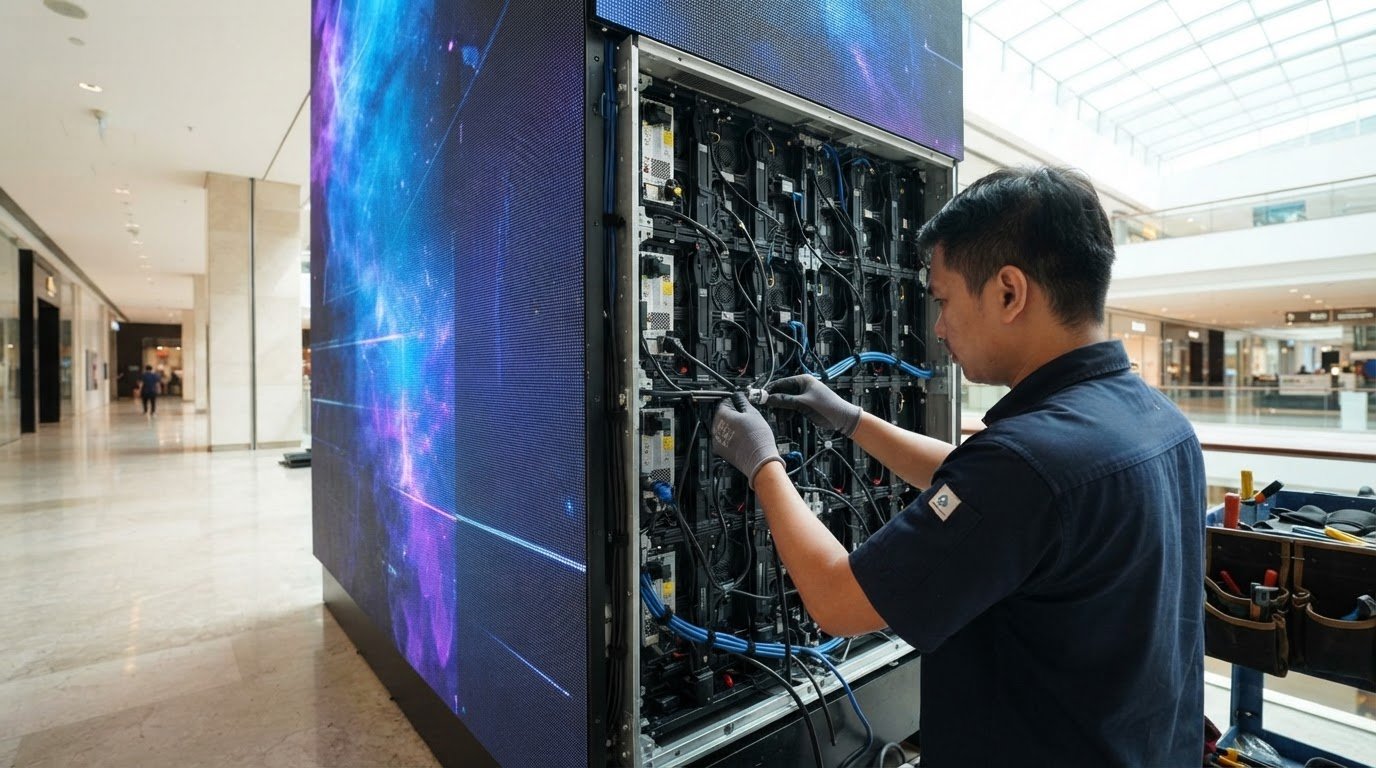
A display interruption rarely arrives at a convenient time. Preventing LED display downtime starts with five practical habits: routine inspections, careful cleaning, systematic troubleshooting, safe maintenance access and performance alerts that surface issues early. Together, they help teams spot developing faults before daily operations are disrupted. When image quality changes or a display goes dark, it is natural to focus on the screen. But power, signal connections, control settings, dust, heat and moisture can all affect performance. A consistent care plan therefore looks beyond the visible symptom. This guide explains what to include in routine checks, how to clean indoor and outdoor screens without introducing avoidable risks, and where to begin when a display flickers, loses signal or shows a distorted image. It also covers maintenance access and performance monitoring, with practical considerations for commercial sites in Singapore’s humid climate. Use the steps to build a clearer maintenance routine and know when a fault needs technical attention.
Key Takeaways
- Build routine checks around power, wiring, control settings and display performance so developing faults are easier to identify.
- Clean LED screens gently and adapt the method to indoor or outdoor conditions to avoid introducing moisture or surface damage.
- When an image flickers, goes black or appears misaligned, trace the signal chain systematically before considering component replacement.
- Plan maintenance access, drainage and site conditions into the display installation to make inspection and servicing more straightforward.
- Use performance alerts to flag changes early and support a clear response process when an issue arises.
Table of Contents
- 1. Routine inspections and professional maintenance
- 2. Cleaning indoor and outdoor LED screens
- 3. Control system and signal-chain troubleshooting
- 4. Installation structure, drainage and maintenance access
- 5. Alerts for display performance issues
- ETA Visual: Transparent LED Displays
1\. Routine inspections and professional maintenance
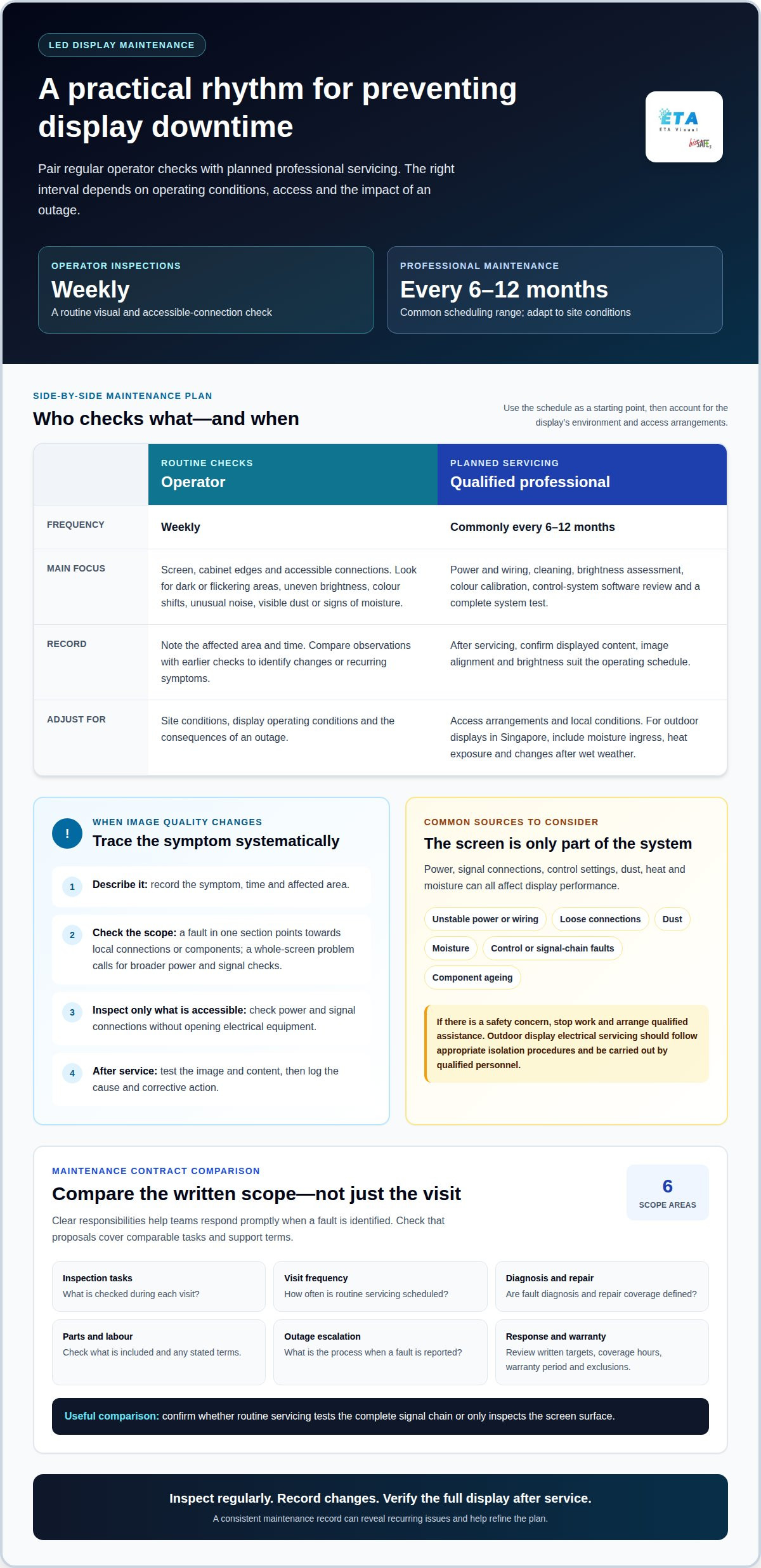
A consistent inspection routine is central to preventing LED display downtime. Operators are advised to inspect LED displays weekly, while professional maintenance checks are commonly scheduled every 6-12 months. Set the frequency around the display’s operating conditions, access arrangements and the consequences of an outage.
Start each inspection with a visual check of the screen, cabinet edges and accessible connections. Look for dark or flickering areas, uneven brightness, colour shifts, unusual noise, visible dust or signs of moisture. Record the affected area and time, then compare your observations with earlier checks. A fault limited to one section points towards local connections or components; a whole-screen problem calls for broader power and signal checks.
A planned service should include power and wiring checks, cleaning, brightness assessment, colour calibration, control-system software review and a system test. Confirm that the displayed content, image alignment and brightness suit the operating schedule after servicing. For an outdoor LED display in Singapore, include checks for moisture ingress, heat exposure and changes following wet weather. These steps support performance and lifespan, but don’t replace safe access procedures.
When comparing maintenance contracts, review the written scope: inspection tasks, scheduled visit frequency, fault diagnosis, repair coverage, parts and labour terms, and the process for escalating an outage. Compare like with like, especially whether routine servicing tests the complete signal chain or only inspects the screen surface. Clear responsibilities help teams act promptly when a fault is identified.
Singapore electrical safety and outdoor signage requirements depend on the installation and the work involved. Arrange site-specific checks with building management and qualified electrical personnel; outdoor display electrical servicing should follow appropriate isolation procedures and be carried out by qualified personnel.
- Common downtime causes include unstable power or wiring, loose connections, dust, moisture, control-system or signal-chain faults, and component ageing.
- Useful spares depend on the installed system. Keep compatible modules, receiving cards, power supplies or signal cables only where they match the equipment and can be stored correctly.
Do not assume that every installation has the same response time or warranty terms. Before choosing a maintenance contract, review its written response target, coverage hours, diagnostic and repair scope, warranty period, parts and labour coverage, and exclusions.
During an outage, record the symptom and affected area, determine whether the fault is local or screen-wide, and inspect accessible power and signal connections without opening electrical equipment. If there is a safety concern, stop work and arrange qualified assistance. After service is restored, test the image and content, then log the cause and corrective action. This record can reveal recurring issues and help refine the maintenance plan.
2\. Cleaning indoor and outdoor LED screens
Dust and residue can obscure pixels, reduce visual clarity and make a screen appear uneven. In Singapore, humid conditions and outdoor exposure make careful cleaning particularly relevant. Cleaning should remove surface contamination without pushing moisture or debris into the LED screen, its seams or ventilation openings.
Begin with a visual assessment. Note whether dust, fingerprints, food residue or water marks affect the display, and check its cleaning instructions before choosing a method. Use a clean, soft microfibre cloth and a non-abrasive solution suitable for the display. Avoid abrasive pads, rough paper and strong pressure, which can damage the surface or stress LED modules.
For an indoor screen, clean small areas gently instead of scrubbing one spot. A dry microfibre cloth can lift loose dust; use a lightly dampened cloth only if the approved cleaning method allows it. Keep liquids away from cabinet gaps, connectors and ventilation openings. For example, a retail screen near food service may collect fine grease or fingerprints, which need careful removal without soaking the display.
Outdoor cleaning requires extra care. Do not spray water directly onto an outdoor LED screen unless the manufacturer explicitly permits it. If the display is designed for low-pressure rinsing, follow the specified method and dry the screen thoroughly afterwards. Rain exposure does not mean every screen surface or opening is suitable for direct washing.
Plan cleaning around the weather and site conditions. Avoid working during rain or when wind could carry water or debris across the display. For a screen near a road, construction area or loading bay, check for accumulated dust and residue, then use the approved cleaning method rather than brushing contaminants across the surface. Never improvise with a pressure washer or household solvent.
Follow cleaning with a system test. Once the screen is dry, display a range of content and check for dark areas, colour differences, flicker or image interruptions. A plain colour field can make uneven patches easier to spot, while normal content may reveal issues hidden by a blank screen. Record the affected cabinet or area for follow-up.
Set the cleaning routine according to the display’s environment, not an arbitrary universal interval. A protected office screen and an outdoor-facing display collect different contaminants. Record cleaning dates, observed residue and visual changes, then adjust the schedule when site conditions change. These records also help distinguish surface dirt from a developing display fault.
For a broader maintenance plan, use this LED display maintenance guide for Singapore businesses to connect cleaning procedures with ongoing care.
3\. Control system and signal-chain troubleshooting
A fault can originate in the content source, processor, sending card, receiving cards, cables or LED panels. Trace the signal path in order instead of replacing a cabinet immediately. For a black screen, first confirm the input source, then inspect signal connections, transmitter and receiver cards, and control-system status. If the entire display flickers, investigate the main power supply and signal chain.
Look at the pattern of the fault. A single dark cabinet may indicate a local connection or receiving-card issue; a shifted or cropped image may involve source resolution, video-processor scaling or card mapping. Inspect the affected panels, then extend checks to adjacent cabinets and shared connections. This step-by-step approach can narrow the fault without unnecessary disassembly.
Keep control software configurations consistent. Align the control computer, processor and display settings, and review software compatibility if performance changes after an update. Before changing parameters, save the working configuration and mapping file. If the image shifts after a settings change, compare the saved mapping and source resolution before altering cabinet connections.
Follow the control-system and display manufacturers’ instructions for starting up and shutting down the installed system. The sequence can vary depending on the equipment and configuration. If a fault occurs during a restart, note the steps taken so operators can distinguish a source or software issue from a screen-side fault.
Temperature and humidity can affect display operation in Singapore’s warm, humid environment. Follow the operating limits specified by the manufacturer for the installed display; figures such as -20 to 60 degrees Celsius and humidity below 85 percent should not be treated as universal. In a humid indoor room, a dehumidifier can help reduce condensation around modules. Check ventilation paths and nearby air-conditioning discharge for trapped heat or direct condensation.
During troubleshooting, note the symptom, affected cabinets, source input and any recent configuration changes. For example, if one section shows a distorted image, compare its receiving-card mapping with the saved parameters before changing the whole display. If an update preceded the fault, record the software version and settings before rolling back or reconfiguring.
Keep operator checks separate from electrical repair. Staff can confirm the selected input and inspect accessible signal cables, but should not open powered cabinets or adjust internal power connections. If the fault involves internal electrical components, isolate the equipment and assign the work to qualified personnel.
A well-documented signal path makes fault diagnosis more direct. A structured LED display integration plan helps connect source, processor, cards and cabinets into a system that can be tested methodically.
4\. Installation structure, drainage and maintenance access
A stable support structure protects cabinet alignment and helps limit mechanical stress across an LED display. During installation planning, confirm that the mounting surface, fixing points and cabinet layout suit the display design. If cabinets shift or sit unevenly, pixel alignment can change, creating visible seams or image defects. Record the final arrangement so future inspections can identify movement.
Water management matters for outdoor screens in Singapore’s frequent rain and humid conditions. Review how water drains from the display surround, canopy and mounting structure, and look for places where water could collect near cabinet edges or cable entries. Blocked drainage or water directed towards the screen can increase moisture exposure. Moisture can contribute to flickering, black screens, corrosion, short circuits or unstable operation.
Do not assume an installation is protected simply because it looks sealed. Follow the manufacturer’s installation and maintenance instructions for the specific display, including cabinet orientation and permitted access methods. During site checks, inspect visible seals, cable routes and drainage paths for damage or obstruction. Qualified personnel should handle repairs involving electrical components.
Plan maintenance access before fixing the screen in place. Keep the front access to indoor display cabinets clear so technicians can inspect modules without moving furniture, retail fixtures or meeting-room equipment. For rear-access installations, provide a workable route to the cabinet backs and connections. A display mounted tightly against a wall can make even a simple module inspection difficult.
Singapore commercial sites also have operational constraints. In a shopping mall, coordinate access routes, loading arrangements, work areas and permitted working hours with building management. At an office or hotel, consider how maintenance access affects guests, staff and daily operations. Confirm the access method during the installation plan, rather than discovering a blocked route during a display failure.
Preventive maintenance should cover more than the screen face. A technician can inspect the mounting structure, fixings, cabinet alignment, cable support and drainage alongside display operation. Check for temperature changes around the installation, such as heat trapped behind cabinets or airflow blocked by new fit-out work. These observations can reveal site changes that place extra stress on modules.
Document the installation, including cabinet positions, access points and relevant connection locations. During later checks, compare these records with visible conditions and note any obstruction, movement or moisture marks. Clear access and maintained drainage help reduce avoidable disruption by making inspection and repair more direct.
For displays stored for long periods, the guide advises periodically powering them on to help prevent moisture buildup and maintain component health. Professional outdoor LED displays can have a lifespan of 50,000 to 100,000 operating hours, depending on components, environment and maintenance.
A European retail chain experienced downtime from power surges in early 2026 and recovered through surge protection. Include storage practices, operating condition and surge protection in maintenance planning.
5\. Alerts for display performance issues
Remote monitoring can identify a display fault before staff notice an interruption. Monitoring software checks display performance and sends alerts when it detects an issue, giving the assigned team a starting point for investigation.
Alerts are most useful when they describe a clear condition and response. For example, a signal-loss alert should identify the affected display, record when the event occurred and direct the operator to inspect the source and signal path. A consistent format makes alerts easier to act on across multiple sites.
Separate urgent faults from changes that need review. A display that has stopped showing content needs a different response from a brightness variation that still allows playback. Set priorities according to operational impact, then decide who receives each alert and who follows up. Without assigned responsibility, notifications can accumulate without resolving the underlying fault.
Remote alerts do not replace on-site inspection. They help narrow the next check by identifying a reported performance issue, while a technician confirms the cause at the display. For example, an alert can prompt checks of the control system and connections, but cannot establish whether a loose cable or failed component caused the interruption.
Use alert records to identify recurring patterns. If the same cabinet or display reports repeated issues, compare event times with site activity, recent configuration changes and maintenance records. Repeated faults in one area can guide a focused inspection before components are replaced. Keep the original alert details alongside the repair outcome.
Review alert settings whenever the installation changes. A new content source, processor configuration or operating schedule can affect what the monitoring system reports. After a system change, test the notification route and confirm that the named recipient can interpret the message. This keeps the response process current instead of relying on outdated contact or escalation details.
Singapore businesses can also align alert routing with site operations. A retail display, hotel screen and office video wall may have different teams responsible for content, facilities and technical support. Define the first recipient, backup contact and escalation path for each installation. Clear ownership helps prevent duplicate responses and missed handovers.
Include monitoring results in routine maintenance reviews. Track whether alerts were acknowledged, what inspection followed and whether the fault returned. These records show whether corrective action resolved the issue or further checks are needed. Replace components only after diagnosis identifies them as the likely cause.
ETA Visual: Transparent LED Displays
ETA Visual can help businesses planning a transparent LED display assess how the screen, structure and operating environment work together. This is a practical next step when routine care highlights access, installation or performance considerations that affect a display project.
For a Singapore site, planning should account for the display location, surrounding structure, ventilation and how technicians will reach the equipment for inspection. These factors support a maintenance approach suited to the installation, rather than treating the screen as a standalone component. ETA Visual provides transparent LED displays alongside design, installation and ongoing maintenance for commercial LED solutions.
Discuss a transparent LED display project or maintenance requirements with ETA Visual.
Make uptime part of the display plan
Preventing LED display downtime starts before the next fault: align maintenance responsibilities with how the screen is used, site access conditions and the impact of an interruption. This gives facilities, IT and operations teams a clearer basis for planning support and future display decisions.
For a new installation or upgrade, match the display type to its environment and maintenance needs. ETA Visual offers Indoor P0.9~P5 LED Screens, Outdoor LED Billboards and Transparent LED Displays for commercial applications. The right configuration depends on the site, viewing requirements and integration with existing systems.
If your current display needs a more structured maintenance approach, or you are planning a commercial LED project, discuss your requirements with ETA Visual.
A considered next step can help your team plan with greater clarity and keep the display suited to the demands of the space.
How often should LED displays be inspected and maintained?
Set the inspection and service schedule using the display manufacturer’s maintenance guidance, operating hours, site conditions and the impact of an interruption. A screen used continuously in a public-facing space may need a different plan from one used intermittently in a controlled room. Review the schedule after a change in operating hours, relocation or refurbishment, and record the reason for any adjustment.
What preventive maintenance checklist helps avoid LED display failures?
Include operational readiness in equipment servicing. Confirm that current content files and display parameters are backed up, spare components are identified by compatible part details, and staff know how to report a fault. For a retail promotion change, for example, include a playback check in the handover so a content issue is not mistaken for a screen failure. Keep the checklist specific to the installed system.
How can temperature, humidity, dust and ventilation affect LED display reliability?
Conditions can vary across a single installation, so note where the display sits in relation to air-conditioning outlets, doors, kitchens or ongoing fit-out work. Compare environmental observations with the location and timing of reported faults; this can reveal patterns a general room reading misses. For example, a recurring issue near an air-conditioning outlet may warrant a closer assessment of that cabinet’s surroundings.
What backup power and surge protection do LED displays need?
Choose backup power based on the equipment that must remain operational and the response required during an interruption. The display, processor and content source may have different continuity needs. Surge protection can help protect display power supplies from fluctuations; have a qualified electrical professional assess the site’s protection and backup arrangement. Test the planned response so staff know whether content continues, pauses or shuts down safely.
Visual planning reference
| Planning factor | What to define | Why it matters |
|---|---|---|
| Viewing positions | Nearest viewing distance and audience locations | Supports an appropriate pixel-pitch and screen-size decision. |
| Content workflow | Input sources, resolutions and control workflow | Helps ensure information remains readable and simple to operate. |
| Installation conditions | Structure, access, power, ventilation and maintenance access | Aligns the display scope with the physical site before procurement. |
Want an accurate budget for your space?
We'll do a free site survey and prepare a clear, itemised quotation — no obligation.
Frequently asked questions
Set the inspection and service schedule using the display manufacturer’s maintenance guidance, operating hours, site conditions and the impact of an interruption. A screen used continuously in a public-facing space may need a different plan from one used intermittently in a controlled room. Review the schedule after a change in operating hours, relocation or refurbishment, and record the reason for any adjustment.
Include operational readiness in equipment servicing. Confirm that current content files and display parameters are backed up, spare components are identified by compatible part details, and staff know how to report a fault. For a retail promotion change, for example, include a playback check in the handover so a content issue is not mistaken for a screen failure. Keep the checklist specific to the installed system.
Conditions can vary across a single installation, so note where the display sits in relation to air-conditioning outlets, doors, kitchens or ongoing fit-out work. Compare environmental observations with the location and timing of reported faults; this can reveal patterns a general room reading misses. For example, a recurring issue near an air-conditioning outlet may warrant a closer assessment of that cabinet’s surroundings.
Choose backup power based on the equipment that must remain operational and the response required during an interruption. The display, processor and content source may have different continuity needs. Surge protection can help protect display power supplies from fluctuations; have a qualified electrical professional assess the site’s protection and backup arrangement. Test the planned response so staff know whether content continues, pauses or shuts down safely.
Confirm the viewing distance, display size, content type, installation conditions and signal-source requirements before selecting a system.
Pixel pitch should be selected against the closest intended viewing distance, the information density of the content and the available budget.
Plan the next step
Continue with a relevant solution and real Singapore project evidence.