LED Display System Integration in Singapore: From Design to Reliable Operation
Written and reviewed by the ETA Visual Engineering & Project Team. Guidance is updated when project, product or Singapore site-planning practices change.
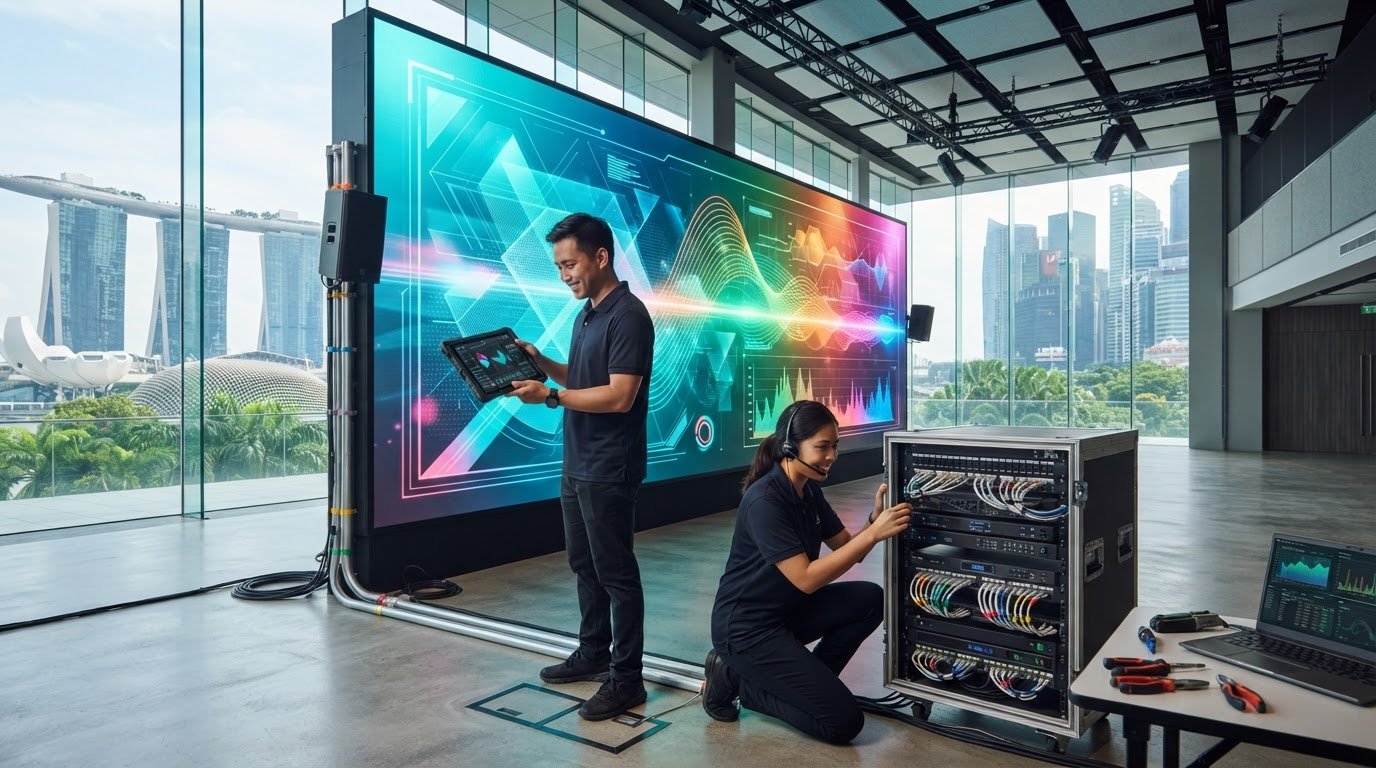
What if a new LED screen looks impressive on opening day but cannot receive content reliably or fit the way your team works? That is why LED display system integration involves more than selecting panels. The screen is one part of a wider system, and decisions about content, control, existing AV and site constraints all affect how well it works. A dependable solution connects those parts before installation. In Singapore, that means considering the display’s location, power, supporting structure, humidity, installation access and building requirements. It also means planning how content reaches the screen, who controls it and how the system will be maintained. This guide explains the components and decisions involved, what site and operational information to prepare, and how design, installation and commissioning fit together. A system integrator coordinates the display, processing and control equipment, content sources, existing AV and site requirements so the complete solution is designed to work as one and support day-to-day operation.
Key Takeaways
- LED display system integration connects the screen with content, processing, control, connectivity and installation, rather than treating the panels as a standalone purchase.
- Map the signal path from content source to display, including any media players, content management systems or external data sources required for the project.
- Account for Singapore’s humidity, heat and outdoor exposure, alongside building management coordination, loading arrangements, access and permitted work hours.
- Follow a planned workflow from requirements and site survey through design, installation, commissioning and handover to reduce avoidable changes.
- Plan maintenance access and support before handover, distinguishing scheduled preventive maintenance from repair when a fault occurs.
Table of Contents
- What LED display system integration includes in a commercial project
- How content, signal flow and control work together in an LED display system
- Singapore site conditions that shape LED display integration
- A practical LED display integration workflow, from survey to commissioning
- Keeping an integrated LED display dependable after handover
What LED display system integration includes in a commercial project
LED display system integration is the coordinated design and connection of the display, content sources, processing, control, connectivity and installation requirements into one commercial system. The aim is to make sure each part suits the space and the way the screen will be used, rather than treating the LED panels as a standalone purchase.
That distinction matters in a retail environment, meeting space or lobby. The display may need to show scheduled promotional material, presentations or content from an existing AV setup. Each use can affect the screen configuration, signal path and control method. For example, an interactive display has different operating needs from a screen used only for scheduled playback. ETA Visual explores this application in its guide to interactive LED displays in Singapore.
Which components make up an integrated LED display system?
The visible screen is built from LED modules assembled into cabinets. Processing and control equipment prepare and distribute the image across the display, while content sources provide the material to show. A content management system (CMS) may help users organise and schedule that material, depending on the project’s requirements.
Signal routing is the path content takes from its source to the screen. A media player or computer sends a signal to processing equipment, which prepares it for display. Control equipment helps manage how the screen operates. The exact arrangement depends on the display and use case. For background on the screen itself, see LED display technology.
How does LED integration differ from a standalone screen installation?
A standalone installation may focus on mounting the panels and connecting them to a signal source. Integration brings the wider system into scope: how content is prepared, which devices feed the screen, how users control it, and how the display is commissioned for its intended use. It also considers how the equipment fits the site and connects with existing AV infrastructure.
Content and workflow shape the design. A screen showing scheduled visuals may need a different playback and control arrangement from one receiving live presentations or other external sources. The system scope therefore depends on the application, existing infrastructure and project requirements, not simply the screen’s dimensions.
When reviewing a commercial proposal, look beyond the panel specification. A complete scope should explain how the display, processing, control, connectivity and installation fit together, and how the finished setup will be tested and handed over. This is the practical difference between supplying and mounting a screen and planning LED display system integration around the space and its day-to-day use.
How content, signal flow and control work together in an LED display system
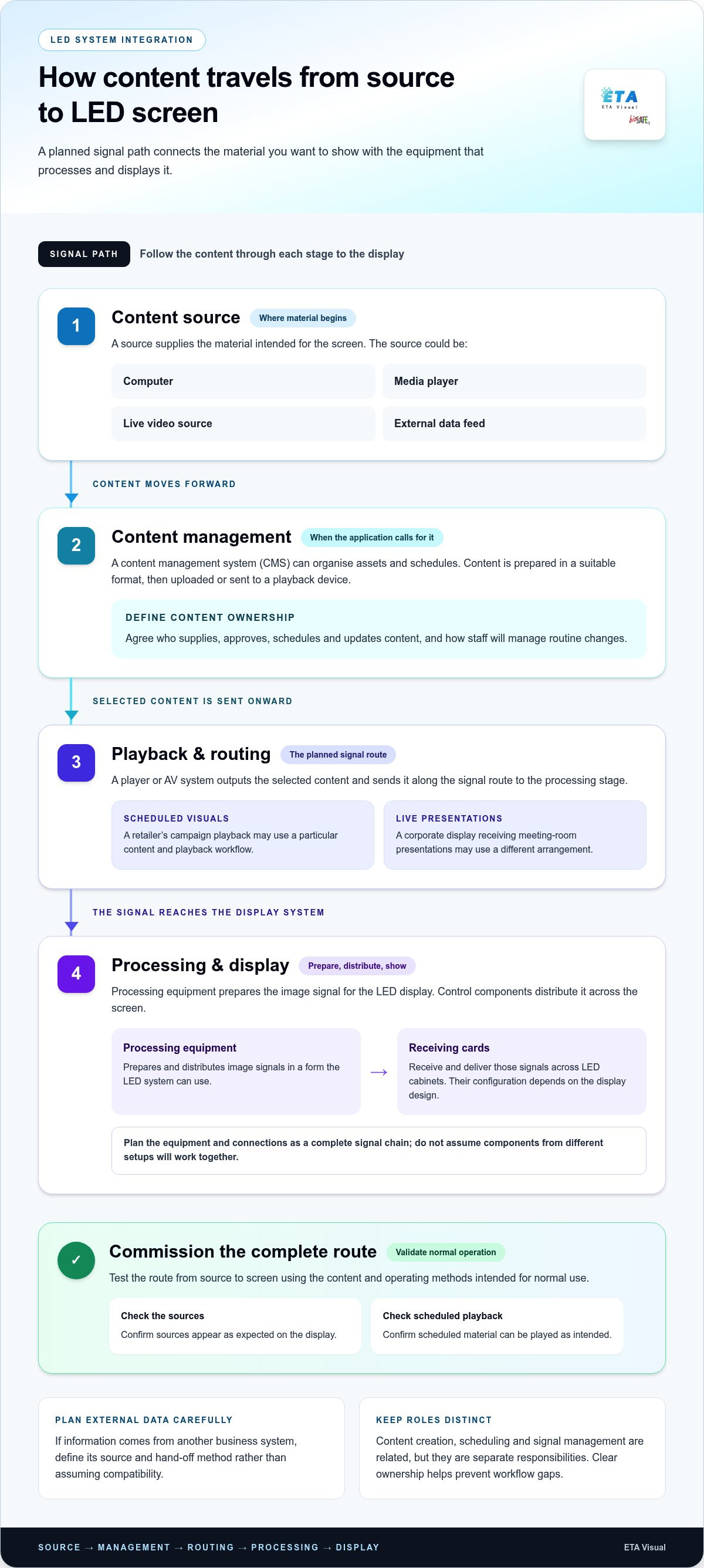
A display can be correctly assembled yet still be difficult to operate if the content workflow and signal path have not been planned together. In LED display system integration, signal-flow planning clarifies how content moves from its source to the screen, where it is processed and which equipment or person controls each stage.
A typical path may look like this:
- Content source: A computer, media player, live video source or external data feed supplies the material.
- Content management: A CMS may be used to organise assets and schedules where the application calls for it.
- Playback and routing: A player or AV system outputs the selected content and sends it along the planned signal route.
- Processing and display: Processing equipment prepares the image signal for the LED display, while control components distribute it across the screen.
How does content travel from a CMS to an LED screen?
Content is created or supplied, prepared in a suitable format, then uploaded or sent to a playback device. A CMS can manage assets and schedules. The player delivers the selected material to the processing stage, which feeds the display. The precise workflow depends on the system design, content sources and operating requirements. Agree early who supplies, approves, schedules and updates content, and how staff will manage routine changes.
For example, a retailer scheduling campaign visuals may use a different workflow from a corporate display receiving presentations from meeting-room equipment. If external data is involved, such as information generated by another business system, define the source and hand-off method rather than assuming they will be compatible. Content creation, scheduling and signal management are related but distinct responsibilities. Clear ownership helps prevent gaps between producing an asset and getting it on screen.
What do processing and receiving cards do?
Processing equipment prepares and distributes image signals in a form the LED system can use. Receiving cards are components within the display system that receive and deliver those signals across LED cabinets. Their configuration depends on the display design. Plan the equipment and connections as a complete signal chain, without assuming that components from different setups will work together.
Commissioning should test the route from source to screen using the content and operating methods intended for normal use. Check that sources appear as expected, scheduled material can be played, control actions work as planned and the image is mapped correctly across the display. Documenting the signal path and hand-offs also gives the operations team a useful reference when content or connected equipment changes.
For projects where the LED screen must work alongside other room systems, integrated AV system design can help frame the wider connection and control requirements.
Singapore site conditions that shape LED display integration
In Singapore, a display’s surroundings affect more than its appearance. Humidity, heat, rain exposure, available mounting space and access for future servicing all inform system design. A site survey connects these conditions with practical project details, including power provision, structural support, delivery routes and building management processes. For LED display system integration, these are design inputs, not details to leave until installation day.
Site conditions vary, so these comparisons are planning prompts rather than fixed specifications:
Indoor: Consider ventilation and heat around the display, nearby equipment, viewing positions, mounting structure and access for inspection or component replacement.
Semi-exposed: Establish how much rain, humidity, direct sun and heat may reach the screen. Exposure depends on the exact location, such as whether it is sheltered by a canopy or open to the elements.
Outdoor: Assess exposure to weather, water ingress risks, sunlight, wind and the conditions around the mounting location. Equipment selection and protection measures should follow the actual site assessment, not a blanket assumption about outdoor suitability.
What should a Singapore commercial site survey assess?
Start with where people will view the screen and what the display needs to communicate. Record sightlines, nearby light sources, mounting position and the intended audience experience. The survey should also establish available power and connectivity, structural information relevant to the proposed support, and the operating environment around the screen. These findings help translate the brief into a workable design before equipment and installation plans are finalised.
Practical coordination matters too. Confirm the delivery route, loading arrangements, access equipment, building management submission process and permitted work hours. In a mall or occupied office, these details can affect when materials arrive, how equipment reaches the installation area and how work is sequenced. Recording constraints early helps align the technical design with site procedures and avoid last-minute changes to the installation plan.
How do humidity, heat and maintenance access affect planning?
Singapore’s humid, warm climate makes the display’s actual exposure important. An indoor screen in an air-conditioned space differs from one near an entrance or in a naturally ventilated area. Outdoor equipment faces different conditions again. Selection should account for the location and environmental exposure, without assuming one protection rating suits every project.
Plan access for inspection, servicing and component replacement while the display layout is being developed. A screen that leaves no workable route to service points can make routine maintenance more disruptive. Consider whether access is from the front, rear or another planned route, and whether ladders or lifting equipment can be used safely within the space. Coordinate access with the building and operations teams.
Power provision and structural support also need project-specific assessment. The design should account for the display and its supporting arrangement, while electrical planning should suit the proposed system and site conditions. Bringing these details together during the survey gives the installation and commissioning teams a clearer basis for delivery.
A practical LED display integration workflow, from survey to commissioning
A clear project sequence gives each decision a place, from the initial brief to system handover. Confirming content, connectivity, access and operating needs early helps the design respond to the actual site and reduces avoidable changes during procurement or installation. ETA Visual’s LED display design and installation services bring these stages together as part of a coordinated project.
- Requirements: Define the display’s purpose, audience, content types, operating routine and who will manage the system. Note whether it will show scheduled material, live sources or both.
- Site survey: Review the proposed position, viewing conditions, power and connectivity, structural information, equipment location and maintenance access. Record delivery routes and any building management procedures or work-hour limits.
- System design: Use the brief and survey findings to develop a display and supporting system suited to the space. Set out content and signal routes, control arrangements, installation needs and relevant interfaces with existing AV.
- Procurement: Coordinate the specified display and system components with the approved design. Resolve outstanding selections and interfaces before equipment is brought to site.
- Installation: Prepare the site and coordinate the mounting, electrical and signal connections in line with the project plan and site arrangements.
- Commissioning: Check the installed system against agreed requirements, including display operation, signal routing and control workflows. Record any items requiring follow-up.
- Handover: Provide the relevant system information, orient users to routine operation and clarify support responsibilities for ongoing use.
What happens before LED display installation begins?
Planning starts with how the screen will be used, not with a generic size or placement rule. Gather the intended content, audience, playback routine, source equipment and the people responsible for updates. Then use the survey to assess the proposed position against viewing conditions, power, connectivity, structural support and access. This helps the design reflect actual project conditions and gives building management and other site stakeholders time to coordinate their requirements.
What should commissioning and handover cover?
Commissioning checks whether the installed system operates in line with the agreed design. The team can verify that intended sources reach the display, signal routing is correct and control actions match the planned workflow. Handover should also cover user orientation, relevant system documentation and who is responsible for operational support. Agree these items during planning rather than leaving them until the final day.
As part of the design, document the display components, signal route and operating workflow. This gives the team a practical reference for routine use and future changes to content or connected equipment.
ETA Visual designs and installs LED display systems, including commissioning. Share your project requirements to discuss the next steps.
Keeping an integrated LED display dependable after handover
Handover is the start of normal operation, not the end of project planning. Dependable LED display system integration accounts for inspection, maintenance access and support responsibilities while the system is being designed. This gives the operations team a clearer way to manage routine care and respond when something needs attention.
Two types of support serve different purposes:
- Preventive maintenance involves planned inspections and servicing based on the display, its operating environment and the maintenance arrangements for the site. It can help identify issues that warrant attention before they interrupt normal use, but it does not guarantee that faults will not occur.
- Reactive repair begins after a fault or operational problem is reported. The focus is to diagnose the issue and carry out appropriate repair work. The cause may sit in the content source, signal route, control equipment or display components.
What should an LED display maintenance plan address?
Plan how the display will be inspected and accessed, who will coordinate site entry, and how maintenance activity will be recorded. Keep the system configuration and relevant equipment details with the maintenance records so that changes and prior work can be understood over time. The scope should reflect the installation and its operating conditions, including whether the display is indoors or exposed to a more demanding environment.
Maintenance access should be practical, not merely shown on a drawing. Consider how authorised personnel can reach inspection points and components for servicing or replacement, and whether access arrangements fit the building’s procedures. For more detail on lifecycle planning, refer to this LED screen maintenance guide.
How can teams prepare for troubleshooting and support?
Keep system diagrams, equipment details, signal-flow information and content workflows accessible to authorised staff. If a problem occurs, note what the screen is showing, whether it affects the whole display or only part of it, and any recent changes to content, sources or control settings. These details help narrow down where investigation should begin, without assuming the screen itself is at fault.
A logical initial check follows the system path: confirm the content source and playback, trace the signal connection and routing, review the relevant control settings, then assess the processing and display components. Record findings and any action taken. If the issue remains, this information gives the support team a useful starting point and can reduce repeated diagnostic steps.
ETA Visual provides LED system design, installation, commissioning, maintenance and repair, connecting project delivery with ongoing operational support. The ETA Visual website outlines the company’s LED and AV services.
Turn your display brief into a workable plan
Your next step is to turn the display idea into a clear project brief. Set out what the screen needs to show, where it will operate, how people will use it and what existing equipment it must connect with. These details help shape LED display system integration around your business needs rather than a generic hardware specification.
ETA Visual has delivered projects in more than ten countries, bringing a broad project perspective to commercial LED and AV work. For a Singapore site, the design still needs to respond to its particular layout, operating conditions and installation requirements. A discussion of these practical details can help establish a considered direction for the project.
Bring your initial requirements, site information and questions to the discussion. The brief does not need to solve every technical detail; it needs to give the project a useful starting point.
A clear brief gives the design, installation and commissioning work a practical starting point.
What is LED display system integration?
It is the project-specific coordination needed to make a commercial LED display fit its intended use and site. Beyond selecting a screen, the team establishes the interfaces, operating requirements and responsibilities that shape the finished solution. For a buyer, a useful distinction is whether a proposal explains how the system will be used and supported, or only lists display hardware and installation work.
How does an LED display connect to a content management system?
The connection depends on the chosen CMS and display design, so identify the platform and its operational requirements early. Confirm who administers user access, who approves material and how content changes are managed when staff or campaigns change. If an existing platform is involved, include the people responsible for it in planning. This helps surface ownership or access issues before the display is ready to operate.
What is the difference between LED display installation and system integration?
Look at the agreed deliverables and responsibilities. An installation scope may cover physical placement and connections, while an integration scope can also define how the system fits the organisation’s operating requirements, what is included in commissioning, and what information is provided at handover. A clear scope helps the project team distinguish completed work from items that remain the responsibility of the client or another project party.
What should a site survey check before an LED display project?
To make a survey more productive, prepare current floor plans or relevant drawings, photographs of the proposed area, and details of equipment that may connect to the display. Arrange access to the location and involve the people who understand the premises, such as facilities or building management representatives. This preparation can help the survey team validate assumptions and identify information that needs follow-up before the design is finalised.
Does an LED display system need a separate content management system?
No. The decision should reflect how content is managed in practice, not an assumption that every screen needs a dedicated platform. If material changes infrequently and a straightforward playback method meets the project requirements, a separate CMS may not be necessary. Where content needs regular updates or scheduling, a CMS may be useful. Consider the user workflow, administration and existing systems together before choosing an approach.
How is an LED display system tested before handover?
Agree the acceptance criteria before commissioning begins, so the project team knows what evidence the handover should include. Depending on the design, this may involve a record of checks, outstanding items and the final system configuration. Keep a copy with the site’s operational documentation. This gives the team a baseline for future changes and helps distinguish the installed configuration from later adjustments made during day-to-day use.
Why should maintenance access be considered during LED display design?
Because a maintenance plan also affects how servicing can be scheduled around normal business activity. A display in a public or customer-facing area may require coordination to limit disruption, while access arrangements can involve the premises team. Decide how maintenance activity will be organised and who coordinates site access. The plan should suit the installation’s operating conditions rather than assume the same schedule or method for every display.
Can an existing AV or data system be integrated with an LED display?
It may be possible, depending on the equipment, interfaces and intended workflow. Prepare an inventory of the existing source devices or platforms, their locations and the teams responsible for them. This helps the design identify where connection responsibilities sit and which parties need to coordinate changes. It also reduces the risk of overlooking a source that is essential to the display’s intended use.
Planning a commercial LED display system? Discuss your project with ETA Visual.
Visual planning reference
| Planning factor | What to define | Why it matters |
|---|---|---|
| Viewing positions | Nearest viewing distance and audience locations | Supports an appropriate pixel-pitch and screen-size decision. |
| Content workflow | Input sources, resolutions and control workflow | Helps ensure information remains readable and simple to operate. |
| Installation conditions | Structure, access, power, ventilation and maintenance access | Aligns the display scope with the physical site before procurement. |
Want an accurate budget for your space?
We'll do a free site survey and prepare a clear, itemised quotation — no obligation.
Frequently asked questions
The visible screen is built from LED modules assembled into cabinets. Processing and control equipment prepare and distribute the image across the display, while content sources provide the material to show. A content management system (CMS) may help users organise and schedule that material, depending on the project’s requirements. Signal routing is the path content takes from its source to the screen. A media player or computer sends a signal to processing equipment, which prepares it for display. Control equipment helps manage how the screen operates. The exact arrangement depends on the display and use case. For background on the screen itself, see LED display technology.
A standalone installation may focus on mounting the panels and connecting them to a signal source. Integration brings the wider system into scope: how content is prepared, which devices feed the screen, how users control it, and how the display is commissioned for its intended use. It also considers how the equipment fits the site and connects with existing AV infrastructure. Content and workflow shape the design. A screen showing scheduled visuals may need a different playback and control arrangement from one receiving live presentations or other external sources. The system scope therefore depends on the application, existing infrastructure and project requirements, not simply the screen’s dimensions. When reviewing a commercial proposal, look beyond the panel specification. A complete scope should explain how the display, processing, control, connectivity and installation fit together, and how the finished setup will be tested and handed over. This is the practical difference between supplying and mounting a screen and planning LED display system integration around the space and its day-to-day use. A display can be correctly assembled yet still be difficult to operate if the content workflow and signal path have not been planned together. In LED display system integration, signal-flow planning clarifies how content moves from its source to the screen, where it is processed and which equipment or person controls each stage. A typical path may look like this:
Content is created or supplied, prepared in a suitable format, then uploaded or sent to a playback device. A CMS can manage assets and schedules. The player delivers the selected material to the processing stage, which feeds the display. The precise workflow depends on the system design, content sources and operating requirements. Agree early who supplies, approves, schedules and updates content, and how staff will manage routine changes. For example, a retailer scheduling campaign visuals may use a different workflow from a corporate display receiving presentations from meeting-room equipment. If external data is involved, such as information generated by another business system, define the source and hand-off method rather than assuming they will be compatible. Content creation, scheduling and signal management are related but distinct responsibilities. Clear ownership helps prevent gaps between producing an asset and getting it on screen.
Processing equipment prepares and distributes image signals in a form the LED system can use. Receiving cards are components within the display system that receive and deliver those signals across LED cabinets. Their configuration depends on the display design. Plan the equipment and connections as a complete signal chain, without assuming that components from different setups will work together. Commissioning should test the route from source to screen using the content and operating methods intended for normal use. Check that sources appear as expected, scheduled material can be played, control actions work as planned and the image is mapped correctly across the display. Documenting the signal path and hand-offs also gives the operations team a useful reference when content or connected equipment changes. For projects where the LED screen must work alongside other room systems, integrated AV system design can help frame the wider connection and control requirements. In Singapore, a display’s surroundings affect more than its appearance. Humidity, heat, rain exposure, available mounting space and access for future servicing all inform system design. A site survey connects these conditions with practical project details, including power provision, structural support, delivery routes and building management processes. For LED display system integration, these are design inputs, not details to leave until installation day. Site conditions vary, so these comparisons are planning prompts rather than fixed specifications: Indoor: Consider ventilation and heat around the display, nearby equipment, viewing positions, mounting structure and access for inspection or component replacement. Semi-exposed: Establish how much rain, humidity, direct sun and heat may reach the screen. Exposure depends on the exact location, such as whether it is sheltered by a canopy or open to the elements. Outdoor: Assess exposure to weather, water ingress risks, sunlight, wind and the conditions around the mounting location. Equipment selection and protection measures should follow the actual site assessment, not a blanket assumption about outdoor suitability.
Start with where people will view the screen and what the display needs to communicate. Record sightlines, nearby light sources, mounting position and the intended audience experience. The survey should also establish available power and connectivity, structural information relevant to the proposed support, and the operating environment around the screen. These findings help translate the brief into a workable design before equipment and installation plans are finalised. Practical coordination matters too. Confirm the delivery route, loading arrangements, access equipment, building management submission process and permitted work hours. In a mall or occupied office, these details can affect when materials arrive, how equipment reaches the installation area and how work is sequenced. Recording constraints early helps align the technical design with site procedures and avoid last-minute changes to the installation plan.
Singapore’s humid, warm climate makes the display’s actual exposure important. An indoor screen in an air-conditioned space differs from one near an entrance or in a naturally ventilated area. Outdoor equipment faces different conditions again. Selection should account for the location and environmental exposure, without assuming one protection rating suits every project. Plan access for inspection, servicing and component replacement while the display layout is being developed. A screen that leaves no workable route to service points can make routine maintenance more disruptive. Consider whether access is from the front, rear or another planned route, and whether ladders or lifting equipment can be used safely within the space. Coordinate access with the building and operations teams. Power provision and structural support also need project-specific assessment. The design should account for the display and its supporting arrangement, while electrical planning should suit the proposed system and site conditions. Bringing these details together during the survey gives the installation and commissioning teams a clearer basis for delivery. A clear project sequence gives each decision a place, from the initial brief to system handover. Confirming content, connectivity, access and operating needs early helps the design respond to the actual site and reduces avoidable changes during procurement or installation. ETA Visual’s LED display design and installation services bring these stages together as part of a coordinated project.
Plan the next step
Continue with a relevant solution and real Singapore project evidence.

