LED Screen Content Management Software for Remote Updates
Written and reviewed by the ETA Visual Engineering & Project Team. Guidance is updated when project, product or Singapore site-planning practices change.
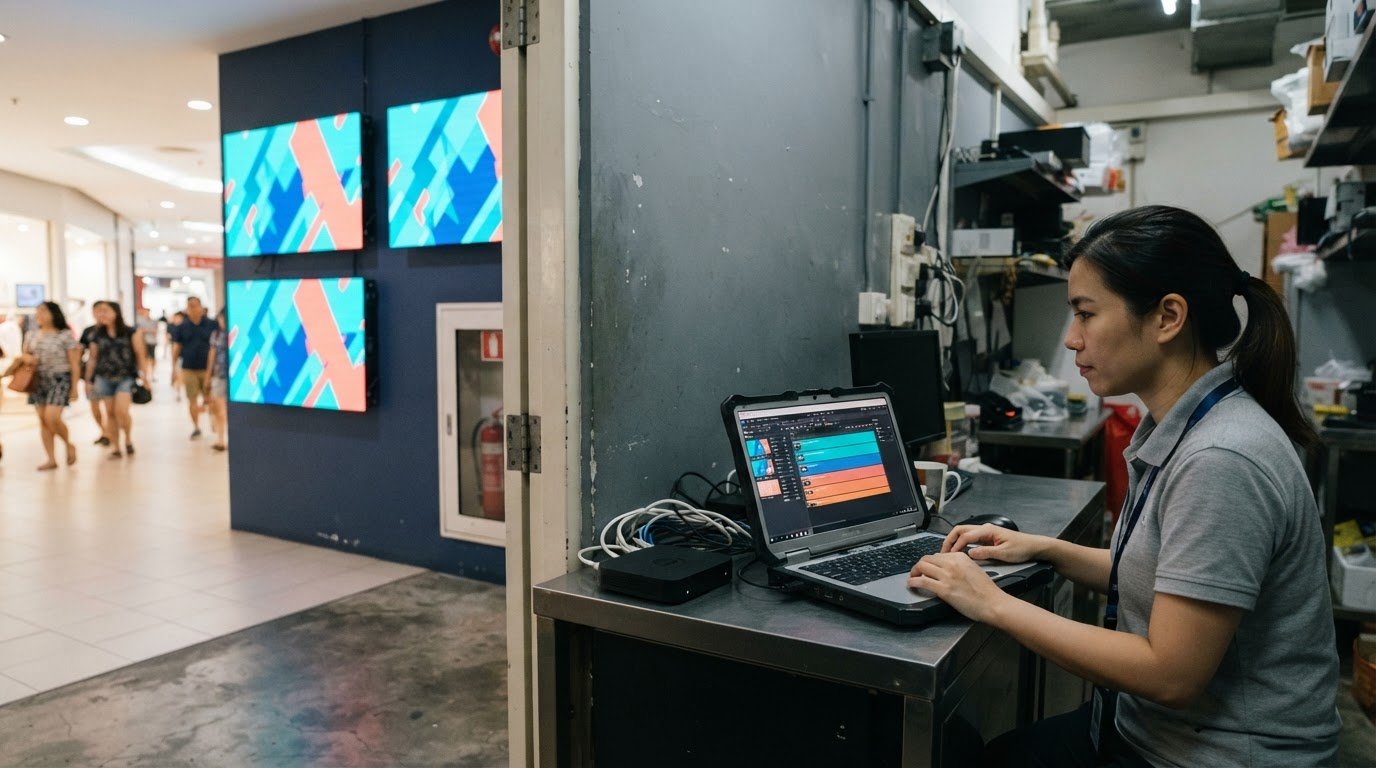
LED screen content management software lets teams schedule content, update displays remotely and coordinate playback across screens. The right setup connects creative assets to the display, so staff can manage campaigns without changing each screen manually. Good content matters because a screen communicates clearly only when its message suits the audience, viewing distance and surroundings. Short text, legible fonts, strong contrast and uncluttered layouts make information easier to absorb. Reviewing creative on the actual display also helps show how it looks in use. This guide explains remote control and scheduling, content preparation for ads, videos and information, and how to compare software options. It also covers practical checks, including compatibility with your screen setup and testing content under its operating lighting conditions, to help you make an informed decision for a Singapore business.
Key Takeaways
- Organise playlists around campaign priorities and set playback times to keep screen content relevant without relying on manual changes.
- Plan network connections, screen grouping and signal flow together, accounting for installation access and site conditions in Singapore.
- Use remote publishing and status monitoring to manage displays, while keeping a clear process for diagnosing connection or playback issues.
- Prepare assets for the display’s resolution and viewing environment, with readable layouts that communicate one key message at a time.
- Compare software by compatibility, ease of operation and ongoing requirements; match the display system to the intended space and use.
Table of Contents
- Content Scheduling and Playlists
- How to Control a Professional LED Screen
- Remote Content Management
- Creating Ads, Videos, Images and Information
- LED Software Comparison and Ratings
- ETA Visual: Indoor P0.9~P5 LED Screens
Content Scheduling and Playlists
Scheduling turns campaign plans into controlled playback. Playlists group assets, while calendars assign them to selected screens, dates and times. An organised schedule streamlines updates and helps prevent outdated creative from staying on screen.
Content Scheduling and Playlists
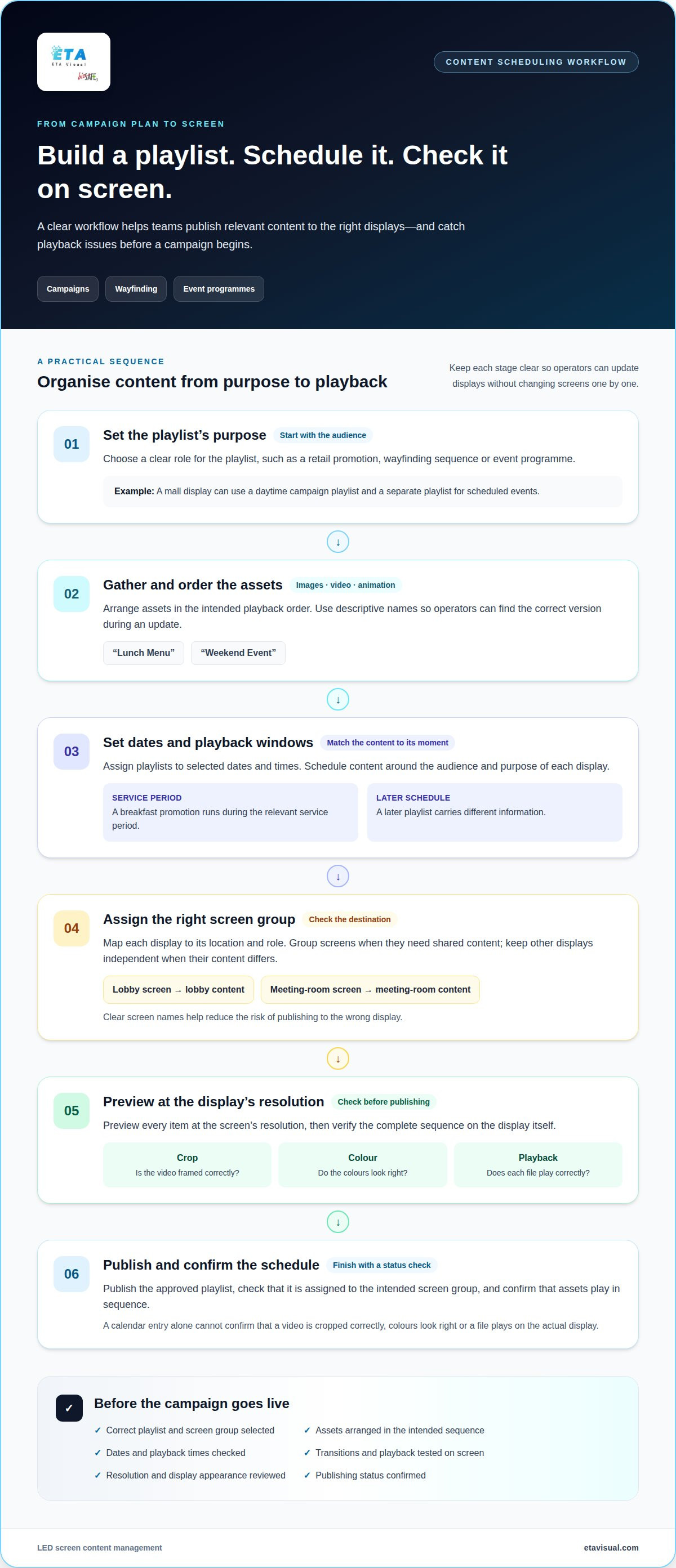
Build each playlist around a clear purpose, such as a retail promotion, wayfinding sequence or event programme. Arrange images, videos and animation in the intended order, then assign the playlist to selected dates and times. For example, a mall display can run a daytime campaign playlist and a separate playlist for scheduled events.
Keep asset names descriptive, such as “Lunch Menu” or “Weekend Event”, so operators can find the right version during an update. Preview each item at the display’s resolution before publishing. An event screen installation can support scheduled content for a venue programme.
Scheduled Content Playback
Set playback windows to suit the audience and purpose of each display. A breakfast promotion, for instance, can run during the relevant service period, while a later playlist carries different information. Scheduling content for selected dates and times reduces the need to change every asset manually.
Before a campaign begins, check that the intended playlist is assigned to the correct screen group and that its assets play in sequence. Test transitions and playback on the display itself. A calendar entry cannot show whether a video is cropped, colours look right or a file plays correctly.
Software Features and Selection Criteria
Look for scheduling by date and time, playlist organisation, remote publishing, and support for the screen’s required resolution and video formats. For multi-display sites, check whether operators can group screens and apply updates consistently. The active playlist and next scheduled change should be easy to identify.
Ease of use matters in daily operation. A clear preview, straightforward calendar and visible publishing status help staff manage routine updates. Match features to your workflow: a single display may need simple scheduling, while a venue with changing campaigns may benefit from grouped playlists and central control.
Security, Uptime, and Content Compliance
Where available, protect publishing access with individual operator accounts and role-based permissions. Limit who can edit or publish playlists, and keep a record of approved assets and changes. These steps reduce the risk of accidental replacements or unauthorised content appearing on a public display.
For outdoor LED screens, scheduling does not replace site-specific approvals. Requirements can depend on the screen’s location and the content shown, so assess relevant permissions and property-management conditions before playback. To support uptime, keep a known-good playlist and document the update process. Clear ownership helps staff respond if a display shows stale content or loses scheduled playback.
How to Control a Professional LED Screen
Professional LED control connects a content source, controller and display network. The connection method shapes how operators publish content and diagnose faults.
Network Connections for Screens
A local network connects the control computer and screen controller within the site. This suits a shop or meeting room where staff manage signage from an operations workstation. Internet access supports remote publishing when the control platform can reach the screen system. Depending on the source and controller, signals may already be digital or may be processed into the format required by the display system before being distributed across the display modules.
Choose a connection based on where operators work and how the screen is used. A screen near its control equipment may use a local connection. A remote team managing an advertising display may need internet access. Confirm the signal route, network access and equipment locations during planning, rather than treating the screen as an isolated device.
Multi-Screen Network Support
For multiple screens, check whether the control system can group displays and send content through one interface. A retailer with screens in separate areas could assign a shared campaign to selected displays while keeping others independent. Networked synchronisation also helps coordinated content appear across modules at the same time.
Map each display to its location and intended role. A lobby screen and a meeting-room screen, for example, may need different content, even when managed by the same system. Clear naming helps operators select the right destination and reduces the risk of publishing signage to the wrong screen.
Network Planning and Troubleshooting
Plan the network alongside the physical installation. Record controller locations, cable routes, power access and the point where the display joins the site network. In Singapore malls and offices, coordinate equipment access and work timing with building management. A documented signal path helps technical teams distinguish a network issue from a display or source problem.
During commissioning, test the full path from content source to screen. Confirm that each display receives the intended signal and grouped screens stay synchronised. If playback fails, check the source output, controller status and network connection in sequence. This structured approach narrows down the fault without changing several settings at once.
For a project that needs coordinated screen and network planning, discuss an integrated display setup.
Remote Content Management
Remote management lets operators publish updates and review connected display status without standing beside each screen. A reliable workflow combines remote access, publishing permissions and a clear response process.
Remote Publishing and Device Monitoring
Can the system manage several screens remotely? Yes. A networked platform can publish updates to multiple displays from a central interface, with internet access where the system supports it.
Remote publishing helps when a retail team needs to replace a promotion across different locations. Operators select the target screens, publish approved content and review the result. The platform may also show whether a screen or controller is reachable, helping staff distinguish a connectivity issue from a content problem.
Assign a responsible operator, limit publishing access and record the intended update. After publishing, review the platform status, then inspect the image on the actual LED display where possible. Remote status is useful, but may not reveal visual issues such as cropping or colour mismatch.
Remote Management Across Multiple Screens
A multi-screen dashboard can group displays by location, campaign or function. A hotel team, for example, could manage lobby signage separately from meeting-space screens. Central oversight helps teams keep these groups distinct while managing them through one interface.
Use clear screen names that identify each site and viewing area, such as “Main Lobby” or “Meeting Room”. Before publishing, review the selected group and its assigned content. This helps prevent a campaign intended for one audience from appearing on an unrelated display.
Remote access depends on the screen system’s network connection and operator permissions. If a display appears offline, follow a consistent troubleshooting sequence: check its connection, inspect controller status, then confirm the platform can reach the device. Record the fault and actions taken so technical staff can see what changed before investigating further.
Common mistakes include assuming a successful upload proves playback is correct, selecting an overly broad screen group and leaving old access rights active after staff changes. A Singapore retail team can reduce these risks by maintaining an approved-content process and current screen list. For outdoor displays, include site access and local maintenance arrangements in the response plan.
Creating Ads, Videos, Images and Information
Effective digital signage starts with one clear message for its intended audience. A café promoting a lunch set, for example, should make the offer immediately visible rather than crowding the screen with its full menu. Viewers may have only a few seconds to process content, so use a short headline, concise supporting text and one clear next step.
Design each visual for the screen’s aspect ratio and resolution before publishing. A landscape image stretched into a portrait layout can distort logos and product photography. Keep important text and images within the visible area, and avoid fine details that may disappear when viewed from across a shop. A screen resolution and content planning approach helps align creative assets with the display format.
Design layouts for the viewing distance. Use larger text when viewers stand farther away, choose clean fonts and create strong contrast between text and background. Dark lettering against a similarly dark product image, for example, can be hard to read in a bright retail setting. Leave enough white space around the headline, price or key information to avoid a cluttered appearance.
Use images with enough detail for the display’s resolution, then review them on the actual screen. A file that looks sharp on a laptop may appear soft or poorly framed across a large LED surface. Check cropping, colour and text legibility under the display’s operating lighting. A storefront facing daylight and an office lobby have different visual conditions.
Motion can draw attention, but it should support the message. Use smooth transitions and consistent animation, such as subtle movement towards a product or call to action. Avoid flashing effects and rapid scene changes. Present one key message at a time, then give viewers enough time to read it before the next creative appears.
- Before publishing: match the asset dimensions to the screen layout.
- During review: assess text, contrast and images from the audience’s actual viewing position.
- For updates: replace outdated offers and check the new version on the display.
These checks help keep advertising clear across different spaces and lighting conditions. A focused visual hierarchy helps the audience recognise the message before decorative effects compete for attention.
LED Software Comparison and Ratings
Compare software against your display system and daily workflow, not star ratings alone. A high rating cannot establish whether a platform supports your controller, resolution or publishing requirements.
Which platforms support common controllers and hardware brands? Compatibility depends on the specific controller, receiving card and software integration, so no single platform works with every setup. Assess the actual hardware combination and test playback before installation.
Compare each option using consistent criteria: resolution and video-format support, scheduling, remote publishing, multi-screen control, device-status monitoring and ease of operation. A single indoor display may need straightforward publishing, while a retail group may require central management and separate content for each outlet. LED screen content management software should suit operators’ workflows, not simply offer the longest feature list.
Use a structured evaluation rather than relying on ratings alone:
- Compatibility: assess support for the required resolution, video formats and controller integration.
- Workflow: test how operators create, preview, approve and publish content.
- Operations: compare remote access, screen grouping, scheduling and device-status information.
- Evaluation: use a free trial where available to test real content and everyday tasks.
A trial should reflect the intended installation. Load representative campaign material, confirm playback, adjust a playlist and review device-status information. This can reveal practical limitations that a feature list or rating won’t show. Include staff training and routine software updates in the comparison.
How much does LED screen content management software cost in Singapore? Costs depend on project requirements, including the licensing model, number of screens, required features, hardware integration and support scope. Request a quotation to discuss the costs for your project. Separate any installation or configuration work from recurring software charges when assessing the overall budget.
Compare operational value as well as initial outlay. Suitable scheduling and remote control may reduce manual work across multiple displays, while advanced features can add complexity if they don’t support the actual workflow. Match the platform to the screens, audience and messages you need to manage. The right LED screen content management software should suit the system and be practical for the people operating it.
No single platform suits every setup. Choose one verified with your exact controller and receiving card, then confirm compatibility by testing playback on the intended hardware.
ETA Visual: Indoor P0.9~P5 LED Screens
ETA Visual helps businesses plan and integrate indoor LED screens with content workflows suited to their spaces. Its Indoor P0.9~P5 LED Screens support applications such as retail displays, office environments and hospitality settings, with screen selection shaped by viewing distance, content and site conditions.
Consider content management alongside display design. Screen dimensions and resolution affect how images, text and video appear, while the controller and signal path influence how content reaches the display. Matching these elements during planning helps avoid a system that installs successfully but proves difficult to operate for everyday updates.
ETA Visual’s project process can include site surveys, system design, procurement, installation and commissioning. Planning for a retail or office site also considers installation access, power provision, mounting conditions and maintenance access. These details help determine where the screen and control equipment can be placed, and how technical teams can reach them later.
Discuss the intended use before settling on a display configuration. A screen for close viewing in a meeting space has different content and resolution needs from a prominent retail feature. The project team can align the display with the audience, room layout and operational requirements, then consider how its control system fits the wider AV setup.
ETA Visual’s other LED display options include Outdoor LED Billboards, Transparent LED Displays, and Flexible & Curved LED. Each suits a different environment or design need. Outdoor locations face weather and lighting conditions, while transparent or curved formats may suit particular storefronts or architectural layouts. The right option depends on the site and the screen’s intended role.
Before installation, define who will publish content, which formats the team expects to use, and whether updates will be managed locally or remotely. These decisions guide system integration and commissioning. They also help make the daily workflow practical for staff responsible for campaigns, information or presentations.
If you’re planning an indoor LED display or reviewing an existing setup, contact ETA Visual to discuss your project requirements.
Make Your Next Display Decision with Confidence
Connect the content workflow to the screen’s operating environment. Before committing to a system, define who will manage updates, how content approval works and what the display must communicate. These decisions help determine whether the setup suits daily operations, rather than simply offering a long feature list.
Choosing LED screen content management software is only one part of the decision. The platform, display hardware and installation need to work as a coherent system. For a Singapore project, consider the physical site and the people responsible for operating the screen after commissioning. A clear brief makes it easier to discuss suitable options and identify integration requirements early.
ETA Visual can help assess your display requirements and plan a solution around your site and intended use. Share your project objectives, location and preferred content workflow to start a focused conversation.
A well-planned system gives your team a practical foundation for future content and campaigns.
Why Is Good Content So Important for LED Displays?
Good content gives an LED display a clear purpose and helps viewers understand its message quickly. A concise promotion, for example, can make a product or offer easier to notice than a crowded slide with competing messages. Content also affects how professional the screen appears. Keep creative relevant to its audience, refresh outdated information, and ensure text and imagery remain legible in the display’s actual surroundings.
How does it work?
An LED display system takes a video or image source and processes it for the screen’s layout. A controller distributes the signal to the display modules, which work together to show the visual. During commissioning, technicians test the source, signal path and screen output as one system. This helps identify issues such as an incorrect input or misaligned image before the display is used for presentations or public information.
What is LED screen content management software and how does it work?
LED screen content management software helps prepare and control material shown on a display. Operators can organise creative assets, assign content to screens and manage playback. The software works alongside display hardware, including the controller that sends visual data to the screen. For example, a retailer can manage campaign content through a central platform while the display system renders it on the installed screen.
What are the best LED screen content management software options in 2026?
There is no single best option for every LED installation in 2026. A suitable platform should match the display controller, required resolution and content formats, as well as the operator’s workflow. A single screen with occasional updates has different needs from a group of displays managed centrally. Compare platforms using the same sample content and routine tasks, then assess compatibility, publishing clarity and ongoing operating requirements.
How do leading LED display CMS platforms compare in features and ease of use?
Compare platforms by testing how easily an operator can complete a real task, such as replacing an expired promotion or assigning a presentation to one screen. Review support for your hardware, file formats, user permissions and playback status. Ratings can highlight interface concerns, but they don’t demonstrate compatibility with a particular installation. A trial using representative content gives a more practical view of everyday use.
How do I upload, schedule, and update content on an LED screen?
Prepare content in a format and resolution supported by the display system, then upload it through the management platform. Assign the asset to the intended screen or playlist and set its playback period. After publishing, confirm the correct version appears on the display. For a last-minute correction, replace the relevant asset, check its destination and review playback instead of rebuilding the entire campaign.
What internet, network, and hardware requirements does LED display CMS need?
Requirements depend on the platform, controller and display configuration. Remote publishing needs a network path between the management platform and screen system; a locally managed screen may use a site network instead. Hardware commonly includes a content source, controller and LED display modules. When planning the system, map equipment locations, signal connections and power access, then confirm compatibility and network access with the technical team responsible for installation.
Visual planning reference
| Planning factor | What to define | Why it matters |
|---|---|---|
| Viewing positions | Nearest viewing distance and audience locations | Supports an appropriate pixel-pitch and screen-size decision. |
| Content workflow | Input sources, resolutions and control workflow | Helps ensure information remains readable and simple to operate. |
| Installation conditions | Structure, access, power, ventilation and maintenance access | Aligns the display scope with the physical site before procurement. |
Want an accurate budget for your space?
We'll do a free site survey and prepare a clear, itemised quotation — no obligation.
Frequently asked questions
Good content gives an LED display a clear purpose and helps viewers understand its message quickly. A concise promotion, for example, can make a product or offer easier to notice than a crowded slide with competing messages. Content also affects how professional the screen appears. Keep creative relevant to its audience, refresh outdated information, and ensure text and imagery remain legible in the display’s actual surroundings.
An LED display system takes a video or image source and processes it for the screen’s layout. A controller distributes the signal to the display modules, which work together to show the visual. During commissioning, technicians test the source, signal path and screen output as one system. This helps identify issues such as an incorrect input or misaligned image before the display is used for presentations or public information.
LED screen content management software helps prepare and control material shown on a display. Operators can organise creative assets, assign content to screens and manage playback. The software works alongside display hardware, including the controller that sends visual data to the screen. For example, a retailer can manage campaign content through a central platform while the display system renders it on the installed screen.
There is no single best option for every LED installation in 2026. A suitable platform should match the display controller, required resolution and content formats, as well as the operator’s workflow. A single screen with occasional updates has different needs from a group of displays managed centrally. Compare platforms using the same sample content and routine tasks, then assess compatibility, publishing clarity and ongoing operating requirements.
Compare platforms by testing how easily an operator can complete a real task, such as replacing an expired promotion or assigning a presentation to one screen. Review support for your hardware, file formats, user permissions and playback status. Ratings can highlight interface concerns, but they don’t demonstrate compatibility with a particular installation. A trial using representative content gives a more practical view of everyday use.
Prepare content in a format and resolution supported by the display system, then upload it through the management platform. Assign the asset to the intended screen or playlist and set its playback period. After publishing, confirm the correct version appears on the display. For a last-minute correction, replace the relevant asset, check its destination and review playback instead of rebuilding the entire campaign.
Plan the next step
Continue with a relevant solution and real Singapore project evidence.