LED Screen Calibration: When to Calibrate and How It Works
Written and reviewed by the ETA Visual Engineering & Project Team. Guidance is updated when project, product or Singapore site-planning practices change.
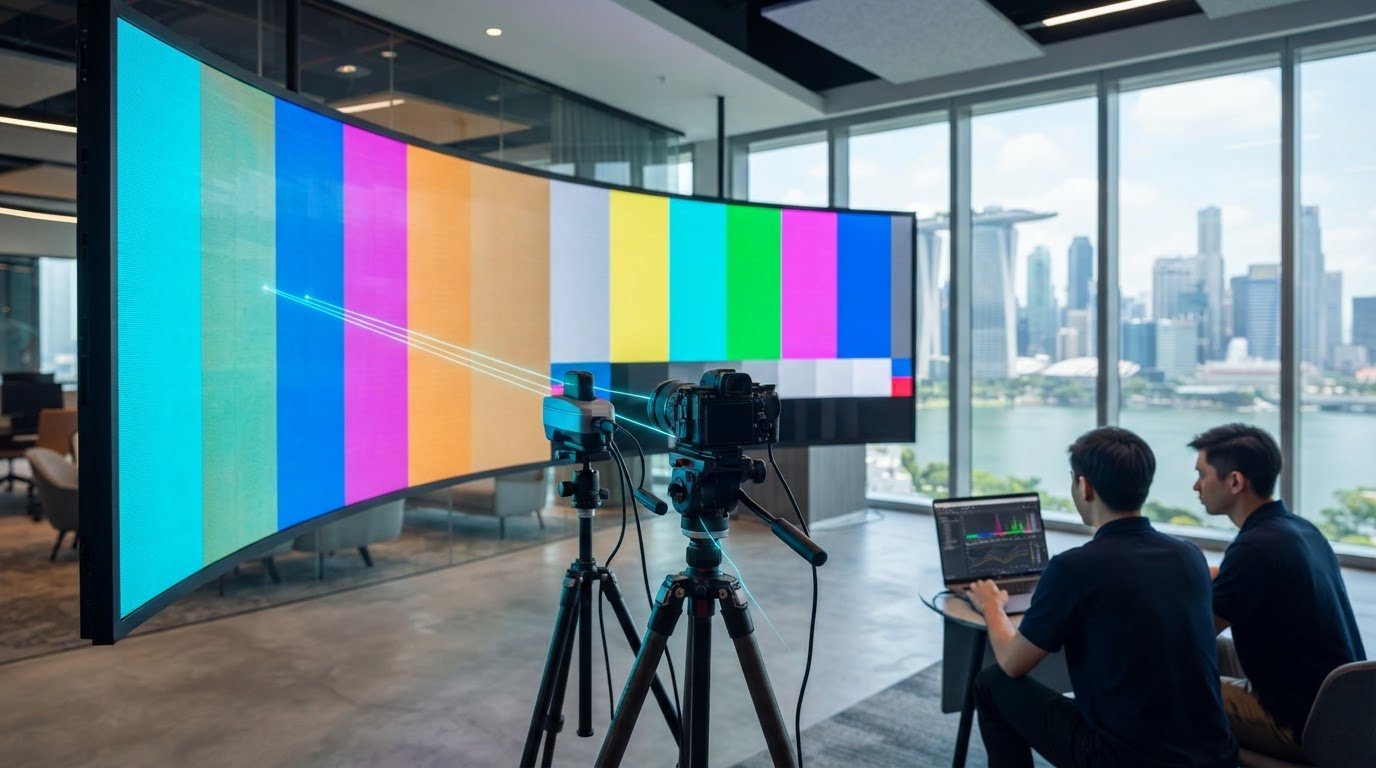
A large or curved LED display can look uneven even when every panel is working. Test it at least once every month for colour inconsistencies, and consider calibration when a grayscale gradient shows visible bands, dark scenes reveal patchiness, or colours vary across modules. LED screen calibration corrects brightness and colour differences, but irregular shapes need more than a routine flat-screen adjustment. It’s easy to assume that a screen installed and commissioned correctly will keep looking consistent. Over time, LED ageing and heat can affect brightness and white balance, while small differences between modules become more obvious across a large image. This guide explains the signs that calibration is needed, how to assess image accuracy, and how colourimeters, cameras and calibration software work together. It also covers the specific challenges of curved, special-shaped and large-format displays, so you can understand what a reliable calibration process involves before image inconsistency affects presentations, retail content or camera-facing production.
Key Takeaways
- Use grayscale gradients and large, uniform colour fields to spot banding or unevenness, especially in dark scenes and camera-facing environments.
- LED ageing can change brightness, white balance and colour output, so assess consistency over time rather than relying only on the original factory calibration.
- Factory and on-site calibration serve different purposes: production calibration sets an initial baseline, while on-site adjustment helps align cabinets in their installed environment.
- Colourimeters, calibration cameras and software measure display differences and calculate pixel-level corrections more objectively than visual judgement alone.
- Curved, special-shaped and large displays need calibration suited to their geometry; a standard flat-screen approach may not address every viewing angle or section.
Table of Contents
- How to test the image calibration of your led screen?
- Q: Could you start by explaining what calibration is?
- 9.2 When Is a Calibrated LED Display Recommended?
- Calibration using cameras, colorimeters and software
- Calibration for curved, special-shaped and large LED screens
- ETA Visual: Indoor P0.9~P5 LED Screens
How to test the image calibration of your led screen?
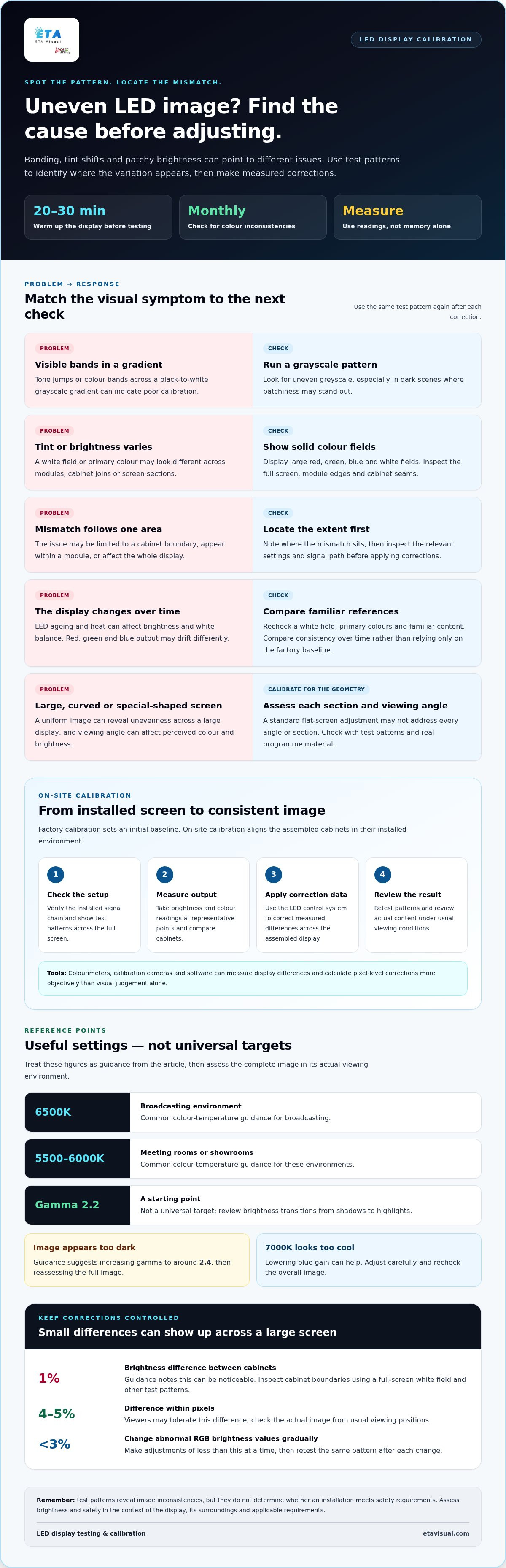
Warm the display for 20-30 minutes, then show a grayscale gradient and solid-colour fields. Look for banding, tint shifts and uneven brightness across the screen, including cabinet joins and module edges.
For Singapore projects, assess brightness and safety in the context of the display, its surroundings and applicable requirements. Test patterns can reveal image inconsistencies, but they do not determine whether an installation meets safety requirements.
Common image problems include banding, colour casts and uneven brightness. First check whether the issue affects one area or the whole display. Then inspect the relevant settings and signal path before making gradual corrections.
Brightness and Greyscale Performance
Brightness is the display’s light output, contrast separates dark and bright areas, colour gamut describes the range of colours, and greyscale performance describes how neutral tones appear. Together, these qualities affect how clearly viewers see the content.
Display a grayscale gradient from black to white. Visible jumps in tone or colour bands can indicate poor calibration. Then show large red, green, blue and white fields to spot tint or brightness variation. Compare the image under its usual lighting conditions, such as a bright retail space or a dim presentation room.
Colour Temperature and Gamma Settings
Colour temperature describes how white appears, while gamma shapes brightness transitions from shadows to highlights. Brightness and contrast also affect image detail, so assess their combined effect instead of changing one setting in isolation.
Common guidance uses 6500K for broadcasting environments and 5500K-6000K for meeting rooms or showrooms. A gamma value of 2.2 is a starting point, not a universal target. Adjust contrast to suit the display and viewing conditions. Review actual content after changes, since excessive contrast can hide shadow detail or clip bright areas.
Ageing and Colour Changes
As LEDs age, brightness can fall and white balance can shift, changing the appearance of neutral whites and primary or intermediate colours. If red, green and blue output drift differently, a screen that once looked consistent may develop a visible tint.
Compare a white field and primary-colour fields with familiar reference content, then inspect dark scenes for uneven greyscale. If the image appears too dark, guidance suggests increasing gamma to around 2.4. For a 7000K colour temperature that appears too cool, lowering blue gain can help. Adjust carefully and reassess the full image.
Consistency Between Cabinets
Cabinet consistency means matching brightness and colour across the display; module uniformity checks for variation within each cabinet. Differences at cabinet boundaries can appear as visible blocks, while uneven LED modules may create patches within a cabinet.
Show a full-screen white field, then inspect a grayscale gradient and solid colours across every seam. Guidance notes that a 1% brightness difference between cabinets can be noticeable, while viewers may tolerate a 4-5% difference within pixels. Also compare content from the usual viewing positions, since viewing angle can affect perceived colour and brightness.
To investigate a mismatch, note whether it follows a cabinet boundary, appears within a module or affects the whole screen. Then check settings and signal flow before applying corrections. Adjust abnormal RGB brightness values by less than 3% at a time, and retest the same pattern after each change.
Q: Could you start by explaining what calibration is?
Calibration measures differences in light output and colour, then applies corrections to produce a more consistent image. Manufacturers calibrate LED screens before delivery, but the factory baseline cannot account for every installed viewing environment.
On-Site Calibration
On-site calibration aligns cabinets after installation, correcting visible differences across the assembled screen. This matters because cabinets that look consistent individually can appear mismatched when placed side by side in one continuous image.
The process begins by checking the installed signal chain and displaying test patterns across the full screen. A technician measures brightness and colour at representative points, compares readings between cabinets, then applies correction data through the LED control system. This targets the display’s measured output instead of relying on memory or visual judgement alone.
Installation conditions affect the result. Viewing angle, ambient light and the screen’s physical arrangement all influence what the audience sees. A large uniform image may reveal a cabinet boundary that busy video content conceals, so assess consistency with both test patterns and real programme material.
For example, a screen in a broadcast environment needs to look consistent on camera and to viewers in the room. On-site measurements help identify whether a mismatch comes from cabinet output, configuration or the content signal before corrections are applied.
Professional and DIY Calibration
DIY adjustments can improve obvious image issues, but professional calibration uses measurement and correction tools to align cabinets more precisely. This distinction matters for large displays, camera-facing screens and colour-critical content.
A user can select a built-in screen mode or adjust basic settings, then compare a test image. This helps check a simple change, such as whether the whole screen appears too bright. It does not measure each cabinet or calculate correction values for individual pixels.
Professional calibration measures the display systematically and applies data through its control system. Calibration algorithms calculate corrections for brightness and colour deviations, helping maintain consistency across the screen instead of changing only the overall image.
For a small, non-critical display, basic visual adjustment may be sufficient. For a commercial wall showing detailed graphics, broadcast content or large uniform backgrounds, measurement provides a more repeatable basis for decisions. It can also help distinguish calibration issues from source or signal-flow faults.
Before deciding on an approach, identify the symptom, test with a known pattern and check whether the mismatch affects one cabinet or the entire display. A commercial LED display installation brings system integration and commissioning into the project, which can help establish a measured baseline once the screen is assembled.
9.2 When Is a Calibrated LED Display Recommended?
Consider calibration when a display needs to meet a defined visual target, panels look inconsistent during use, or the application changes. LED screen calibration aligns the display’s output with a chosen requirement. It is particularly relevant to broadcast studios, virtual production stages, retail displays and large-format screens, where visible variation can distract from content or affect production work.
A calibrated display has correction values applied to bring its output closer to the intended result; an uncalibrated display relies on its existing settings. The difference matters when content spans cabinets or several displays need to look consistent. Absolute calibration suits high-end televisions and professional broadcast systems that must match a defined reference. Other applications may prioritise relative consistency.
When Calibration Makes a Difference
Calibrate after commissioning if the screen must meet a specific visual target. Reassess after changes to its configuration, control system or application. For example, a retail display repurposed for camera-facing content may need a different target from one used only for promotional graphics. A presentation wall for colour-critical material also has different priorities from a screen used for text and general information.
How often should an LED display be calibrated? There is no single interval for every installation. The application, operating conditions, required image consistency and observed changes all help determine the schedule. Reassess when a new use, service intervention or visible mismatch gives you a practical reason to review the settings.
Power, Lifespan and Greyscale
Calibration focuses on image output, while power use and display lifespan are also affected by other operating factors. Brightness settings can affect power use, so do not lower output solely to reduce consumption if that makes content hard to see. Set a target suited to the viewing environment, then consider energy use and equipment life as broader operating decisions.
Greyscale capability matters for applications that show subtle shadow detail, smooth gradients or low-light imagery. “Infi-bit” may describe a display’s grayscale processing, but the label alone does not establish how content will look. Assess the actual material and viewing purpose: a production environment may need fine tonal transitions, while a text-led information display may prioritise legibility.
Incorrect settings can make content look unnaturally dark, overly contrasted or colour-shifted. For camera-facing applications, the wrong image target can also make on-screen content differ from the intended production result. Match the calibration objective to the display’s actual task before adjusting settings.
Calibration using cameras, colorimeters and software
Different calibration tools serve different purposes. Cameras capture spatial information, colorimeters measure light and colour, and software supports analysis. The right combination depends on the display’s size, shape and required image accuracy.
Calibration Cameras and Colourimeters
A calibration camera records light across a display, making it useful for assessing variation over a broad surface. A colorimeter measures colour and brightness at a point, which suits targeted checks. These tools are useful because people may notice a mismatch without reliably identifying its location or size.
A scientific-grade camera can capture brightness and chromaticity data. Camera resolution affects how clearly the imaging system distinguishes display details, while lens choice and camera position influence the captured view. Measurement tools can assess colour and brightness, though their precision can vary. Those figures describe different measurement characteristics, not a guarantee of identical results across instruments.
Brightness, Colour, and Grayscale Steps
Calibration software organises readings, represents differences clearly and produces data compatible with the display hardware. Its interface and export options matter because operators need to interpret results and transfer supported files to the relevant control system.
Camera-based calibration maps show where output varies across the screen. Depending on the system, a map can help distinguish broad changes across a cabinet from smaller local variations. Before choosing software, check that it supports the camera or meter, control hardware and display geometry. This compatibility matters more than a feature list that does not match the installed system.
Brightness, colour and viewing conditions provide useful context when interpreting instrument readings.
Calibration Time and Cost Factors
Equipment choice affects setup requirements and the available output. A camera system may suit broad surface mapping, while a colorimeter can help with targeted readings. The display’s area, shape, measurement access and software compatibility also affect the work involved.
Data transfer is another practical consideration. High-resolution captures can create large datasets, so the computer, connection method and software must handle the information reliably. For a commercial installation, consider whether equipment can be positioned safely and consistently, and whether the resulting files can be kept for future comparison.
These factors shape the scope and cost of the work, but do not establish a fixed rate. Before work begins, define the instrument type, measurement coverage, compatible control hardware and expected data deliverables.
Calibration for curved, special-shaped and large LED screens
A curved or irregular LED surface changes how viewers see its pixels, so a flat-screen calibration approach may not be sufficient. The process must account for screen geometry, measurement position and operating conditions.
Why geometry changes the process
On a curved screen, pixels face different directions across the surface. A camera positioned centrally may therefore capture sections at different angles, affecting brightness and colour readings. Spherical and other special-shaped displays have further changes in surface orientation, making consistent camera placement and mapping important.
Large displays present a different challenge: measurement and correction must cover the full surface, not just an easy-to-reach central area. A camera-based map can show where output varies across modules or sections. Calibration software then uses measured data to calculate corrections, while a full-screen retest shows whether the changes improved consistency.
Plan measurements around the installed screen
Start by documenting the screen’s shape, module layout, viewing positions and access constraints. Divide a large or irregular surface into practical measurement zones, then capture comparable test patterns in each zone. Keep the camera position and pattern conditions consistent between captures. Otherwise, measurement differences may reflect setup changes rather than display output.
Review both uniform fields and real content. A white field can reveal brightness variation, while gradients and colour fields help expose tonal or colour differences. Check the image from the intended audience positions too: a screen may measure consistently from one camera position yet look different to viewers standing off-centre.
Operating temperature also matters. LED heating can change colour, and thermal dynamic calibration can compensate for this drift in real time. For a display in Singapore, include its normal operating state in the assessment rather than relying only on a cold start, as operating conditions and ambient warmth may vary by location.
Allow time for scale and access
The area, geometry, camera setup, correction scope and physical access all affect the work involved. As a reference, calibrating a 100㎡ outdoor square LED display usually takes about 4 to 6 hours. Curves, restricted access or more detailed mapping can change the work required, so this example is not a fixed duration for every screen.
For a commercial curved installation, map the screen as built and assess it from its intended viewing positions. This makes corrections relevant to the actual application rather than an idealised flat surface.
ETA Visual: Indoor P0.9~P5 LED Screens
ETA Visual helps Singapore businesses plan indoor LED screens around the space, content and viewing conditions. Its Indoor P0.9~P5 LED Screens suit different commercial applications, with the appropriate configuration depending on project requirements.
For displays showing branded visuals, presentations or detailed graphics, consider how brightness and colour consistency will look across the full screen. Screen size, viewing positions, ambient light and content all affect design and commissioning. For curved installations, Flexible & Curved LED can support shaped display concepts where a standard flat screen is unsuitable.
Discuss your display requirements with ETA Visual or visit etavisual.com.
Plan the next step for your display
Use your next content update or maintenance review to assess whether the screen still meets its purpose. Note where inconsistencies appear, which content exposes them, and how the image looks from the intended viewing positions. This gives your team a clear basis for deciding whether to adjust settings, investigate a hardware issue or arrange measured calibration.
For a new or changing commercial space, treat LED screen calibration as part of the wider display plan. Screen format, content, ambient light and viewing geometry all shape the outcome. ETA Visual offers Indoor P0.9~P5 LED Screens, Outdoor LED Billboards and Transparent LED Displays for different business applications.
Share your display requirements and the image issues you have observed to discuss a practical next step.
A considered assessment can help you move forward with clarity and confidence.
What are the limitations of this approach?
Calibration corrects measurable output differences, but it cannot repair failed LEDs or damaged hardware. Its effect is also limited by the display’s physical colour and brightness capabilities. A camera map represents the screen under the conditions captured, so a different viewing angle or operating temperature may change how the image looks. If a defect remains after correction, diagnose the hardware or signal path instead of repeatedly adjusting values.
What’s the benefit of calibrating a wall in this way?
Measured calibration gives a video wall a more coherent appearance, especially when content spans several cabinets. For example, a brand colour across the wall is less likely to show abrupt shifts at panel boundaries. A stored measurement baseline also gives facilities teams a useful comparison after maintenance or component replacement. This makes it easier to identify whether a later visual change is localised or affects the wider display.
SHOULD AN OLD LED SCREEN BE RECALIBRATED?
Yes. Assess an older screen for calibration if its image has drifted or different sections no longer match. Ageing can change brightness and white balance, so compare neutral greys and familiar brand colours with earlier reference content. Calibration can correct output differences, but it cannot restore a failed LED or reverse physical deterioration. Distinguish visible image drift from hardware faults before deciding which correction is appropriate.
Why Is LED Pixel Correction Necessary for LED Display Screen?
Pixel correction addresses individual pixels whose brightness or colour differs from neighbouring pixels. Without correction, these differences can appear as specks, patches or uneven tones, especially in flat colour fields and detailed graphics. On a retail display, even a small pixel mismatch can disrupt a clean product image. Correction data targets the affected output rather than changing the whole screen’s appearance to compensate.
What equipment and software are used to calibrate LED screens?
Typical equipment includes a calibration camera or colorimeter, a computer with compatible calibration software, and access to the display’s LED control system. The camera or meter captures output; the software analyses readings and produces correction data. Before measuring, check that the software matches the control hardware and can apply its correction file. This avoids collecting useful readings that cannot be transferred to the screen.
How do you calibrate LED video walls for uniformity across panels?
Assess the wall as one surface, not as isolated panels. Display a uniform test field and a grayscale pattern, then measure across cabinet boundaries and note where the output changes. Compare readings with the signal configuration to rule out a source or mapping issue. Apply corrections through the control system, then retest the same positions with real content. Keep the resulting baseline for future maintenance comparisons.
Visual planning reference
| Planning factor | What to define | Why it matters |
|---|---|---|
| Viewing positions | Nearest viewing distance and audience locations | Supports an appropriate pixel-pitch and screen-size decision. |
| Content workflow | Input sources, resolutions and control workflow | Helps ensure information remains readable and simple to operate. |
| Installation conditions | Structure, access, power, ventilation and maintenance access | Aligns the display scope with the physical site before procurement. |
Want an accurate budget for your space?
We'll do a free site survey and prepare a clear, itemised quotation — no obligation.
Frequently asked questions
Calibration corrects measurable output differences, but it cannot repair failed LEDs or damaged hardware. Its effect is also limited by the display’s physical colour and brightness capabilities. A camera map represents the screen under the conditions captured, so a different viewing angle or operating temperature may change how the image looks. If a defect remains after correction, diagnose the hardware or signal path instead of repeatedly adjusting values.
Measured calibration gives a video wall a more coherent appearance, especially when content spans several cabinets. For example, a brand colour across the wall is less likely to show abrupt shifts at panel boundaries. A stored measurement baseline also gives facilities teams a useful comparison after maintenance or component replacement. This makes it easier to identify whether a later visual change is localised or affects the wider display.
Yes. Assess an older screen for calibration if its image has drifted or different sections no longer match. Ageing can change brightness and white balance, so compare neutral greys and familiar brand colours with earlier reference content. Calibration can correct output differences, but it cannot restore a failed LED or reverse physical deterioration. Distinguish visible image drift from hardware faults before deciding which correction is appropriate.
Pixel correction addresses individual pixels whose brightness or colour differs from neighbouring pixels. Without correction, these differences can appear as specks, patches or uneven tones, especially in flat colour fields and detailed graphics. On a retail display, even a small pixel mismatch can disrupt a clean product image. Correction data targets the affected output rather than changing the whole screen’s appearance to compensate.
Typical equipment includes a calibration camera or colorimeter, a computer with compatible calibration software, and access to the display’s LED control system. The camera or meter captures output; the software analyses readings and produces correction data. Before measuring, check that the software matches the control hardware and can apply its correction file. This avoids collecting useful readings that cannot be transferred to the screen.
Assess the wall as one surface, not as isolated panels. Display a uniform test field and a grayscale pattern, then measure across cabinet boundaries and note where the output changes. Compare readings with the signal configuration to rule out a source or mapping issue. Apply corrections through the control system, then retest the same positions with real content. Keep the resulting baseline for future maintenance comparisons.
Plan the next step
Continue with a relevant solution and real Singapore project evidence.

