LED Refresh Rate: Engineering Guide for Singapore Displays
Written and reviewed by the ETA Visual Engineering & Project Team. Guidance is updated when project, product or Singapore site-planning practices change.
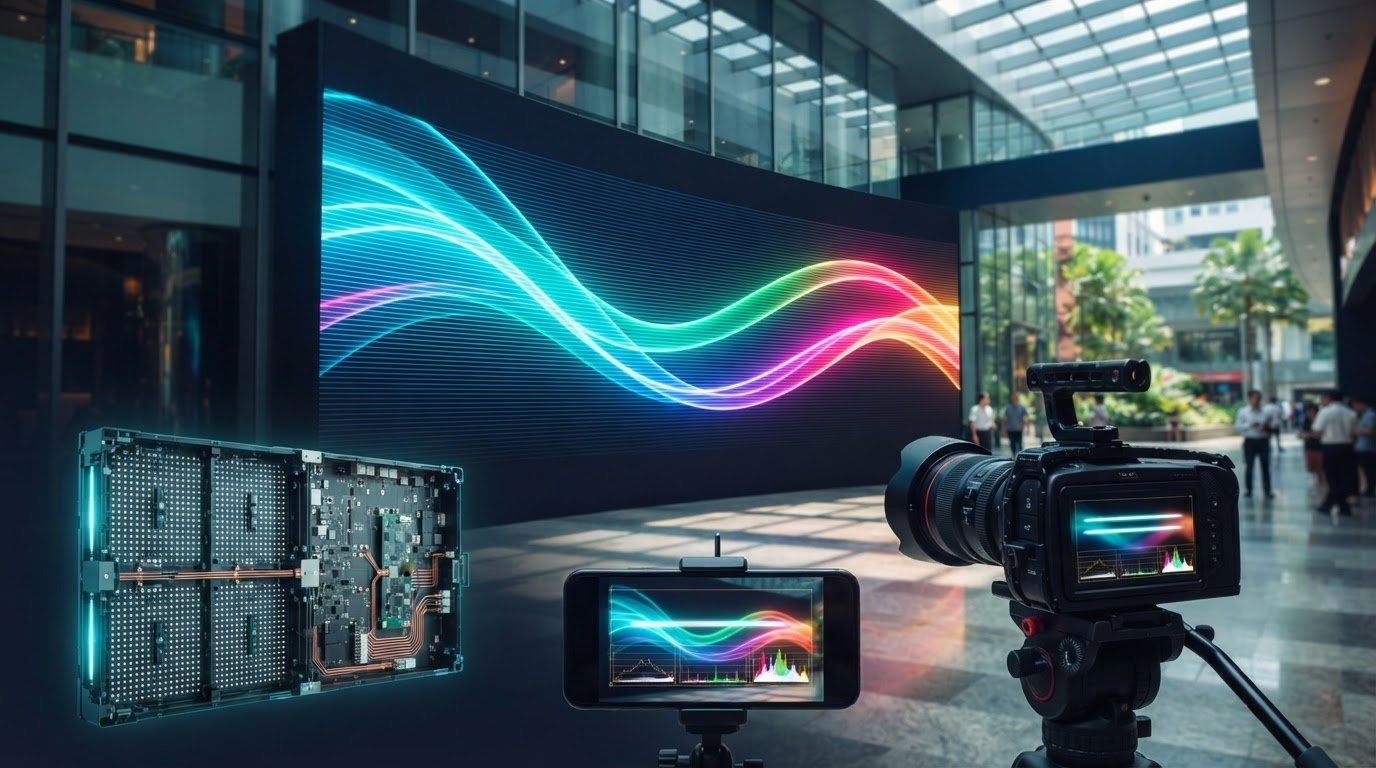
What if the LED screen in your retail space looks clear in person but shows black scan lines in customers’ phone videos? For camera-sensitive indoor displays, the LED refresh rate is a key part of the picture. A 3,840 Hz refresh rate is a common professional choice for commercial spaces where screens may be filmed, though it doesn’t guarantee flicker-free results with every camera or system configuration. If you’re comparing specifications, it’s easy to confuse refresh rate with frame rate. Refresh rate describes how often the display redraws the image; frame rate is how many unique frames the video source sends each second. Both matter, but they solve different problems. This guide explains what refresh rate you may need for an indoor LED screen in Singapore, how driver ICs and scan settings affect camera performance, and why the highest advertised figure isn’t always the best choice. You’ll also learn what to consider for visual comfort, system stability and a sound hardware investment.
Key Takeaways
- Choose an LED refresh rate based on where the screen will be viewed and filmed, not simply the highest figure on a specification sheet.
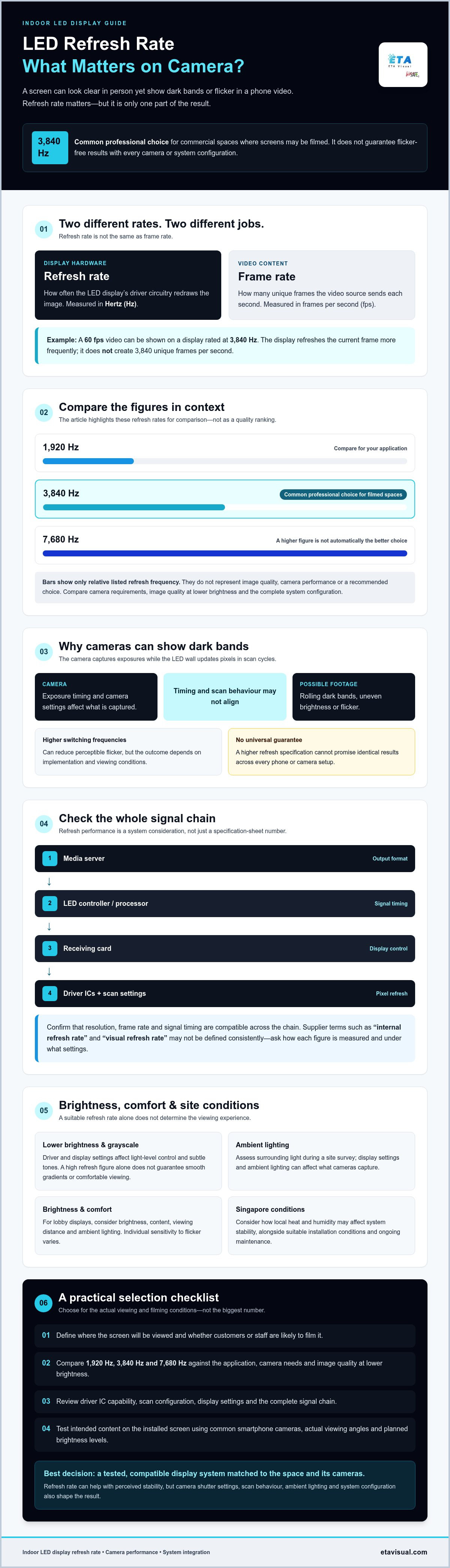
- Compare 1920 Hz, 3840 Hz and 7680 Hz in the context of your application, camera requirements and image quality at lower brightness.
- Assess ambient lighting during a site survey, as display settings and surrounding lights can affect what cameras capture.
- Check the complete signal chain, including the media server, controller, receiving card and driver ICs, when evaluating refresh performance.
- Consider how Singapore’s heat and humidity may affect system stability, and plan for suitable installation conditions and ongoing maintenance.
Table of Contents
Understanding LED Refresh Rate: Definition and Core Mechanics
The LED refresh rate describes how frequently the display’s driver circuitry refreshes the image, measured in Hertz (Hz). A rate of 3,840 Hz represents thousands of refresh cycles per second. It is a hardware characteristic, not the number of different images in the video. For a foundational overview of the term and its distinction from frame rate, see this refresh rate definition.
In an LED wall, the driver IC (integrated circuit) controls how LED pixels are switched and how their brightness is represented. Its capabilities, alongside the display’s scan configuration and settings, influence refresh performance. The stated figure is therefore one part of the system specification, not a complete measure of image quality. ETA Visual’s LED display solutions in Singapore are selected around the requirements of the installation and intended use.
The Science of Pulse-Width Modulation (PWM)
PWM controls perceived brightness by switching LEDs on and off rapidly and varying the proportion of time they remain on during each cycle. The driver IC manages this operation across pixels and colour channels. Grayscale depends on controlling these light levels with sufficient precision, particularly when displaying subtle tones or operating at lower brightness. The relationship is affected by the driver and display settings, so a high refresh figure alone doesn’t guarantee smooth gradients or comfortable viewing. Higher switching frequencies can reduce perceptible flicker, but results also depend on the implementation and viewing conditions.
Refresh Rate vs. Frame Rate (FPS)
Frame rate is content-driven; refresh rate is hardware-driven. A 60 fps video contains up to 60 unique frames each second, while a display rated at 3,840 Hz refreshes its output far more frequently. The display can refresh the current frame between incoming frames; it doesn’t create additional content or turn the video into 3,840 fps. The higher refresh frequency may help the wall appear more stable to viewers and cameras, but camera shutter settings, scan behaviour and system configuration also affect captured footage.
Suppliers may use terms such as “internal refresh rate” and “visual refresh rate” differently. Often, internal rate refers to the display’s driver or scanning operation, while visual rate describes the reported or observable result. These labels aren’t always defined consistently, so ask how each figure is measured and under what settings. During commissioning, the media server’s output format must also be compatible with the LED processor and receiving cards. Confirm resolution, frame rate and signal timing across this chain, then test the actual content on the installed screen.
Why Refresh Rate Matters for Singapore Commercial Spaces
A display in a Singapore shopping mall is not seen only by people walking past it. Customers may photograph a storefront or record a short video, turning the screen into part of the brand’s social media presence. If the image appears clean to the eye but shows dark bands or flicker in a phone recording, the display can undermine the presentation it was installed to support.
The Retail Photography Challenge
Smartphone cameras capture images in exposures, while an LED wall updates pixels in rapid scan cycles. If the camera’s exposure timing and the screen’s scanning do not align, footage may show rolling dark bands, uneven brightness or flicker. The result depends on the camera, its settings and the display system; a higher refresh specification can help, but it cannot guarantee identical results across every phone.
This is a practical brand consideration for mall retail, not only a broadcast-studio concern. Luxury storefronts need content to remain visually composed in customer photos and video. ETA Visual’s Coach storefront project provides a relevant example of an LED display application in a retail setting. For a new installation, test the intended content with common smartphone cameras at the actual viewing angles and brightness levels.
Comfort and Consistency in Corporate Lobbies
Reception and facilities teams may spend much of the working day near a lobby display. Flicker that is not obvious to every viewer can still be distracting, and individual sensitivity varies. Refresh rate is one factor to assess alongside brightness, content, viewing distance and ambient lighting. A screen that is excessively bright for its surroundings can be uncomfortable even if its refresh performance is suitable.
Corporate backdrops also appear in video calls, presentations and live events, where camera settings can reveal banding that staff do not notice in person. The corporate LED backdrop project is a useful reference for this type of application. Rather than assuming one specification fits every lobby, consider how the display will be viewed throughout its operating schedule and test it with the cameras and content used on site.
F&B outlets face a similar camera and viewing challenge. Menus, promotions and branded content should remain legible and visually steady for customers nearby, while avoiding unnecessarily high brightness in the dining environment. A site assessment can help identify ambient light and viewing conditions before finalising settings. LG Display’s research on refresh rate impact concerns gaming displays rather than large-format LED walls, but reinforces that refresh behaviour can influence perceived visual smoothness. It should not be treated as a direct specification guide for commercial LED.
For retail applications, review ETA Visual’s LED display solutions for retail alongside the specific camera, content and site conditions your team needs to support.
Technical Comparison: Standard vs. High Refresh Rates
Refresh-rate tiers help narrow a specification, but the right choice depends on camera use, content, brightness settings and the display system as a whole. A higher figure is not automatically a better investment: driver IC capability and grayscale performance matter alongside the stated rate.
- 1,920 Hz: A standard tier that may suit signage viewed mainly by the naked eye, where filming is not a key requirement. Confirm performance with the intended content and operating settings.
- 3,840 Hz: A commonly recommended professional choice for indoor commercial displays, balancing camera suitability and visual performance for applications such as retail, corporate spaces and events.
- 7,680 Hz or higher: A specialised option to consider for broadcast, XR production or high-speed filming, where demanding camera workflows may justify the additional specification.
Why 3,840 Hz Is Common in Professional Indoor Displays
Fine-pitch indoor displays are often viewed at close range and may show detailed images, gradients and moving content. A 3,840 Hz specification can support camera-friendly performance, but it does not by itself guarantee higher contrast or smoother colour transitions. Those qualities also depend on LED and driver characteristics, calibration, grayscale handling and brightness. ETA Visual’s fine-pitch indoor LED installation offers a relevant example of this display category. Consider 7,680 Hz when professional camera or high-speed capture requirements call for it, rather than selecting it solely because the number is higher.
Low-brightness performance deserves particular attention. A capable driver IC and suitable PWM settings can help preserve tonal gradation when the screen is dimmed, but refresh rate alone does not determine grayscale quality. Ask suppliers to demonstrate dark scenes and subtle colour transitions at the brightness levels the display will actually use.
Match the Specification to the Application
Pixel pitch is part of the decision, not a standalone rule. A P0.9 screen intended for close viewing and frequent filming may warrant more attention to camera tests and grayscale behaviour than a P5 screen used for distant viewing. Either could require a higher or lower tier depending on its use; pitch alone does not prescribe a refresh rate.
For a high-altitude outdoor billboard used mainly for advertising, 1,920 Hz may be sufficient if it meets viewing and camera requirements. Check whether the screen will appear in phone footage before settling on that specification. Higher refresh rates can increase power demand, although the impact varies with the driver IC and system design. Since driver selection affects capability and project quotation, compare demonstrated performance and total system requirements, not refresh figures in isolation. A site survey can help establish the viewing conditions, brightness needs and camera use before finalising the specification.
Singapore Environmental Factors: Lighting and Power
Refresh performance should be assessed in the actual installation environment, not from a hardware specification alone. In Singapore retail spaces, the screen may operate under bright mall lighting, within a tightly fitted display feature and for long daily periods. A site survey helps identify these conditions before the LED system and its settings are finalised.
Ambient Light and Camera Testing
Mall lighting and LED screens use separate electronic drivers, each with its own switching behaviour. If a phone camera captures the screen and nearby lights at incompatible timings, footage may show flicker, banding or apparent pulsing. The effect depends on the camera’s shutter settings, the screen’s scan behaviour, lighting controls and brightness levels. It is not reliably solved by matching the display’s refresh rate to the mains frequency.
Singapore’s electrical supply operates at 50 Hz, but that does not mean an LED wall should be set to a 50 Hz refresh rate. Display refresh, video frame rate, lighting-driver behaviour and mains frequency are related only through the wider system; they are not interchangeable settings. During a retail site survey, check the screen from intended viewing positions, note the surrounding lighting and dimming conditions, and test representative content with phone cameras. These checks can inform the specification for LED displays for Singapore retail.
Heat, Humidity and Electrical Planning
Higher refresh operation can add to a display system’s power and heat load, although the actual impact depends on the driver IC, brightness, content and system design. In Singapore’s warm, humid climate, the installation should account for heat dissipation and avoid trapping warm air behind an LED cabinet. Tight retail fit-outs need particular attention to ventilation and maintenance access. Humidity can also contribute to corrosion or condensation where equipment and environmental conditions are poorly managed, so enclosure conditions and installation details matter for long-term stability.
Before installation in an older commercial building, confirm the display’s electrical load requirements with the project team and check that the planned supply and distribution can support the system. Do not assume that an existing circuit has suitable capacity. Include controllers and associated equipment in the assessment, and coordinate any required electrical works with the relevant building and project professionals.
Commissioning should include checks of operating brightness, image stability and system temperature under realistic use. Ongoing inspection can help identify changes in driver performance or ventilation that affect reliability. ETA Visual’s AV maintenance services are relevant to planning that support for commercial display systems.
Selecting the Right Refresh Rate for Your AV Integration
Specify refresh performance around the way the screen will be used, then check that the complete system can deliver it. The LED refresh rate on a component datasheet is not enough on its own: the media server, LED processor or controller, receiving cards and driver ICs must work together at the chosen resolution, frame rate, brightness and scan configuration.
Match the Display to the Application
Retail screens are often photographed, so include smartphone testing in the acceptance criteria. For a hotel ballroom, consider event footage, presentation content and the cameras likely to record the screen. A corporate display may prioritise comfortable daily viewing, while a control-room installation needs its operating and continuity requirements defined clearly. Transparent LED used for window marketing also needs assessment in its actual setting, where daylight, reflections and the content behind the screen affect legibility.
These applications don’t call for one universal specification. Define viewing conditions, filming needs, operating hours and content first. Then have the integrator match the LED modules, driver ICs and processing configuration to those requirements. ETA Visual’s LED video wall integration brings display hardware and AV system design into the same project discussion.
Verify the Specification Before Purchase
Ask suppliers to document how the quoted refresh figure is measured, which driver IC and scan configuration are used, and whether the full proposed signal chain supports the required mode. Request a demonstration using representative content, including gradients and darker scenes if those will appear in service. For camera-facing installations, test with the intended phones or cameras and relevant settings. A single advertised number cannot promise identical footage across every camera.
Confirm that the media server’s output format is compatible with the processor and receiving cards, and that the proposed settings can be maintained after commissioning. This helps prevent a specification that looks suitable on paper but cannot be achieved consistently by the integrated system.
Survey, Commission and Maintain
A site survey establishes the practical conditions before hardware is selected: ambient light, viewing angles, camera use, installation constraints, power and maintenance access. During commissioning, check the actual content and operating settings on the installed screen. Camera tests can reveal banding or flicker under specific conditions, but should be described as verification for those test conditions, not a guarantee of universal flicker-free performance.
Preventive maintenance can help identify changes in display operation and keep components in suitable working condition. Include access and support requirements in the project plan, particularly for screens in continuous-use environments.
Specify for the Space, Then Verify the System
The right LED refresh rate depends on how a screen will be viewed, filmed and operated. A high figure alone won’t ensure camera-ready results: driver ICs, display settings and the complete signal chain all matter. Site conditions, including ambient lighting and ventilation, also influence how the system performs over time.
For a sound specification, define the application first, then assess the display and its supporting hardware as one integrated system. ETA Visual brings more than eight years of AV integration experience in Singapore, with a specialisation in P0.9 to P5 indoor LED technology and local technical support and maintenance.
With careful planning, testing and ongoing support, your display can be selected for its real operating conditions, not just its headline specification. A well-integrated system is a practical foundation for clear, stable visuals in your commercial space.
What is a good refresh rate for a commercial LED display?
A refresh rate of 3,840 Hz is a common professional choice for commercial LED displays, particularly where people may film the screen. The right specification depends on the application, camera requirements, brightness settings and the display’s driver and scan configuration. Some signage that is rarely filmed may suit a lower rate, while broadcast or high-speed capture can require more. Assess performance across the complete system, not just the headline figure.
Why do I see black lines on my LED screen when I take a photo?
Black lines usually appear because the camera’s exposure timing interacts with the LED screen’s scanning cycles. A phone captures an image over a particular exposure period, and parts of the display may be updating at different moments. The result can be rolling dark bands or flicker, even if the screen looks steady to the eye. Camera model, shutter settings, screen configuration and brightness all affect the result, so test with the cameras used on site.
Does a higher refresh rate consume more power?
It can, but the power impact depends on the display design and operating conditions. Driver IC, brightness, content and configuration all contribute to the system’s load, so refresh rate alone cannot predict consumption. Higher operating demands may also affect heat management inside the LED cabinet. Ask the supplier for power information for the proposed configuration and consider ventilation and electrical capacity as part of the installation plan.
Is 1920Hz enough for an indoor LED video wall?
A 1,920 Hz rate may be suitable for some indoor video walls, especially if the screen is viewed directly and isn’t frequently filmed. For commercial spaces where staff or visitors may take photos and videos, 3,840 Hz is a common professional choice. Neither figure guarantees camera results across all devices. Test the proposed screen with representative content, intended brightness and the cameras likely to record it before confirming the specification.
What is the difference between refresh rate and scan rate?
Refresh rate describes how frequently the display refreshes its image, while scan rate refers to how the LED display addresses rows or groups of pixels during operation. They are related, but they are not interchangeable specifications. Scan configuration can affect how a screen behaves on camera and how the system achieves its stated performance. Ask the supplier to explain the measurement method and demonstrate the complete display configuration rather than comparing numbers without context.
How does refresh rate affect the lifespan of an LED screen?
Refresh rate alone doesn’t determine how long an LED screen lasts. The operating environment, brightness, heat management, component quality and maintenance also influence long-term performance. A higher refresh setting may contribute to system power use and heat, depending on the design, so appropriate ventilation and operating conditions matter. Follow the manufacturer’s operating guidance and arrange suitable inspection and maintenance to help identify performance changes over time.
Can I upgrade the refresh rate of an existing LED wall?
Possibly, but an upgrade depends on the LED modules, driver ICs, receiving cards, processor and configuration already installed. A controller change alone may not enable a higher rate if other components cannot support it. First, confirm the existing system specifications and test whether the full signal chain can operate at the proposed setting. An integrator can assess compatibility and explain whether configuration changes or hardware replacement would be needed.
Visual planning reference
| Planning factor | What to define | Why it matters |
|---|---|---|
| Viewing positions | Nearest viewing distance and audience locations | Supports an appropriate pixel-pitch and screen-size decision. |
| Content workflow | Input sources, resolutions and control workflow | Helps ensure information remains readable and simple to operate. |
| Installation conditions | Structure, access, power, ventilation and maintenance access | Aligns the display scope with the physical site before procurement. |
Want an accurate budget for your space?
We'll do a free site survey and prepare a clear, itemised quotation — no obligation.
Frequently asked questions
A refresh rate of 3,840 Hz is a common professional choice for commercial LED displays, particularly where people may film the screen. The right specification depends on the application, camera requirements, brightness settings and the display’s driver and scan configuration. Some signage that is rarely filmed may suit a lower rate, while broadcast or high-speed capture can require more. Assess performance across the complete system, not just the headline figure.
Black lines usually appear because the camera’s exposure timing interacts with the LED screen’s scanning cycles. A phone captures an image over a particular exposure period, and parts of the display may be updating at different moments. The result can be rolling dark bands or flicker, even if the screen looks steady to the eye. Camera model, shutter settings, screen configuration and brightness all affect the result, so test with the cameras used on site.
It can, but the power impact depends on the display design and operating conditions. Driver IC, brightness, content and configuration all contribute to the system’s load, so refresh rate alone cannot predict consumption. Higher operating demands may also affect heat management inside the LED cabinet. Ask the supplier for power information for the proposed configuration and consider ventilation and electrical capacity as part of the installation plan.
A 1,920 Hz rate may be suitable for some indoor video walls, especially if the screen is viewed directly and isn’t frequently filmed. For commercial spaces where staff or visitors may take photos and videos, 3,840 Hz is a common professional choice. Neither figure guarantees camera results across all devices. Test the proposed screen with representative content, intended brightness and the cameras likely to record it before confirming the specification.
Refresh rate describes how frequently the display refreshes its image, while scan rate refers to how the LED display addresses rows or groups of pixels during operation. They are related, but they are not interchangeable specifications. Scan configuration can affect how a screen behaves on camera and how the system achieves its stated performance. Ask the supplier to explain the measurement method and demonstrate the complete display configuration rather than comparing numbers without context.
Refresh rate alone doesn’t determine how long an LED screen lasts. The operating environment, brightness, heat management, component quality and maintenance also influence long-term performance. A higher refresh setting may contribute to system power use and heat, depending on the design, so appropriate ventilation and operating conditions matter. Follow the manufacturer’s operating guidance and arrange suitable inspection and maintenance to help identify performance changes over time.
Plan the next step
Continue with a relevant solution and real Singapore project evidence.

