Future-Proof Commercial AV Systems for Easier Upgrades
Written and reviewed by the ETA Visual Engineering & Project Team. Guidance is updated when project, product or Singapore site-planning practices change.
A commercial AV system can’t be future-proof indefinitely, but it can be designed to adapt as needs change instead of requiring a complete replacement. Future-proofing commercial AV systems means matching the design to how each space is used, allowing for practical upgrades and keeping key equipment accessible for maintenance. The goal isn’t to predict every technology shift, but to make change more manageable. It’s reasonable to want a system that stays useful as teams, rooms and meeting habits evolve. The right design depends on how signals need to travel, whether the system can expand and how much flexibility each space requires. This guide explains how to assess existing infrastructure, plan for changing workplace needs and keep switching, processing and control components serviceable. It also compares fixed, matrix-based, modular and AV-over-IP designs, so you can understand the trade-offs and choose an approach suited to your commercial environment in Singapore.
Key Takeaways
- Set clear goals for the spaces and systems before choosing equipment, so design decisions support actual business needs.
- Assess signal routes, network capacity and existing equipment to select an architecture that can accommodate planned changes.
- Plan rooms around how teams work, with flexible connectivity and meeting tools that suit different activities.
- Keep switching, processing and control equipment accessible, and maintain clear system documentation to simplify servicing and upgrades.
- Compare fixed, matrix-based, modular and AV-over-IP designs by their routing needs, expansion options and operational requirements.
Table of Contents
- How to Future-Proof Your Business with Integrated IT and AV Systems?
- What Does It Mean to Future-Proof AV Infrastructure?
- Hybrid work and changing workplace needs
- Keeping switching, processing, and control serviceable
- Comparing fixed, matrix-based, modular, and AV-over-IP systems
- ETA Visual: Retail Background Music Systems
How to Future-Proof Your Business with Integrated IT and AV Systems?
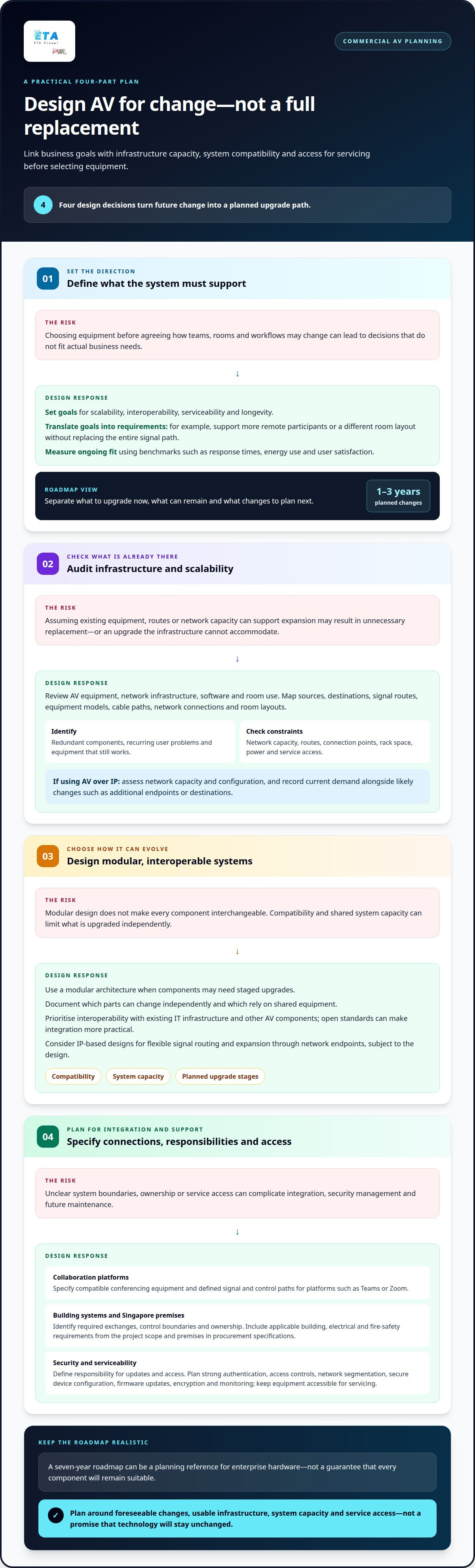
Plan for change before selecting equipment. A structured process links business goals with infrastructure capacity, system compatibility and access for servicing.
Step 1: Set Scalability and Longevity Goals
Define what the system must support as teams, rooms and workflows change. Set goals for scalability, interoperability, serviceability and longevity, then translate them into practical requirements. For example, a meeting room might need to accommodate more remote participants or a different layout without replacing its entire signal path. Don’t treat a predicted service life as a guarantee. Design around foreseeable changes and upgrade options.
Set measurable benchmarks for performance and scalability, such as response times, energy use and user satisfaction. These measures help you assess whether the system continues to meet its purpose. A technology roadmap should also distinguish infrastructure to upgrade now, equipment that can remain and planned changes over the next one to three years.
Step 2: Audit Infrastructure and Scalability
Review existing AV equipment, network infrastructure, software and room use before choosing a design. Identify outdated or redundant components, recurring user problems, signal routes and equipment that still works. An audit can show where existing hardware can integrate with a new system, avoiding unnecessary replacement.
Assess the constraints on expansion: network capacity, available routes, connection points, rack space, power and access for servicing. For AV over IP, network capacity and configuration are central to performance. Record current demand and likely changes, such as additional endpoints or destinations. Use these findings to set scalability measures rather than assuming the existing infrastructure can support future equipment.
Step 3: Design Modular, Interoperable AV Systems
Choose a modular architecture when components may need staged upgrades. Its flexibility depends on module compatibility and system capacity, so document which parts can be changed independently and which rely on shared equipment. Modular design can support longevity, but it doesn’t make every component interchangeable.
Prioritise interoperability with existing IT infrastructure and other AV components. Open standards can make integration more practical, while IP-based designs can support flexible signal routing and expansion through network endpoints. For Singapore workplaces, a workplace AV integration approach should also account for room use, infrastructure and future changes.
Step 4: Plan Integrations and Requirements
Specify how collaboration platforms and building systems will connect. Commercial AV can integrate with Teams or Zoom through compatible conferencing equipment and defined signal and control paths. Building management integration depends on the systems involved, so identify required exchanges, control boundaries and ownership during design.
For Singapore installations, identify applicable building, electrical and fire-safety requirements from the project scope and premises, then include them in procurement specifications. Reduce cybersecurity risks through strong authentication, access controls, network segmentation, secure device configuration, firmware updates, encryption and monitoring. Document who manages updates and access, so security responsibilities remain clear after commissioning.
What Does It Mean to Future-Proof AV Infrastructure?
Choose an architecture based on the signals, rooms and network capacity your organisation needs. A practical assessment turns existing infrastructure into a roadmap for systems that can evolve.
Audit Existing AV Infrastructure
Map each audiovisual source, destination and signal route, from a laptop input to a display or room speaker. Record equipment models, cable paths, network connections and room layouts, then identify functional components that can stay. If AV over IP is in use, include network capacity and configuration in the assessment. This inventory gives you a clear view of existing constraints and usable infrastructure.
Include the people who operate and support the system. Facilities staff may identify access constraints, while IT can explain network dependencies. Compare how platforms and equipment are used across rooms, not just how they appear in a rack diagram.
Build a Technology Roadmap
Use the audit to separate immediate requirements from later upgrades. Identify what to replace now, what can stay and what to plan for over the next one to three years. For example, a business might retain reliable control equipment while scheduling a display upgrade separately.
Set the roadmap around actual routing needs, planned room changes and system capacity. Enterprise hardware can be planned around a seven-year roadmap, but that timeframe is a planning reference, not a guarantee that every component will remain suitable. Assign an owner to each planned change to keep the roadmap connected to procurement and operations.
Choose Routing and Infrastructure
Match the signal architecture to the number of sources, destinations and routes. Traditional dedicated cabling can suit a small system with stable connections. AV over IP carries audio and video across network infrastructure, allowing flexible routing and expansion through network endpoints, depending on the design.
That flexibility makes network capacity, configuration, VLANs, Quality of Service and security part of AV planning. A networked design also requires AV and network expertise, plus clear troubleshooting procedures. A specialist commercial AV system design can align signal routing with the building’s infrastructure.
Plan for Bandwidth and Standards
Specify cabling and network capacity against the signals the system must carry. Cat 6, Cat 6A or fibre may suit different applications. Shielded Category 6A supports 10 Gbps Ethernet, while Category 6A is recommended for HDBaseT 4K/60 transmission over runs of 100 m. OM4 or OS2 fibre can handle 40-100 Gbps for signal extension.
Which AV standards and protocols should commercial systems support? Prioritise open standards and protocols compatible with the chosen endpoints, existing IT infrastructure and required signal formats. Consider future demands such as 8K video, but avoid specifying bandwidth without checking the complete signal path, network capacity and equipment compatibility.
Hybrid work and changing workplace needs
Plan workplace AV around what people do in each space, not just its current furniture or equipment. A hybrid-ready design should support in-room collaboration and remote participation while adapting to changes in how the room is used.
Map work activities to room functions. Document how teams use meeting rooms, training spaces and breakout areas. A room for client presentations may need clear camera views and reliable content sharing, while a brainstorming area may need movable displays and wireless connectivity. This activity-based approach helps specify equipment around real collaboration needs instead of assuming every room requires the same setup.
Include likely changes in workforce size and work styles in your planning. If a room shifts between team workshops and formal meetings, consider how users will connect devices, share content and hear remote participants in either layout.
Design meetings for remote participants. Select conferencing equipment and room layouts that capture voices and views across the space. Noise cancellation, automatic speaker tracking and multi-camera setups can help remote attendees follow discussion in larger or more complex rooms. Their value depends on room geometry, seating and meeting format, so map these factors before specifying equipment.
Plan compatibility with platforms such as Zoom, Microsoft Teams or Google Meet. Define how users will start meetings, share content and switch between in-room and remote participants. Clear, consistent controls reduce friction when staff move between rooms or use different conferencing platforms.
Allow rooms to change purpose. Use movable displays and wireless connectivity where teams need to reconfigure spaces for presentations, workshops or breakout discussions. Check that power, signal access and network coverage work in each intended layout. A fixed installation may suit a dedicated boardroom, while a flexible room needs equipment and controls that continue to work after the furniture moves.
Consider AI-enabled features such as auto-framing cameras and voice-activated controls when they suit the meeting workflow. Treat them as specific functional requirements, not assumptions: define which tasks they should support and how users will operate them.
Extend the same planning to learning spaces. Hybrid classrooms can combine projectors, webcams and wireless screen-sharing tools with learning management systems. Map how educators present material, interact with in-person learners and include remote participants. This helps identify the connections needed between audiovisual equipment and digital learning platforms.
Interactive AV tools can also support employee onboarding and ongoing learning. Plan content sharing and camera coverage around the teaching format, then keep controls consistent across rooms where possible. This makes collaboration easier to adopt as learning needs evolve.
Keeping switching, processing, and control serviceable
Serviceability takes more than choosing replaceable hardware. Accurate equipment records, accessible components and clear control logic help teams maintain performance as individual parts become outdated.
Trace every source and signal path. Document how a laptop, conferencing system or media player reaches each processor, switcher and display. Include cable routes, network connections, control systems and equipment models. A signal-flow diagram makes it easier to locate a fault when a display shows no image or a room receives the wrong source.
Review the diagram against the installed system after changes. If a switcher or processor is replaced, update its connections and configuration record instead of relying on an old drawing. This keeps troubleshooting grounded in the actual hardware path.
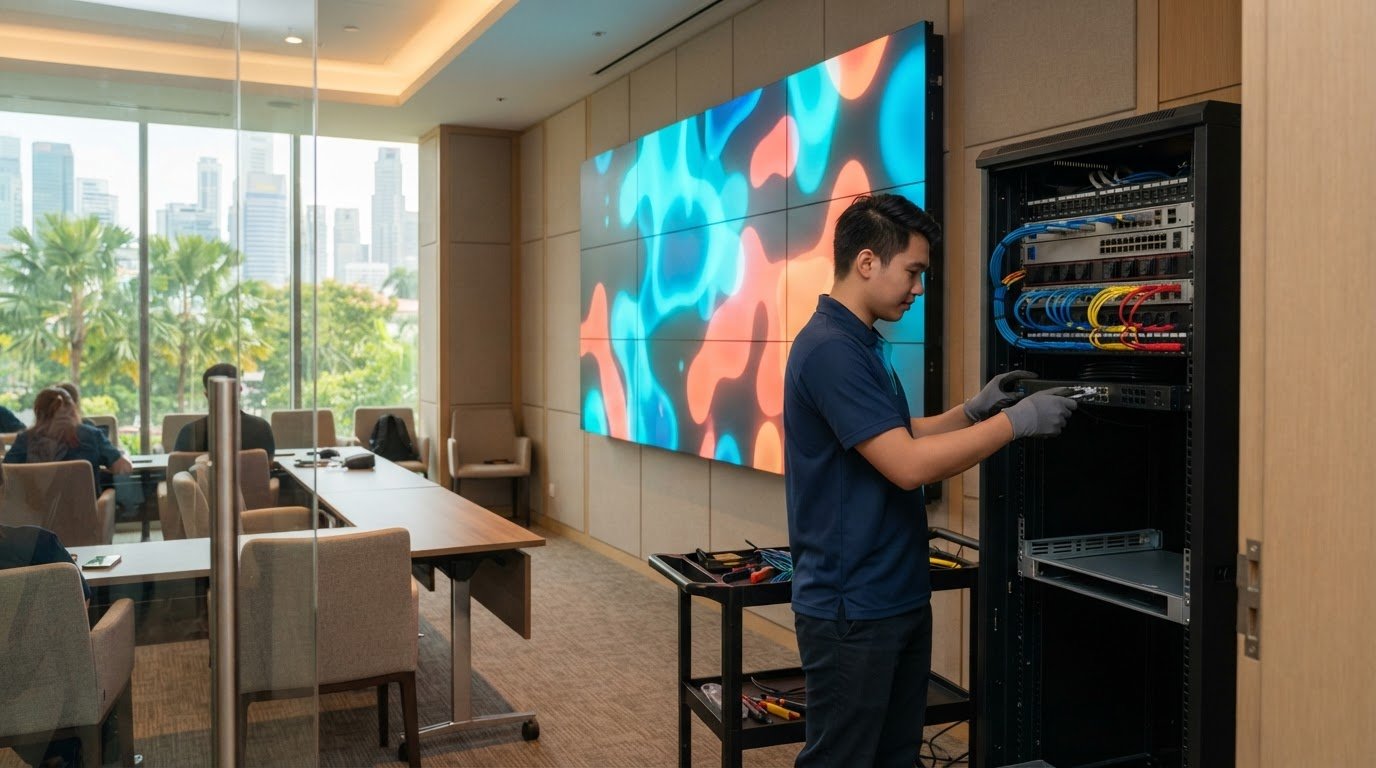
Keep service access in the design. Place switching and processing equipment where technicians can identify connections and remove components without disturbing other systems. Label cables at both ends, leave clear working access around racks and group equipment by function, such as video processing and room control.
Installation access in offices and malls can depend on site conditions and building management arrangements. Plan maintenance routes, equipment locations and permitted work periods around these constraints. A component that’s difficult to reach is harder to inspect or replace.
Manage devices and configurations centrally. Where appropriate, use AV management platforms to view device status, connectivity, performance, software and firmware versions, usage and system alerts. This gives IT and facilities teams a more consistent view than checking each room manually. Document control configurations and software versions so support staff can distinguish a device fault from a configuration change.
Assign clear responsibility for reviewing alerts and applying updates. Remote management can simplify routine oversight across rooms, while a record of changes helps teams understand when a control system started behaving differently.
Automate only defined tasks. Smart controls can switch off idle equipment or adjust power and audio settings. For example, a meeting room can follow a documented standby sequence after use while preserving the controls needed for the next session. Test each automation against actual room use to avoid interrupting a presentation or disconnecting an active meeting.
Plan upgrades by component instead of automatically replacing the entire system. An organisation may replace outdated displays while keeping reliable control systems, processors or switching hardware. Review compatibility and configuration before each change to protect the value of the existing AV investment.
Comparing fixed, matrix-based, modular, and AV-over-IP systems
Choose an architecture by mapping source-to-destination routes, expected changes and support requirements. A simple meeting room with fixed connections has different needs from a site routing content to several rooms.
Use fixed point-to-point routing for stable, limited connections. Dedicated cables connect defined sources to destinations, such as a presentation laptop to a room display. This approach can be straightforward to operate when routes are few and unlikely to change. Adding a destination, however, may require extra cabling or replacement of signal-path components. Document each route during installation so future troubleshooting follows the actual connection path.
Choose this design when a room has a predictable purpose and doesn’t need to route multiple sources between several displays. It becomes less adaptable if meeting formats change or users regularly need different signal paths.
Select a matrix system when users need centralised routing. A matrix switch assigns multiple sources to multiple destinations, allowing staff to direct content to different rooms or displays. Routing capacity can be expanded by adding or replacing switching hardware, depending on the system design. The trade-off is central dependency: configuration and control requirements need active management.
Map the routes users need before specifying the matrix. For example, decide whether a source in one meeting room must reach a display elsewhere. Include control settings and staff procedures in the design, as incorrect configuration can make available routes difficult to use.
Consider modular hardware for staged upgrades. A modular system can allow compatible components to be added or replaced individually. This can support phased changes without replacing every part at once, but module compatibility and system capacity determine the upgrade options. Keep a record of installed modules and their configurations so later changes fit the existing design.
Modularity doesn’t remove the need to assess dependencies. An unsupported component may still need replacing, and any new module must work with the system’s other hardware and software. Choose this approach when upgrades are likely to happen incrementally.
Use AV over IP when network-based distribution fits the site. It transports audiovisual signals over network infrastructure, enabling flexible routing and expansion through network endpoints, depending on the design. This can suit organisations adding destinations or changing layouts. Network capacity and configuration are central to performance, and operation requires both AV and network knowledge.
Compare all four designs against route stability, expansion needs, configuration and support capacity. Fixed routing suits a few stable paths; matrix systems centralise multiple routes; modular designs support compatible component changes; AV over IP uses the network for distribution. Match the architecture to the work, not a technology label.
ETA Visual: Retail Background Music Systems
ETA Visual designs and installs Retail Background Music Systems for businesses planning sound around their store layout. If you’re changing a floor plan, adding customer areas or updating your AV setup, consider how music should serve each part of the space.
Retail sound zoning can help define where audio is heard and how different areas are managed. Planning should account for the store layout, customer and staff needs, speaker placement and how the system will be operated. These choices help make the audio setup suitable for the retail environment.
Contact ETA Visual to discuss a Retail Background Music System for your store.
Plan the next upgrade with purpose
Future-proofing commercial AV systems is an ongoing planning decision, not a promise that technology will never change. Treat each upgrade as a chance to align the system with how your business operates now, and record the decisions that will guide its next phase.
A useful next step is to identify the change your team most needs and define what success would look like. A clear brief gives the project a practical starting point and keeps technical decisions connected to business priorities.
With a clear priority and a considered plan, your next AV decision can support the way your business grows.
Can a commercial AV installation really be future-proof?
Not completely, because future devices and workplace practices can introduce requirements today’s system can’t predict. The practical goal is to make future changes manageable. For example, define how your business will assess proposed changes before approving them: consider user impact, installation disruption and whether the change supports a documented business need. This process can prevent upgrades driven only by new technology or product availability.
How Long Should AV Infrastructure Last?
A conference room AV system can be planned for a 5-10-year service life. This is a planning horizon, not a promise that every device will remain suitable for that entire period. Usage, environmental conditions and changing business needs all affect replacement decisions. Review the system when meeting formats change or users report declining performance, rather than waiting for equipment failure to trigger an unplanned project.
Should I choose a modular AV system for a commercial installation?
Choose a modular design if different parts of the installation are likely to be renewed at different times. For example, an organisation might plan display changes separately from updates to room audio. Modular construction can help limit the scope of a refresh, but it isn’t always the best option. For a small, stable room, a simpler design may avoid unnecessary configuration and management overhead.
What happens if one device in an AV signal chain is outdated?
An outdated device can prevent a particular source or content type from working, even if other equipment appears operational. A useful first response is to isolate the affected use case: test another source, input or content format, and record whether the fault follows the device or connection. For protected content, mismatched HDCP support can also affect playback; displays supporting HDCP 2.3 are one consideration in system planning.
What does future-proofing a commercial AV system involve?
It means making deliberate choices that reduce disruption when business needs change. Future-proofing commercial AV systems includes deciding who approves updates, how users receive operational guidance and how installation work will fit around business activity. For instance, a retailer may need upgrade work coordinated with store operations, while an office may prioritise keeping meeting rooms available. Include these operational decisions in the project plan alongside technical requirements.
How do AV-over-IP and traditional AV systems compare for scalability and cost?
Neither approach is always less expensive. AV over IP may need additional network work or configuration, while dedicated cabling can require new installation work when routes change. Compare labour, disruption, equipment, testing and ongoing support, not just the initial hardware. A stable, simple room may favour direct connections; a site expecting frequent routing changes should consider the wider lifecycle implications.
What commercial AV hardware is most likely to become obsolete, and when?
Devices that depend on changing content formats, conferencing features or software support can become unsuitable before they physically fail. Pay attention to cameras, codecs, signal processors and control platforms when a business changes its meeting tools or content sources. There’s no reliable universal date for obsolescence. Track whether each device still supports the tasks staff need, and use that assessment to plan replacement before normal operations are interrupted.
What should a commercial AV system design include for upgrades and expansion?
Include acceptance tests based on real use, such as joining a meeting, sharing a laptop presentation and restoring the system after a restart. Define who signs off each test and how staff will learn routine operation. For phased installations, specify how to test each stage before the next begins. These measures help confirm the system works for its intended users, rather than relying only on equipment being powered on.
Visual planning reference
| Planning factor | What to define | Why it matters |
|---|---|---|
| Viewing positions | Nearest viewing distance and audience locations | Supports an appropriate pixel-pitch and screen-size decision. |
| Content workflow | Input sources, resolutions and control workflow | Helps ensure information remains readable and simple to operate. |
| Installation conditions | Structure, access, power, ventilation and maintenance access | Aligns the display scope with the physical site before procurement. |
Want an accurate budget for your space?
We'll do a free site survey and prepare a clear, itemised quotation — no obligation.
Frequently asked questions
Not completely, because future devices and workplace practices can introduce requirements today’s system can’t predict. The practical goal is to make future changes manageable. For example, define how your business will assess proposed changes before approving them: consider user impact, installation disruption and whether the change supports a documented business need. This process can prevent upgrades driven only by new technology or product availability.
A conference room AV system can be planned for a 5–10-year service life. This is a planning horizon, not a promise that every device will remain suitable for that entire period. Usage, environmental conditions and changing business needs all affect replacement decisions. Review the system when meeting formats change or users report declining performance, rather than waiting for equipment failure to trigger an unplanned project.
Choose a modular design if different parts of the installation are likely to be renewed at different times. For example, an organisation might plan display changes separately from updates to room audio. Modular construction can help limit the scope of a refresh, but it isn’t always the best option. For a small, stable room, a simpler design may avoid unnecessary configuration and management overhead.
An outdated device can prevent a particular source or content type from working, even if other equipment appears operational. A useful first response is to isolate the affected use case: test another source, input or content format, and record whether the fault follows the device or connection. For protected content, mismatched HDCP support can also affect playback; displays supporting HDCP 2.3 are one consideration in system planning.
It means making deliberate choices that reduce disruption when business needs change. Future-proofing commercial AV systems includes deciding who approves updates, how users receive operational guidance and how installation work will fit around business activity. For instance, a retailer may need upgrade work coordinated with store operations, while an office may prioritise keeping meeting rooms available. Include these operational decisions in the project plan alongside technical requirements.
Neither approach is always less expensive. AV over IP may need additional network work or configuration, while dedicated cabling can require new installation work when routes change. Compare labour, disruption, equipment, testing and ongoing support, not just the initial hardware. A stable, simple room may favour direct connections; a site expecting frequent routing changes should consider the wider lifecycle implications.
Plan the next step
Continue with a relevant solution and real Singapore project evidence.