Fine Pitch LED Wall Design and Display Quality for Boardrooms
Written and reviewed by the ETA Visual Engineering & Project Team. Guidance is updated when project, product or Singapore site-planning practices change.
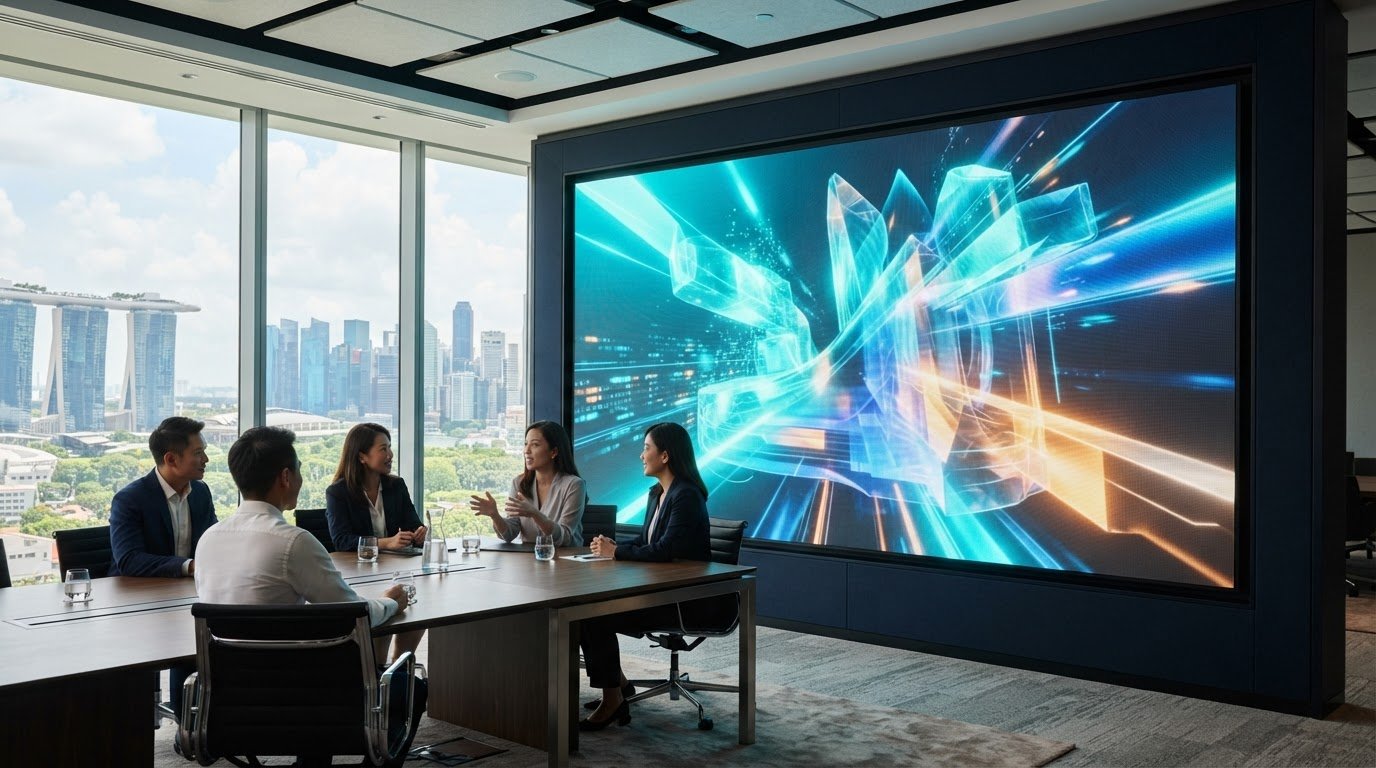
Pixel pitch can matter more than screen size when boardroom viewers sit close to the display. For a fine pitch LED wall for boardrooms, pixel pitches from P0.93 to P1.87 are recommended for clear viewing at typical meeting-room distances of 2-4 m. A smaller pitch packs pixels more tightly, helping fine text, charts and video appear clearer at close range. That clarity is only one part of a successful boardroom display. The wall must also suit the room layout, work with the content and conferencing equipment in use, and remain practical to maintain. This article explains how pixel pitch affects viewing, what a seamless LED surface changes compared with a multi-panel display, and which performance and maintenance considerations matter in a Singapore boardroom. You’ll also see how screen dimensions, brightness, heat dissipation and access for servicing influence the design, so you can assess the full system rather than choosing on resolution alone.
Key Takeaways
- Match pixel pitch to where participants sit and the level of detail they need to read, rather than choosing the smallest pitch by default.
- Consider whether a continuous LED surface better suits your presentation style than the visible joins of an LCD video wall.
- Plan screen dimensions and resolution around the boardroom layout, seating positions and content format.
- Assess brightness, refresh performance, contrast and viewing angles together to support clear presentations and video calls.
- Make front access and module-level servicing part of the design to simplify maintenance over the display’s working life.
Table of Contents
- What is Ultra-Fine Pixel Pitch and Why Does it Matter?
- Seamless LED wall design compared with LCD video walls
- What Is a Fine Pitch LED Display for Meeting Rooms?
- Brightness, refresh rate, contrast and viewing angle
- LED panel lifespan and front-service maintenance
- ETA Visual: Indoor P0.9~P5 LED Screens
What is Ultra-Fine Pixel Pitch and Why Does it Matter?
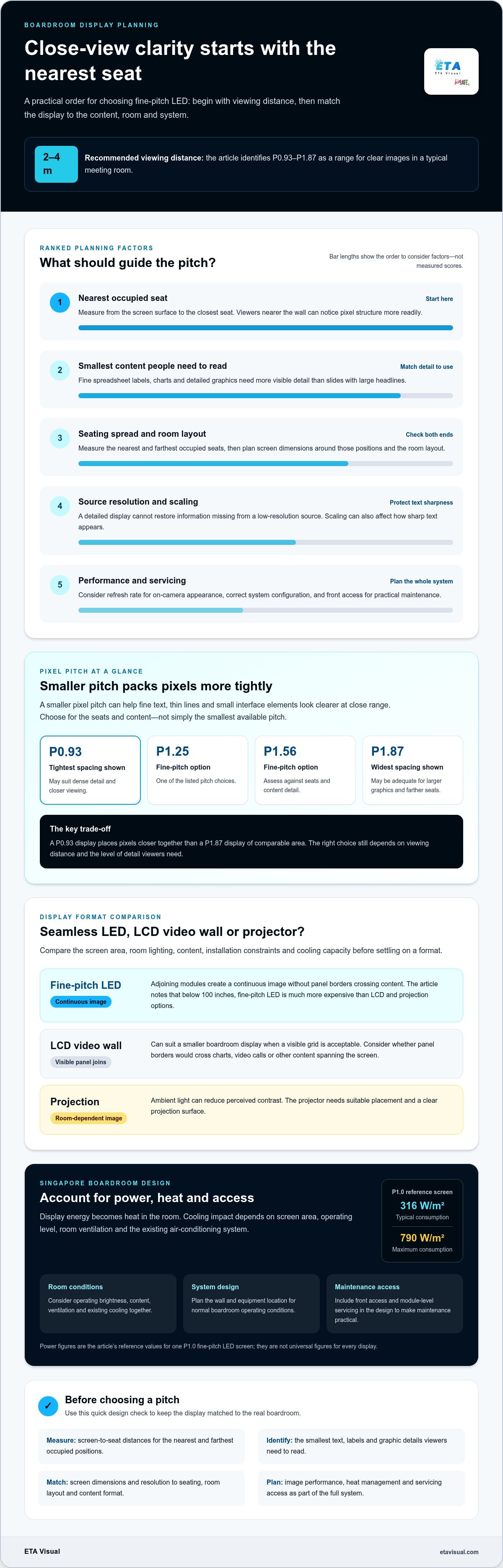
Pixel pitch is the distance between adjacent pixel centres, measured in millimetres. A smaller pitch means more pixels in the same screen area. To plan screen size, measure the nearest and farthest viewing positions, then match the display dimensions and content resolution to those seats and the room layout.
For boardroom viewing at 2-4 m, P0.93-P1.87 is a recommended range for clear images. The right choice depends on whether people need to read fine text, inspect detailed graphics or mainly follow presentations.
Pixel Pitch and Viewing Distance
Viewing distance is the space between a seat and the screen, and it helps determine how fine the pixel pitch needs to be. At 2-4 m, P0.93-P1.87 can support clear viewing in a typical meeting room. Consider the closest seat first: viewers nearer the display can notice pixel structure more readily than people seated farther away.
Measure from the screen surface to the nearest and farthest occupied seats, not the room’s overall length. Then consider the content: small spreadsheet labels need more visible detail than slides with large headlines. This gives the design a practical basis without assuming one pitch suits every boardroom.
Pixel Density for Close Viewing
Pixel density describes how closely pixels are packed across a screen, and it increases as pixel pitch decreases. For example, a P0.9 display places pixels closer together than a P1.87 display of comparable area. That tighter spacing can help preserve detail when participants sit close to the wall.
Fine pitch options include 0.93, 1.25, 1.56 and 1.87 mm. These differences affect how smoothly text edges, thin lines and small interface elements appear at close range. A P0.93 screen may suit content with dense detail, while a larger pitch may be adequate when presentations use larger graphics and viewing positions are farther back.
Image Clarity at Close Range
Fine pixel pitch supports close-view clarity by reducing the visible gaps between pixels. This matters when boardroom participants read charts, review designs or share documents with small labels. A display with a 3 mm pitch could look grainy at close range, even though that pitch worked well for larger venues a few years ago.
Screen clarity also depends on the source content and how it is displayed. A detailed screen cannot restore information missing from a low-resolution source, and scaling can affect text sharpness. Match the screen’s pixel structure to the content people will use, including video calls, presentation slides and shared applications.
For a fine pitch LED wall for boardrooms, consider pixel pitch alongside seating distance and the smallest content people need to read. Refresh rate also affects how the screen appears on camera, while image performance depends on correct system configuration. Treat pitch as one design decision, not a stand-alone measure of display quality.
Seamless LED wall design compared with LCD video walls
A fine-pitch LED wall creates a continuous image across adjoining modules, while LCD video walls have visible panel borders. This matters in a boardroom where charts, video calls and branded content may span the screen. The right choice depends on display size, viewing conditions, room design and intended use.
At sizes below 100 inches, fine-pitch LED displays are described as much more expensive than LCD and projection options. LCD panels can suit a smaller boardroom display, particularly when a visible grid is acceptable. As the image area grows, the uninterrupted LED surface can make presentations feel more cohesive, without panel bezels crossing content.
Projectors avoid a tiled panel grid, but their image depends on the room and projection setup. Ambient light can reduce perceived contrast, and the projector needs suitable placement and a clear projection surface. LED walls generate the image at the screen. For a boardroom used for video calls and detailed presentations, compare how each option handles lighting, content and installation constraints.
Power and heat should be considered alongside image quality. As a reference, one P1.0 fine-pitch LED screen lists typical power consumption of 316 W/m² and maximum consumption of 790 W/m². Electrical energy used by a display becomes heat in the room, so the cooling impact depends on screen area, operating level, room ventilation and the existing air-conditioning system.
For Singapore offices, include heat management in the room design rather than treating the screen as an isolated device. The display’s operating brightness and content affect power demand; the room’s ventilation and cooling determine how that heat is managed. Good heat dissipation also helps protect internal electrical components. A suitable design accounts for the wall, equipment location and the boardroom’s normal operating conditions.
LED walls also create a large, consistent canvas for corporate branding. One screen can show presentation slides, video calls and branded backdrops rather than splitting those functions across smaller panels. In retail environments, the same seamless presentation can support campaign visuals across a larger area, although boardroom meeting needs should guide the design.
Before selecting a format, compare total screen size, room lighting, content types, power requirements and the practical effect of panel joins. A video wall that looks impressive in a showroom may not suit a boardroom with limited space or cooling capacity. A useful LED and LCD video wall comparison can help frame these trade-offs for a Singapore project.
What Is a Fine Pitch LED Display for Meeting Rooms?
A meeting-room LED display combines modular panels into a screen sized for the room, resolution and seating layout. In Singapore, building approvals depend on the premises and installation scope; coordinate with building management and relevant authorities on applicable requirements. The design must also account for wall support, electrical supply, cable routes, heat and sound from cooling equipment.
Boardroom Display Configurations
A boardroom configuration is the planned arrangement of LED cabinets, resolution and screen dimensions for a particular meeting space. It matters because the cabinet grid determines the final image size and pixel resolution. A 16:9 layout can suit presentation slides and video calls, while a panoramic format may better fit a wide boardroom wall.
Room dimensions and seating positions shape the practical choice. For example, a single long table in a 6-8 m boardroom can use a display around 3.0-3.5 m wide and 1.7-2.0 m high. These dimensions are an example, not a fixed standard. Keep sightlines, ceiling height and the screen’s position relative to the table in view.
Standard 1080P and 4K Configurations
A standard 1080P LED wall has a resolution of 1920×1080 pixels, while a 4K configuration provides greater pixel resolution. Choosing between them matters because the source resolution, screen dimensions and content detail must work together.
Examples of 1080P layouts include a 108-inch 4×4 array at 1.2 mm pitch, a 136-inch 5×5 array at 1.5 mm, and a 163-inch 6×6 array at 1.8 mm. A 217-inch 8×8 array at 2.5 mm is another example. For 4K, examples include a 163-inch 6×6 array at 0.9 mm, a 217-inch 8×8 array at 1.2 mm, and a 271-inch 10×10 array at 1.5 mm. These configurations show how pitch and cabinet count affect the overall format.
Modular and Installation Configurations
Modular LED displays use cabinets assembled into a larger screen, so the module arrangement determines its dimensions and shape. This matters when a boardroom needs a format beyond a single standard display. A 16:9 wall is one option; corner installations can also use 90-degree splicing, subject to the display system’s design.
Installation planning connects the display to the room’s structure and systems. Check wall support for the assembled cabinets, electrical capacity for the screen, and routes for signal and power cabling. Acoustic comfort also matters: fan noise or cooling equipment can distract during discussion, so include ventilation and operating sound in the design. In Singapore offices, coordinate access, work timing and cable pathways with building management before installation begins.
Brightness, refresh rate, contrast and viewing angle
Image quality depends on how brightness, colour, grayscale, refresh rate and viewing angle work together. In a Singapore boardroom, assess these characteristics under the room’s actual lighting and seating conditions.
Brightness and Colour Performance
Brightness is the screen’s light output, while colour performance describes how accurately it reproduces shades. Both affect whether slides and video appear clear in a boardroom. Indoor meeting-room LED displays commonly list brightness ranges of 600-1,200 nits, but a high maximum is not a reason to run the screen at full output.
Boardroom and showroom LED walls usually operate at 30% brightness or less. This can reduce glare during presentations and make extended viewing more comfortable. Test skin tones, brand colours and presentation graphics at the intended operating level. A bright corporate logo and a detailed video call place different demands on colour consistency.
Brightness and Grayscale Across Lighting Conditions
Grayscale describes the display’s ability to show gradations between dark and bright areas. Fine-pitch LED displays can offer 24-bit grayscale, supporting smooth transitions in gradients and shadow detail. This matters when a boardroom screen shows dark presentation backgrounds, product imagery or video with subtle changes in tone.
Daylight and dimmed lighting can change how image details appear. Compare the same image with the room lights on and lowered, then set brightness for the usual meeting conditions. For example, a dark video frame may lose visible detail if the display is too dim for a brightly lit room.
Contrast Under Ambient Lighting
Contrast is the visible difference between the darkest and brightest parts of an image. Ambient light can make dark areas look lighter, reducing perceived contrast even when the screen itself is unchanged. In a boardroom with bright windows, review black text, dark slides and detailed images from seats around the table.
Balance brightness and contrast rather than maximising either independently. Higher output may help content remain legible in a bright space, but excessive brightness can cause discomfort during long meetings. Test typical content under the room’s usual lighting, including a presentation slide and video-call view, before setting operating levels.
Refresh Rate and Viewing Angle
Refresh rate describes how often the screen updates its image, while viewing angle indicates how far off-centre people can sit and still see it clearly. Both matter for video calls, camera recordings and seating spread across a wide table. A suitable viewing angle helps participants at the sides see a consistent image.
Indoor fine-pitch LED displays commonly list viewing angles around 160-178°. Check the manufacturer’s viewing-angle measurement alongside actual seating positions, since the screen’s installation height and orientation also affect sightlines. For camera use, test moving content and presentations through the intended video-conferencing setup. Refresh-rate performance and camera settings together influence how the screen appears on camera.
LED panel lifespan and front-service maintenance
Fine-pitch LED products often have a stated lifespan of 100,000 hours or more, but that figure isn’t a maintenance schedule or a guarantee of uniform performance. In a boardroom, practical serviceability matters because a fault affecting one module shouldn’t require dismantling the entire display. Check how modules, power supplies and other serviceable components can be accessed.
Front-service maintenance lets technicians reach modules and electronics from the screen’s front. This is useful when a wall sits close to a partition or has no rear access. A front-service module can be removed with a dedicated tool for repair or replacement, without taking down the full display. The service method depends on the display’s construction.
Some LED cabinets use magnetic modules that attach to the cabinet and can be removed from the front with the appropriate service tool. This can make access more direct, but careful handling and accurate replacement are still necessary. Modules must match the display’s pitch and cabinet format to align correctly with the surrounding surface.
Plan access before installation. Identify where technicians will stand, how they will reach the screen, and whether nearby furniture or room fittings need to move. In Singapore offices, coordinate maintenance access with building management and consider the boardroom’s meeting schedule. A front-service design can reduce dependence on clearance behind the wall, but safe access to the front remains essential.
Spare modules can help shorten troubleshooting when a component needs replacement. Store them in suitable conditions and keep them matched to the installed display, including its pixel pitch and configuration. For example, a spare module for a P1.0 screen isn’t automatically suitable for a screen with a different pitch. During commissioning, record module positions and system settings to support accurate diagnosis later.
After replacing a module, check the image across the repaired area and adjacent panels. Differences in colour or brightness can make a repair noticeable, especially on uniform backgrounds. Displays with onboard flash memory can load stored calibration data after module replacement, helping restore the original calibration. Check the visual match during servicing to keep presentations and video calls consistent.
Maintenance planning should also cover routine inspection, cleaning methods and fault reporting. Singapore’s humid environment makes suitable room conditions and careful cleaning relevant to long-term upkeep. Avoid treating a lifespan figure as a reason to defer inspection; operating conditions and component faults still influence maintenance needs. A planned LED display maintenance approach supports more predictable servicing.
ETA Visual: Indoor P0.9~P5 LED Screens
ETA Visual offers Indoor P0.9~P5 LED Screens for boardrooms that need a display planned around viewing distance, content and room layout. The suitable pixel pitch is only one part of the design: screen dimensions, operating brightness, conferencing needs and access for future servicing also affect how well the installation works day to day.
Bring these requirements together early, especially when connecting the display to existing meeting-room equipment or planning a new boardroom. ETA Visual designs and installs LED display solutions around the space and its intended use, rather than treating the screen as a stand-alone purchase.
Contact ETA Visual to discuss your boardroom display requirements.
Plan the Boardroom Around the Display
Include the display in the boardroom plan from the outset, before furniture and room systems are fixed. This lets the screen, seating, conferencing equipment and maintenance access work together. The right fine pitch LED wall for boardrooms should support how your team presents, collaborates and makes decisions while fitting the room’s practical constraints.
Before design begins, bring together the room layout, typical content, meeting technology and operational needs. These details help shape a solution for the business over time, rather than focusing on the screen alone. ETA Visual offers indoor LED screens alongside other display types for commercial applications, including outdoor billboards and transparent displays.
Share your boardroom requirements with ETA Visual to discuss a suitable next step.
A well-planned display can become a dependable part of everyday collaboration. When you’re ready, discuss your boardroom requirements with ETA Visual.
What pixel pitch is best for a 3-5 meter viewing distance?
There isn’t one pitch that can be selected from distance alone, particularly across a 3-5 metre seating range. Note the nearest seat, the farthest seat and the smallest details shown in meetings. For a room extending beyond the typical 2-4 metre viewing range, assess those positions against actual presentation material rather than assuming a pitch recommendation applies unchanged.
What pixel pitch is suitable for a fine-pitch LED wall in a boardroom?
Choose a pitch by considering the closest viewing position, the display’s physical dimensions and the detail participants need to see. A room used mainly for presentation slides may have different requirements from one used to review detailed plans or dense data tables. Ask for a visual assessment using representative content and seating positions, rather than deciding from a specification sheet alone.
How does a fine-pitch LED wall compare with an LCD video wall or projector for boardrooms?
Compare options against the room’s operating needs, not just their appearance in a showroom. Consider how often the display will be used, whether presentations need to fill the screen, where equipment can be mounted and how the room is lit. A smaller display may make LCD or projection more practical, while a larger presentation canvas may favour LED. The right choice depends on the project’s priorities.
What brightness, resolution, refresh rate, and color specifications should boardroom LED displays have?
Review specifications against the material the boardroom actually displays. Check that the screen can reproduce the resolution of connected presentation sources, then assess text, gradients, brand colours and video-call faces using real content. For camera use, test moving images through the conferencing system and camera. This can reveal issues a specification list alone may not show.
How are fine-pitch LED walls installed, calibrated, and integrated with video conferencing systems?
Plan how each meeting source reaches the display, including laptops, room computers and conferencing equipment. Confirm how users switch between sources and whether shared content appears in the intended format. During handover, test a typical meeting from the presenter’s position and participant seats. Include the room camera to check that screen content and people remain clear during video calls.
What are the maintenance, lifespan, warranty, and repair risks of fine-pitch LED walls?
Review warranty documents for coverage, exclusions, parts and labour, and keep them with system records. A stated lifespan is not the same as a warranty or a prediction of when repairs will be needed. For operational planning, identify how faults are reported, which components can be replaced, and whether preventive maintenance or emergency on-site repair suits the room’s use.
What is the cost of a fine-pitch LED wall in Singapore, including installation?
Below 100 inches, fine-pitch LED walls are much more expensive than LCD and projection options; above 100 inches, their pricing becomes competitive. No installation cost figures are available.
Visual planning reference
| Planning factor | What to define | Why it matters |
|---|---|---|
| Viewing positions | Nearest viewing distance and audience locations | Supports an appropriate pixel-pitch and screen-size decision. |
| Content workflow | Input sources, resolutions and control workflow | Helps ensure information remains readable and simple to operate. |
| Installation conditions | Structure, access, power, ventilation and maintenance access | Aligns the display scope with the physical site before procurement. |
Want an accurate budget for your space?
We'll do a free site survey and prepare a clear, itemised quotation — no obligation.
Frequently asked questions
There isn’t one pitch that can be selected from distance alone, particularly across a 3–5 metre seating range. Note the nearest seat, the farthest seat and the smallest details shown in meetings. For a room extending beyond the typical 2–4 metre viewing range, assess those positions against actual presentation material rather than assuming a pitch recommendation applies unchanged.
Choose a pitch by considering the closest viewing position, the display’s physical dimensions and the detail participants need to see. A room used mainly for presentation slides may have different requirements from one used to review detailed plans or dense data tables. Ask for a visual assessment using representative content and seating positions, rather than deciding from a specification sheet alone.
Compare options against the room’s operating needs, not just their appearance in a showroom. Consider how often the display will be used, whether presentations need to fill the screen, where equipment can be mounted and how the room is lit. A smaller display may make LCD or projection more practical, while a larger presentation canvas may favour LED. The right choice depends on the project’s priorities.
Review specifications against the material the boardroom actually displays. Check that the screen can reproduce the resolution of connected presentation sources, then assess text, gradients, brand colours and video-call faces using real content. For camera use, test moving images through the conferencing system and camera. This can reveal issues a specification list alone may not show.
Plan how each meeting source reaches the display, including laptops, room computers and conferencing equipment. Confirm how users switch between sources and whether shared content appears in the intended format. During handover, test a typical meeting from the presenter’s position and participant seats. Include the room camera to check that screen content and people remain clear during video calls.
Review warranty documents for coverage, exclusions, parts and labour, and keep them with system records. A stated lifespan is not the same as a warranty or a prediction of when repairs will be needed. For operational planning, identify how faults are reported, which components can be replaced, and whether preventive maintenance or emergency on-site repair suits the room’s use.
Plan the next step
Continue with a relevant solution and real Singapore project evidence.

