Digital Posters for Shopping Malls: Singapore Buyer’s Guide
Written and reviewed by the ETA Visual Engineering & Project Team. Guidance is updated when project, product or Singapore site-planning practices change.
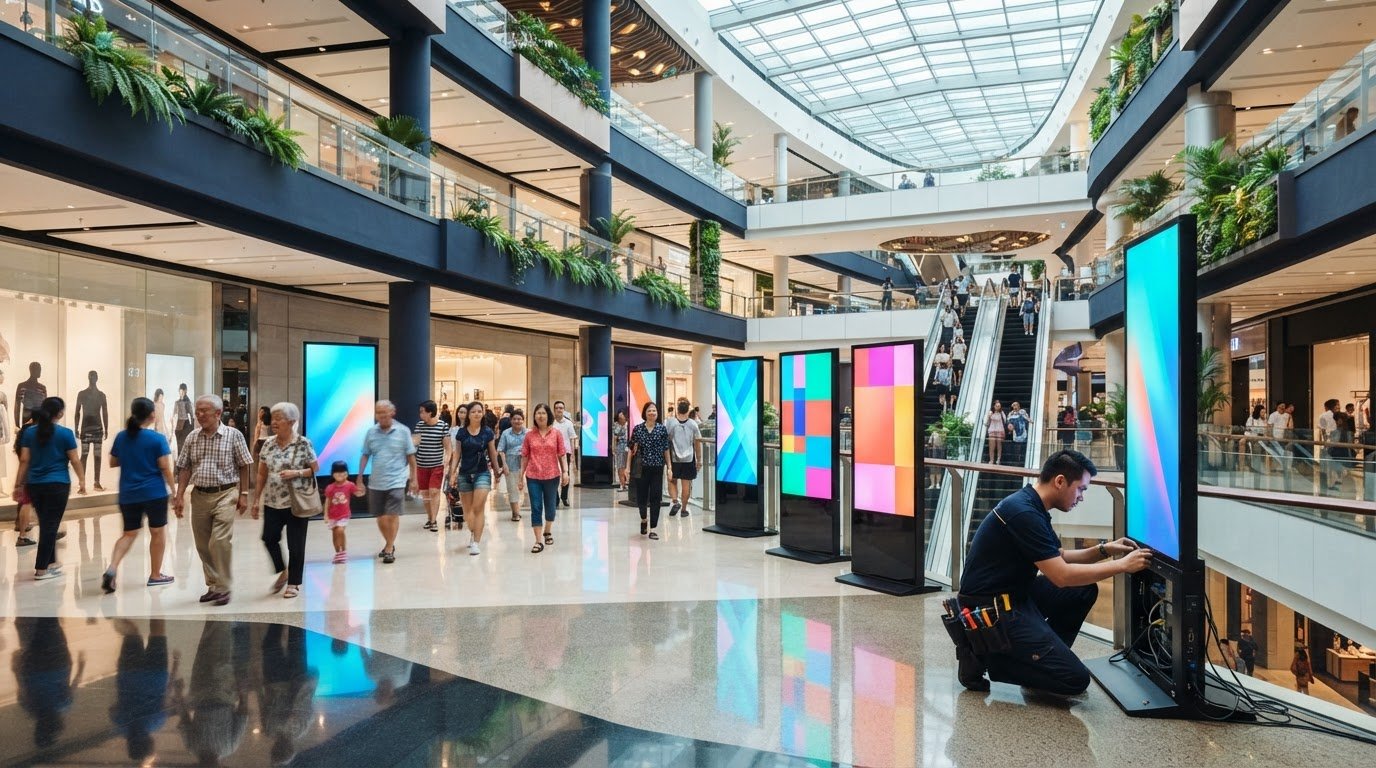
The screen with the sharpest image may still be the wrong choice for a mall site. Digital posters for shopping malls need to suit viewing distances, ambient light, available space and the way the display will be installed and maintained. Start by defining the display’s purpose and location, then assess the format and resolution. The screen is only one part of the system: mall access arrangements, building management requirements, content updates, power and signal connections, and maintenance access all affect how well a project works. Planning these details early helps avoid a display that looks right on paper but doesn’t suit the site or daily operations. This guide explains how to compare display formats and resolution, plan content and system requirements, and scope installation and ongoing support in Singapore. It covers what to assess before choosing hardware, how to account for mall operating conditions and site constraints, and why integration matters from survey through commissioning. The aim is a practical project scope built around the viewing environment and the people who will operate the system.
Key Takeaways
- Match each poster’s role, such as promotions, wayfinding or event messaging, to its placement and audience.
- Choose between LED and other digital signage formats based on the application, viewing distance and content needs, not on a single specification.
- Compare digital posters for shopping malls by location, content workflow and service access, then decide whether one screen or coordinated displays suit the site.
- Document audience flow, viewing distance and content types before system design to create a clear project scope.
- Plan the display, playback, signal flow, installation, commissioning and support together so operational needs are considered from the outset.
Table of Contents
What shopping malls need from digital posters
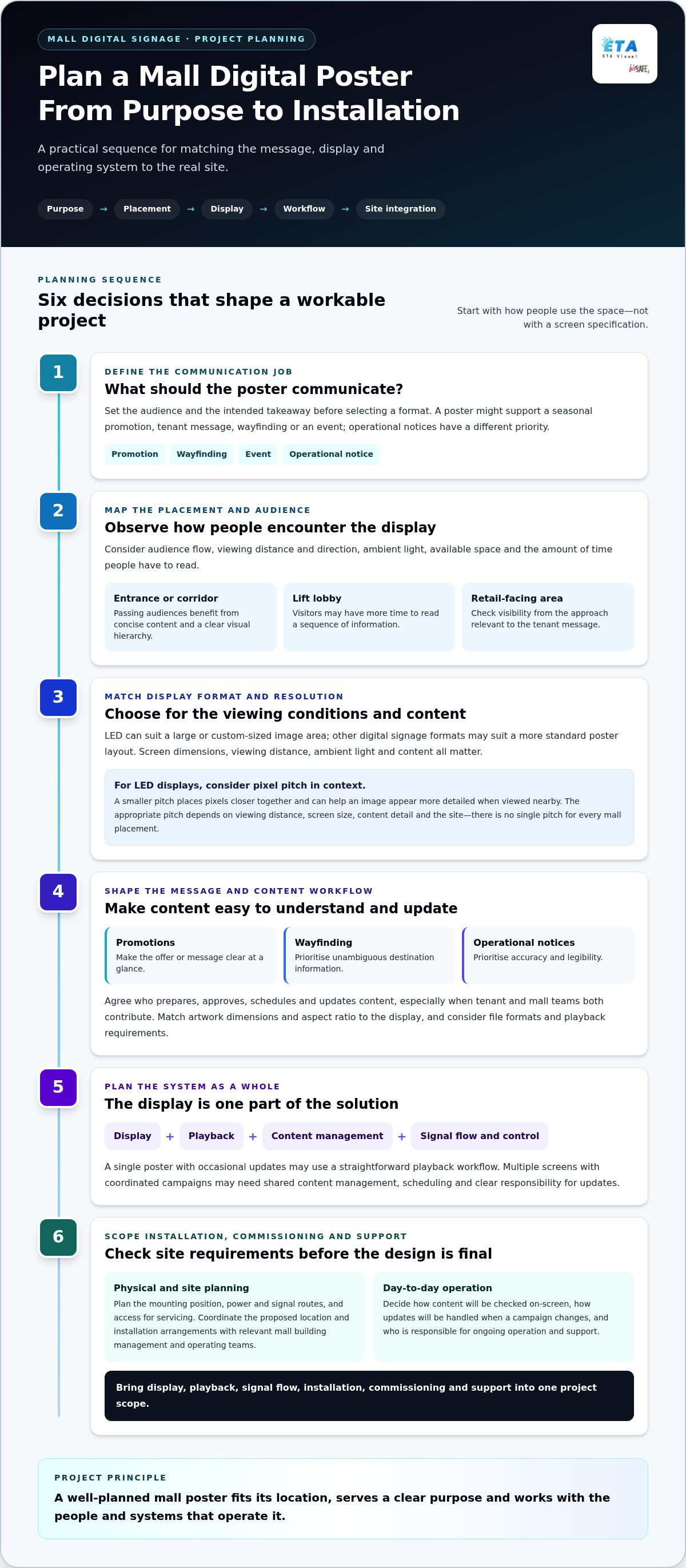
Digital posters can promote a seasonal offer, carry tenant messaging, direct visitors to a destination or communicate an event. One screen may not serve every purpose equally well. Before choosing a format, define who needs the information, where they will see it and what they should take away from it.
A digital poster is typically a display in a specific location with a defined communication role. A mall-wide signage network is broader: it coordinates screens, locations and content workflows. A single poster may operate independently, while a network can require central content management and consistent control. The right scope depends on the number of screens and who will update them.
Match the display location to its communication job
Plan around how people move through the site. At an entrance, visitors may be passing through rather than stopping, so a short promotion or event message with a clear visual hierarchy is easier to absorb. Corridors also favour concise content, particularly where people approach from different directions. In a lift lobby, visitors may have more time to read a sequence of information. A retail-facing placement can support a tenant promotion if the display is visible from the relevant approach.
Viewing distance, viewing direction and ambient light all affect readability. A message for people passing at a distance needs a different layout from one intended to be read while waiting nearby. Observe audience flow at the proposed location, then consider text size, contrast and the amount of information shown. A good-looking screen cannot compensate for poor placement or content that asks a moving audience to read too much.
Keep the content suited to its purpose. Promotions need a clear offer or call to action; wayfinding needs unambiguous destination information; operational notices need to prioritise accuracy and legibility. Mixing these messages without a clear hierarchy can make a poster harder to understand at a glance.
Why a mall display is more than a screen
A useful starting point is to define the system as a display plus content delivery and control. Playback hardware or an integrated player presents the material; content management determines how it is scheduled and updated; signal flow carries content to the screen; and control supports day-to-day operation. The components and workflow depend on the screen format and site design. For a general introduction to the medium, see this Digital Signage Overview.
One poster with occasional updates may need a straightforward playback workflow. Several screens showing coordinated campaigns may need shared content management, scheduling and clear responsibility for updates. The physical layout matters too: plan power and signal routes, mounting position and servicing access alongside the display. For a Singapore mall, coordinate the proposed location and installation arrangements with the relevant building management and operating teams. These details shape a practical digital signage system from the outset.
Planning digital posters for shopping malls around content, site conditions and operation helps match the display to its purpose. Next, compare display approaches against the viewing environment rather than assuming one format suits every placement.
How display and content choices affect mall poster performance
Select a display for the viewing conditions and the material it needs to show, not simply because it is LED or has a particular resolution. LED can suit applications that call for a large or custom-sized image area, while other digital signage formats may fit a more standard poster layout. These formats aren’t automatically interchangeable: screen dimensions, viewing distance, ambient light and content all affect the result.
Promotional artwork with large images and short headlines has different requirements from detailed maps, schedules or tenant information. The system needs to present content clearly at the intended location and support the way it will be played and updated.
Choosing an appropriate display format and resolution
Pixel pitch is the distance between neighbouring pixels on an LED display. A smaller pitch places pixels closer together, which can help an image appear more detailed when viewed nearby. The appropriate pitch depends on viewing distance, screen size, content detail and the site, so no single pitch suits every mall placement.
Assess brightness and image quality in the actual environment, including nearby lighting and changes in ambient light. For more technical context on LED formats and design considerations, see this guide to indoor LED display technology.
Plan content delivery and system control
Settle the daily content workflow before finalising the display. Who prepares artwork, approves it, schedules campaigns and updates messages? Define these responsibilities clearly, especially when tenants or mall teams contribute content. Artwork dimensions and aspect ratio should match the display layout. Consider file formats and playback requirements during system design.
Media playback, signal routing and control also need to suit the installation. One display may use a direct connection from a local player; a group of screens may need coordinated delivery and control, depending on the operating workflow. Plan how content will be checked on-screen and how updates will be handled if a campaign changes.
For campaign planning, the Out of Home Advertising Association of America discusses findings on consumer response in its Effectiveness of Digital Out-of-Home Advertising report. The practical lesson for mall teams is to align the message and creative with the placement, rather than treating the screen as a substitute for a content plan.
Effective digital posters for shopping malls connect the display, artwork and delivery workflow. ETA Visual integrates digital signage systems for commercial sites, bringing these elements into the project plan.
Compare digital poster options by installation and operating needs
A display choice affects more than what shoppers see. It also determines how content reaches the screen, how installation is coordinated and how technicians can access equipment for servicing. Compare the full operating arrangement before settling on a format. A screen that suits the viewing environment may still be difficult to manage if its location, connections or maintenance access haven’t been considered.
Single-screen placement or coordinated display network?
A single screen can suit a specific placement with a focused message and a straightforward update process. Multiple displays may call for coordinated scheduling or central oversight, particularly when campaigns need to run consistently across locations. Neither approach is inherently better: the decision depends on who manages content, how often it changes and whether each screen has a distinct role.
Display format
LED or another digital signage format, selected for the intended content, screen dimensions and site conditions.
Location
A single poster point or several placements, each assessed for audience flow, visibility and installation access.
Content workflow
One-screen updates may be managed locally; multiple screens may need coordinated scheduling and clear approval responsibilities.
Service access
Allow for inspection, cleaning and repair access, including the route to equipment and the working area around it.
Broader retail planning can help clarify how individual displays fit into a wider customer communication approach. Samsung Business Insights discusses signage in a retail context in its article on Digital Signage Impact on Retail Sales. For a Singapore-focused perspective on planning retail signage, see this retail digital signage buyer’s guide.
Assess integration, access and maintenance requirements
For mall installations in Singapore, factor in building management coordination, loading procedures, delivery routes and permitted working hours. A site survey helps establish where equipment, power and signal connections can be accommodated. Indoor conditions also vary: locations near entrances may have different heat and humidity exposure from enclosed areas, so hardware selection should reflect the actual environment.
Plan servicing access before confirming the final layout. A display mounted where it is difficult to inspect or reach can complicate routine cleaning and repair. Include the access method and any operational constraints in the project scope.
Budget for the complete scope, not just the screen. Include survey, system design, procurement, installation, commissioning and ongoing support. Requirements and site conditions determine the final project scope. A clear plan for content and maintenance responsibilities helps mall teams understand what happens after handover.
Use this checklist before specifying mall digital posters
A clear brief turns a display idea into a workable project scope. Before system design begins, document the communication goal, proposed locations, audience flow, viewing distance and content types. This gives the survey and design team a practical basis for assessing placement, connections, installation access and operating needs.
- Define the communication goal. Specify whether the display is for promotions, tenant messages, wayfinding or event updates, and identify the intended audience.
- Map the proposed locations. Record audience movement, sightlines, viewing distance, ambient conditions and any obstructions at each placement.
- Describe the content and workflow. Note the content types, how often they change, who prepares and approves them, and who schedules updates.
- Assess the site and installation. Review power availability, mounting conditions, signal routes, service access, loading arrangements and installation windows with the relevant project teams.
- Assign operating and support ownership. Clarify who manages content after handover and who coordinates routine checks, maintenance and fault reporting.
Information to prepare for a site survey
Bring a marked-up floor plan or available drawings showing proposed screen positions and dimensions. Include known sightline issues, nearby lighting, mounting constraints and existing power or data routes. If details are unavailable, note that for assessment rather than making assumptions about capacity or structure.
For Singapore mall sites, note loading access, delivery procedures and any permitted installation windows. Building management, facilities teams, tenants and project contractors may each hold information that affects access or coordination. This Singapore AV site survey guide explains the information typically considered during planning.
Commissioning and handover questions
Before handover, establish who will verify that the display presents content correctly and that playback, signal flow and control operate as designed. Agree how the operating team will make routine content updates, where approved files or schedules are managed, and how issues should be recorded and escalated. Make these responsibilities clear to both the mall team and any tenant content owner.
Confirm that technicians have practical access for inspection, cleaning and repair. In Singapore’s warm, humid environment, site conditions should inform equipment selection and maintenance planning; exact requirements depend on the location. Include these considerations in the project scope for digital posters for shopping malls, alongside installation coordination and commissioning responsibilities.
ETA Visual’s site surveys and system design help connect the brief to a practical display and integration plan.
Plan an integrated digital poster project with ETA Visual
A mall display project is easier to manage when the screen, content delivery, installation and support plan are designed as one system. ETA Visual designs, supplies, installs and maintains LED screens and AV systems for commercial spaces. The project approach starts with the site and communication goal, then brings together system design, installation and commissioning to suit the location, playback method, signal routes and day-to-day workflow.
What an integrated project process covers
The process begins with the proposed use and site conditions. A survey informs decisions about placement, mounting, power, signal routing and access. System design brings those findings together with the display format and content workflow, so equipment and connections suit the installation rather than being treated as separate decisions.
Installation is coordinated around the site plan and mall operating arrangements. Commissioning follows, with checks to confirm that the display, playback and signal flow work as intended and that the operating team can carry out its workflow. This is also the time to resolve handover questions, such as who schedules content and how routine updates are made. ETA Visual’s digital signage service integrates these planning and system requirements for commercial sites.
Support the display beyond installation
Plan maintenance before the screen is mounted. The layout should allow suitable access for inspection, cleaning and repair, while the project scope should identify who is responsible for content updates, routine checks and fault reporting after handover. Clear responsibilities help mall operators, tenants and facilities teams understand how the system will be managed.
ETA Visual provides preventive maintenance and repair support for commercial display systems. The support plan can be considered alongside the operating environment and practical access at each location, rather than left until a fault occurs. For indoor mall placements in Singapore, site conditions such as heat and humidity should also inform equipment selection and maintenance planning.
The Centrepoint Mall Shopfront project is an example of ETA Visual’s work in a mall-facing setting. Its title identifies the project context. The broader planning lesson is to define the site, display purpose and operating requirements together before finalising the system.
For digital posters for shopping malls, ETA Visual can coordinate the survey, design, installation and commissioning around your site and operational needs.
Give your mall display plan a clear next step
Turn your preferred use case into a brief that can guide decisions and keep the project aligned as it develops. For digital posters for shopping malls, start with the locations and messages that matter most, then capture what the operating team needs to manage the displays confidently. A focused initial scope can also provide a basis for considering future placements without committing to a wider network before it is needed.
Bring your site information and operational priorities to ETA Visual to shape the next steps around your requirements.
A practical plan makes it easier to move forward with clarity.
What are digital posters for shopping malls?
They are electronic displays used to present changing information or promotional content in mall environments. A poster might show a tenant offer, an event announcement or a visitor notice, with content updated digitally rather than printed and replaced. Depending on the setup, it may operate as an individual screen or as part of a wider signage system. The intended audience and purpose determine how it should be specified.
Are LED screens suitable for digital posters in shopping malls?
Yes. LED screens can suit mall poster applications, particularly where the design calls for a larger or customised display area. Suitability depends on placement, viewing distance, content detail and surrounding light. For example, a screen in a bright, open concourse needs a different assessment from one in an enclosed corridor. Select the display and installation for the actual site, not by format alone.
How do I choose the right resolution for a mall digital poster?
Start with the screen’s physical dimensions, how close visitors will stand and the level of detail the artwork needs to show. For LED, pixel pitch affects how finely the image is rendered, but there is no single pitch that works for every viewing distance. Check that the content canvas matches the display’s pixel dimensions, then review representative artwork from the intended viewing position before confirming the design.
Can mall digital posters be managed across multiple locations?
Yes. Multiple displays can be coordinated through a content management and playback arrangement designed for the operating workflow. This can help teams schedule consistent campaign material across several locations while allowing location-specific messages where needed. The system design should account for who can publish changes, how content is grouped by screen and what happens if a display goes offline. Central management depends on the selected system and site connectivity.
What should a mall digital poster site survey assess?
A survey should assess the proposed screen position, sightlines, mounting conditions, power availability and practical routes for signal cabling. It should also consider nearby light sources, heat exposure and how technicians can reach the equipment. A wall that appears suitable from the floor, for example, may have limited service access behind it. Available drawings and building management information help the design team assess these details.
How do I maintain digital poster displays in a shopping mall?
Follow the equipment manufacturer’s maintenance guidance and keep a record of inspections, cleaning and reported faults. Routine checks can include confirming that scheduled content is playing correctly and noting visible changes in image or operation. Keep vents and service areas unobstructed, and use suitable cleaning methods rather than applying liquid directly to the screen. Preventive maintenance and repair support can help manage issues through a defined support arrangement.
What affects the budget for a shopping mall digital poster project?
Budget depends on the project scope and site conditions, not only the display. Relevant items include screen format and dimensions, playback and control requirements, mounting and cabling, installation coordination, commissioning and ongoing support. Multiple placements may add content management or coordination requirements. For a useful comparison, request a scope that identifies what is included at each project stage and separates optional elements, rather than comparing screen hardware alone.
Visual planning reference
| Planning factor | What to define | Why it matters |
|---|---|---|
| Viewing positions | Nearest viewing distance and audience locations | Supports an appropriate pixel-pitch and screen-size decision. |
| Content workflow | Input sources, resolutions and control workflow | Helps ensure information remains readable and simple to operate. |
| Installation conditions | Structure, access, power, ventilation and maintenance access | Aligns the display scope with the physical site before procurement. |
Want an accurate budget for your space?
We'll do a free site survey and prepare a clear, itemised quotation — no obligation.
Frequently asked questions
A single screen can suit a specific placement with a focused message and a straightforward update process. Multiple displays may call for coordinated scheduling or central oversight, particularly when campaigns need to run consistently across locations. Neither approach is inherently better: the decision depends on who manages content, how often it changes and whether each screen has a distinct role. Display format LED or another digital signage format, selected for the intended content, screen dimensions and site conditions. Location A single poster point or several placements, each assessed for audience flow, visibility and installation access. Content workflow One-screen updates may be managed locally; multiple screens may need coordinated scheduling and clear approval responsibilities. Service access Allow for inspection, cleaning and repair access, including the route to equipment and the working area around it. Broader retail planning can help clarify how individual displays fit into a wider customer communication approach. Samsung Business Insights discusses signage in a retail context in its article on Digital Signage Impact on Retail Sales. For a Singapore-focused perspective on planning retail signage, see this retail digital signage buyer’s guide.
They are electronic displays used to present changing information or promotional content in mall environments. A poster might show a tenant offer, an event announcement or a visitor notice, with content updated digitally rather than printed and replaced. Depending on the setup, it may operate as an individual screen or as part of a wider signage system. The intended audience and purpose determine how it should be specified.
Yes. LED screens can suit mall poster applications, particularly where the design calls for a larger or customised display area. Suitability depends on placement, viewing distance, content detail and surrounding light. For example, a screen in a bright, open concourse needs a different assessment from one in an enclosed corridor. Select the display and installation for the actual site, not by format alone.
Start with the screen’s physical dimensions, how close visitors will stand and the level of detail the artwork needs to show. For LED, pixel pitch affects how finely the image is rendered, but there is no single pitch that works for every viewing distance. Check that the content canvas matches the display’s pixel dimensions, then review representative artwork from the intended viewing position before confirming the design.
Yes. Multiple displays can be coordinated through a content management and playback arrangement designed for the operating workflow. This can help teams schedule consistent campaign material across several locations while allowing location-specific messages where needed. The system design should account for who can publish changes, how content is grouped by screen and what happens if a display goes offline. Central management depends on the selected system and site connectivity.
A survey should assess the proposed screen position, sightlines, mounting conditions, power availability and practical routes for signal cabling. It should also consider nearby light sources, heat exposure and how technicians can reach the equipment. A wall that appears suitable from the floor, for example, may have limited service access behind it. Available drawings and building management information help the design team assess these details.
Plan the next step
Continue with a relevant solution and real Singapore project evidence.

