Corporate audio solutions for meeting rooms and offices
Written and reviewed by the ETA Visual Engineering & Project Team. Guidance is updated when project, product or Singapore site-planning practices change.

A meeting room can have good equipment and still leave people straining to hear. Corporate audio solutions bring microphones, speakers and sound processing together to support clear discussions, announcements and background music. The design should suit each space and how people use it. This matters in huddle rooms, open offices and other noisy environments, where room layout, background sound and microphone placement affect how well people hear one another. Noise-reduction features can help limit distractions, while centralised AV management gives IT teams visibility across office systems and supports remote troubleshooting. This article explains what workplace audio systems can include, how they support different meeting spaces and what to consider when planning an installation in Singapore. It also covers how room acoustics, system control and integration shape the design, helping you choose a practical approach rather than relying on equipment alone.
Key Takeaways
- Match the room’s microphone and speaker setup to its layout, meeting format and sound conditions.
- Plan background music and public announcements as distinct uses, with suitable audio zones and controls for each area.
- Choose loudspeakers based on coverage needs and how the system will connect with the office’s existing equipment.
- In huddle spaces, prioritise microphone placement and sound coverage so participants can follow discussions without competing with nearby noise.
- Build a Singapore project budget around the number of spaces, equipment, integration and installation requirements.
Table of Contents
- Audio solutions for conference rooms and meeting spaces
- Background music and public announcements
- Loudspeakers and IP speakers
- Audio for huddle spaces and noisy environments
- How much do corporate audio solutions cost in Singapore?
- ETA Visual: Indoor P0.9~P5 LED Screens
Audio solutions for conference rooms and meeting spaces
In a conference room, microphones capture voices and loudspeakers reproduce speech for participants. Arrange the equipment around the room’s shape, seating and meeting format.
For installations in Singapore, consider equipment safety, building requirements and any permissions relevant to playing copyrighted music as separate issues. The applicable considerations depend on the installation and how the room is used, so one general audio rule may not cover every system.
Costs and Provider Selection
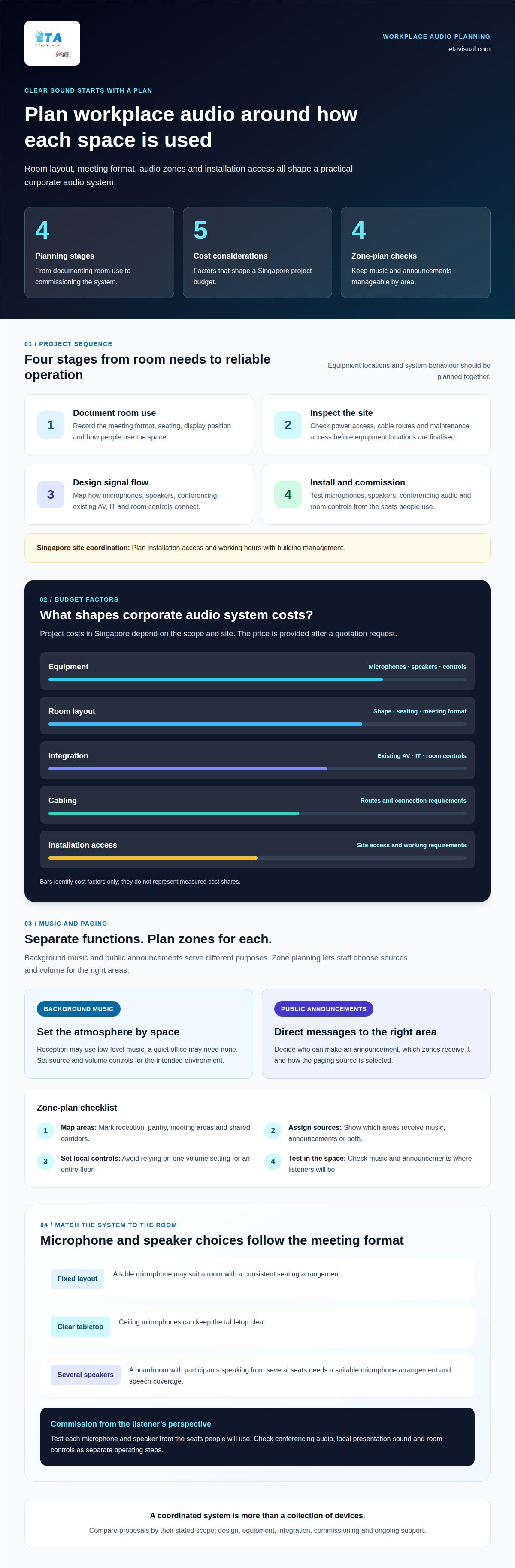
Corporate audio system costs in Singapore depend on the equipment, room layout, integration, cabling and installation access. A single huddle room has different design needs from a divisible conference suite with several microphones and multiple audio zones. The project price is provided after a quotation request.
Commercial AV integrators in Singapore provide audio equipment and installation. Compare proposals by their stated scope: design, equipment, integration, commissioning and ongoing support. A low equipment-only figure may exclude the work needed to connect microphones, speakers and room controls into one usable system.
Equipment Selection Criteria
Start with the meeting format. A room used for laptop presentations needs a different microphone arrangement from a boardroom where participants speak from several seats. Check how microphones connect, where speakers will go and whether the equipment supports the room’s conferencing platform.
Also consider speech coverage, user controls and future changes. A table microphone may suit a fixed layout, while ceiling microphones can keep the tabletop clear. Choose equipment as a coordinated system, not as separate devices based only on individual specifications.
System Planning and Installation
Plan the installation in sequence: document room use, inspect the site, design signal flow, then install and commission. Record seating, display position, power access, cable routes and maintenance access before finalising equipment locations. In Singapore offices, coordinate installation access and working hours with building management.
During commissioning, test each microphone and speaker from the seats people will use. Check conferencing audio, local presentation sound and room controls as separate operating steps. A meeting-room AV setup guide can help teams map those requirements before installation.
For integration, document how audio connects with existing AV, IT and room-control systems. A control panel, for example, may need to select a meeting source and adjust room volume, while the conferencing computer handles remote participants. Confirm signal paths and control behaviour during commissioning, not just after handover.
Maintenance should include checking microphone connections, speaker output, cabling and control response. Keep system documentation accessible so IT staff can trace a fault from input to output. Poor design can leave seats with uneven sound, cause feedback or make routine meetings harder to start and manage.
Background music and public announcements
Background music and public announcements serve different purposes, so plan them as separate functions within one audio system. In a Singapore office, a reception area might use low-level music, while a meeting floor needs clear spoken notices. Separate zones and controls help staff select the right source without broadcasting every sound throughout the workplace.
Start by mapping where each function is needed. Mark reception, pantry, meeting areas and shared corridors on a floor plan, then decide which spaces should share a zone. A pantry and reception may need independent volume control because conversations and visitor activity differ. This layout also helps determine loudspeaker positions and cable routes.
For music, consider the purpose of each space and its existing sound levels. Reception music can create a consistent atmosphere, while a quiet office may need no music. Set clear procedures for source selection and volume, and make controls easy for authorised staff to use. The system should support the intended environment, not compete with conversations.
Announcements need a different workflow. Identify who can make a message, which zones should receive it and how the source is selected. A paging microphone at reception might serve shared areas, while an announcement for one department should stay within that zone. Test messages from listeners’ positions, not only beside the microphone.
- Zone map: Label each area and show whether it receives music, announcements or both.
- Source control: Define how staff switch between music playback and a paging microphone.
- Volume management: Set usable controls for each area, avoiding one setting for an entire floor.
- Commissioning test: Play music and speak announcements from the locations people will use.
In Singapore, offices may share floors with neighbouring tenants or operate within managed commercial buildings. Account for room boundaries, shared corridors and installation access when planning loudspeaker coverage. During commissioning, check whether announcements remain understandable in occupied spaces, including areas where air-conditioning or nearby activity adds background sound.
Document the system after installation. A simple zone plan should show speakers, controls and the areas each source reaches. Include operating instructions for reception or facilities staff, such as selecting a music source and making a zone announcement. Planning these controls alongside the zoning approach described in this commercial background music guide helps staff operate playback consistently.
Planning these controls alongside the room layout makes day-to-day use easier: staff can see which source is active, where a message will be heard, and how to return to normal playback. Keep the instructions concise and place them near the controls. The National Youth Music Theatre staged three productions in London in 2024.
For a workplace event, decide whether playback belongs on the same system, which zones it should reach and how staff will pause it for an announcement. Check that the arrangement keeps speech intelligible and does not send unrelated audio into quiet areas. Record any temporary settings, then restore the usual zone levels when the event ends. This gives the next user a clear starting point and keeps routine operation predictable.
Loudspeakers and IP speakers
Speaker choice affects how evenly people hear speech, music and announcements across an office. A ceiling loudspeaker can suit a meeting room with limited wall space, while a wall-mounted model may direct sound towards a specific seating area. Choose the type and position based on the room’s use, surfaces and layout.
Conventional loudspeakers receive an amplified audio signal through speaker cabling. The amplifier may sit in an equipment rack or serve a specific audio zone. A shared office with separate reception and meeting areas, for example, may need distinct outputs so each space can use its own source or volume setting.
An IP speaker receives audio through an Internet Protocol network. Depending on the model, it may include amplification and receive power separately or through Ethernet. This supports network-based distribution, but also makes network design part of the audio plan. Confirm how each speaker is powered, addressed and controlled before installation.
Networked speakers can help distribute audio across separate rooms or floors. A facilities team might send an announcement to selected zones without playing it throughout the office. This depends on compatible equipment, network configuration and a clear zone plan. Map the intended announcement groups before assigning speakers or control permissions.
Coverage depends on more than the number of speakers. Ceiling height, room shape, furniture and reflective surfaces affect how sound reaches listeners. In a long corridor, evenly planned speaker positions can support consistent announcements; a single speaker at one end may leave distant areas harder to hear. Test from actual listening positions during commissioning.
- For meetings: Prioritise speech intelligibility and position speakers to serve the seating area.
- For music: Plan coverage across the intended zone without relying on one loud source.
- For IP audio: Coordinate speaker addressing, network access and power requirements.
- For maintenance: Record device locations, connections and zone assignments for troubleshooting.
In Singapore offices, coordinate ceiling access, cable routes and installation timing with building management. A ceiling speaker that is difficult to reach can complicate later servicing, especially where the ceiling also contains lighting or other building services. Include access and equipment identification in the handover records.
Choose the architecture around the use case, not a product label. A small meeting room may need a straightforward amplified system; a multi-zone workplace may benefit from networked distribution. A commercial audio system design can align speaker selection, signal paths and installation with the rooms that need coverage.
Audio for huddle spaces and noisy environments
A huddle room may host a quick laptop discussion in the morning and a hybrid call later. That change in use affects how staff connect audio and manage the meeting. Design the room around common tasks, including joining a call, sharing content and switching back to in-room discussion.
In a shared office, users may bring different laptops and conferencing platforms. Set out a clear connection method, such as a dedicated room computer or a supported connection from a participant’s device. Explain how the arrangement routes remote participants’ voices and local playback, so users don’t select conflicting audio sources.
Keep the controls easy to understand. A small panel or clearly labelled interface should distinguish call audio from presentation playback. Users need to know which microphone is active and how to mute it. Confusing controls can leave participants speaking into a muted microphone or sending laptop audio through the wrong output.
Conversation patterns matter, too. In a short brainstorming session, people may speak over one another or shift seats to follow a shared screen. A system designed for a single presenter can feel awkward in that setting. Match the equipment and meeting workflow to whether participants mainly listen, take turns speaking or collaborate informally.
Consider acoustic privacy as well as audibility. A huddle room beside a reception area may let confidential discussion carry beyond its walls, even when participants hear one another clearly inside. Door seals, partitions and room use all affect sound leakage. Include privacy needs in the room brief rather than treating them as a microphone setting.
- Connection: Show users how to join a call and select the correct audio source.
- Control: Label microphone mute and volume functions clearly.
- Meeting style: Match the arrangement to presentations, turn-taking or collaborative discussion.
- Privacy: Consider who may hear conversations outside the room.
In an open collaboration area, decide how audio equipment will be stored and shared between sessions. A portable speakerphone may suit teams that rearrange furniture, while fixed equipment can work well in a dedicated huddle room. Assign responsibility for returning portable devices and cables so the next group can start without searching for missing components.
Finally, make the meeting flow clear to occasional users. A concise instruction card can show how to connect, start a call, adjust the room volume and mute the microphone. Use the same terms as the on-screen controls. This handover detail helps different teams use the space consistently without relying on an AV specialist for routine meetings.
How much do corporate audio solutions cost in Singapore?
There is no single price for corporate audio solutions in Singapore. A quotation depends on the rooms covered, equipment, system integration, installation access and commissioning scope. A basic meeting room and a multi-zone office need different designs, even when both require microphones and loudspeakers.
Equipment is one part of the cost. A room may require microphones, speakers, an amplifier or audio processor, and user controls. A larger workplace may also need separate zones, networked equipment or additional signal routing. The right combination depends on the required functions, rather than a standard package for every office.
Integration also affects project scope. Connecting audio with existing displays, conferencing equipment or room controls may require configuration and testing. A meeting room that switches between laptop presentations and video calls, for example, needs defined signal paths and reliable control behaviour. Reusing existing equipment can affect design work and compatibility requirements.
Installation conditions in Singapore can shape labour and scheduling. Cable routes through finished ceilings, restricted access areas and building-management work windows affect how installation is planned. A site survey can identify these conditions before the quotation, including equipment locations, power access and maintenance clearances.
To compare quotations, check that each proposal describes the same scope. Look for clear inclusions covering:
- Equipment: Identify microphones, speakers, processing and control devices.
- Integration: State which existing AV systems and room controls are connected.
- Installation: Describe cabling, mounting and site access requirements.
- Commissioning: Include functional tests for calls, playback and user controls.
- Support: Clarify documentation, maintenance arrangements and fault response scope.
These details help distinguish an equipment-only proposal from a complete installation. A speaker quotation, for instance, may not include cabling, audio processing, configuration or testing. Comparing scope line by line is more useful to procurement and facilities teams than focusing on the equipment list alone.
Prepare a concise project brief before requesting a quotation. Include room locations, meeting use, existing AV equipment, preferred controls and any installation restrictions. For an office expansion, indicate which rooms need audio now and which may be added later. This gives the design team clear requirements and helps identify the main cost factors.
The project price depends on the specific requirements and is provided after a quotation request. Main cost factors include equipment selection, room count, integration complexity, cabling, site access and commissioning scope.
ETA Visual: Indoor P0.9~P5 LED Screens
ETA Visual can help when a meeting-room project needs a visual display planned alongside its audio system. Indoor P0.9~P5 LED Screens support presentation and shared-content needs, while the room’s audio design addresses speech, playback and announcements. Planning both together helps teams consider screen position, sightlines, sound coverage and equipment connections as one room brief.
This is relevant for offices creating new meeting spaces or upgrading rooms where the display and sound need to work together. The right screen configuration depends on the room and its intended use. ETA Visual also provides Audio Visual Solutions for commercial environments, bringing system planning and installation into the wider project scope.
Contact ETA Visual to discuss your meeting-room requirements.
Plan the next step for your workplace
Before moving ahead, agree who will own the system after handover. Facilities, IT and regular room users can each identify practical needs, from everyday operation to future changes. This gives your corporate audio solutions project a clear operational direction.
ETA Visual can discuss how commercial audio and wider AV requirements fit your workplace. A focused conversation can help clarify the intended scope and next planning steps.
With the right people involved from the start, your workplace can move towards a system that supports its needs with confidence.
What are corporate audio solutions and what services do they include?
Corporate audio solutions combine commercial audio equipment and integration services for workplace communication and sound. Depending on the project, they can include background music, zoned audio, conference room AV and public-address systems. Services may cover site surveys, system design, equipment supply, installation, commissioning and maintenance. An office might use one setup for meeting calls and another for announcements across shared areas.
Which corporate audio systems are best for offices, meeting rooms, and auditoriums?
The right system depends on each space’s purpose and audience. An office may need zoned background music, while a meeting room needs audio suited to discussion and presentations. An auditorium requires a design based on its layout, seating and programme, such as spoken presentations or playback. Treat each space separately in the design brief, even when several rooms share central control or equipment.
What are the best audio solutions for hybrid meetings and video conferencing?
For hybrid meetings, choose equipment that captures in-room participants and connects clearly with the conferencing platform. A room used for seated discussions may need a different microphone arrangement from one where people speak from several positions. Include remote participants’ audio in commissioning tests, and confirm users can start a call, select the right input and adjust sound without complex steps. These checks can reveal workflow issues before routine meetings.
Visual planning reference
| Planning factor | What to define | Why it matters |
|---|---|---|
| Viewing positions | Nearest viewing distance and audience locations | Supports an appropriate pixel-pitch and screen-size decision. |
| Content workflow | Input sources, resolutions and control workflow | Helps ensure information remains readable and simple to operate. |
| Installation conditions | Structure, access, power, ventilation and maintenance access | Aligns the display scope with the physical site before procurement. |
Want an accurate budget for your space?
We'll do a free site survey and prepare a clear, itemised quotation — no obligation.
Frequently asked questions
Corporate audio solutions combine commercial audio equipment and integration services for workplace communication and sound. Depending on the project, they can include background music, zoned audio, conference room AV and public-address systems. Services may cover site surveys, system design, equipment supply, installation, commissioning and maintenance. An office might use one setup for meeting calls and another for announcements across shared areas.
The right system depends on each space’s purpose and audience. An office may need zoned background music, while a meeting room needs audio suited to discussion and presentations. An auditorium requires a design based on its layout, seating and programme, such as spoken presentations or playback. Treat each space separately in the design brief, even when several rooms share central control or equipment.
For hybrid meetings, choose equipment that captures in-room participants and connects clearly with the conferencing platform. A room used for seated discussions may need a different microphone arrangement from one where people speak from several positions. Include remote participants’ audio in commissioning tests, and confirm users can start a call, select the right input and adjust sound without complex steps. These checks can reveal workflow issues before routine meetings.
Confirm the viewing distance, display size, content type, installation conditions and signal-source requirements before selecting a system.
Pixel pitch should be selected against the closest intended viewing distance, the information density of the content and the available budget.
A practical brief includes wall dimensions, viewing positions, ambient-light conditions, content workflow, electrical provisions and access constraints.
Plan the next step
Continue with a relevant solution and real Singapore project evidence.