AV systems for corporate town halls with hidden wiring
Written and reviewed by the ETA Visual Engineering & Project Team. Guidance is updated when project, product or Singapore site-planning practices change.
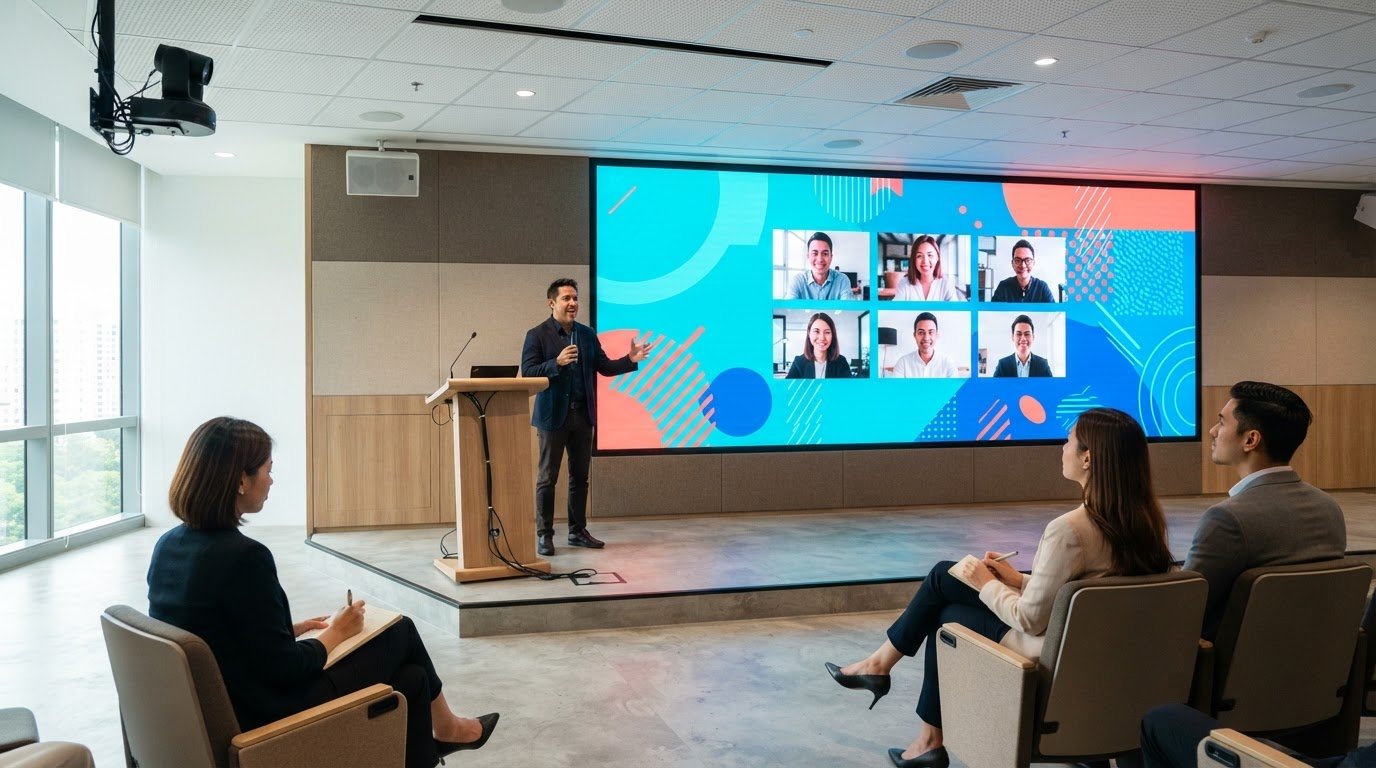
The cleanest town hall AV setup is planned before the first cable is run. An AV system for corporate town halls can conceal cabling in walls, ceilings or under floors where the building layout allows, while connecting displays, cameras, microphones and conferencing equipment as one system. The cable routes must also preserve access for installation and future maintenance. A polished room matters, but hidden wiring is only one part of a reliable event setup. Clear speech, camera coverage, readable displays and smooth transitions depend on how the equipment works together, whether attendees are in the room or joining remotely. This guide explains how to plan the wiring and integrate cameras, conferencing, microphones, room acoustics and sightlines for corporate town halls and large meetings in Singapore. You’ll see what a site assessment should account for, how room layout affects equipment placement, and how commissioning and rehearsal help prepare the system for live use. The aim is a professional, uncluttered space that supports the event without making the technology difficult to operate.
Key Takeaways
- Plan concealed cable routes alongside equipment placement, signal flow and future maintenance access.
- Match camera coverage and conferencing integration to how presenters, audiences and remote participants need to be seen and heard.
- Assess room reflections, seating layout and standing areas before finalising microphone and display positions.
- Choose display arrangements around room depth, ambient light and the content attendees need to read.
- Use commissioning and a technical rehearsal to test transitions, content sharing and the complete event workflow.
Table of Contents
- Cameras and conferencing platforms for hybrid events
- Integrated audiovisual systems for town halls
- Room sightlines and acoustic assessment
- AV for corporate town halls and large meetings
- Large or dual digital displays
- ETA Visual
Cameras and conferencing platforms for hybrid events
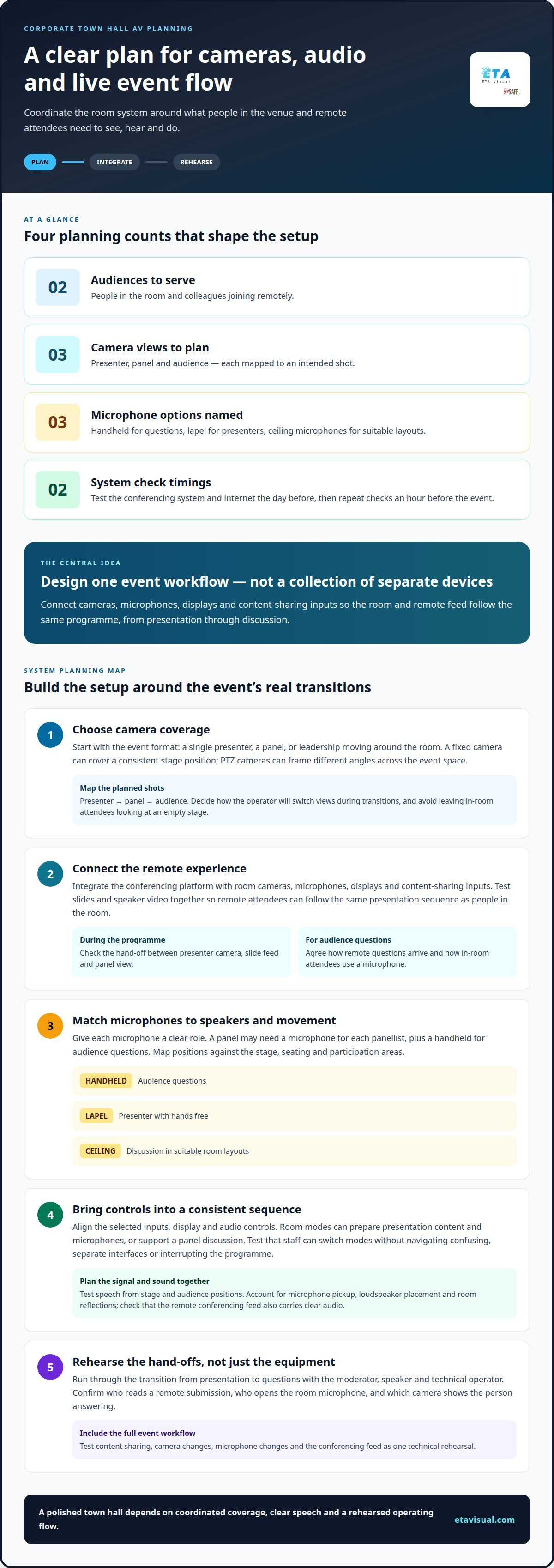
Plan camera positions, conferencing and content sharing as one workflow. The room feed should give remote attendees a clear view of speakers, presentations and audience interaction.
In-Person and Remote Attendance
Start with the event format: a single presenter, a panel or leadership moving around the room. A fixed camera can cover a consistent stage position, while PTZ cameras can frame different angles across the event space. Choose views that show speakers clearly without leaving in-room attendees looking at an empty stage.
For a town hall connecting several offices, audience cameras can show participation beyond the main venue. This helps remote colleagues see the scale of the meeting and recognise other teams. Map each camera to a planned shot, such as the presenter, panel or audience, then decide how operators will switch views during transitions.
Streaming and Remote Participation
Integrate the conferencing platform with the room’s cameras, microphones, displays and content-sharing inputs. Platforms such as Microsoft Teams or Zoom can connect remote staff with the live event. Test how slides and speaker video appear together, then confirm remote attendees can follow the same presentation sequence as people in the room.
If the event includes streaming or recording, define the signal path and operating roles before the session. An operator might switch between a presenter camera, a slide feed and a panel view. Test the conferencing system and internet connection the day before, then repeat the checks an hour before the event.
Attendee Engagement and Q&A
Remote attendees need a clear way to contribute, not just watch. Set the Q&A process before the town hall: questions might arrive through a digital platform, while in-room attendees use a microphone. A moderator can group questions and cue leadership, keeping the discussion organised across both audiences.
Rehearse the hand-off from presentation to questions with the moderator, speaker and technical operator. Confirm who reads a remote submission, who opens the room microphone and which camera shows the person answering. Include these transitions in a full technical rehearsal so the conferencing feed reflects the discussion, not only the slides.
Integrated audiovisual systems for town halls
Coordinate microphones, speakers, displays and control interfaces around the event workflow. A well-integrated design lets operators manage presentations and speaker transitions without juggling separate, confusing controls.
Microphone Coverage
Choose microphones based on who speaks and where they move. Handheld microphones suit audience questions, while lapel microphones keep a presenter’s hands free. Ceiling microphones can capture discussion in suitable room layouts, including panel areas. Give each microphone a clear role so operators can select the right source as the event moves between speakers.
Map microphone positions against the stage, seating and audience participation areas. A panel discussion, for example, may need a microphone for each panellist, plus a handheld microphone for questions. Integrating microphone selection with room controls reduces unnecessary pauses and keeps the active speaker audible to people in the hall and online.
Clear Audio Communication
Position and set speaker levels to make speech clear throughout the occupied area. Loudspeakers placed too close to presenters can create feedback, so the design must account for microphone pickup and speaker placement together. Room layout, reflective surfaces and speaker locations all affect how clearly people hear announcements and discussion.
During commissioning, test speech from different positions, including the stage and audience area. Check transitions between lapel and handheld microphones, and listen for feedback or uneven coverage. The remote conferencing feed also needs a clean audio signal so participants in the room and online can follow the same conversation.
Audiovisual Hardware Selection
Select hardware based on the event format, room infrastructure and devices employees will use. An HDMI laptop input provides a direct presentation connection; a wireless presentation system can support compatible devices without a cable hand-off. Consider ease of operation, device compatibility and security within the organisation’s technology environment.
Bring the selected inputs, display and audio controls into a consistent operating sequence. For example, one room mode can prepare presentation content and microphones, while another supports a panel discussion. Test whether staff can switch between these modes without navigating separate interfaces or interrupting the programme.
Distributed Audio
Divide audio into zones when the venue serves different purposes. The main hall may need speech reinforcement, while a breakout area or technical booth may need a different level. Separate zone control helps prevent programme audio from overwhelming quiet work areas while keeping the main event clear for attendees.
Plan each zone around its use and the event’s transitions. A town hall that opens breakout discussions before reconvening needs a clear changeover between spaces. Integrating these requirements into a commercial audio system design helps align coverage, controls and daily operation with the venue’s needs.
Room sightlines and acoustic assessment
Assess the room before fixing display, camera or seating positions. A site review should map entrances, columns, glass walls, existing infrastructure and likely audience arrangements. These details affect sightlines, sound and installation routes, especially when one venue must support leadership presentations, panel discussions and streamed sessions.
Test sightlines from the front, sides and rear of the planned seating area. Check whether attendees can see presentation content when people stand and whether columns or room dividers block the display. For a flexible town hall, assess both theatre-style seating and a layout with breakout areas. Position displays to suit each format, not just the empty-room view.
Room acoustics matter because glass walls and other hard, flat surfaces can reflect sound. These reflections can make speech harder to understand, particularly when several people are speaking. During the assessment, identify reflective surfaces and listen from different audience positions. Soft, absorbent surfaces, acoustic panels, ceilings and floors can help reduce reverberation and sound reflections.
Audience planning should account for how people enter, move and participate. Map the presenter area, audience seating and standing zones, then consider how each affects visibility and camera positions. A large display may be visible from the front but obscured at the rear when attendees stand. Strategically placed reinforcement screens can keep content visible across the room.
Occupancy sensors can monitor attendance in real time, helping teams adjust room resources and avoid underusing or overloading a space. Attendance information, for example, can inform seating arrangements or equipment allocation for a scheduled session. Sensors are one input, not a substitute for planning: the room must still suit the event format and its presentation, discussion or streaming requirements.
Meeting room management platforms can help organise bookings, layouts and equipment availability. When a space hosts both routine meetings and company-wide sessions, connect booking information with the intended setup. A town hall may need different display positions and seating from a standard meeting. Clear room-use modes help staff prepare the space consistently for each activity.
For Singapore offices, coordinate the assessment with facilities teams before installation. Confirm access routes, ceiling conditions, available power and the locations of existing services. These site details influence where equipment can be mounted and how cabling can be routed. Record the agreed layouts and operational requirements so later room changes do not compromise sightlines, acoustics or equipment access.
AV for corporate town halls and large meetings
Large meetings place different demands on a venue than routine presentations. Design the system around the event format, the room’s infrastructure and the sequence of activities.
Start with the programme. A leadership update may move from opening remarks to slides, a live feed, audience questions and employee recognition. Each transition needs a defined signal path and operator action. Map the required sources, destinations and controls before installation so the technical design supports the agenda rather than forcing changes during the event.
For content sharing, plan a connection for a presentation laptop, such as an HDMI input, or use a wireless presentation system. Choose the method based on the room’s technology environment, device compatibility, ease of use and security. Test the actual content and hand-off process, including the switch from slides to a speaker or live camera feed.
Preset room-use modes can simplify operation for staff who do not manage AV every day. A town hall mode, for example, can prepare the display and presentation inputs, while a discussion mode supports a different event flow. An intuitive tablet interface can bring these controls together and reduce separate actions during programme changes.
Plan for continuity as well as the main signal route. Spare microphones and cables can help address common equipment issues during an event. Redundant internet connections, microphones and displays may also be appropriate when the meeting requires backup options. Choose provisions based on which failure would most disrupt leadership communication.
Coordinate the moderator, speakers and technical operator around one run sheet. The operator needs to know when slides change, when a live feed appears and when audience questions begin. A moderator’s cue, for example, can prompt the operator to display a live event dashboard or switch to a speaker view. This shared sequence helps limit disruption between activities.
Commissioning should test the installed system and operating workflow, not just individual devices. Run a full technical rehearsal with the actual presentation sources, microphones, display content and event transitions. For hybrid meetings, include the conferencing platform and internet connection. Test the equipment and connection the day before, then repeat the checks an hour before the event.
Finish with usable system documentation and operating guidance. Record the room modes, input connections and basic recovery steps so staff can prepare the space consistently. A clear handover also helps technical teams maintain the system and troubleshoot issues without relying on memory. For large meetings, disciplined integration matters as much as the equipment list.
Large or dual digital displays
Choose display formats based on viewing positions, content and room lighting. A single large screen, paired displays or a video wall may suit different town hall layouts.
Start by listing the content people must read, such as leadership slides, performance dashboards or live video. Then consider the farthest seats, side viewing angles and likely standing areas. A display that works from the front row may be difficult to read at the rear. Strategically placed reinforcement screens can keep content visible when attendees stand or the room extends beyond one screen’s useful viewing area.
Large-format projectors and screens can present town hall content across a room. LED video walls are another option for bright visuals in spaces with ambient light. The right choice depends on the room, screen position and content. Text-heavy slides need clear legibility, while branded visuals and video may place different demands on the display surface.
Dual displays can separate content from the presenter. One screen, for example, can show slides while another carries a live camera view or remote participants. This can help attendees follow both the presentation and speaker without repeated switching. It also requires a defined signal flow so the control system can assign each source to the intended display during the event.
Match the display arrangement to the event format. A leadership update may rely on slides and video, while a collaborative session could benefit from an interactive display for annotations and shared documents. Live polls can also gather audience responses during a town hall. Decide how content will be created, connected and switched before fixing screen locations.
Installation planning should account for mounting positions, cable routes, power and access for maintenance. In Singapore offices, coordinate display works with building management and facilities teams, especially where ceiling access or shared spaces affect installation timing. Confirm that the display does not block sightlines, existing services or access routes. These practical details influence the final layout as much as screen size.
Commissioning should test the actual room setup, not just whether a display powers on. Check presentation inputs, image framing, source switching and visibility from different seating areas. Run slides with the text and video formats used at the event. For dual screens, test the intended content pairing and confirm operators can select it smoothly.
ETA Visual
ETA Visual can help connect town hall display needs with the room’s layout, audience sightlines and presentation format. That means considering how screen placement, content sources and signal flow work together, rather than choosing a display in isolation. Where a meeting space needs a visual centrepiece, options include Indoor P0.9~P5 LED Screens, Transparent LED Displays or Flexible & Curved LED, depending on the application and environment.
Bring the room plan, intended seating arrangement and typical presentation content into the discussion. These details help shape a practical display system and its integration within the space. Contact ETA Visual to discuss your corporate town hall requirements.
Turn your event plan into a practical design brief
Before committing to an AV system for corporate town halls, define what the space must support over time, not just for the next event. Note the meeting formats, room layouts and presentation needs that may change. This gives the design process a clear basis for balancing today’s requirements with future use.
A useful starting brief can include a floor plan, typical agenda, preferred operating workflow and any planned room changes. These details help connect the event’s objectives to a practical AV design for your Singapore workplace.
With a clear brief and considered design, your team can create a town hall space ready for what comes next.
How will the AV equipment be wired and hidden?
Coordinate the cable plan with room drawings and other building works before finishes are completed. This helps avoid clashes with lighting, air-conditioning and electrical services. The design should identify where connections emerge at the lectern, operator position and display equipment. For a renovation, confirm which ceiling or wall areas can be opened and who will coordinate reinstatement. This helps avoid late changes to the planned finish.
What AV equipment is needed for a corporate town hall?
A typical AV system for corporate town halls combines event equipment with the tools used to control and monitor it. Depending on the programme, this may include a presenter confidence monitor, source switcher, playback computer and operator control point alongside the room’s display and sound equipment. A confidence monitor lets a presenter view notes without turning towards the main screen. Build the equipment schedule around the required event functions.
What microphone, speaker and mixer setup works best for a town hall audience?
Configure the mixer for predictable channel handling, not just the microphone list. Separate speaker channels make it easier to adjust levels without changing every input, while mute groups can help manage unused microphones between agenda items. For remote conferencing, the audio mix must prevent remote participants’ voices from returning to them. Give the operator a clear channel layout and identify which controls affect the room or remote feed.
How do you choose a projector or LED screen for a corporate town hall?
Check that the display format suits the source content before selecting equipment. A widescreen presentation, portrait feed or split-screen layout may use the available display area differently. Ask the content team for representative slides and video, then check how logos, captions and small text appear in the intended layout. This can also reveal whether presentation templates need adjustment for the chosen display arrangement.
What AV setup is needed to livestream or record a corporate town hall?
Decide whether recording should capture the live programme mix or separate source tracks for later editing. A clean programme feed can combine the selected speaker, presentation and audio, while separate recordings offer more flexibility in post-production. Assign responsibility for starting, stopping and naming recordings. If the session will be shared afterwards, establish its intended audience and handling process before recording begins.
How should AV equipment be planned for different venue sizes and audience numbers?
An AV system for corporate town halls should support the event formats the organisation expects to use. Plan for likely changes, such as adding a second presentation source, connecting another display or extending the system into an overflow area. Document spare inputs and expansion points in the design. This makes future changes easier to scope without assuming every venue needs the same equipment package.
What are common corporate town hall AV problems and how can they be prevented?
Source compatibility can cause problems even when every device powers on. A laptop may output a resolution, aspect ratio or protected signal that the display chain cannot accept. Use the actual presentation computer and media files during preflight, including embedded video and fonts. Keep a known-good presentation profile available and record any device settings the operator may need to restore after another user changes them.
What is the setup and soundcheck checklist for a corporate town hall?
Before setup, confirm room access, the final running order, approved media files and who holds platform credentials. At soundcheck, have each speaker use their normal speaking position and volume, then confirm mute and handover cues with the moderator. Check that the operator can identify each source and restore the agreed starting state. Keep the final run sheet and equipment notes at the control position for the event team.
Visual planning reference
| Planning factor | What to define | Why it matters |
|---|---|---|
| Viewing positions | Nearest viewing distance and audience locations | Supports an appropriate pixel-pitch and screen-size decision. |
| Content workflow | Input sources, resolutions and control workflow | Helps ensure information remains readable and simple to operate. |
| Installation conditions | Structure, access, power, ventilation and maintenance access | Aligns the display scope with the physical site before procurement. |
Want an accurate budget for your space?
We'll do a free site survey and prepare a clear, itemised quotation — no obligation.
Frequently asked questions
Coordinate the cable plan with room drawings and other building works before finishes are completed. This helps avoid clashes with lighting, air-conditioning and electrical services. The design should identify where connections emerge at the lectern, operator position and display equipment. For a renovation, confirm which ceiling or wall areas can be opened and who will coordinate reinstatement. This helps avoid late changes to the planned finish.
A typical AV system for corporate town halls combines event equipment with the tools used to control and monitor it. Depending on the programme, this may include a presenter confidence monitor, source switcher, playback computer and operator control point alongside the room’s display and sound equipment. A confidence monitor lets a presenter view notes without turning towards the main screen. Build the equipment schedule around the required event functions.
Configure the mixer for predictable channel handling, not just the microphone list. Separate speaker channels make it easier to adjust levels without changing every input, while mute groups can help manage unused microphones between agenda items. For remote conferencing, the audio mix must prevent remote participants’ voices from returning to them. Give the operator a clear channel layout and identify which controls affect the room or remote feed.
Check that the display format suits the source content before selecting equipment. A widescreen presentation, portrait feed or split-screen layout may use the available display area differently. Ask the content team for representative slides and video, then check how logos, captions and small text appear in the intended layout. This can also reveal whether presentation templates need adjustment for the chosen display arrangement.
Decide whether recording should capture the live programme mix or separate source tracks for later editing. A clean programme feed can combine the selected speaker, presentation and audio, while separate recordings offer more flexibility in post-production. Assign responsibility for starting, stopping and naming recordings. If the session will be shared afterwards, establish its intended audience and handling process before recording begins.
An AV system for corporate town halls should support the event formats the organisation expects to use. Plan for likely changes, such as adding a second presentation source, connecting another display or extending the system into an overflow area. Document spare inputs and expansion points in the design. This makes future changes easier to scope without assuming every venue needs the same equipment package.
Plan the next step
Continue with a relevant solution and real Singapore project evidence.