5 AV system integration challenges that cause compatibility gaps
Written and reviewed by the ETA Visual Engineering & Project Team. Guidance is updated when project, product or Singapore site-planning practices change.
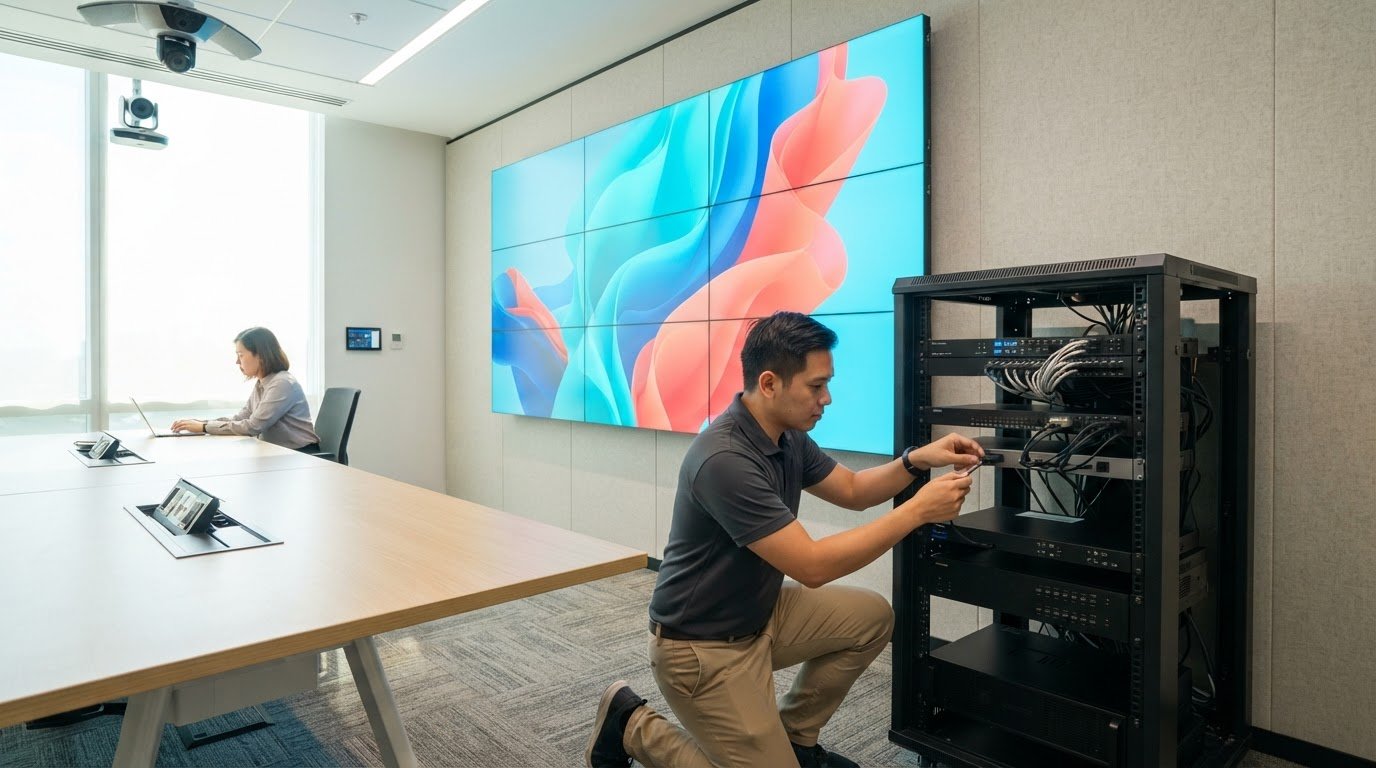
A room full of equipment that appears compatible can still fail as a meeting system. AV system integration challenges often arise when displays, audio, controls and network connections do not work together as intended. Integration brings these components into one coordinated setup, from system design and equipment selection through installation, configuration and testing. Reliable meeting rooms depend on more than capable devices. The room layout, existing infrastructure and connection requirements all affect how clearly people can hear and see one another, and how easily they can start a meeting. When these details are overlooked, compatibility gaps can lead to confusing controls, inconsistent audio or video, and connection problems. This article explains five common challenges and how careful planning can address them. You’ll learn what to consider when matching equipment, designing a scalable system, coordinating controls and resolving meeting-room audio, video and connectivity issues. The aim is a system that works as a whole and is practical to use.
Key Takeaways
- AV integration brings equipment, connections and configuration together, while a site assessment helps surface infrastructure, schedule and budget constraints early.
- Control systems, matrix switchers and converters each play a different role in routing signals and making connected equipment easier to operate.
- Checking how new devices work with existing hardware, software and networks can help prevent compatibility gaps before installation.
- A modular system design can make it easier to accommodate future equipment or room changes without redesigning the entire setup.
- Meeting room performance depends on more than the devices: audio, video, network capacity, room acoustics and commissioning all need attention.
Table of Contents
- 1. What Is AV System Integration?
- 2. Control systems, matrix switchers and video converters
- 3. Equipment compatibility and interoperability
- 4. Scalable and modular system architecture
- 5. Meeting room audio, video and connectivity problems
- ETA Visual
1\. What Is AV System Integration?
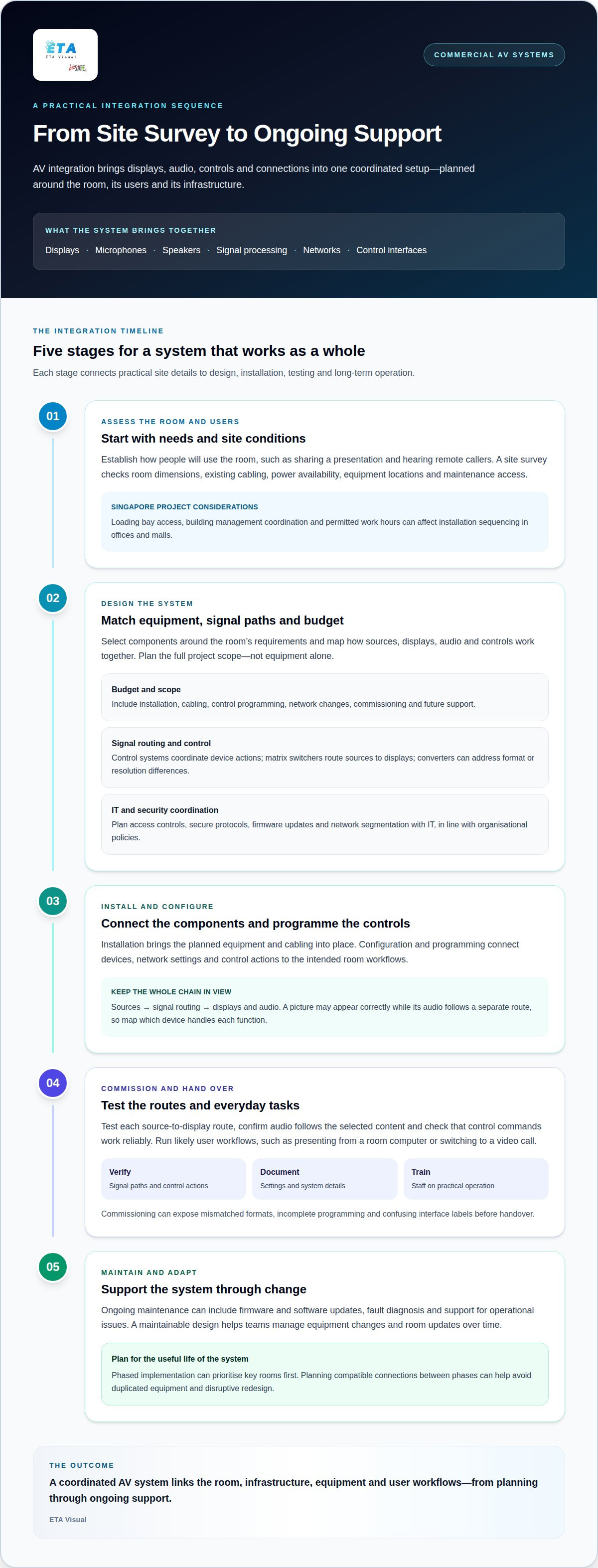
AV system integration connects displays, microphones, speakers, signal processing, networks and control interfaces in one operational setup. An integrator assesses user needs, designs the room and selects components, then manages installation, network configuration and programming. The work continues with testing, staff training and ongoing maintenance. For example, a conference room design must account for how a presenter shares content and how participants hear remote callers.
Budget planning should cover more than equipment. Installation, cabling, control programming, network changes, commissioning and future support all affect the project scope. A considered design links each component to a business need, such as clear speech in a meeting room or consistent audio across a retail space. This helps decision-makers prioritise essential functions over features that do not support daily use.
ROI depends on how a system performs over its useful life, not just its initial purchase. A system that is easier to operate can reduce setup friction, while maintainable components can simplify servicing and upgrades. Phased implementation can spread investment: a business might equip priority meeting rooms first, then extend the design to other spaces. Planning compatible connections between phases helps avoid duplicated equipment and disruptive redesign.
Schedule and infrastructure constraints can change the installation plan. A site survey identifies room dimensions, existing cabling, power availability, equipment locations and maintenance access before components are specified. In Singapore offices or malls, loading bay access, building management coordination and permitted work hours can also affect sequencing. A structured AV system design connects these site details to drawings, installation tasks and commissioning requirements.
Networked AV systems also introduce cybersecurity risks. Unauthorised access, weak credentials, outdated firmware and poorly separated network traffic can expose devices or interrupt service. A well-planned design coordinates with IT on access controls, secure protocols, firmware updates and network segmentation, in line with the organisation’s policies.
Testing confirms that each signal path and control action works as intended, from source selection to room playback. The integrator can test common user tasks, verify audio and video performance, document settings and train staff before handover. Ongoing maintenance can include firmware and software updates, fault diagnosis and support for operational issues. These steps help teams manage the system through equipment changes, room updates and everyday use.
2\. Control systems, matrix switchers and video converters
A control system gives users one interface for operating connected audiovisual components. In a corporate meeting room, a touch panel might select a display input, adjust volume and start a presentation. The interface coordinates actions across separate devices, so users do not have to operate each component independently. Poorly planned controls can still cause confusion, especially when common tasks require navigating several menus or remotes.
Matrix switchers manage signal routing. They let an integrator send different sources to selected displays, such as routing a laptop to the main screen while another source feeds a confidence display. Some switchers also offer functions such as scaling or cropping. Video scalers and converters address format or resolution differences between sources and displays. They can help connect equipment that would otherwise fail to show a usable image, but cannot overcome every limitation in a signal path.
Control depends on the whole signal chain, not just the visual system. Sources, displays, microphones, speakers, amplifiers, digital signal processors, cabling and network connections each have a role. For example, a presentation may appear correctly while its audio follows a separate route, leaving users with sound from the wrong source. Signal-flow design maps these relationships before installation and identifies which device controls each function.
For Singapore projects, relevant technical standards depend on the interfaces and equipment selected. HDMI, HDBaseT and IP-based systems are examples of standards used to support interoperability, but no single interface suits every connection. Regulatory or building requirements depend on the installation scope and site conditions. The design should account for applicable project and building-management requirements rather than assume one universal AV rule.
Standardised hardware and documented control logic can make systems easier to support. When several rooms share a layout, consistent equipment and interface patterns help users carry familiar actions from one space to another. Centralised control software can also give administrators one interface for managing AV across a facility. This supports scalability when network access, permissions and device compatibility are planned with the organisation’s IT team.
During commissioning, the integrator tests each source-to-display route, confirms audio follows the selected content, and checks that control commands work reliably. The team can also test likely user workflows, such as presenting from a room computer or switching to a video call. These checks expose mismatched formats, incomplete programming and confusing interface labels before handover. For a coordinated commercial AV integration design, the control interface, signal routing and connected hardware should be planned as one system.
3\. Equipment compatibility and interoperability
Equipment compatibility involves more than matching connectors. A display, source device and processor must support a workable signal format, resolution and connection path. For example, an HDMI source may physically connect to a display but still fail to deliver the expected image if settings or intermediary devices conflict. Integrators assess the complete signal chain, including hardware, software and network dependencies.
Legacy equipment adds another layer of complexity. An integrator inventories existing devices, firmware versions, connection types and network requirements, then compares them with the proposed system. If an older source cannot communicate directly with a new display, a suitable converter, scaler or signal processor may bridge the format difference. Middleware may also connect equipment that uses different control methods.
These measures need to be tested, not assumed. Before deployment, the integrator checks each planned source-to-display route and verifies that audio, control and image functions work together. For instance, a laptop, switcher and display should be tested using the actual connection path and operating settings. This can reveal compatibility gaps before installation disrupts normal business activity.
Standards can guide equipment selection, but a shared label does not guarantee that every feature will work together. HDMI, HDBaseT and IP-based systems are common connection approaches, each suited to different signal and infrastructure needs. The design must account for device capabilities at both ends, cable routes, software versions and the functions users need. This matters especially when combining components from different generations.
Software compatibility matters too. A control interface may depend on device drivers, firmware or network communication. An update to one component can affect how another responds, so the integrator documents versions and tests the integrated configuration. Where automation is involved, each programmed action should be checked against the devices it controls. This helps prevent faults such as a display switching inputs without the corresponding audio route.
Standardising equipment across rooms can simplify configuration and maintenance. A consistent mix of compatible displays, control interfaces and connection methods helps technical teams support repeated room layouts. However, standardisation should suit each room’s needs: a large presentation space may require different signal routing from a small meeting room. The design should also allow future devices to connect without replacing every existing component.
After commissioning, clear records help preserve interoperability as equipment changes. These can include signal-flow drawings, device models, firmware versions and control settings. Planned maintenance can identify outdated software or failing connections before they affect daily use. A structured AV maintenance programme helps keep the installed configuration documented and supportable over time.
4\. Scalable and modular system architecture
A modular architecture lets a business expand an AV system without replacing every component. It separates functions such as signal distribution, room control and audio processing, so each area can be upgraded independently. For example, an office can add meeting spaces while retaining a shared control approach. Scalability depends on planning connections, equipment capacity and operating requirements before installation begins.
Future needs should shape the initial design. An integrator can map likely changes, such as adding displays, supporting new meeting formats or extending audio into another zone. The design then identifies which components can support expansion and which may need replacement. This avoids treating “future-proof” as a product feature: no system can anticipate every technology or business change.
Modular choices also vary by application. A retail background music system may need additional audio zones as a store’s layout changes, while a corporate AV system may need more display inputs or room-control functions. In either case, the integrator documents system capacity and the interfaces between modules. This record helps guide later upgrades without assuming every new component will work automatically.
Scalability also includes the user experience. Where practical, a new room should retain familiar control interfaces so staff can move between spaces without relearning basic tasks. If an advanced function is added, training should explain how it fits existing workflows. For example, adding video conferencing to a presentation room should not make basic display sharing harder to find on the control panel.
Expansion can cause downtime if equipment changes interrupt shared signal paths or room controls. The integrator plans the work sequence around affected spaces, identifies dependencies and tests each change before normal use resumes. In a facility with several rooms, staged commissioning can keep unaffected spaces operational. Clear configuration records also make it easier to restore the previous setup if a change causes a problem.
In Singapore, expansion planning should account for site realities as well as technology. A new display or equipment rack may require structural review, power planning, cable routes and access for future maintenance. In malls and offices, building management procedures and permitted work periods can influence installation sequencing. A future-ready commercial AV design considers these constraints alongside equipment growth, helping teams plan upgrades without losing sight of daily operations.
5\. Meeting room audio, video and connectivity problems
A meeting feels far from smooth when voices drop out, screens show blank inputs or remote participants cannot connect. These symptoms can have different causes. Microphone placement, room acoustics, camera framing, display settings and network performance all affect the experience. An integrator traces each problem through the room’s equipment and signal paths instead of assuming a device has failed.
Room acoustics affect speech clarity. Glass walls and hard surfaces can reflect sound, creating echo that makes voices difficult to understand. Air-conditioning noise can also compete with speech. Microphone selection and placement, speaker direction and audio processing should suit the room and seating arrangement. During commissioning, speech is tested from different positions, then levels and processing are adjusted to reduce echo and unwanted noise.
Lighting affects both camera images and screen visibility. Strong daylight behind participants can make faces appear dark, while reflections on a display can obscure shared content. The system design considers camera position, window direction and the room’s lighting during typical meetings. Testing should cover different lighting conditions, not just an empty room with fixed lights, so camera framing and display visibility work for actual users.
Connectivity issues can arise between a meeting device, room display, conferencing platform and network. For AV-over-IP, the network needs suitable capacity and configuration for the planned traffic. The integrator works with IT to review bandwidth, network paths and traffic prioritisation. Testing should cover the actual meeting workflow, including joining a call, sharing content and switching between local and remote audio.
Audio and video can also fall out of sync. Delays may come from signal processing, network transport or differing device settings. The integrator checks the complete path, selects suitable equipment and adjusts the configuration to keep playback aligned. When audio is inconsistent, testing and calibration can help identify whether the cause is room acoustics, cable connections, microphone settings or the conferencing device.
Commissioning should include a practical meeting, not just individual equipment checks. Participants can join remotely, speak from their usual seats and share content using the devices they normally use. The integrator records the final configuration and trains staff on routine tasks, such as selecting a source or muting a microphone. This makes faults easier to diagnose and helps users return to a known working setup.
Discuss your meeting room AV requirements
ETA Visual
ETA Visual helps Singapore businesses address AV system integration challenges through coordinated system planning, installation and commissioning. The work considers how components function together in the actual space, including signal flow, controls, user requirements and maintenance needs. This approach is useful when a new setup must fit existing infrastructure or recurring meeting problems point to gaps between devices.
For commercial environments, ETA Visual’s Audio Visual Solutions can be planned around room function and operational needs rather than treating equipment as separate purchases. The team can also help assess how display choices fit the wider setup, from Indoor P0.9~P5 LED Screens to Transparent LED Displays, depending on the application.
Contact ETA Visual to discuss your AV integration requirements.
Plan for the System Your Business Needs Next
AV system integration challenges are easier to address when the design reflects how people use a space today and how that use may change. Before a new project or upgrade, define the operational priorities: what people need to see, hear and control. A clear brief gives the integration work a practical starting point.
For commercial spaces, display requirements can vary by location and viewing context. ETA Visual offers Indoor P0.9~P5 LED Screens, Outdoor LED Billboards and Transparent LED Displays as part of its display solutions. The right direction depends on the site and intended application, not a single specification applied everywhere.
A considered next step can turn a complex technical decision into a system designed around your business. Your project can move forward with a clearer understanding of what the space needs.
What Is AV System Integration?
AV system integration is the coordinated design and connection of audiovisual equipment for a defined business use. It can include displays, microphones, speakers, conferencing devices, networks and controls. For example, a boardroom setup may need to support in-room presentations and remote participants through one workflow. The scope depends on the space, existing infrastructure, users’ tasks and how the organisation plans to support the system.
How can an AV integrator help businesses improve AV and IT collaboration?
An AV integrator can coordinate technical decisions between AV specialists and an organisation’s IT team. For example, both teams can agree how meeting-room devices connect to the network, who manages software updates and where faults should be reported. Shared support processes also clarify how incidents are assigned and escalated. This coordination helps prevent AV changes from conflicting with network policies or leaving support responsibilities unclear.
What are common challenges when AV and IT aren’t aligned?
Misalignment can leave teams unsure who manages device access, network changes, software updates or fault escalation. For instance, a meeting-room device may lose network access after a configuration change, while AV support lacks the information needed to diagnose the issue. Unclear ownership can prolong troubleshooting and complicate maintenance. Agreeing responsibilities, escalation routes and change procedures before deployment gives both teams a clearer way to handle incidents.
Why is AV and IT alignment important?
Alignment helps ensure connected AV equipment fits the organisation’s network, security practices and support workflows. This matters when room systems rely on network access for conferencing, control or content sharing. For example, IT can manage device access and the network, while AV specialists focus on signal paths and room operation. Coordinated planning can also make system changes easier to document and support.
What are the most common AV system integration challenges?
Common AV system integration challenges include incompatible devices, unclear signal routing, difficult controls, limited room infrastructure and unreliable meeting connections. A system may display a presentation but fail to route its audio correctly, or a network change may interrupt conferencing. These issues often cross equipment and team boundaries. Effective planning treats the room, devices, network and user workflow as connected parts of one solution.
How do interoperability issues affect AV system integration?
Interoperability issues arise when devices cannot exchange signals or control commands as the design requires. A source may physically connect to a display but use an unsupported format, or control software may not communicate with a device. The result can be missing content, partial functionality or extra troubleshooting. Testing actual equipment combinations and documenting software and firmware versions helps identify dependencies before later changes affect the setup.
What are common AV integration project delays and how can they be prevented?
Delays can stem from late design changes, incomplete site information, equipment incompatibility, network coordination or restricted installation access. In a Singapore office or mall, building-management procedures and work periods can also affect installation sequencing. An integrator can reduce avoidable hold-ups by coordinating drawings, dependencies, access arrangements and commissioning tasks with the relevant project teams. Clear decisions about room functions and equipment early in planning also limit disruptive scope changes.
Visual planning reference
| Planning factor | What to define | Why it matters |
|---|---|---|
| Viewing positions | Nearest viewing distance and audience locations | Supports an appropriate pixel-pitch and screen-size decision. |
| Content workflow | Input sources, resolutions and control workflow | Helps ensure information remains readable and simple to operate. |
| Installation conditions | Structure, access, power, ventilation and maintenance access | Aligns the display scope with the physical site before procurement. |
Want an accurate budget for your space?
We'll do a free site survey and prepare a clear, itemised quotation — no obligation.
Frequently asked questions
AV system integration is the coordinated design and connection of audiovisual equipment for a defined business use. It can include displays, microphones, speakers, conferencing devices, networks and controls. For example, a boardroom setup may need to support in-room presentations and remote participants through one workflow. The scope depends on the space, existing infrastructure, users’ tasks and how the organisation plans to support the system.
An AV integrator can coordinate technical decisions between AV specialists and an organisation’s IT team. For example, both teams can agree how meeting-room devices connect to the network, who manages software updates and where faults should be reported. Shared support processes also clarify how incidents are assigned and escalated. This coordination helps prevent AV changes from conflicting with network policies or leaving support responsibilities unclear.
AVSystem Integration refers to the same practice as AV system integration: bringing audiovisual devices and their connections into a working arrangement for a specific environment. The coordinated design may include audio, video, control and network functions. Integration is more than installing separate products. It also considers how users move between tasks, such as starting a call, sharing a presentation and adjusting room audio.
Misalignment can leave teams unsure who manages device access, network changes, software updates or fault escalation. For instance, a meeting-room device may lose network access after a configuration change, while AV support lacks the information needed to diagnose the issue. Unclear ownership can prolong troubleshooting and complicate maintenance. Agreeing responsibilities, escalation routes and change procedures before deployment gives both teams a clearer way to handle incidents.
Alignment helps ensure connected AV equipment fits the organisation’s network, security practices and support workflows. This matters when room systems rely on network access for conferencing, control or content sharing. For example, IT can manage device access and the network, while AV specialists focus on signal paths and room operation. Coordinated planning can also make system changes easier to document and support.
Common AV system integration challenges include incompatible devices, unclear signal routing, difficult controls, limited room infrastructure and unreliable meeting connections. A system may display a presentation but fail to route its audio correctly, or a network change may interrupt conferencing. These issues often cross equipment and team boundaries. Effective planning treats the room, devices, network and user workflow as connected parts of one solution.
Plan the next step
Continue with a relevant solution and real Singapore project evidence.