What to Look for in an AV Maintenance Plan in Singapore
Written and reviewed by the ETA Visual Engineering & Project Team. Guidance is updated when project, product or Singapore site-planning practices change.
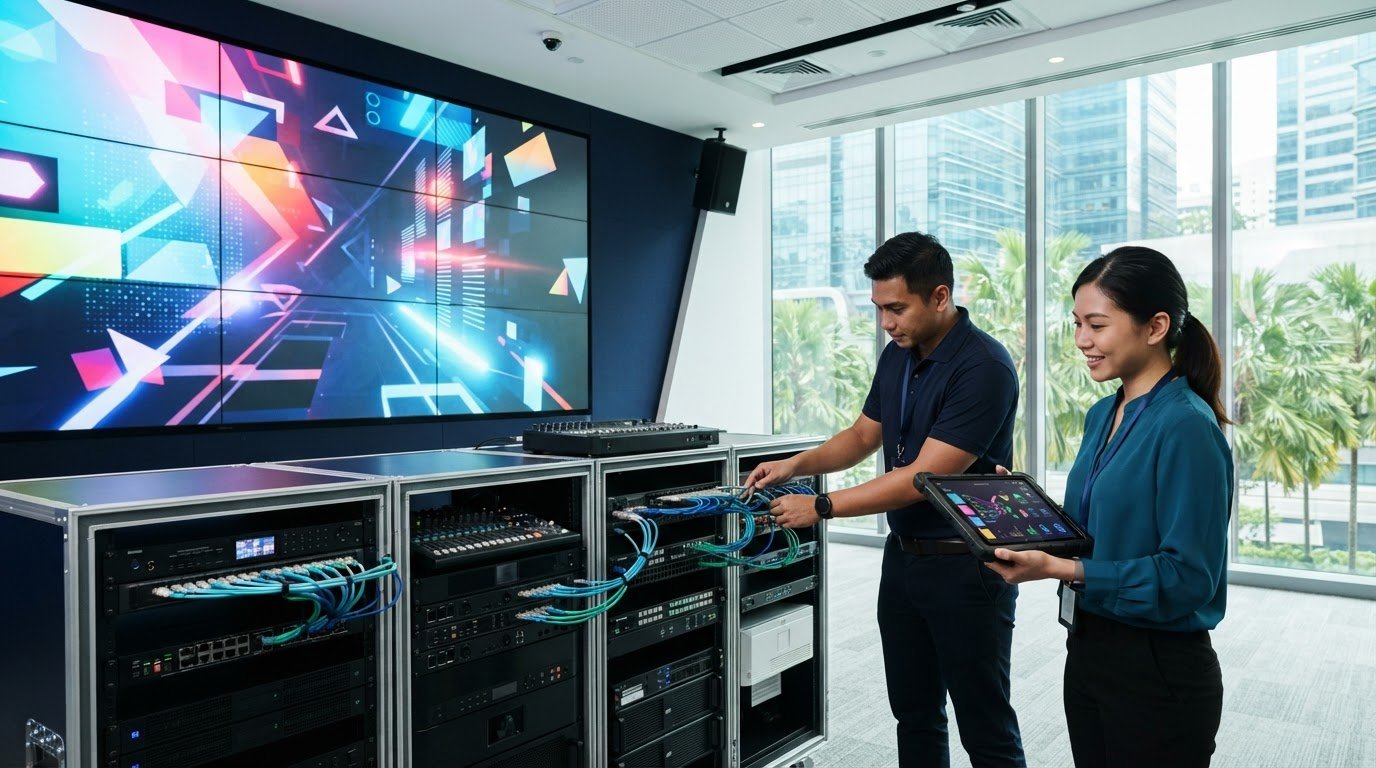
A maintenance plan can include regular visits and still leave important gaps in support. Knowing what to look for in an AV maintenance plan means checking more than how often a technician attends. Preventive inspections and fault-response support serve different purposes, and displays rely on connected equipment to work as intended. A useful plan should reduce avoidable disruption and help keep essential systems ready for use. Look for a documented scope that covers the relevant signal chain, including displays, processors, control equipment, audio components and connections. Check how remote monitoring, firmware updates, fault reporting and escalation are handled rather than assuming they are included in a scheduled visit. In Singapore, maintenance access also needs to fit the site. Business hours, building management procedures, loading arrangements and restrictions on when work can take place may all affect how support is delivered. This guide offers a practical framework for comparing coverage, response arrangements and service records, so you can choose a plan that suits your systems and day-to-day operations.
Key Takeaways
- Start with the business impact of AV faults. Identify critical spaces, equipment and workflows before comparing visit schedules.
- Use an asset-and-task matrix to check whether the plan covers connected components, maintenance activities, exclusions and repair responsibilities.
- When deciding what to look for in an AV maintenance plan, compare inspection frequency, fault escalation and service reporting with your operational priorities.
- Account for Singapore site conditions, including humidity, heat, ventilation, building procedures, loading access and permitted working hours.
- Use the documented scope and service records to decide whether planned maintenance is a better fit than repair-only support for your AV systems.
Table of Contents
- AV Maintenance Plan: Start with Operational Risk
- Check that the AV maintenance plan covers the complete system
- Compare AV maintenance plans by support, reporting and follow-through
- Test the maintenance plan against Singapore site conditions
- Choose an AV maintenance plan that supports long-term system performance
AV Maintenance Plan: Start with Operational Risk
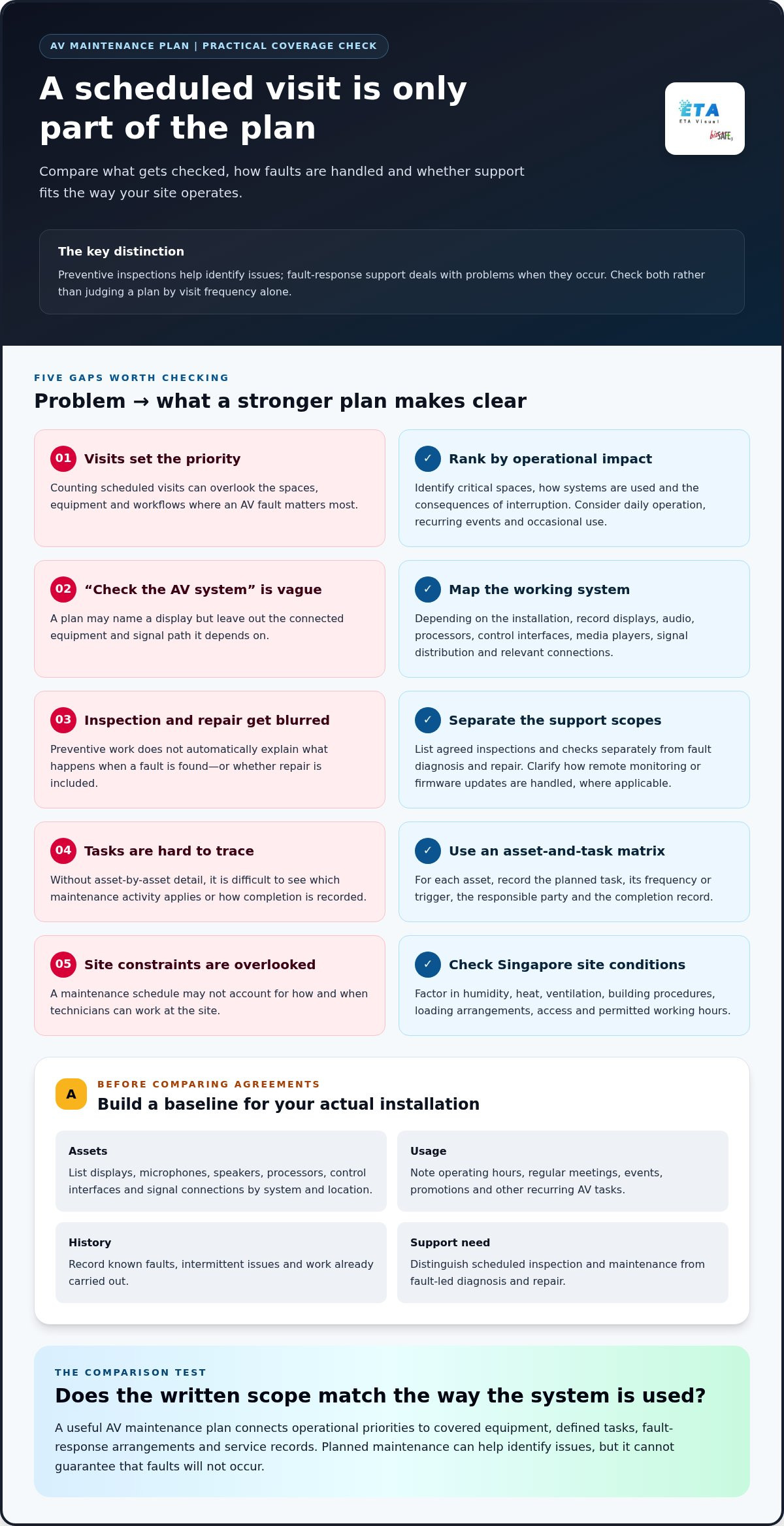
Choose maintenance based on the consequences of a system failure, not simply the number of visits in an agreement. A display used for daily promotions, a meeting room used for client presentations and an AV system used for internal announcements have different operational priorities. More visits do not necessarily mean better coverage if the plan overlooks the equipment or workflows that matter most.
Start by identifying where AV supports business activity and what happens if it stops working. A fault could delay a meeting, interrupt a customer-facing display, affect hospitality operations or disrupt internal communications. Preventive maintenance can help identify issues and support system reliability, but it cannot guarantee that faults will not occur. Consider repair and fault-response arrangements alongside planned checks.
Which AV systems should be prioritised?
Rank systems by operational importance, how they are used and the consequences of interruption. Consider whether equipment runs throughout the day, supports a recurring event or is needed only occasionally. Include connected displays, audio, control processors and signal distribution when they work together as one system. A fault in one connection or component can affect the wider user experience, even if the main screen appears unaffected.
For a video wall, record the display alongside its relevant signal and control equipment. The Singapore LED video wall guide explains how design, installation and maintenance relate to the wider display system. For broader context, an audiovisual systems overview describes how AV combines equipment and applications to deliver sound and images.
How to define the maintenance need before comparing plans
Build a simple baseline before reviewing agreements. Record the installed assets, their locations, known recurring issues, operating patterns and relevant maintenance history. Note which spaces are business-critical, who uses each system and the workflows it supports. This helps you assess a plan against your actual installation rather than a generic equipment list.
- Assets: List the displays, microphones, speakers, processors, control interfaces and signal connections that form each working system.
- Usage: Note operating hours, regular meetings, events, promotions and other recurring AV tasks.
- History: Record faults, intermittent issues and work already carried out.
- Support need: Separate scheduled inspection and maintenance from fault-led diagnosis and repair.
Use this baseline to assess what to look for in an AV maintenance plan: a clear match between operational priorities, system scope and support arrangements. System criticality should set maintenance priorities because the impact of interruption matters more than the number of scheduled visits. This gives your team a practical basis for comparing agreements and identifying where planned maintenance can be most useful.
Check that the AV maintenance plan covers the complete system
A maintenance plan should describe the work against the equipment installed, rather than rely on a broad promise to “check the AV system”. A practical comparison tool is an asset-and-task matrix: list each asset, the maintenance activity assigned to it and how findings will be recorded. This makes gaps visible, such as a plan that names the LED display but omits the signal path or control equipment it depends on.
Map maintenance coverage across connected AV equipment
Build the matrix around the system design. Depending on the installation, it may include LED screens or other displays, audio equipment, control processors, user interfaces, media players, signal distribution and relevant connections. Match each item to a task that makes sense for its role instead of assuming one generic inspection covers every component.
Before routine servicing begins, document the assets and their current condition. A baseline can identify equipment models and locations, note known issues and distinguish existing faults from later findings. For an LED screen, screen-specific checks are only one part of the picture: the plan should also explain how supporting signal and control components are covered. Maintenance activities should reflect the system design, manufacturer guidance and practical site requirements. For broader reference, AVIXA’s audiovisual standards cover standards relevant to the wider AV industry.
Use a matrix with columns for the asset, planned task, frequency or trigger, responsible party and completion record. A display, for example, might have a defined inspection task, while a processor or connection has a separate functional check suited to its role. The exact tasks depend on the equipment and installation; the important point is to make coverage specific and traceable.
Separate included maintenance from repair and replacement
Preventive work and fault-led repairs are different parts of support. The written scope should state which inspections, cleaning, functional checks, remote monitoring or firmware updates are included, where applicable. It should also explain what happens when a technician finds a fault, including whether diagnosis and repair are covered or treated as additional work.
- Included tasks: Record the agreed preventive activities and the assets they apply to.
- Client responsibilities: Note access arrangements, operating information and other site inputs needed to carry out the work.
- Exclusions: Identify equipment or activities outside the defined scope.
- Separate work: Clarify how repair labour, replacement parts, upgrades and equipment failures are handled.
Do not assume a maintenance agreement automatically pays for parts, upgrades or replacement equipment. Clear wording helps the facilities, IT or AV team distinguish planned maintenance from work that may require a separate decision. ETA Visual provides commercial AV maintenance in Singapore. The scope should still be documented for the equipment installed at your site.
Compare AV maintenance plans by support, reporting and follow-through
A written scope shows what is covered; support terms and records show how that work is managed over time. Compare plans side by side using the same questions. Regular inspections are useful only when their frequency makes sense for equipment use, manufacturer guidance and the consequences of disruption. A heavily used meeting room may need a different approach from a display that operates intermittently.
What should support and escalation terms make clear?
Separate support activities rather than treating them as one general service. A scheduled visit is planned work; remote monitoring may help identify system conditions; on-site fault support addresses an issue that has already affected operation. The agreement should explain how to report a fault, what information to provide, who receives the report and how it is triaged and escalated. Read availability or response commitments in the agreement itself rather than inferring them from general service descriptions.
- Contact route: Record the agreed channel for reporting issues and the information needed, such as affected equipment, symptoms and when the fault occurs.
- Escalation: Understand how an unresolved or business-critical fault is passed to the appropriate support contact.
- Follow-up: Check how status, findings and next steps are communicated after diagnosis or a site visit.
These details matter for intermittent problems too. A clear log of when a signal drops, which source is in use and whether the issue affects one room or several can help narrow down the fault. It gives the support team a more useful starting point than a report that simply says the AV is not working.
How to assess maintenance reports and records
Ask what the service record will capture after each planned visit or fault call. It should identify the equipment covered, work completed, observed issues and recommended follow-up. For an integrated system, records that connect a symptom with the affected room, display or signal path are more useful than a generic note that an inspection took place.
- Work completed: Show which agreed tasks were carried out and on which assets.
- Findings: Distinguish routine observations from faults, recurring symptoms or items needing attention.
- Recommendations: State suggested next steps and whether they involve preventive follow-up or separate repair work.
- History: Keep records consistent so changes and repeat issues can be reviewed over time.
A useful maintenance record turns completed work and observed issues into information your team can act on. Consistent reporting can support troubleshooting, maintenance planning and budget discussions by showing what has been checked and where follow-up may be needed. For broader Singapore planning context, the Singapore AV equipment maintenance business guide complements these contract-level checks. Together, clear support terms and usable records help you judge not just what a plan promises, but how its work can be tracked and acted upon.
Test the maintenance plan against Singapore site conditions
A workable maintenance schedule has to fit the site, not just the equipment list. Singapore’s heat and humidity are relevant conditions to assess, but they do not automatically indicate a fault or dictate a fixed maintenance interval. The plan should reflect where equipment is installed, how it is ventilated, whether it is exposed to outdoor conditions and what access is available for inspection.
Also distinguish practical planning from mandatory technical or regulatory requirements. A building’s access process or preferred work window is an operational constraint, not in itself a technical standard. Requirements for particular work depend on the system and project. A general maintenance checklist is not a substitute for assessing applicable requirements when work involves electrical or structural elements.
Plan visits around business operations and building access
Before scheduling, map how technicians will reach the equipment and what approvals or coordination the site requires. In a mall, hotel or office, access may involve building management, a loading bay, security arrangements or an agreed work period. Consider customer traffic, tenant activity, staff use and events, especially if testing could interrupt a live display, meeting room or audio system. Include the facilities contact in planning where appropriate.
Account for Singapore’s tropical operating environment
Review equipment location and surroundings rather than assuming climate alone determines the maintenance scope. Heat, humidity, dust, ventilation and outdoor exposure may affect what needs inspection, depending on the installation. For example, note whether airflow around equipment is obstructed or whether an outdoor display is exposed to weather. Use manufacturer guidance and observed site conditions to inform tasks and scheduling, without applying universal intervals or environmental thresholds.
Use this checklist to test whether a proposed plan is practical for your site:
- Site conditions: Record indoor or outdoor placement, heat, humidity, ventilation, dust and relevant exposure around the equipment.
- Access: Identify access routes, loading arrangements, approvals and the building or facilities contact involved in arranging entry.
- Operating windows: Note business hours, customer-facing activity, meetings and events that could be disrupted by inspection or testing.
- Maintenance responsibilities: Clarify who arranges access, coordinates with building management, prepares equipment and communicates site restrictions.
- Work requirements: Separate routine inspection from work that may need additional technical or project-specific assessment.
Bring these details into the written scope. A plan can then define not only which equipment is maintained, but how visits are arranged around site operations and which responsibilities sit with the building or business team. If access is restricted to a particular window, state that early so the schedule and work approach can account for it.
For help defining a practical scope, discuss your AV maintenance requirements with ETA Visual.
Choose an AV maintenance plan that supports long-term system performance
The strongest plan is the one that fits the installed system and the way your organisation uses it. Compare each option against five points: system fit, written scope, site practicality, support terms and reporting. A higher visit count alone does not show whether an agreement covers the equipment, access arrangements and fault process that matter to your operation.
Use a final comparison checklist before agreeing a plan
Before signing, use the same checklist for each plan so differences are clear and documented:
- System fit: Does the asset list cover the installed displays, audio, signal paths and control equipment that work together?
- Preventive scope: Are planned tasks and inspection frequency stated, with activities suited to the system and manufacturer guidance?
- Boundaries: Are exclusions, client responsibilities, fault-led repairs, parts and replacement equipment clearly distinguished?
- Site practicality: Does the plan account for access arrangements, permitted work periods and coordination with building management where needed?
- Support and records: Are monitoring, firmware updates and on-site fault support described clearly, with a process for reporting issues and receiving service records?
Read the agreement as an operating document, not just a list of services. It should help your team understand what happens during planned work, what happens when equipment develops a fault and how findings are recorded for follow-up. If a term is broad, clarify its meaning and boundaries in the written scope.
When an integrated AV maintenance partner is a better fit
Planned maintenance may be more suitable than repair-only support when several connected components serve a business-critical workflow, or when recurring faults need to be tracked rather than handled one at a time. A display issue, for instance, may involve the screen, source, signal distribution or control settings. Considering those elements together helps direct investigation towards the system, not just its most visible symptom. Repair-only support may suit less critical equipment with limited operational impact.
ETA Visual is a Singapore-based AV system integrator that supports commercial LED displays, audio and AV systems through maintenance, remote monitoring, firmware updates and repair. This integrated perspective is useful when a plan needs to account for how displays, audio, signal flow and control work together. It does not remove the need for a clear scope or realistic support terms; it gives the maintenance discussion a system-wide basis.
Ultimately, what to look for in an AV maintenance plan is a documented match between your equipment, operational priorities, site arrangements and support needs. Use the comparison checklist to identify gaps and agree how planned work, fault handling and reporting will fit your operation.
Turn Your Comparison into a Clear Support Plan
Turn your findings into a practical maintenance brief. Bring together the equipment inventory, priority workflows, known issues and site access requirements, then use them to define the support your team needs. This gives the discussion a concrete starting point and helps ensure the agreed scope reflects how your AV systems are actually used.
Knowing what to look for in an AV maintenance plan is valuable when it leads to clear decisions: which systems need planned attention, how faults should be handled and what information your team needs after each service. A well-matched plan can support considered maintenance and future planning without implying that faults will never occur.
With a clear brief and realistic expectations, you can keep AV support aligned with your operation. Request a discussion with ETA Visual
Is an AV maintenance plan the same as an equipment warranty?
No. A warranty and a maintenance plan are separate arrangements. A warranty document sets out the manufacturer’s or seller’s terms for particular equipment, while a maintenance agreement defines service activities and support. Keep both documents with the asset records, and note which party handles a warranty claim if a fault occurs. Coverage and claim conditions vary, so do not assume that a service visit extends a warranty or that a warranty includes routine maintenance.
How often should commercial AV equipment be maintained?
There is no single interval that applies to every system. Set schedules for specific tasks and assets rather than assigning the same visit frequency to every component. For example, a plan might distinguish routine visual checks from tasks scheduled in line with manufacturer guidance. Review the schedule after equipment is upgraded, relocated or used for a different purpose, so the maintenance arrangement continues to match the installation.
Can an AV maintenance plan cover equipment from multiple manufacturers?
Yes. A plan can cover equipment from different manufacturers when its scope identifies each device and its role in the system. Keep model and serial details, software versions and relevant configuration information in the asset records. This helps distinguish a display issue from a problem involving a processor or control interface. Warranty terms may differ by manufacturer, so record them separately from the maintenance agreement.
Can remote monitoring replace on-site AV maintenance?
Remote monitoring can provide useful information, but its value depends on what each device can report and how the system is connected. Define which equipment is monitored, what conditions generate an alert and who receives that information. Also consider who manages network access and permissions. A monitoring dashboard may show a device’s reported status, but it will not necessarily explain the cause of a user-facing problem.
What happens if an AV system fails between scheduled maintenance visits?
The agreement should describe the available support for faults between visits. Internally, prepare a simple continuity procedure: identify an alternative room, source or approved way to deliver essential content while the issue is assessed. If a fault appears, avoid factory resets or unapproved configuration changes that could remove useful diagnostic information. Record the steps already taken so the system’s condition is clear during troubleshooting.
What should we prepare before an AV maintenance visit?
Help the technician verify the system’s actual operation, not just whether the equipment powers on. Identify a representative user workflow, such as joining a meeting, selecting a source or playing scheduled display content, and note the expected result. Make the relevant content or source available for testing. If temporary access to system controls or software is needed, agree how it will be provided and managed before the visit.
Visual planning reference
| Planning factor | What to define | Why it matters |
|---|---|---|
| Viewing positions | Nearest viewing distance and audience locations | Supports an appropriate pixel-pitch and screen-size decision. |
| Content workflow | Input sources, resolutions and control workflow | Helps ensure information remains readable and simple to operate. |
| Installation conditions | Structure, access, power, ventilation and maintenance access | Aligns the display scope with the physical site before procurement. |
Want an accurate budget for your space?
We'll do a free site survey and prepare a clear, itemised quotation — no obligation.
Frequently asked questions
Rank systems by operational importance, how they are used and the consequences of interruption. Consider whether equipment runs throughout the day, supports a recurring event or is needed only occasionally. Include connected displays, audio, control processors and signal distribution when they work together as one system. A fault in one connection or component can affect the wider user experience, even if the main screen appears unaffected. For a video wall, record the display alongside its relevant signal and control equipment. The Singapore LED video wall guide explains how design, installation and maintenance relate to the wider display system. For broader context, an audiovisual systems overview describes how AV combines equipment and applications to deliver sound and images.
Separate support activities rather than treating them as one general service. A scheduled visit is planned work; remote monitoring may help identify system conditions; on-site fault support addresses an issue that has already affected operation. The agreement should explain how to report a fault, what information to provide, who receives the report and how it is triaged and escalated. Read availability or response commitments in the agreement itself rather than inferring them from general service descriptions. These details matter for intermittent problems too. A clear log of when a signal drops, which source is in use and whether the issue affects one room or several can help narrow down the fault. It gives the support team a more useful starting point than a report that simply says the AV is not working.
No. A warranty and a maintenance plan are separate arrangements. A warranty document sets out the manufacturer’s or seller’s terms for particular equipment, while a maintenance agreement defines service activities and support. Keep both documents with the asset records, and note which party handles a warranty claim if a fault occurs. Coverage and claim conditions vary, so do not assume that a service visit extends a warranty or that a warranty includes routine maintenance.
There is no single interval that applies to every system. Set schedules for specific tasks and assets rather than assigning the same visit frequency to every component. For example, a plan might distinguish routine visual checks from tasks scheduled in line with manufacturer guidance. Review the schedule after equipment is upgraded, relocated or used for a different purpose, so the maintenance arrangement continues to match the installation.
Yes. A plan can cover equipment from different manufacturers when its scope identifies each device and its role in the system. Keep model and serial details, software versions and relevant configuration information in the asset records. This helps distinguish a display issue from a problem involving a processor or control interface. Warranty terms may differ by manufacturer, so record them separately from the maintenance agreement.
Remote monitoring can provide useful information, but its value depends on what each device can report and how the system is connected. Define which equipment is monitored, what conditions generate an alert and who receives that information. Also consider who manages network access and permissions. A monitoring dashboard may show a device’s reported status, but it will not necessarily explain the cause of a user-facing problem.
Plan the next step
Continue with a relevant solution and real Singapore project evidence.

