School LED Display Singapore 2026: A Complete Buyer Guide for Halls and Campus Spaces
Written and reviewed by the ETA Visual Engineering & Project Team. Guidance is updated when project, product or Singapore site-planning practices change.
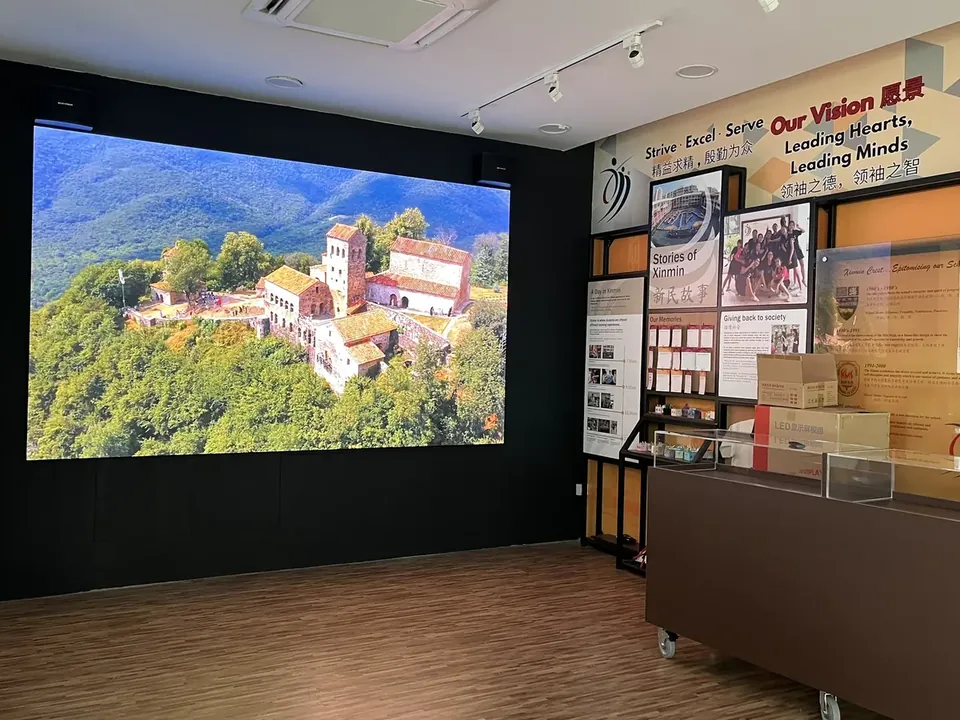
A school hall is one of the hardest rooms in Singapore to fit with a screen. Seating runs deep, ceilings are high, windows spill daylight across the stage, and the same floor has to host morning assembly, concert rehearsals, parent briefings and PE. A projector can look acceptable at nine in the morning and washed out by eleven; a commercial video wall can be bright but too small for the back row. An indoor LED display solves the brightness and scale problem, but only when it is specified for the room rather than chosen from a catalogue. This guide sets out what school leaders, operations managers and finance teams should settle before requesting quotations: the pixel pitch that suits your hall depth, brightness that survives daylight without glare, mounting and safety in a space used by students, a content workflow staff can actually run, and a procurement sequence that fits the Singapore school calendar. It draws on ETA Visual school projects, including a P2.6 GOB indoor LED screen for the Australia International School multi-purpose hall and a P1.86 screen at Xinmin Secondary School.
What Singapore schools actually use LED displays for
Most Singapore schools start with one screen and later wish they had planned two. The first request is the hall: a stage backdrop for assembly, National Day, concerts and prize presentations. The second is a wall-mounted screen in a multi-purpose room for staff briefings, workshops and parent sessions. A third is the reception or heritage wall, where the screen carries school identity rather than timetables.
These are different products. A stage backdrop is judged from 15 to 25 metres and must carry large text without looking coarse. A presentation wall is viewed from 4 to 8 metres and needs finer detail for slides. A reception wall is viewed from 1 to 3 metres, so pitch and finish matter more than size. Schools that make one screen do all three usually compromise the hall.
Separate the display from the message: decide who owns the screen, who approves content, and whether it runs live laptop feeds, scheduled playlists or both.
Match pixel pitch to hall depth, not to the brochure
The most common mistake is buying a finer pitch than the room needs, or a coarser one than the content demands. Pixel pitch is the distance between LED clusters; smaller numbers mean more pixels per square metre, a higher price and a closer comfortable viewing distance.
A practical rule for video is one metre of viewing distance per millimetre of pitch, so P2.6 suits 2.6 metres and P4 suits 4 metres. School halls rarely have a front row closer than three metres, so P2.6 to P4 covers most assemblies. At the back, content matters more: text needs a cap height of roughly one two-hundredth of the viewing distance, about 100 mm from 20 metres.
For a hall used mainly for slides and short videos, P2.5 to P3 is sensible. For a deep hall with 25 metres to the last row, P3.9 to P4 is enough and costs less per square metre. Fine pitch below P2 belongs where people sit within three metres. At Australia International School, the multi-purpose hall uses a P2.6 GOB indoor LED screen as a stage backdrop, a pitch that suits assembly viewing and close-up content.
Brightness, daylight and glare
Indoor LED is measured in nits. Most school halls are comfortable between 600 and 1,000 nits, with the upper end for rooms with large windows or skylights. More is not automatically better: a screen at full output in a dim hall is tiring and washes out dark content.
Glare is the bigger issue in Singapore. Afternoon sun on a west-facing wall can put a sheet of light across a stage backdrop. Plan the screen against the window wall, use a matte module surface where available, and set separate daytime and evening brightness. If the hall is used for photography, ask about scan rate and camera performance, because LED walls can band on video.
Content contrast matters as much as nits. Dark text on a light background reads better in a bright hall; white on black looks stronger in a darkened auditorium. Test both with the house lights on.
Mounting, sightlines and student safety
A hall screen is usually a stage backdrop hung behind the proscenium or a wall-mounted panel on a side wall. The backdrop gives the cleanest sightlines but needs rigging points and a structural frame. A wall mount is simpler, but the bottom edge must clear seated heads and the front rows should not look up steeply.
Set the bottom edge at least 1.2 to 1.5 metres above the stage floor, and higher where young children perform. Check the view from the front row, back row and side aisles.
Structure is where schools underestimate cost. A large LED wall is heavy, and plasterboard partitions will not carry it. Fixings should go into structural concrete or steel, with an engineer confirming large walls or overhead rigging. In halls used for sports, protect the lower modules and choose impact-resistant modules such as GOB. Keep the screen clear of exit routes and confirm fire requirements with your QP or fire safety manager.
Service access decides long-term cost. Front-service modules can be replaced from the face without scaffolding; rear access needs 600 to 800 mm of clearance and ventilation. In a school, front service is the difference between a quick module swap and a holiday shutdown.
Content and control: design for the staff who will run it
The screen will be judged by what staff can do on a busy Monday. Keep control simple: a wall panel or tablet that switches sources, plus a scheduler for notices and event slides. If the school has an AV or IT team, a networked player may be better; if not, a local player with a USB workflow beats a cloud account nobody administers.
Agree templates before installation: title slide, event slide, video frame and a holding image. Lock the aspect ratio to the screen's native resolution and keep a five percent safe area, because content near the frame can be clipped.
Training matters more than the manual. Two one-hour sessions, one for the office team and one for the AV club or IT teacher, plus a one-page source-switching guide, prevents most support calls. Set an image consent rule for student photographs, consistent with your PDPA and media consent policies.
Procurement: surveys, approvals and term breaks
Start with a site survey, not a price list. Record hall dimensions, ceiling height, stage depth, wall construction, power, cable routes, lift and door access, and the hours allowed for noisy work.
In Singapore, government and government-aided schools typically buy through public-sector processes, including GeBIZ, with quotation or tender thresholds and approval cycles. Independent and international schools usually run internal procurement with operations, finance and, for larger sums, board approval. Compare quotes on the same scope: screen area and pitch, module size, structure, control, cabling, installation, commissioning, training, warranty and spares.
Schedule installation for the June or December holidays, with a buffer before open house or National Day. A 20 to 40 square metre hall screen typically needs one to two weeks on site, including structure, cabling and commissioning, though access restrictions can extend that. Confirm production and shipping dates in writing.
Budget drivers and lifecycle planning
Four things drive the price: pixel pitch, total area, structure and access, and the control system. Finer pitch increases module count and cost per square metre. A stage backdrop with rigging and a custom frame can cost more than the screen, and a simple local player costs far less than a networked system.
Rather than comparing dollars per square metre, ask for an itemised breakdown and a five-year view, including spare modules, cleaning and a calibration check after the first year. LED modules age gradually, so a few matching spares keep a hall running while replacements arrive.
Plan the screen as part of the room. Lighting, acoustics, stage layout and seating all affect whether the display looks good in use. A screen specified for the room will still look right in year five; one bought on price alone dates within a season.
| Space | Typical viewing distance | Practical pixel pitch | Brightness target | What matters most |
|---|---|---|---|---|
| Assembly hall stage backdrop | 8-25 m | P2.6-P4 | 700-1,000 nits | Text size, sightlines, front service |
| Multi-purpose hall wall | 4-15 m | P2.5-P3.9 | 600-1,000 nits | Impact protection, fixing height |
| Reception or heritage wall | 1.5-5 m | P1.5-P2.5 | 500-800 nits | Fine detail, finish, close viewing |
| Canteen or notice area | 3-10 m | P3-P4 | 700-1,000 nits | Scheduling, durability, cleaning |
Want an accurate budget for your space?
We'll do a free site survey and prepare a clear, itemised quotation — no obligation.
Frequently asked questions
For most assembly halls, P2.6 to P4 is the practical range. The choice depends on the back-row distance and text size. A hall with 20 to 25 metres of seating depth usually works at P3.9 to P4, while a room viewed from 4 to 8 metres suits P2.5 to P2.6.
Cost depends on screen area, pixel pitch, structure, access and control. Two quotes can differ because one excludes rigging, cabling or commissioning. Ask for an itemised breakdown covering modules, structure, control, installation, training, warranty and spares.
Yes, and that is usually the best window. A 20 to 40 square metre hall screen typically needs one to two weeks on site, plus production lead time. Confirm delivery dates in writing and keep a buffer before open house.
It can be, if the screen is mounted above head height, fixed to structural walls or steel, and protected at the lower edge. Impact-resistant modules such as GOB reduce damage from balls. Keep it out of exit routes and have the fixing checked by an engineer.
An internal wall-mounted screen normally does not need planning permission, but structural fixing, fire safety and escape routes still apply. Larger installations may need an engineer's assessment, and materials should meet fire performance requirements. Confirm the scope with your QP or fire safety manager.
Clean the face with a soft dry cloth, keep the rear ventilation clear, and store a few matching spare modules. Check brightness uniformity after the first year and recalibrate if the wall looks patchy. Keep a log of sources and faults.
Plan the next step
Continue with a relevant solution and real Singapore project evidence.