Digital Menu Boards for Singapore F&B: Costs and Savings
Written and reviewed by the ETA Visual Engineering & Project Team. Guidance is updated when project, product or Singapore site-planning practices change.
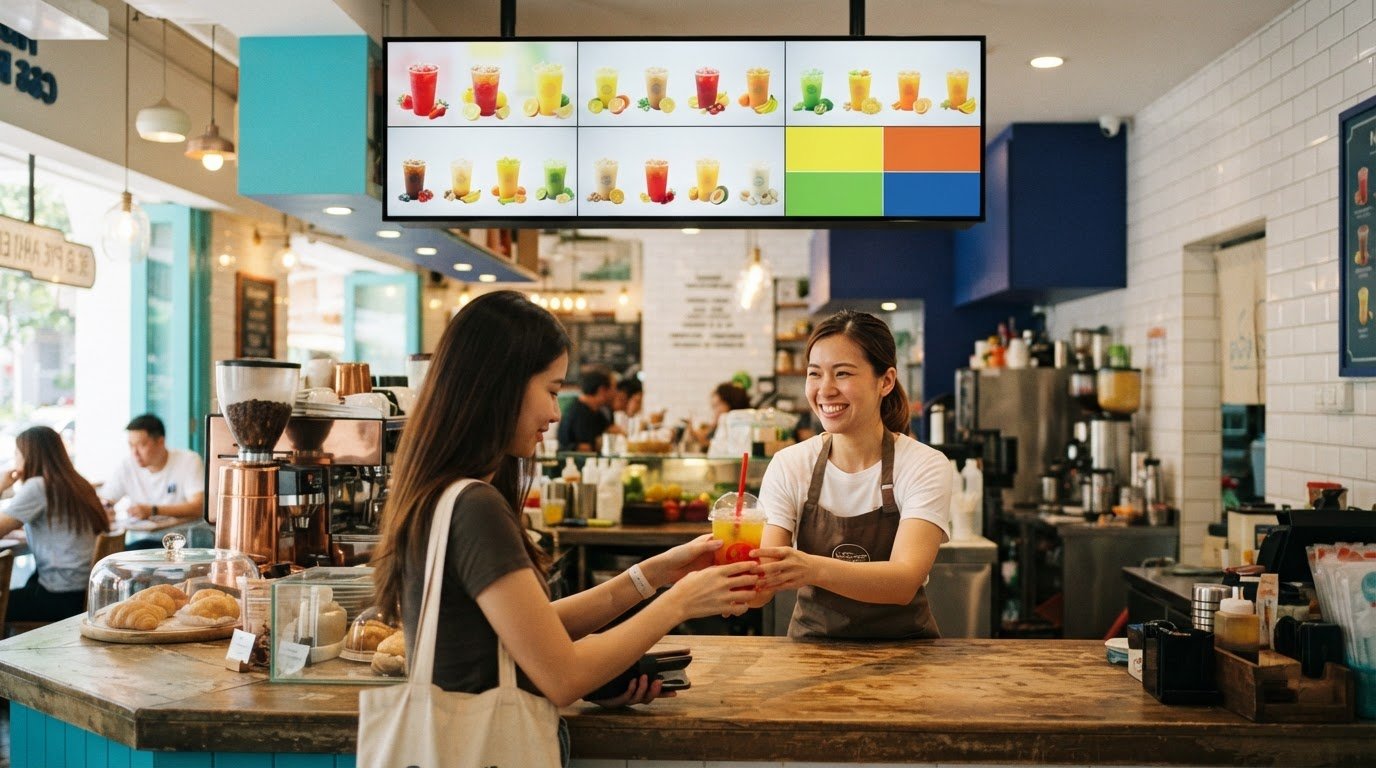
A screen doesn’t exempt a menu from Nutri-Grade requirements. In Singapore, restaurants selling freshly prepared beverages graded C or D must display the Nutri-Grade mark beside each beverage wherever it is listed for sale, including on a digital menu at the point of purchase. When planning a digital menu board for F&B operators in Singapore, ensure the mark stays clear and correctly placed as content changes. Printed menus can be costly and time-consuming to update. Digital boards make it easier to revise prices, promotions and item availability, but the decision involves more than replacing print. Screen choice, installation conditions, content control and the use of motion all affect whether the menu works well in your outlet. This guide explains when Nutri-Grade marks apply, how digital and printed menus compare over time, and what to consider when managing screens across outlets. It also covers animated transitions and how to draw attention to featured items without making menus harder to read or key information easier to miss.
Key Takeaways
- Keep required Nutri-Grade marks beside eligible freshly prepared beverages wherever they’re listed for sale, including at the digital point-of-purchase menu.
- Compare the initial screen investment with the ongoing printing and labour involved in menu changes to understand where long-term savings may come from.
- For multiple outlets, centralised content management and role-based access can help keep menus and prices consistent while controlling who can make changes.
- Plan screen resolution and brightness around viewing distance and location, particularly where sunlight or outdoor conditions affect readability.
- Use animation to draw attention to selected items, while keeping essential menu information clear and easy to read.
Table of Contents
- Do digital menu boards need to show Nutri-Grade marks?
- Long-term savings compared with printed menus
- Multi-outlet content management
- Screen resolution and brightness considerations
- What are the best digital menu board providers in Singapore for F&B businesses?
- ETA Visual
Do digital menu boards need to show Nutri-Grade marks?
Yes. Singapore restaurants selling freshly prepared beverages graded C or D must show the Nutri-Grade mark beside each beverage wherever it is listed for sale, including menus at the point of purchase. A digital menu must keep the mark beside the relevant drink when layouts, prices or promotions change. Treat the mark as part of the menu artwork, not as a separate optional screen.
Commercial-grade displays are better suited to extended operating hours than screens designed for occasional home use. For a digital menu board for an F&B business in Singapore, consider operating hours, viewing conditions, ventilation, mounting and maintenance access together. Cloud-based digital signage lets authorised staff update content centrally, while the display presents it in-store. Make sure the content workflow keeps required marks clear and consistently placed.
The outlet format shapes the setup. A single café may use two or three screens above its counter, while a twenty-outlet quick-service restaurant chain needs a rollout designed for multiple sites. A cloud platform can manage content across as many as fifty outlets. Pilot the system in one representative outlet first, then refine screen layout, publishing steps and staff training before wider deployment.
Train staff on a simple publishing sequence: select the correct menu, preview the screen, confirm the Nutri-Grade mark remains beside eligible drinks, then publish. Assign roles so only authorised team members can change prices or regulated menu details. A manager can also schedule breakfast promotions to end at 10:30, reducing the risk of outdated content remaining on display.
Outages, glare and cybersecurity can interrupt service or make dishes difficult to see. Plan a manual fallback menu, position screens to limit reflections, and restrict account access with individual logins and strong passwords.
In Singapore, local digital-signage integrators are the relevant provider category for installation and support. Local support, warranty coverage and financing are separate terms, so compare their scope and conditions rather than assuming they come as one package.
Shopfront and outdoor displays face rain, humidity and sunlight. Choose equipment and placement for the actual exposure, and plan safe maintenance access before installation. Near an entrance, glare can reduce readability, so test sightlines from the pavement and ordering queue. Indoor screens avoid direct weather exposure but still need suitable brightness and ventilation.
Smaller outlets can use compact digital displays or simpler signage where counter space is limited. Basic signage or 3D box-up signage can add visual impact without occupying much room. Keep dish names, prices and marks legible, and use animation sparingly so transitions don’t obscure essential details. Choose hardware and software with the next five years of use in mind.
Long-term savings compared with printed menus
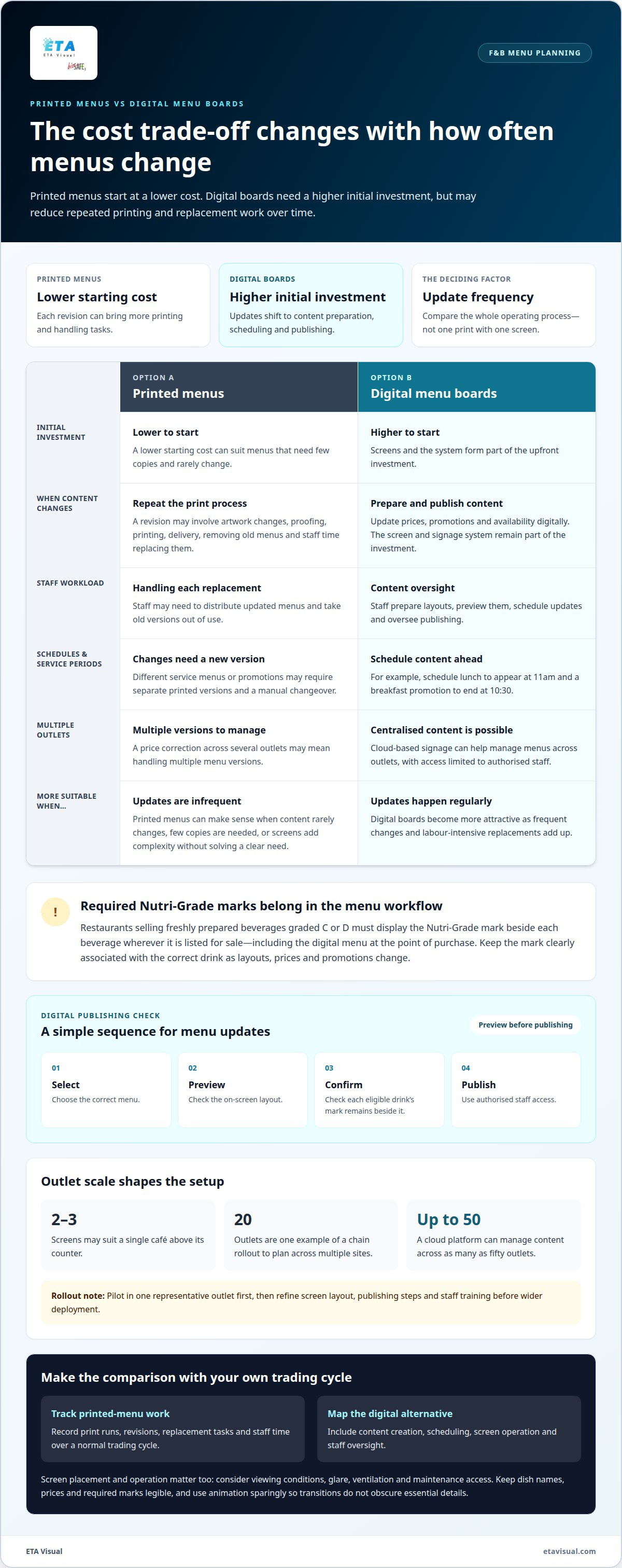
Printed menus have a lower starting cost, but each change can add printing and labour tasks. Digital menu boards require a higher initial investment but can reduce printing and labour costs over time. The comparison depends on how often prices, dishes, promotions and specials change, and how many copies each outlet needs.
To assess total cost, list the recurring work involved in a printed update: artwork changes, proofing, printing, delivery, removing old menus and staff time spent replacing them. A price correction across several outlets, for example, may require multiple menu versions. Digital signage shifts that work to content preparation and publishing, while screens and the system remain part of the investment.
Digital menus are most useful when updates happen regularly. A restaurant can schedule its lunch menu to appear at 11am, then replace it with dinner dishes later. A breakfast promotion can be set to end at 10:30, avoiding a manual screen change during service. Staff can prepare each layout in advance, preview it, and publish the scheduled content.
Dayparting also lets operators tailor the visual hierarchy to each service period. Breakfast can prioritise coffee and quick meals, lunch can feature set meals, and evening content can highlight sharing dishes or seasonal specials. Keep the core layout consistent, then change featured items and promotion panels. This makes menus easier to scan without rebuilding every screen.
Printed menus still make sense when content rarely changes, an outlet needs few copies, or screens would add complexity without solving a clear operational need. Digital boards become more attractive as frequent updates and labour-intensive replacements add up. Compare the full operating process, not just the cost of one printed menu with one display.
Nutri-Grade marks also belong in the digital content workflow. For freshly prepared beverages graded C or D, keep the mark beside the drink wherever it appears for sale. When updating a beverage layout or promotion, preview it to confirm the mark remains clearly associated with the correct item.
For a practical comparison, record each print run, menu revision and replacement task over a normal trading cycle. Then map the digital alternative, including content creation, scheduling, screen operation and staff oversight. This makes the trade-off visible without relying on generic savings claims. It also shows whether the main benefit is less printing, less staff handling, faster promotions or a combination.
Operators assessing the screen and content system together can explore digital signage solutions in Singapore as part of their planning.
Multi-outlet content management
Across several outlets, a price change can become a coordination problem. A central content management system (CMS) gives teams one place to prepare approved menu updates, while outlet-specific versions accommodate local dishes or availability. This separates shared brand content from genuine site variations and reduces the chance that a branch displays an old price.
Set permissions before publishing. A marketing editor can prepare images and promotions, while an operations manager approves prices and publishes final content. Outlet staff can be given access to report unavailable dishes without changing the master menu. This role-based structure supports accountability and helps prevent accidental edits across the chain.
Build reusable templates for recurring content. A breakfast layout, for example, can use the same logo, typography and category order across outlets while allowing each restaurant to feature its own specials. Store approved images, video and menu layouts in organised folders. Clear filenames, such as “Breakfast-Approved” or “Seasonal-Current”, make the right asset easier to find.
Cloud-based digital signage can distribute approved content to screens across multiple outlets. A controlled publishing workflow should include preview, outlet selection, approval and publication. Keep a record of who approved each change and when it went live. This audit trail helps operations teams investigate differences between a planned menu and the display customers see.
Social media feeds can add timely visual content, but they need editorial control. Where a platform supports feed integration, use selected posts rather than an unfiltered stream. Assign a reviewer to check image quality, wording and relevance before content appears beside dishes or prices. A supplier should clarify how feed content is moderated and whether staff can pause it centrally.
Can digital menu boards integrate with POS systems and online ordering platforms in Singapore? Yes. Menu boards can sync with order systems and pair with mobile ordering platforms. The integration design determines which menu details, prices and availability updates pass between connected systems, supporting kitchen workflows and reducing manual re-entry.
Plan the rollout around actual operations, not just screen installation. Start with a representative outlet, test publishing permissions, and confirm that breakfast, lunch and promotional content appear on the intended displays. Then document the process for outlet managers, including who handles corrections and escalates technical issues. This gives the next locations a proven workflow to follow.
Use performance reviews to refine content decisions. Compare promotion timing, item availability and sales or margin data from systems the business already uses. If a featured dish regularly sells out early, operations can adjust its placement or schedule. The CMS manages distribution; restaurant teams remain responsible for accurate menu decisions.
Screen resolution and brightness considerations
Menu text needs to be readable from the customer’s position, not just from beside the screen. Digital menu board text should be large enough to read from three to four metres away. Check the smallest item name, price and required mark at that distance. If customers need to move closer to read modifiers, simplify the layout or reposition the display.
Resolution affects how much detail a screen can show clearly. Match the content canvas to the display’s native resolution and shape, then check how text and food images appear at full size. A wide screen may suit several menu categories, while portrait orientation can give a narrow counter more vertical space. Don’t stretch a landscape design across a portrait display.
Brightness must suit the viewing environment. A screen facing direct sunlight needs brightness suitable for outdoor use, while an indoor counter display has different requirements. Reflections from glass doors or polished surfaces can still reduce contrast, even when the display is bright. During planning, assess the screen from the pavement, entrance and ordering queue at different times of day.
Templates make menu changes more consistent across outlets. Create a master layout with fixed areas for category headings, item names, prices and dish images, then use a separate panel for rotating specials. A limited-time drink, for example, can move into the featured area without shifting core meal prices. Preview each template on the actual screen before publishing.
Keep motion and visual detail secondary to legibility. A short transition can draw attention to a featured dish, but rapidly changing text makes prices harder to compare. Use high-contrast type, consistent spacing and clear grouping. Test a complete menu with long dish names and any required beverage marks, rather than approving a template with placeholder text alone.
Hardware and installation decisions affect what customers see. Confirm the mounting position, screen orientation, power access, signal route and service access before installation. In a mall or food-court unit, coordinate access and work timing with building management. Allow ventilation around the display, and avoid locations where kitchen heat, steam or cleaning activity could affect operation.
Commissioning should include a content test, not just a power-on check. Display the final menu, inspect image sharpness and text from the customer’s approach, then check brightness under the outlet’s actual lighting. Record the approved settings and template version for future updates. This gives staff a useful reference when screens are replaced or layouts change.
What are the best digital menu board providers in Singapore for F&B businesses?
There isn’t one best provider for every restaurant in Singapore. The right fit depends on whether you need screens, content management, installation or integration with existing systems. A straightforward signage setup may suit a single café. A chain with several outlets needs central publishing, permissions and a consistent support process.
Providers generally fall into three groups: display suppliers, digital-signage software providers and AV system integrators. A display supplier focuses on screen hardware. A software provider manages content and scheduling. An AV integrator coordinates screens, mounting, signal flow, commissioning and ongoing maintenance as one operating system. This approach suits projects where installation constraints and content control matter as much as the screen itself.
Assess each provider against the work your restaurant needs completed:
- Design: Does the proposed screen arrangement fit the counter, customer sightlines and menu format?
- Content: Can staff schedule promotions, manage outlet-specific menus and control publishing access?
- Integration: Can the proposed setup connect with the restaurant’s existing ordering or POS workflow?
- Delivery: Does the scope cover site assessment, installation, commissioning and maintenance access?
For a mall unit, installation planning should account for building management requirements, loading access and permitted work hours. Planning these details before delivery can reduce disruption during installation. Outdoor or shopfront screens need a separate assessment of rain exposure, humidity, sunlight and maintenance access.
Read warranty terms as part of the technical scope. Confirm which components and labour are covered, how faults are reported, and what support process applies after commissioning. Financing is a separate commercial arrangement, not an automatic feature of digital signage. Treat it as a distinct part of the written proposal alongside equipment, software and installation scope.
A practical selection process starts with a representative outlet. Define the menu content, screen positions and publishing roles, then test the proposed workflow using actual dishes, prices and promotions. This reveals whether staff can manage updates and customers can read the display from the ordering queue. For a chain, document the approved setup before expanding to other locations.
A strong proposal connects screen specifications to outlet conditions, explains how content reaches each display, and sets out how the system will be maintained. This end-to-end view helps F&B operators assess the operational fit rather than choosing on hardware alone.
ETA Visual
ETA Visual helps F&B operators plan display systems around outlet layout, viewing conditions and installation requirements. For indoor menus, Indoor P0.9~P5 LED Screens provide an option where the screen format and viewing distance suit the space. The design process considers placement, power, signal flow and access for maintenance, alongside how customers approach the counter.
For shopfront or architectural applications, Outdoor LED Billboards and Transparent LED Displays can suit different visibility and frontage requirements. The right configuration depends on the outlet’s environment and the screen’s purpose. ETA Visual can assess these practical considerations as part of an LED and AV project.
Contact ETA Visual to discuss your F&B display requirements.
Plan the next step for your outlet
Choosing a digital menu board for an F&B business in Singapore means deciding how customers will encounter your menu and how your team will manage it. Before moving ahead, define the display’s purpose: supporting counter orders, promoting dishes from the shopfront, or fitting a distinctive frontage. That brief helps align the screen design with your space and service flow.
ETA Visual can help shape the display system around those requirements, with options including Indoor P0.9~P5 LED Screens, Outdoor LED Billboards and Transparent LED Displays. The focus is on matching the solution to the outlet, rather than selecting a screen in isolation.
With a clear brief, your next discussion can focus on layout, installation conditions and the display’s role in daily operations. Take the next step when you’re ready.
A carefully planned display gives your team a more deliberate way to present the menu and support the customer experience.
Do you supply the screens?
Yes. ETA Visual supplies commercial LED screens and can coordinate the display with the wider AV system. This is useful when a restaurant needs more than a standalone panel, such as connected screens or a display integrated into a shopfront. The project can be planned around the outlet’s menu format, physical layout and operating requirements.
How much does restaurant digital signage cost in Singapore?
The cost depends on the display type, project scope, installation conditions and content-management requirements. A compact counter setup and a multi-screen restaurant project involve different equipment and integration needs. Pricing is provided after a quotation request. The quotation can separate hardware, software, installation and requested support, making the proposed scope easier to review.
How much does a digital menu board cost in Singapore, including hardware, software and installation?
There isn’t one fixed total for hardware, software and installation. Display configuration, mounting method, cabling route, content platform and site access all affect the project scope. Pricing is provided after a quotation request. A project proposal should distinguish one-off equipment and installation from recurring platform charges, so the restaurant can assess the full commitment.
What are the monthly subscription and maintenance costs for digital menu boards in Singapore?
Subscription charges depend on the software arrangement, while maintenance depends on the support scope. ETA Visual offers annual preventive maintenance contracts for commercial AV systems. For budgeting, separate the platform’s billing period from any maintenance agreement and note what each covers. This helps operators forecast recurring expenditure without confusing content access with hardware servicing.
How do digital menu boards compare with printed menus for cost, sales and ease of updating?
To assess commercial impact, compare like-for-like periods using existing sales and labour records. Track, for example, whether a featured item’s sales mix changes during a promotion, alongside staff time spent handling menu revisions. This doesn’t prove the screen alone caused a change, but it gives operators a useful basis for deciding whether the format supports their service and merchandising goals.
What screen sizes, brightness and display specifications suit Singapore restaurants and hawker stalls?
Besides screen dimensions, consider aspect ratio, image source quality and how the display will be viewed from the side of a queue. A menu designed for a wide landscape screen may crop badly on a portrait display. At a hawker stall, the available mounting area and neighbouring stall layouts can also affect what customers see. Match the content design to the chosen screen format.
How do you install and set up a digital menu board in Singapore?
Setup involves coordinating the display with the restaurant’s physical and IT environment. Plan for the mounting surface, power and signal routes, network access where required, and the media player or content source. In managed buildings, coordinate work access and installation timing. Test the final configuration with the restaurant’s own content before handover.
What licences, regulations or content requirements apply to digital signage in Singapore?
Requirements depend on what the screen displays and where it is installed. Assign responsibility for reviewing menu claims, promotional wording, imagery and applicable food-labelling obligations before publication. Outdoor or shopfront placement may involve different site considerations from an indoor counter display. Keep an approval record for published content, including who reviewed changes and which version is in use.
Visual planning reference
| Planning factor | What to define | Why it matters |
|---|---|---|
| Viewing positions | Nearest viewing distance and audience locations | Supports an appropriate pixel-pitch and screen-size decision. |
| Content workflow | Input sources, resolutions and control workflow | Helps ensure information remains readable and simple to operate. |
| Installation conditions | Structure, access, power, ventilation and maintenance access | Aligns the display scope with the physical site before procurement. |
Want an accurate budget for your space?
We'll do a free site survey and prepare a clear, itemised quotation — no obligation.
Frequently asked questions
Yes. ETA Visual supplies commercial LED screens and can coordinate the display with the wider AV system. This is useful when a restaurant needs more than a standalone panel, such as connected screens or a display integrated into a shopfront. The project can be planned around the outlet’s menu format, physical layout and operating requirements.
The cost depends on the display type, project scope, installation conditions and content-management requirements. A compact counter setup and a multi-screen restaurant project involve different equipment and integration needs. Pricing is provided after a quotation request. The quotation can separate hardware, software, installation and requested support, making the proposed scope easier to review.
There isn’t one fixed total for hardware, software and installation. Display configuration, mounting method, cabling route, content platform and site access all affect the project scope. Pricing is provided after a quotation request. A project proposal should distinguish one-off equipment and installation from recurring platform charges, so the restaurant can assess the full commitment.
Subscription charges depend on the software arrangement, while maintenance depends on the support scope. ETA Visual offers annual preventive maintenance contracts for commercial AV systems. For budgeting, separate the platform’s billing period from any maintenance agreement and note what each covers. This helps operators forecast recurring expenditure without confusing content access with hardware servicing.
To assess commercial impact, compare like-for-like periods using existing sales and labour records. Track, for example, whether a featured item’s sales mix changes during a promotion, alongside staff time spent handling menu revisions. This doesn’t prove the screen alone caused a change, but it gives operators a useful basis for deciding whether the format supports their service and merchandising goals.
Besides screen dimensions, consider aspect ratio, image source quality and how the display will be viewed from the side of a queue. A menu designed for a wide landscape screen may crop badly on a portrait display. At a hawker stall, the available mounting area and neighbouring stall layouts can also affect what customers see. Match the content design to the chosen screen format.
Plan the next step
Continue with a relevant solution and real Singapore project evidence.