Conference Room Projector Alternative: TV or Projector
Written and reviewed by the ETA Visual Engineering & Project Team. Guidance is updated when project, product or Singapore site-planning practices change.
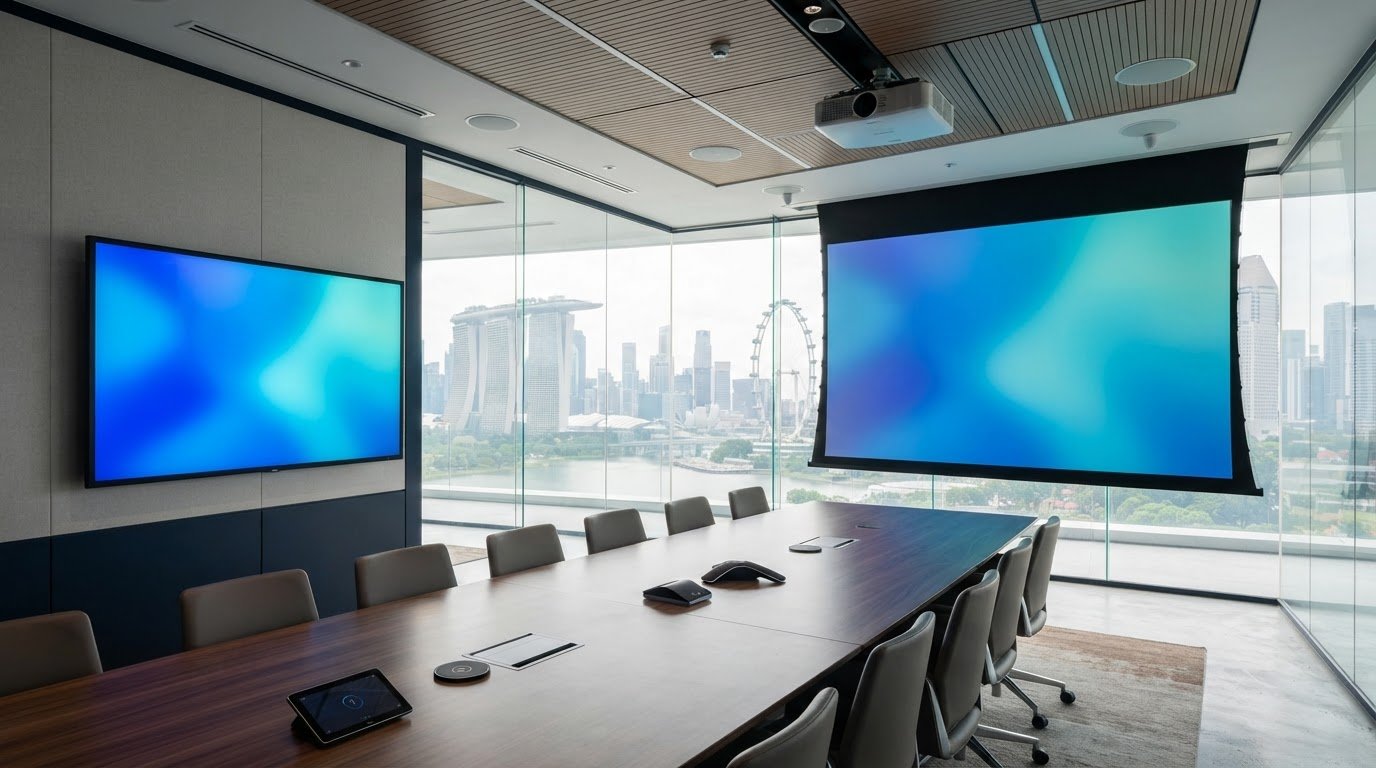
A TV can be the better conference room projector alternative when the room needs a clear, easy-to-view display under normal lighting. For displays smaller than 80 inches, a TV can be a practical choice, while a projector can create a much larger image, including a 100-inch display and options up to 200 inches. The right choice depends on the room’s size, light conditions and how people will use the screen. A projector is a familiar choice for presentations because it can show a large image across a spacious room. But a TV produces its image directly from the display panel and is generally less affected by ambient light. Its fixed physical size, however, limits the viewing area. This guide compares TVs and projectors for brightness, image quality, larger spaces, training and video calls. It also explains how screen size, installation and the room’s AV setup affect the decision, helping you choose a display that suits the way your team meets.
Key Takeaways
- Match the display to the room: a TV can suit screens under 80 inches, while a projector can create a larger image for wider viewing areas.
- For a conference room seating 30 to 50 people, compare a 100- or 120-inch projected image with the sightlines and lighting in the actual space.
- In larger rooms, consider whether multiple displays can make shared content easier to see from different seats.
- For training and video calls, assess more than screen size: content clarity, camera placement and audio coverage all shape the experience.
- Plan the full AV setup around how people connect and present, including resolution, aspect ratio, installation and the projection surface or display mounting.
Table of Contents
- TV or Projector for Conference room, Which One to Choose?
- Using multiple screens in larger conference rooms
- Conference room uses, including training and video conferencing
- Conference room audio-visual technology and projectors
- What are the best alternatives to a projector for a conference room?
- ETA Visual: Indoor P0.9~P5 LED Screens
TV or Projector for Conference room, Which One to Choose?
A TV suits a conference room needing a clear image in normal lighting, while a projector can create a much larger screen, including 100-inch displays and options up to 200 inches. In Singapore, meeting-room display installation involves matching screen size and mounting position to sightlines, room lighting, power, signal routing and building access.
Projectors vs Conference Room TVs
A projector is suited to large images and rooms where participants need to view content across a wide space. A TV is a practical conference room projector alternative for smaller screens: displays below 80 inches can be more cost-effective, and the image is generally less affected by ambient light. TVs produce images directly from their panels and need no separate screen, but their physical size limits the viewing area.
For a projector, account for the projection surface and suitable projection conditions. A 100- or 120-inch projected display is recommended for rooms seating 30 to 50 people. Most TVs are about 65 inches, although 85-inch and 98-inch displays are also available. Compare the seating layout and the farthest viewing position before selecting either option.
Projectors vs Interactive Flat-Screen Displays
An interactive flat-screen display adds direct on-screen interaction. Teams can annotate content or use a digital whiteboard, while a standard projector setup displays content on a screen but is not interactive by itself. Projected images can be much larger, but an interactive panel is a more direct fit for collaborative work around the screen.
Consider the meeting activity, not just the hardware. A presentation-led room may benefit from a large projected image; a workshop using a whiteboard may benefit from interactive input. Check where participants will stand, write and sit so the screen is accessible without obstructing the table or anyone’s view.
Display Size and Resolution by Room
Room dimensions and the content determine the useful display size and resolution. For text-heavy laptop sharing, account for the laptop’s common 16:10 aspect ratio; most flat-screen TVs use 16:9. A mismatch can leave unused screen space or alter how content fits, so test the expected presentation format before finalising the display.
Projector options include 720P, 1080p and 4K. Full HD at 1080p is usually sufficient for conference rooms, while screen sharing may call for higher resolution. A 4K image can show finer detail when both the source and display support it. Clarity also depends on viewing distance and the size of text or diagrams.
| Option | Image size | Bright-room performance | Interaction |
|---|---|---|---|
| Projector | Large images, including 100 inches | Needs suitable projection conditions | Not interactive by itself |
| TV | Commonly about 65 inches; 85- and 98-inch models available | Generally less affected by ambient light | Depends on display type |
| Interactive flat-screen | Limited by its physical panel | Direct panel image | Supports on-screen interaction |
Prioritise the room’s farthest seat, ambient light, content detail and whether meetings need interactive whiteboard functions.
Using multiple screens in larger conference rooms
In a long conference room, one screen may be difficult to see from every seat. Multiple displays can repeat a presentation at different points, while one projector can create a continuous image across a larger screen. Choose the layout based on seating distance, sightlines and whether participants need the same content or separate views.
Choose wireless presentation displays based on compatibility with meeting-room laptops, reliable network access and simple connection steps. A smart TV with built-in casting can suit teams using compatible devices; a dedicated wireless presentation system can support a wider range of devices. Keep a wired HDMI connection available for important meetings when wireless sharing is unsuitable.
Screen layout and viewing distance
Start with a seating plan. Mark the farthest seat, screen positions and any sightlines blocked by columns or room dividers. In an elongated room, two displays showing the same content can serve the front and rear seating areas. In a boardroom with a wide table, paired screens on opposite walls may help participants avoid turning away from the discussion.
Large flat-screen displays measuring 85 inches or 98 inches are available. Their physical dimensions can suit collaboration rooms, but each panel has a fixed screen size. A projector can produce a larger image, with options up to 200 inches, subject to suitable projection conditions and screen placement. Check that both screen types remain visible from the room’s farthest seat.
Smart TV and touch-screen functions
A smart TV may offer built-in wireless casting, while a touch-screen display adds direct interaction for annotations or digital whiteboard work. These functions are different: casting shares a device’s screen, while touch capability lets participants work on the display itself. Make sure the setup matches the meeting workflow, including how guests present and how content is controlled.
For multiple screens, decide whether they will mirror one source or show separate content. Mirroring suits a shared presentation; separate feeds can support video calls and reference documents. Label connection options clearly and test switching sources before using the room.
Cost, installation and maintenance
Compare total project cost, not only the display. Screen count, mounting, signal distribution, cabling, control equipment and installation access all affect the budget. A TV can be more cost-effective below 80 inches, while the cost of a large projector setup includes its screen and installation. Project prices depend on these requirements and are provided after a quotation request.
Installation planning should cover wall support, power, cable routes, ventilation and access for servicing. In Singapore offices, coordinate delivery routes, loading-bay use and installation hours with building management. Maintenance requirements include keeping screens and vents clear, checking connections and confirming that each source displays correctly.
For a room with several screens and shared sources, review the signal flow and control plan through this meeting-room AV setup guide before finalising the layout.
Conference room uses, including training and video conferencing
Choose a display around the room’s purpose, not its name. A meeting room used by up to 15 people has different demands from a conference room hosting 10 to 50 or more. Training, executive presentations and video calls each place different demands on screen content, camera position and audio.
Presentations and executive meetings
Formal meetings, board discussions and important client presentations rely on readable documents, charts and shared slides. A projector can suit a large presentation space where attendees need one image across a wide seating area. For an executive discussion around an elongated table, check whether people at both ends can read key text without leaving their seats.
Plan the sources before choosing a display setup. A presenter may bring a laptop, while the room also needs to show a video call or presentation materials. Map how each source reaches the screen and how the meeting chair switches between them. For example, test a laptop presentation followed by a remote participant’s video feed.
Training rooms and instructional content
Training rooms use projectors to show instructional content, demonstrations and course materials to a group. A large image can help attendees follow a shared diagram or software walkthrough. For small text, spreadsheets or detailed interfaces, check that content remains legible from seats farther from the screen. Both the source device’s resolution and the displayed image affect detail.
Training also involves movement and participation. A facilitator may stand near the screen to demonstrate a process, then return to a laptop to advance slides. Position the display so the presenter does not block essential content. If sessions use a digital whiteboard, include that function in the room’s purpose and plan how participants will contribute.
Video conferencing and hybrid use
Video calls need space for both remote participants and shared meeting content. A single screen can show one source at a time; a multi-display setup can show participants on one screen and slides on another. Choose the layout based on the table, camera framing and the direction people naturally face during discussion.
Before a hybrid meeting, test the full signal path: camera, microphone, room speakers, computer and display. Ask someone to join remotely and check whether their voice is clear from seats around the table. Then share a document and confirm that local participants can read it while still seeing remote attendees. This rehearsal can reveal routing or visibility problems before a client presentation.
For each meeting room, document its main use, typical sources and required functions. This helps match the display and AV setup to the work people actually do.
Conference room audio-visual technology and projectors
A projector is one part of a conference-room AV system, not a complete meeting solution. The visual path starts at a laptop or video-conferencing device, then passes through connection and switching equipment before reaching the projector. Audio follows a separate path through microphones, processing and speakers. Planning both together helps prevent a clear image arriving without usable sound.
Projection conditions and light source
Projector placement affects image size, focus and room usability. A short-throw projector can produce a large image from 3 to 8 feet away, while an ultra-short-throw model can create an 80-inch image from about 20 inches away. These options can help in smaller rooms where a ceiling-mounted device or long throw would obstruct the space.
Some laser projectors use three red, green and blue lasers to reproduce visual content. A high-quality laser projector can last around 20,000 hours. Treat that figure as operating life, not a maintenance schedule: vents, filters where fitted, lens surfaces and room airflow still affect ongoing performance. Keep the light source away from direct obstruction and allow access for servicing.
Signal flow and resolution
Map every source before installation. For example, a room may need laptop presentation, a video-conference computer and a document camera routed to one projector. An AV receiver with at least six HDMI ports can accommodate several connected sources. HDMI 2.0 supports 4K UHD output when the connected display can show it; resolution also depends on the source device and signal path.
Use compatible connections throughout the chain. A 4K laptop connected through equipment that cannot pass the required signal may not deliver the expected image. Label inputs by function, such as “Meeting PC” or “Guest Laptop”, then test switching, sound and image during commissioning. This makes source selection clearer for staff using the room later.
Audio, control and commissioning
Projector placement must work with microphones, speakers and cameras. A ceiling-mounted unit can compete for space with other equipment, so coordinate positions before fixing brackets or running cables. For video calls, test whether the camera captures seated participants and whether remote voices are clear in the room.
For many conference rooms, 5.1-channel sound is a practical audio configuration. Match speaker placement and routing to the room layout, then test speech from different seats. Commissioning should include a complete meeting scenario: connect a laptop, show a presentation, switch to a video call and confirm that both local and remote audio work.
The key is to design the projector, signal routing, control and sound as one AV system. A coordinated conference room AV setup makes each device serve the same meeting purpose.
What are the best alternatives to a projector for a conference room?
For a small meeting group, a flat-screen TV is a straightforward alternative. TVs suit displays below 80 inches and can be more cost-effective at that size. Larger panels, interactive displays and LED video walls serve different room layouts, so compare viewing distance, ambient light, collaboration needs and installation space before choosing.
Most TVs are about 65 inches, with 85-inch and 98-inch options also available. A panel produces its image directly and is generally less affected by ambient light than a projector. Its physical screen size sets a limit, and installation usually needs a wall or stand. A projector can scale larger, but needs a projection surface and suitable conditions.
| Option | Useful for | Key trade-off |
|---|---|---|
| 65-inch TV | Small meeting groups | Limited screen size |
| 85-inch TV | Medium rooms needing a larger panel | Fixed physical size |
| 98-inch TV | Large-format display in a suitable room | Wall or stand space |
| Interactive flat-screen | Touch input and digital whiteboard use | Panel dimensions limit image area |
| LED video wall | Large, configurable display areas | Requires integrated display planning |
| Multiple TVs | Long rooms with distant seating | Requires source distribution |
| Mirrored displays | Showing one presentation at several positions | Every screen shows the same content |
| Separate content displays | Showing slides and video-call participants together | Needs deliberate source routing |
| Short-throw projector | Large images with limited projection distance | Still needs a projection surface |
| Ultra-short-throw projector | Rooms with little space between device and screen | Still depends on projection conditions |
For a room seating 30 to 50 people, a 100- or 120-inch projected display is recommended; compare that image area against panel sightlines. A 98-inch TV may suit some layouts, while multiple screens can help distribute shared content. The best conference room projector alternative depends on the farthest seat and what participants need to see.
Interactive panels suit workshops where participants annotate diagrams or use a whiteboard. For presentation-led meetings, a non-interactive screen may be enough. A wireless presentation display can simplify sharing when compatible devices connect reliably; keep source switching clear for staff and guests.
Display and installation costs depend on screen size, mounting, signal routing, source equipment and room access. Project cost is determined by the case and provided after a quotation request.
Choose the format by prioritising the farthest viewer, content detail, room lighting and interaction needs. For a coordinated display and signal-flow plan, plan your conference-room AV integration.
ETA Visual: Indoor P0.9~P5 LED Screens
ETA Visual supplies Indoor P0.9~P5 LED Screens for businesses considering a large-format display instead of projection. An LED screen may suit a conference room where a fixed display surface and integrated screen design fit the space better than a projector and separate screen.
Choosing an LED display involves more than selecting a screen size. Viewing distance, room layout, content detail, mounting structure, power and maintenance access all affect the design. The display must also work with the room’s presentation sources and AV equipment, so plan signal routing and commissioning alongside installation.
Plan for building access, installation logistics and ongoing service access early in an office project. This helps match the display configuration to the room and its use.
Contact ETA Visual to discuss an indoor LED display for your conference room.
Plan the Display Around Your Next Meeting
Turn your display decision into a practical project brief. Record what meetings need to accomplish, who uses the room and what content they share. This makes it easier to assess a conference room projector alternative based on how your team works, rather than choosing by screen format alone.
Include the room layout, preferred display position and any installation constraints. Note how presenters connect their devices and who will operate the system. These details give the design process a clear starting point and help make the room straightforward to use.
Before finalising the plan, consider how the display will support changes to meeting formats or room use. A considered decision can help the space remain useful as your team’s needs evolve.
With a clear brief, you can move forward confidently and make the room work well for your team.
How large a TV or display is needed for a conference room by seating capacity?
Seating capacity alone doesn’t determine display size; table shape and presentation content matter too. A room used mainly for slide decks may need a different viewing area from one showing detailed design drawings. Before choosing a model, display representative content at its intended size and check legibility from seats at the sides and ends of the table. This helps you assess the layout, not just the headcount.
How much do conference room TVs, LED displays and interactive panels cost in Singapore?
There isn’t one useful price for each category because project scope and equipment choices vary. Compare quotations on the same basis: identify the display, installation work, control equipment and commissioning included in each proposal. Separate essential functions from optional additions, such as touch interaction, so budget decisions reflect how the room will be used. Project pricing is provided after a quotation request, based on the requirements.
Can a large-format TV replace a projector in a bright conference room?
Yes, if the TV’s viewing area suits the room and its intended use. A TV removes the need to align a projector with a separate screen, but its fixed panel dimensions may not suit every presentation layout. Check the wall space, mounting position and how the screen fits alongside room furnishings. A TV is less suitable when the project requires a much larger projected image.
What connectivity and video conferencing features should a conference room display have?
Choose a display setup that works with your organisation’s meeting platform and the devices staff bring into the room. The display is only one component: video calls also need a suitable conferencing device, camera and microphones. Clarify whether users connect their own computers or use a dedicated room system, then test how meeting content and remote participants appear together before handover.
What are the drawbacks of using a TV or LED wall instead of a projector?
A TV fixes the image to one panel, which can limit the visual layout when presentations need an unusually wide or large canvas. An LED wall offers a configurable display area, but content may need scaling to suit its shape and resolution. Neither option removes the need to plan placement, mounting and source compatibility. Weigh these trade-offs against the room’s presentation format and expected changes.
Visual planning reference
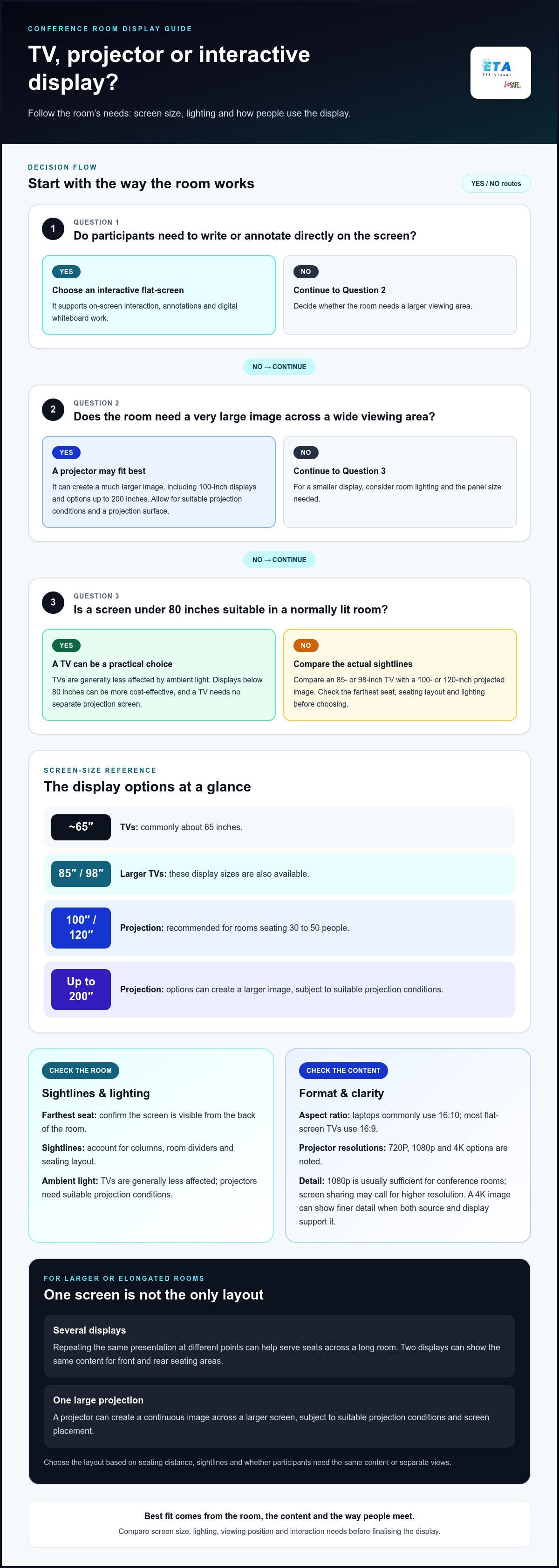
| Option | Image size | Bright-room performance | Interaction |
|---|---|---|---|
| Projector | Large images, including 100 inches | Needs suitable projection conditions | Not interactive by itself |
| TV | Commonly about 65 inches; 85- and 98-inch models available | Generally less affected by ambient light | Depends on display type |
| Interactive flat-screen | Limited by its physical panel | Direct panel image | Supports on-screen interaction |
Want an accurate budget for your space?
We'll do a free site survey and prepare a clear, itemised quotation — no obligation.
Frequently asked questions
Seating capacity alone doesn’t determine display size; table shape and presentation content matter too. A room used mainly for slide decks may need a different viewing area from one showing detailed design drawings. Before choosing a model, display representative content at its intended size and check legibility from seats at the sides and ends of the table. This helps you assess the layout, not just the headcount.
There isn’t one useful price for each category because project scope and equipment choices vary. Compare quotations on the same basis: identify the display, installation work, control equipment and commissioning included in each proposal. Separate essential functions from optional additions, such as touch interaction, so budget decisions reflect how the room will be used. Project pricing is provided after a quotation request, based on the requirements.
Yes, if the TV’s viewing area suits the room and its intended use. A TV removes the need to align a projector with a separate screen, but its fixed panel dimensions may not suit every presentation layout. Check the wall space, mounting position and how the screen fits alongside room furnishings. A TV is less suitable when the project requires a much larger projected image.
Choose a display setup that works with your organisation’s meeting platform and the devices staff bring into the room. The display is only one component: video calls also need a suitable conferencing device, camera and microphones. Clarify whether users connect their own computers or use a dedicated room system, then test how meeting content and remote participants appear together before handover.
A TV fixes the image to one panel, which can limit the visual layout when presentations need an unusually wide or large canvas. An LED wall offers a configurable display area, but content may need scaling to suit its shape and resolution. Neither option removes the need to plan placement, mounting and source compatibility. Weigh these trade-offs against the room’s presentation format and expected changes.
Confirm the viewing distance, display size, content type, installation conditions and signal-source requirements before selecting a system.
Plan the next step
Continue with a relevant solution and real Singapore project evidence.

