Commercial LED Screen Brightness: How to Specify the Right Level in Singapore
Written and reviewed by the ETA Visual Engineering & Project Team. Guidance is updated when project, product or Singapore site-planning practices change.
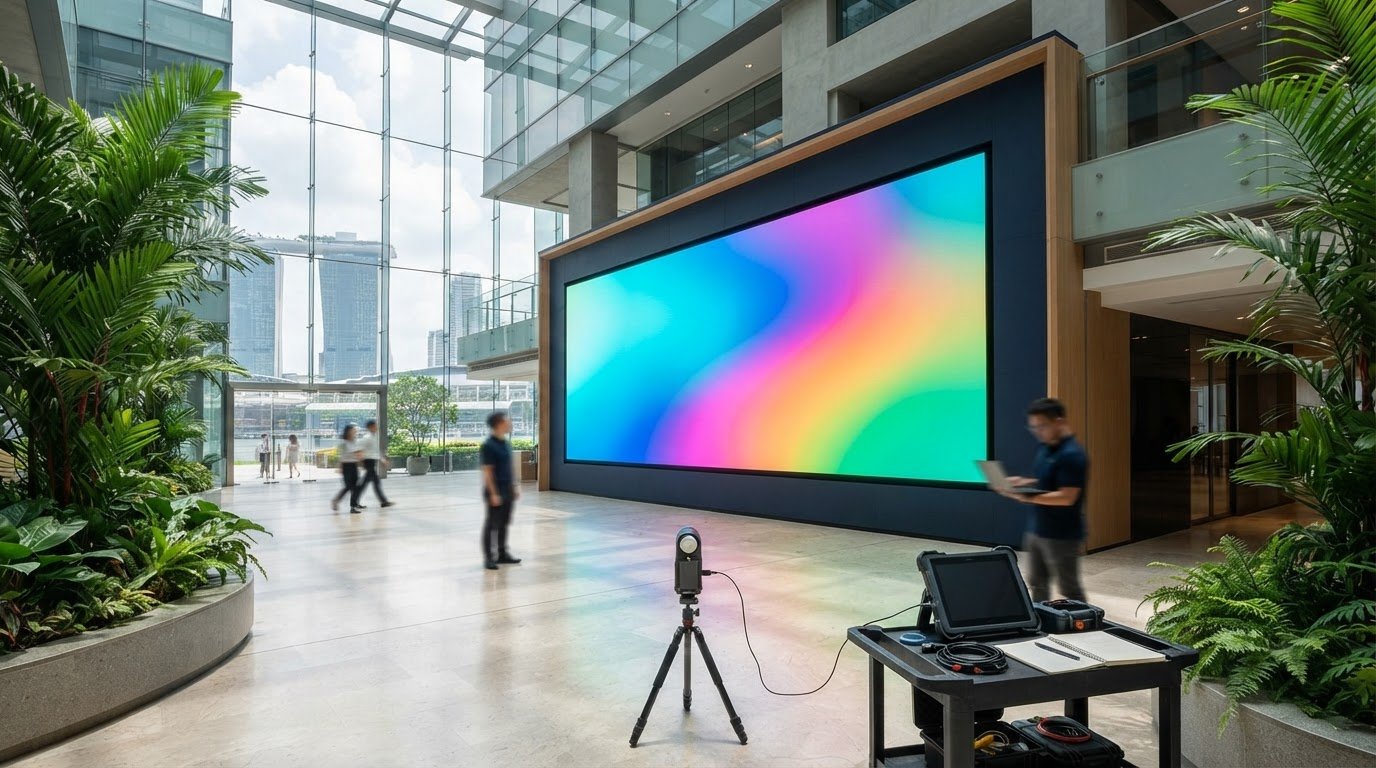
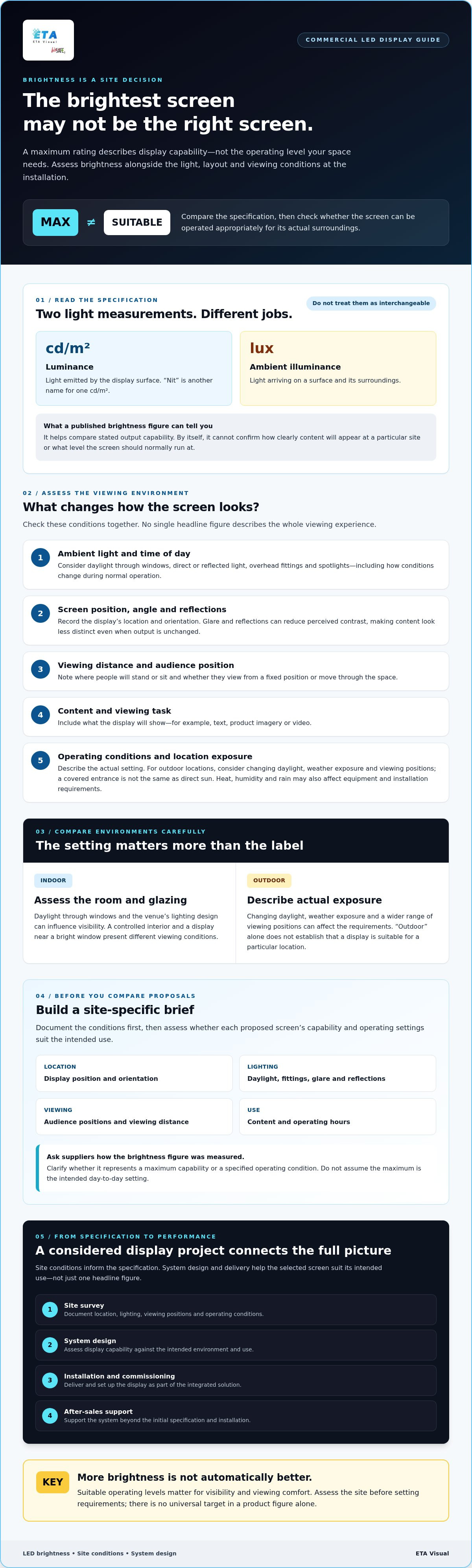
The brightest screen on a supplier’s proposal may be the wrong choice for your space. Commercial LED screen brightness only makes sense alongside ambient light, viewing distance and screen position. A high maximum figure doesn’t automatically mean better visibility or a more comfortable viewing experience. It’s reasonable to compare brightness specifications when assessing proposals, but the number alone can’t show how a display will perform in your space. Daylight, interior lighting and the content being shown all affect what viewers see. This guide explains brightness terminology and its limits, how viewing conditions influence the level you may need, and what to assess before specifying a display. You’ll also learn how to compare proposals using site-specific factors, including placement, operating conditions and integration requirements. A site survey and considered system design help establish those conditions before the specification is finalised, so the chosen screen suits its intended use rather than being selected on one headline figure.
Key Takeaways
- A maximum brightness rating describes a screen’s capability, not the level it should run at in your space.
- Assess commercial LED screen brightness against ambient light, viewing distance, screen orientation, reflections and audience position.
- More brightness isn’t automatically better. Suitable operating levels matter for visibility and viewing comfort.
- Before comparing proposals, document the display location, lighting conditions, viewing positions and operating hours.
- Site survey, system design, installation, commissioning and support all contribute to a display solution that performs as intended.
Table of Contents
- What commercial LED screen brightness means: what the specification tells you
- Which site conditions determine suitable commercial LED screen brightness?
- Is the brightest commercial LED screen always the best choice?
- How to assess brightness requirements before specifying an LED screen
- How an integrated LED display project delivers reliable brightness in practice
What commercial LED screen brightness means: what the specification tells you
A brightness figure describes light leaving the display surface, not how much light is falling on it. That distinction matters. A screen with a high quoted maximum may need a lower operating level in a controlled interior, while the same figure alone can’t confirm visibility in a brighter setting.
In brief: LED screen brightness is the luminance emitted by the display, while ambient illuminance is the light falling on the screen and its surroundings.
How is LED screen brightness measured?
Brightness specifications for LED screens are commonly expressed as luminance in candelas per square metre, written as cd/m². The term “nit” is another name for one cd/m². For a technical explanation of the underlying photometric concept, see Luminance.
Ambient illuminance is a different measurement. It describes light arriving on a surface and is expressed in lux. The two values aren’t interchangeable. A screen’s published luminance figure can help you compare its stated output capability, but it doesn’t establish how clearly content will appear at a particular site. For a fair comparison, ask suppliers how the figure was measured and whether it represents a maximum capability or a specified operating condition.
Why does peak brightness not tell the whole story?
Peak brightness describes what a display can produce under stated conditions. It doesn’t tell you the level the screen will normally run at, or whether that output suits the intended viewing environment. Operating settings, content and surrounding light all influence perceived visibility. Reflections, screen angle and the viewer’s position can also affect how the image looks.
A presentation screen in a meeting room and a display near a bright window have different viewing conditions. That doesn’t establish a universal brightness target for either situation. It shows why a specification must be assessed against the actual installation.
To assess commercial LED screen brightness, separate product capability from the level required for the site. Record the display position, expected lighting and viewing task, then check that the proposed screen can be operated appropriately for those conditions. The fine-pitch indoor LED display project offers an example of an indoor LED installation. Its page should not be taken as evidence of a particular brightness specification. For broader technical context on display selection and system design, consult a commercial LED technology guide.
Which site conditions determine suitable commercial LED screen brightness?
There’s no reliable brightness setting to select from a product sheet alone. The right specification depends on the screen’s surroundings and how people will view it. Brightness selection should reflect assessed site conditions, not a generic target.
How do ambient light and screen placement affect visibility?
Assess the display location under normal operating conditions, including how they change through the day. A nearby window may bring direct or reflected daylight onto the screen, while overhead fittings or spotlights can create glare. These conditions can reduce perceived contrast, making content look less distinct even if the screen’s stated output is unchanged.
During a site survey, note the screen’s orientation and likely reflections, then consider where viewers will stand or sit. A display viewed from a fixed position has different requirements from one seen by people moving through a retail or public space. Include viewing distance and the type of content, such as text, product imagery or video. Don’t prescribe an operating level before these conditions have been assessed.
What changes between indoor and outdoor LED screens?
Indoor installations may be affected by daylight through glazing and the venue’s lighting design. Outdoor screens face changing daylight, weather exposure and a wider range of viewing positions. A covered entrance, for example, isn’t equivalent to a screen exposed to direct sun, so describe the actual exposure rather than relying on the label “outdoor”.
Daylight, heat, humidity and rain may influence visibility, equipment and installation requirements. These environmental factors need to be considered for the specific location. A brightness rating alone doesn’t establish that a display is suitable for outdoor use. The AVIXA guide to assessing brightness requirements can provide further context, but recommendations still need to be checked against the project conditions.
Record conditions at relevant times, not just during a single visit. A practical assessment should capture:
- Daylight and artificial lighting during expected operating hours
- Screen position, orientation and possible reflections
- Typical viewer positions and viewing distances
- Whether the display is indoors, behind glazing, sheltered or exposed
This information gives the design team a grounded basis for comparing proposals. For project-specific advice, you can discuss LED display requirements with ETA Visual.
Is the brightest commercial LED screen always the best choice?
No. A higher maximum brightness can provide useful headroom where lighting conditions vary, but it doesn’t automatically make a screen more suitable. The relevant question is whether the display can deliver clear, appropriate images at its intended operating level in the actual space.
A screen specified for a bright environment may have more output capability than a controlled indoor space needs. That capability can be useful if conditions change, but the proposal should also explain how brightness will be set and adjusted for normal use. Don’t treat the maximum figure as the recommended day-to-day setting.
When can excess brightness become a practical concern?
A display that appears overpowering beside its surroundings may not suit the viewing task, particularly where people are close to the screen or viewing for extended periods. This isn’t an automatic consequence of a high rating. The result depends on the room, content, operating level and audience. Confirm that the system allows brightness to be set appropriately, then test it during commissioning.
Use representative content, not just a bright test image. Check text, darker scenes, brand colours and typical video under the space’s normal lighting. This helps the project team assess whether the selected hardware and controls work together as intended.
How does brightness relate to overall image quality?
Brightness is one part of the picture. Contrast, colour reproduction and refresh behaviour also affect how content looks and performs. A high output figure alone can’t confirm that text will be legible, colours will appear as intended or motion will look suitable for the application. Compare proposals using the same content and viewing conditions where possible.
The Society for Information Display’s examples of award-winning high-brightness displays show that high output is a capability found in some display applications, not a universal target for every installation. Consider it alongside the screen’s intended use and the conditions established during the site assessment.
For a broader discussion of image quality metrics, see the LED display insights. When assessing commercial LED screen brightness, ask suppliers to explain both the stated maximum and the proposed operating approach. ETA Visual’s LED display solutions can be considered as part of a project that brings display selection, integration and commissioning together.
How to assess brightness requirements before specifying an LED screen
Use a site-based process rather than choosing a display from its maximum brightness figure. Define the viewing task, document the installation conditions, then confirm how the proposed system will be configured and tested. This gives suppliers a consistent brief and helps you compare recommendations based on their reasoning, not just their headline specifications.
What should a site survey document?
Start with what the screen must do: show presentations, wayfinding, promotions or other content. Record the display’s position and orientation, typical viewer locations, viewing distances, surrounding light and expected operating hours. If lighting or daylight changes, note when those conditions occur rather than relying on a single observation.
The survey should also consider practical integration. Confirm mounting constraints, power availability, signal flow, access for installation and future maintenance. Check access arrangements, loading requirements and permitted work timings with the relevant building or project parties. These factors can affect the installation plan even though they don’t determine brightness by themselves.
What questions should you ask an LED supplier?
Ask how the proposed commercial LED screen brightness relates to the observed site conditions, viewing task and content. Clarify whether the quoted figure is a maximum capability or a proposed operating level, what control options are included, and how settings will be checked during commissioning. Ask what representative content will be used for testing and what after-sales support is available.
Request the basis for the recommendation in writing. A useful proposal should distinguish measured observations from assumptions and identify anything that still needs confirmation. ETA Visual’s indoor LED screen project example can help you understand an indoor installation context, but it doesn’t establish a brightness specification for your site.
Quick check: site evidence includes observed lighting, screen position, viewer locations and operating hours. Assumptions include unverified daylight conditions, audience positions or a brightness target selected without a site assessment.
- Define the content and viewing task.
- Document lighting, placement, audience positions and operating hours.
- Confirm mounting, power, signal, access and maintenance considerations.
- Ask the supplier to explain the recommendation, control approach and commissioning test.
How an integrated LED display project delivers reliable brightness in practice
Brightness is one design requirement, not a standalone product choice. It needs to fit the viewing conditions and work as part of a complete LED display and AV system, including the display, signal path, control settings, installation and ongoing support. A coordinated project helps make each part of the specification clear before equipment is selected and installed.
The project lifecycle can move through defined stages: a site survey to assess the space and viewing conditions; system design to translate those findings into a suitable display and configuration; installation; commissioning; and support after handover. This process also allows practical constraints, such as mounting, power, signal flow and access for maintenance, to be considered alongside commercial LED screen brightness.
ETA Visual’s indoor fine-pitch LED project is an example of an LED display installation. It should be viewed as a project reference, not as evidence of a particular brightness specification for another site.
What should commissioning verify?
Commissioning should check the installed system against the requirements agreed for the project. Depending on the design, checks may include signal flow from source equipment to the display, control settings, and playback of representative content. Review the result from relevant audience positions and under suitable viewing conditions, rather than relying only on a specification sheet or a single test pattern.
Agree in advance what will be checked and recorded. The appropriate checks and acceptance criteria depend on the system and project requirements. Don’t assume an unverified test standard or threshold applies.
Why plan for maintenance access from the beginning?
Access affects how practical it is to inspect and service a display over its working life. Consider whether the installation allows access to relevant components, and coordinate the approach with building constraints and operating schedules. In commercial premises, loading arrangements, work timing and the effect of maintenance activity on normal operations may also need to be planned with the relevant parties.
ETA Visual’s project lifecycle can include ongoing maintenance and repair support. Clarify the scope and arrangements during project planning, rather than assuming response times or service outcomes that haven’t been agreed.
For a project-specific assessment, discuss the site conditions, system design, commissioning requirements and support needs with an LED and AV integrator.
Specify brightness with confidence
Choosing commercial LED screen brightness starts with the viewing conditions, not the highest figure on a proposal. Assess ambient light, screen position, viewing distance and content, then compare suppliers’ recommendations against those site observations.
A maximum rating describes display capability, not necessarily the appropriate operating level. Brightness also needs to be considered alongside image quality, controls and commissioning, with representative content checked in the intended environment.
ETA Visual designs, supplies, installs and maintains LED screens and AV systems for commercial spaces. Its project services can include site surveys, system design, installation and ongoing maintenance, helping bring the display specification and practical project requirements together.
With a clear brief and site-specific assessment, you can move forward with a solution suited to how your space is actually used.
What brightness is suitable for a commercial LED screen?
The suitable level depends on the installation, not a universal target. Consider ambient light throughout operating hours, screen position, viewing distance, content and audience locations. For example, a screen beside glazing may face different conditions from one in an interior meeting room. A site assessment helps establish the requirements, while the supplier should explain how the proposed display’s capability relates to those conditions.
How is commercial LED screen brightness measured?
Commercial LED screen brightness is commonly specified as luminance in candelas per square metre, written as cd/m² or nits. One nit is equivalent to one cd/m². Check whether a supplier’s figure describes maximum capability or a particular operating condition, and ask how it was measured. The rating helps compare stated output, but doesn’t by itself establish visibility or image quality at your site.
Is a brighter LED screen always better?
No. A higher maximum rating may provide useful capability for demanding or changing light conditions, but it doesn’t automatically make a screen the right fit. The operating level, content, image quality and viewer position matter too. A screen that’s suitable for a bright location may be excessive for another setting if it isn’t controlled appropriately. Ask suppliers how the screen will be configured and tested for its intended use.
How does ambient light affect LED screen brightness?
Ambient light can affect how clearly viewers perceive the screen, especially if daylight or artificial lighting creates reflections or reduces apparent contrast. Conditions may change with the time of day, window exposure or venue lighting. During assessment, record lighting across normal operating hours and consider the display’s orientation and audience positions. This evidence helps the project team recommend a suitable screen and operating approach.
What is the difference between LED screen brightness and ambient illuminance?
LED screen brightness specifications usually describe luminance, or light emitted from the display surface, in cd/m² or nits. Ambient illuminance describes light falling on a surface and is measured in lux. They measure different things and shouldn’t be compared as if they were interchangeable. For a display proposal, check which measurement is being quoted and whether it refers to the screen or the surrounding environment.
Should indoor and outdoor commercial LED screens have the same brightness?
Not necessarily. Indoor and outdoor screens can face different lighting, viewing and environmental conditions. An indoor display near a window may receive strong daylight, while an outdoor screen may be exposed to changing sunlight, heat, humidity and rain. A brightness rating alone doesn’t establish outdoor suitability. Assess the specific installation, including exposure and equipment requirements, before selecting a display or comparing proposals.
What should I ask a supplier about LED screen brightness?
Ask whether the quoted figure is a maximum rating or proposed operating level, and how the recommendation relates to your site conditions and content. Clarify how brightness is controlled, what commissioning checks will cover, and whether representative content can be reviewed from typical viewing positions. Also ask about signal flow, installation constraints and ongoing support. Request that assumptions and unconfirmed site conditions are clearly identified in the proposal.
Visual planning reference
| Planning factor | What to define | Why it matters |
|---|---|---|
| Viewing positions | Nearest viewing distance and audience locations | Supports an appropriate pixel-pitch and screen-size decision. |
| Content workflow | Input sources, resolutions and control workflow | Helps ensure information remains readable and simple to operate. |
| Installation conditions | Structure, access, power, ventilation and maintenance access | Aligns the display scope with the physical site before procurement. |
Want an accurate budget for your space?
We'll do a free site survey and prepare a clear, itemised quotation — no obligation.
Frequently asked questions
Brightness specifications for LED screens are commonly expressed as luminance in candelas per square metre, written as cd/m². The term “nit” is another name for one cd/m². For a technical explanation of the underlying photometric concept, see Luminance. Ambient illuminance is a different measurement. It describes light arriving on a surface and is expressed in lux. The two values aren’t interchangeable. A screen’s published luminance figure can help you compare its stated output capability, but it doesn’t establish how clearly content will appear at a particular site. For a fair comparison, ask suppliers how the figure was measured and whether it represents a maximum capability or a specified operating condition.
Peak brightness describes what a display can produce under stated conditions. It doesn’t tell you the level the screen will normally run at, or whether that output suits the intended viewing environment. Operating settings, content and surrounding light all influence perceived visibility. Reflections, screen angle and the viewer’s position can also affect how the image looks. A presentation screen in a meeting room and a display near a bright window have different viewing conditions. That doesn’t establish a universal brightness target for either situation. It shows why a specification must be assessed against the actual installation. To assess commercial LED screen brightness, separate product capability from the level required for the site. Record the display position, expected lighting and viewing task, then check that the proposed screen can be operated appropriately for those conditions. The fine-pitch indoor LED display project offers an example of an indoor LED installation. Its page should not be taken as evidence of a particular brightness specification. For broader technical context on display selection and system design, consult a commercial LED technology guide. There’s no reliable brightness setting to select from a product sheet alone. The right specification depends on the screen’s surroundings and how people will view it. Brightness selection should reflect assessed site conditions, not a generic target.
Assess the display location under normal operating conditions, including how they change through the day. A nearby window may bring direct or reflected daylight onto the screen, while overhead fittings or spotlights can create glare. These conditions can reduce perceived contrast, making content look less distinct even if the screen’s stated output is unchanged. During a site survey, note the screen’s orientation and likely reflections, then consider where viewers will stand or sit. A display viewed from a fixed position has different requirements from one seen by people moving through a retail or public space. Include viewing distance and the type of content, such as text, product imagery or video. Don’t prescribe an operating level before these conditions have been assessed.
Indoor installations may be affected by daylight through glazing and the venue’s lighting design. Outdoor screens face changing daylight, weather exposure and a wider range of viewing positions. A covered entrance, for example, isn’t equivalent to a screen exposed to direct sun, so describe the actual exposure rather than relying on the label “outdoor”. Daylight, heat, humidity and rain may influence visibility, equipment and installation requirements. These environmental factors need to be considered for the specific location. A brightness rating alone doesn’t establish that a display is suitable for outdoor use. The AVIXA guide to assessing brightness requirements can provide further context, but recommendations still need to be checked against the project conditions. Record conditions at relevant times, not just during a single visit. A practical assessment should capture: This information gives the design team a grounded basis for comparing proposals. For project-specific advice, you can discuss LED display requirements with ETA Visual. No. A higher maximum brightness can provide useful headroom where lighting conditions vary, but it doesn’t automatically make a screen more suitable. The relevant question is whether the display can deliver clear, appropriate images at its intended operating level in the actual space. A screen specified for a bright environment may have more output capability than a controlled indoor space needs. That capability can be useful if conditions change, but the proposal should also explain how brightness will be set and adjusted for normal use. Don’t treat the maximum figure as the recommended day-to-day setting.
A display that appears overpowering beside its surroundings may not suit the viewing task, particularly where people are close to the screen or viewing for extended periods. This isn’t an automatic consequence of a high rating. The result depends on the room, content, operating level and audience. Confirm that the system allows brightness to be set appropriately, then test it during commissioning. Use representative content, not just a bright test image. Check text, darker scenes, brand colours and typical video under the space’s normal lighting. This helps the project team assess whether the selected hardware and controls work together as intended.
Brightness is one part of the picture. Contrast, colour reproduction and refresh behaviour also affect how content looks and performs. A high output figure alone can’t confirm that text will be legible, colours will appear as intended or motion will look suitable for the application. Compare proposals using the same content and viewing conditions where possible. The Society for Information Display’s examples of award-winning high-brightness displays show that high output is a capability found in some display applications, not a universal target for every installation. Consider it alongside the screen’s intended use and the conditions established during the site assessment. For a broader discussion of image quality metrics, see the LED display insights. When assessing commercial LED screen brightness, ask suppliers to explain both the stated maximum and the proposed operating approach. ETA Visual’s LED display solutions can be considered as part of a project that brings display selection, integration and commissioning together. Use a site-based process rather than choosing a display from its maximum brightness figure. Define the viewing task, document the installation conditions, then confirm how the proposed system will be configured and tested. This gives suppliers a consistent brief and helps you compare recommendations based on their reasoning, not just their headline specifications.
Plan the next step
Continue with a relevant solution and real Singapore project evidence.

